
ArrayList源码分析和实例应用
1、ArrayList介绍
ArrayList 是一个数组队列,相当于 动态数组。与Java中的数组相比,它的容量能动态增长。它继承于AbstractList,实现了List, RandomAccess, Cloneable, java.io.Serializable这些接口。
ArrayList 继承了AbstractList,实现了List。它是一个数组队列,提供了相关的添加、删除、修改、遍历等功能。
ArrayList 实现了RandmoAccess接口,即提供了随机访问功能。RandmoAccess是java中用来被List实现,为List提供快速访问功能的。在ArrayList中,我们即可以通过元素的序号快速获取元素对象;这就是快速随机访问。通过比较List的“快速随机访问”和“通过Iterator迭代器访问”,我们会发现,遍历ArrayList时,使用随机访问(即,通过索引序号访问)效率最高,而使用迭代器的效率最低。
ArrayList 实现了Cloneable接口,即覆盖了函数clone(),能被克隆。
ArrayList 实现java.io.Serializable接口,这意味着ArrayList支持序列化,能通过序列化去传输。
和Vector不同,ArrayList中的操作不是线程安全的!所以,建议在单线程中才使用ArrayList,而在多线程中可以选择Vector或者CopyOnWriteArrayList。
2、ArrayList的数据结构
 java.lang.Object

    ↳     java.util.AbstractCollection<E>

          ↳     java.util.AbstractList<E>

                ↳     java.util.ArrayList<E>

 public class ArrayList<E> extends AbstractList<E>

         implements List<E>, RandomAccess, Cloneable, java.io.Serializable {}
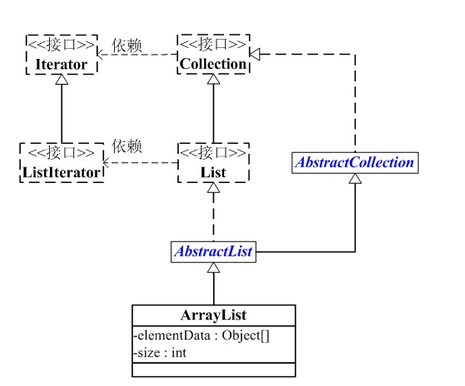
ArrayList包含了两个重要的对象:elementData 和 size。
(01) elementData 是"Object[]类型的数组",它保存了添加到ArrayList中的元素。实际上,elementData是个动态数组,我们能通过构造函数 ArrayList(int initialCapacity)来执行它的初始容量为initialCapacity;如果通过不含参数的构造函数ArrayList()来创建ArrayList,则elementData的容量默认是10。elementData数组的大小会根据ArrayList容量的增长而动态的增长,具体的增长方式在源码中的ensureCapacity()函数来定义。
(02) size 则是动态数组的实际大小。
3、ArrayList的源码分析
 package java.util;

 public class ArrayList<E> extends AbstractList<E>

         implements List<E>, RandomAccess, Cloneable, java.io.Serializable

 {

     // 序列版本号

     private static final long serialVersionUID = 8683452581122892189L;

     // 保存ArrayList中数据的数组

     private transient Object[] elementData;

     // ArrayList中实际数据的数量

     private int size;

     // ArrayList带容量大小的构造函数。

     public ArrayList(int initialCapacity) {

         super();

         if (initialCapacity < 0)

             throw new IllegalArgumentException("Illegal Capacity: "+

                                                initialCapacity);

         // 新建一个数组

         this.elementData = new Object[initialCapacity];

     }

     // ArrayList构造函数。默认容量是10。

     public ArrayList() {

         this(10);

     }

     // 创建一个包含collection的ArrayList

     public ArrayList(Collection<? extends E> c) {

         elementData = c.toArray();

         size = elementData.length;

         // c.toArray might (incorrectly) not return Object[] (see 6260652)

         if (elementData.getClass() != Object[].class)

             elementData = Arrays.copyOf(elementData, size, Object[].class);

     }

     // 将当前容量值设为 =实际元素个数

     public void trimToSize() {

         modCount++;

         int oldCapacity = elementData.length;

         if (size < oldCapacity) {

             elementData = Arrays.copyOf(elementData, size);

         }

     }

     // 确定ArrarList的容量。

     // 若ArrayList的容量不足以容纳当前的全部元素,设置 新的容量=“(原始容量x3)/2 + 1”

     public void ensureCapacity(int minCapacity) {

         // 将“修改统计数”+1

         modCount++;

         int oldCapacity = elementData.length;

         // 若当前容量不足以容纳当前的元素个数,设置 新的容量=“(原始容量x3)/2 + 1”

         if (minCapacity > oldCapacity) {

             Object oldData[] = elementData;

             int newCapacity = (oldCapacity * 3)/2 + 1;

             if (newCapacity < minCapacity)

                 newCapacity = minCapacity;

             elementData = Arrays.copyOf(elementData, newCapacity);

         }

     }

     // 添加元素e

     public boolean add(E e) {

         // 确定ArrayList的容量大小

         ensureCapacity(size + 1);  // Increments modCount!!

         // 添加e到ArrayList中

         elementData[size++] = e;

         return true;

     }

     // 返回ArrayList的实际大小

     public int size() {

         return size;

     }

     // 返回ArrayList是否包含Object(o)

     public boolean contains(Object o) {

         return indexOf(o) >= 0;

     }

     // 返回ArrayList是否为空

     public boolean isEmpty() {

         return size == 0;

     }

     // 正向查找,返回元素的索引值

     public int indexOf(Object o) {

         if (o == null) {

             for (int i = 0; i < size; i++)

             if (elementData[i]==null)

                 return i;

             } else {

                 for (int i = 0; i < size; i++)

                 if (o.equals(elementData[i]))

                     return i;

             }

             return -1;

         }

         // 反向查找,返回元素的索引值

         public int lastIndexOf(Object o) {

         if (o == null) {

             for (int i = size-1; i >= 0; i--)

             if (elementData[i]==null)

                 return i;

         } else {

             for (int i = size-1; i >= 0; i--)

             if (o.equals(elementData[i]))

                 return i;

         }

         return -1;

     }

     // 反向查找(从数组末尾向开始查找),返回元素(o)的索引值

     public int lastIndexOf(Object o) {

         if (o == null) {

             for (int i = size-1; i >= 0; i--)

             if (elementData[i]==null)

                 return i;

         } else {

             for (int i = size-1; i >= 0; i--)

             if (o.equals(elementData[i]))

                 return i;

         }

         return -1;

     }

     // 返回ArrayList的Object数组(这个不常用,因为有向下转型会出现类型转换的异常)

     public Object[] toArray() {

         return Arrays.copyOf(elementData, size);

     }

     // 返回ArrayList的模板数组。所谓模板数组,即可以将T设为任意的数据类型

     public <T> T[] toArray(T[] a) {

         // 若数组a的大小 < ArrayList的元素个数;

         // 则新建一个T[]数组,数组大小是“ArrayList的元素个数”,并将“ArrayList”全部拷贝到新数组中

         if (a.length < size)

             return (T[]) Arrays.copyOf(elementData, size, a.getClass());

         // 若数组a的大小 >= ArrayList的元素个数;

         // 则将ArrayList的全部元素都拷贝到数组a中。

         System.arraycopy(elementData, 0, a, 0, size);

         if (a.length > size)

             a[size] = null;

         return a;

     }

     // 获取index位置的元素值

     public E get(int index) {

         RangeCheck(index);

         return (E) elementData[index];

     }

     // 设置index位置的值为element

     public E set(int index, E element) {

         RangeCheck(index);

         E oldValue = (E) elementData[index];

         elementData[index] = element;

         return oldValue;

     }

     // 将e添加到ArrayList中

     public boolean add(E e) {

         ensureCapacity(size + 1);  // Increments modCount!!

         elementData[size++] = e;

         return true;

     }

     // 将e添加到ArrayList的指定位置

     public void add(int index, E element) {

         if (index > size || index < 0)

             throw new IndexOutOfBoundsException(

             "Index: "+index+", Size: "+size);

         ensureCapacity(size+1);  // Increments modCount!!

         System.arraycopy(elementData, index, elementData, index + 1,

              size - index);

         elementData[index] = element;

         size++;

     }

     // 删除ArrayList指定位置的元素

     public E remove(int index) {

         RangeCheck(index);

         modCount++;

         E oldValue = (E) elementData[index];

         int numMoved = size - index - 1;

         if (numMoved > 0)

             System.arraycopy(elementData, index+1, elementData, index,

                  numMoved);

         elementData[--size] = null; // Let gc do its work

         return oldValue;

     }

     // 删除ArrayList的指定元素

     public boolean remove(Object o) {

         if (o == null) {

                 for (int index = 0; index < size; index++)

             if (elementData[index] == null) {

                 fastRemove(index);

                 return true;

             }

         } else {

             for (int index = 0; index < size; index++)

             if (o.equals(elementData[index])) {

                 fastRemove(index);

                 return true;

             }

         }

         return false;

     }

     // 快速删除第index个元素

     private void fastRemove(int index) {

         modCount++;

         int numMoved = size - index - 1;

         // 从"index+1"开始,用后面的元素替换前面的元素。

         if (numMoved > 0)

             System.arraycopy(elementData, index+1, elementData, index,

                              numMoved);

         // 将最后一个元素设为null

         elementData[--size] = null; // Let gc do its work

     }

     // 删除元素

     public boolean remove(Object o) {

         if (o == null) {

             for (int index = 0; index < size; index++)

             if (elementData[index] == null) {

                 fastRemove(index);

             return true;

             }

         } else {

             // 便利ArrayList,找到“元素o”,则删除,并返回true。

             for (int index = 0; index < size; index++)

             if (o.equals(elementData[index])) {

                 fastRemove(index);

             return true;

             }

         }

         return false;

     }

     // 清空ArrayList,将全部的元素设为null

     public void clear() {

         modCount++;

         for (int i = 0; i < size; i++)

             elementData[i] = null;

         size = 0;

     }

     // 将集合c追加到ArrayList中

     public boolean addAll(Collection<? extends E> c) {

         Object[] a = c.toArray();

         int numNew = a.length;

         ensureCapacity(size + numNew);  // Increments modCount

         System.arraycopy(a, 0, elementData, size, numNew);

         size += numNew;

         return numNew != 0;

     }

     // 从index位置开始,将集合c添加到ArrayList

     public boolean addAll(int index, Collection<? extends E> c) {

         if (index > size || index < 0)

             throw new IndexOutOfBoundsException(

             "Index: " + index + ", Size: " + size);

         Object[] a = c.toArray();

         int numNew = a.length;

         ensureCapacity(size + numNew);  // Increments modCount

         int numMoved = size - index;

         if (numMoved > 0)

             System.arraycopy(elementData, index, elementData, index + numNew,

                  numMoved);

         System.arraycopy(a, 0, elementData, index, numNew);

         size += numNew;

         return numNew != 0;

     }

     // 删除fromIndex到toIndex之间的全部元素。

     protected void removeRange(int fromIndex, int toIndex) {

     modCount++;

     int numMoved = size - toIndex;

         System.arraycopy(elementData, toIndex, elementData, fromIndex,

                          numMoved);

     // Let gc do its work

     int newSize = size - (toIndex-fromIndex);

     while (size != newSize)

         elementData[--size] = null;

     }

     private void RangeCheck(int index) {

     if (index >= size)

         throw new IndexOutOfBoundsException(

         "Index: "+index+", Size: "+size);

     }

     // 克隆函数

     public Object clone() {

         try {

             ArrayList<E> v = (ArrayList<E>) super.clone();

             // 将当前ArrayList的全部元素拷贝到v中

             v.elementData = Arrays.copyOf(elementData, size);

             v.modCount = 0;

             return v;

         } catch (CloneNotSupportedException e) {

             // this shouldn't happen, since we are Cloneable

             throw new InternalError();

         }

     }

     // java.io.Serializable的写入函数

     // 将ArrayList的“容量,所有的元素值”都依次写入到输出流中

     private void writeObject(java.io.ObjectOutputStream s)

         throws java.io.IOException{

     // Write out element count, and any hidden stuff

     int expectedModCount = modCount;

     s.defaultWriteObject();

         // 写入“数组的容量”

         s.writeInt(elementData.length);

     // 写入“数组的每一个元素”

     for (int i=0; i<size; i++)

             s.writeObject(elementData[i]);

     if (modCount != expectedModCount) {

             throw new ConcurrentModificationException();

         }

     }

     // java.io.Serializable的读取函数:根据写入方式读出

     // 先将ArrayList的“容量”读出,然后将“所有的元素值”读出

     private void readObject(java.io.ObjectInputStream s)

         throws java.io.IOException, ClassNotFoundException {

         // Read in size, and any hidden stuff

         s.defaultReadObject();

         // 从输入流中读取ArrayList的“容量”

         int arrayLength = s.readInt();

         Object[] a = elementData = new Object[arrayLength];

         // 从输入流中将“所有的元素值”读出

         for (int i=0; i<size; i++)

             a[i] = s.readObject();

     }

 }
4、ArrayList的遍历方式
ArrayList支持3种遍历方式
(01) 第一种,通过迭代器遍历。即通过Iterator去遍历。
 Integer value = null;

 Iterator iter = list.iterator();

 while (iter.hasNext()) {

     value = (Integer)iter.next();

 }
(02) 第二种,随机访问,通过索引值去遍历。
由于ArrayList实现了RandomAccess接口,它支持通过索引值去随机访问元素。
 Integer value = null;

 int size = list.size();

 for (int i=0; i<size; i++) {

     value = (Integer)list.get(i);

 }
(03) 第三种,for循环遍历。如下:
 Integer value = null;

 for (Integer integ:list) {

     value = integ;

 }
5、ArrayList的测试实例
 import java.util.*;

 /*

  * @desc ArrayList常用API的测试程序

  * @author skywang

  * @email kuiwu-wang@163.com

  */

 public class ArrayListTest {

     public static void main(String[] args) {

         // 创建ArrayList

         ArrayList list = new ArrayList();

         // 将“”

         list.add("1");

         list.add("2");

         list.add("3");

         list.add("4");

         // 将下面的元素添加到第1个位置

         list.add(0, "5");

         // 获取第1个元素

         System.out.println("the first element is: "+ list.get(0));

         // 删除“3”

         list.remove("3");

         // 获取ArrayList的大小

         System.out.println("Arraylist size=: "+ list.size());

         // 判断list中是否包含"3"

         System.out.println("ArrayList contains 3 is: "+ list.contains(3));

         // 设置第2个元素为10

         list.set(1, "10");

         // 通过Iterator遍历ArrayList

         for(Iterator iter = list.iterator(); iter.hasNext(); ) {

             System.out.println("next is: "+ iter.next());

         }

         // 将ArrayList转换为数组

         String[] arr = (String[])list.toArray(new String[0]);

         for (String str:arr)

             System.out.println("str: "+ str);

         // 清空ArrayList

         list.clear();

         // 判断ArrayList是否为空

         System.out.println("ArrayList is empty: "+ list.isEmpty());

     }

 }
备注:
当我们调用ArrayList中的 toArray()函数时,可能会抛出“java.lang.ClassCastException”异常的情况。
ArrayList提供了两个toArray()函数:
Object[] toArray()

<T> T[] toArray(T[] contents)
调用 toArray() 函数会抛出“java.lang.ClassCastException”异常,但是调用 toArray(T[] contents) 能正常返回 T[]。
toArray() 会抛出异常是因为 toArray() 返回的是 Object[] 数组,将 Object[] 转换为其它类型(如如,将Object[]转换为的Integer[])则会抛出“java.lang.ClassCastException”异常,因为Java不支持向下转型。具体的可以参考前面ArrayList.java的源码介绍部分的toArray()。
解决该问题的办法是调用 <T> T[] toArray(T[] contents) , 而不是 Object[] toArray()。
ArrayList源码分析和实例应用的更多相关文章
- ArrayList 源码分析
ArrayList 源码分析 1. 结构 首先我们需要对 ArrayList 有一个大致的了解就从结构来看看吧. 1. 继承 该类继承自 AbstractList 这个比较好说 2. 实现 这 ...
- ArrayList源码分析超详细
ArrayList源码分析超详解 想要分析下源码是件好事,但是如何去进行分析呢?以我的例子来说,我进行源码分析的过程如下几步: 找到类:利用 IDEA 找到所需要分析的类(ztrl+N查找ArraLi ...
- Java - ArrayList源码分析
java提高篇(二一)-----ArrayList 一.ArrayList概述 ArrayList是实现List接口的动态数组,所谓动态就是它的大小是可变的.实现了所有可选列表操作,并允许包括 nul ...
- ArrayList源码分析超详细(转载)
ArrayList源码分析超详细 ArrayList源码分析超详解 想要分析下源码是件好事,但是如何去进行分析呢?以我的例子来说,我进行源码分析的过程如下几步: 找到类:利用 IDEA 找到所需要 ...
- Java入门系列之集合ArrayList源码分析(七)
前言 上一节我们通过排队类实现了类似ArrayList基本功能,当然还有很多欠缺考虑,只是为了我们学习集合而准备来着,本节我们来看看ArrayList源码中对于常用操作方法是如何进行的,请往下看. A ...
- Java ArrayList源码分析(含扩容机制等重点问题分析)
写在最前面 这个项目是从20年末就立好的 flag,经过几年的学习,回过头再去看很多知识点又有新的理解.所以趁着找实习的准备,结合以前的学习储备,创建一个主要针对应届生和初学者的 Java 开源知识项 ...
- ArrayList源码分析笔记
ArrayList源码分析笔记 先贴出ArrayList一些属性 public class ArrayList<E> extends AbstractList<E> imple ...
- Java集合干货——ArrayList源码分析
ArrayList源码分析 前言 在之前的文章中我们提到过ArrayList,ArrayList可以说是每一个学java的人使用最多最熟练的集合了,但是知其然不知其所以然.关于ArrayList的具体 ...
- java集合系列之ArrayList源码分析
java集合系列之ArrayList源码分析(基于jdk1.8) ArrayList简介 ArrayList时List接口的一个非常重要的实现子类,它的底层是通过动态数组实现的,因此它具备查询速度快, ...
随机推荐
- [BZOJ1977][BeiJing2010组队]次小生成树
题解: 首先要证明一个东西 没有重边的图上 次小生成树由任何一颗最小生成树替换一条边 但是我不会证啊啊啊啊啊啊啊 然后就很简单了 枚举每一条边看看能不能变 但有一个特殊情况就是,他和环上的最大值相等, ...
- 【BZOJ2298】[HAOI2011]problem a
题解: 虽然也是个可以过得做法...但又没有挖掘到最简单的做法... 正解是发现这个东西等价于求不相交区间个数 直接按照右端点排序,然后贪心就可以O(n)过了 而我的做法是按照a排序(其实我是在模拟这 ...
- 2018项目UML设计-课堂实战
1. 团队信息 队名:小白吃队 成员: 卢泽明 031602328 蔡文斌 031602301 葛亮 031602617 刘浩 031602423 张扬 031602345 李泓 031602321 ...
- WebAPI——自动生成帮助文档
Web Api 自动生成帮助文档 新建Web Api项目之后,会在首页有API的导航菜单,点击即可看到API帮助文档,不过很遗憾,Description 是没有内容的. 怎么办呢? 第一步: 如果 ...
- LVM管理之减少LV的大小
LVM管理之减少LV的大小 规定动作 1.umount filesystem 2.e2fsck filesystem 3.resize2fs filesystem 4.lvredure 实例演示——— ...
- scrapy 基础使用以及错误方案
原先用的是selenium(后面有时间再写),这是第一次使用scrapy这个爬虫框架,所以记录一下这个心路历程,制作简单的爬虫其实不难,你需要的一般数据都可以爬取到. 下面是我的目录,除了main.p ...
- php通过CURL模拟post提交请求
<?php header("Content-type:text/html;charset=utf-8"); class Test{ public function reque ...
- 2018牛客网暑假ACM多校训练赛(第六场)I Team Rocket 线段树
原文链接https://www.cnblogs.com/zhouzhendong/p/NowCoder-2018-Summer-Round6-I.html 题目传送门 - https://www.no ...
- sql语句表示不等于
<> != 后面均不带引号“”
- 算法进阶面试题07——求子数组的最大异或和(前缀树)、换钱的方法数(递归改dp最全套路解说)、纸牌博弈、机器人行走问题
主要讲第五课的内容前缀树应用和第六课内容暴力递归改动态规划的最全步骤 第一题 给定一个数组,求子数组的最大异或和. 一个数组的异或和为,数组中所有的数异或起来的结果. 简单的前缀树应用 暴力方法: 先 ...