
android mvvm实例解析
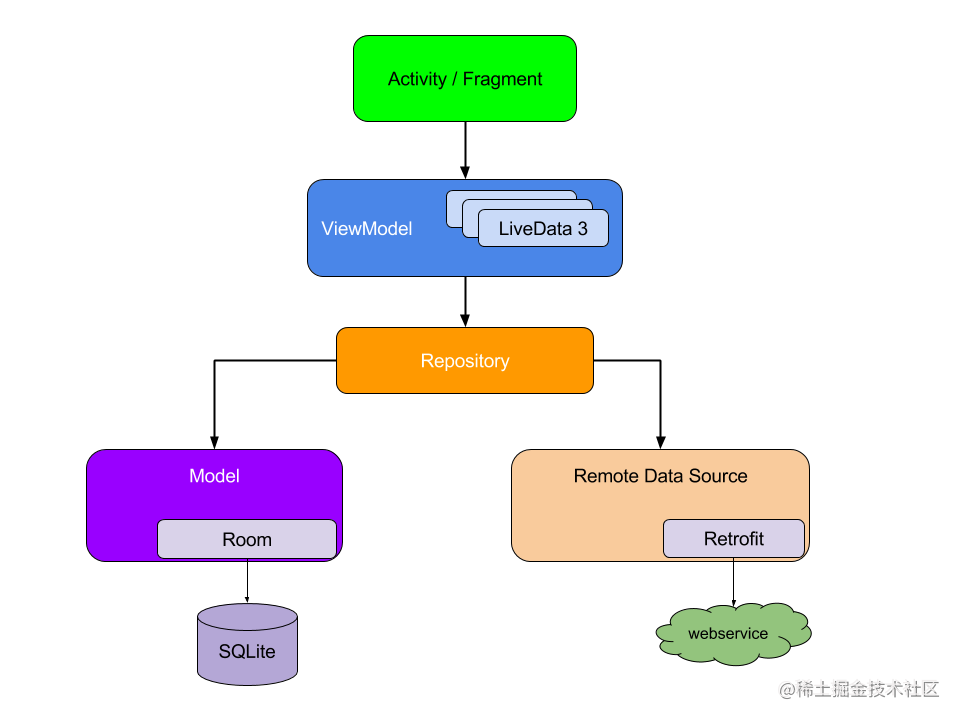
class ChooseAreaFragment : Fragment() {

    private val viewModel by lazy { ViewModelProviders.of(this, InjectorUtil.getChooseAreaModelFactory()).get(ChooseAreaViewModel::class.java) }

    private var progressDialog: ProgressDialog? = null

    private lateinit var adapter: ArrayAdapter<String>

    override fun onCreateView(inflater: LayoutInflater, container: ViewGroup?, savedInstanceState: Bundle?): View? {

        val view = inflater.inflate(R.layout.choose_area, container, false)

        val binding = DataBindingUtil.bind<ChooseAreaBindingImpl>(view)

        binding?.viewModel = viewModel

        return view

    }

    override fun onActivityCreated(savedInstanceState: Bundle?) {

        super.onActivityCreated(savedInstanceState)

        adapter = ChooseAreaAdapter(context!!, R.layout.simple_item, viewModel.dataList)

        listView.adapter = adapter

        observe()

    }

    private fun observe() {

        viewModel.currentLevel.observe(this, Observer { level ->

            when (level) {

                LEVEL_PROVINCE -> {

                    titleText.text = "中国"

                    backButton.visibility = View.GONE

                }

                LEVEL_CITY -> {

                    titleText.text = viewModel.selectedProvince?.provinceName

                    backButton.visibility = View.VISIBLE

                }

                LEVEL_COUNTY -> {

                    titleText.text = viewModel.selectedCity?.cityName

                    backButton.visibility = View.VISIBLE

                }

            }

        })

        viewModel.dataChanged.observe(this, Observer {

            adapter.notifyDataSetChanged()

            listView.setSelection(0)

            closeProgressDialog()

        })

        viewModel.isLoading.observe(this, Observer { isLoading ->

            if (isLoading) showProgressDialog()

            else closeProgressDialog()

        })

        viewModel.areaSelected.observe(this, Observer { selected ->

            if (selected && viewModel.selectedCounty != null) {

                if (activity is MainActivity) {

                    val intent = Intent(activity, WeatherActivity::class.java)

                    intent.putExtra("weather_id", viewModel.selectedCounty!!.weatherId)

                    startActivity(intent)

                    activity?.finish()

                } else if (activity is WeatherActivity) {

                    val weatherActivity = activity as WeatherActivity

                    weatherActivity.drawerLayout.closeDrawers()

                    weatherActivity.viewModel.weatherId = viewModel.selectedCounty!!.weatherId

                    weatherActivity.viewModel.refreshWeather()

                }

                viewModel.areaSelected.value = false

            }

        })

        if (viewModel.dataList.isEmpty()) {

            viewModel.getProvinces()

        }

    }

    /**

     * 显示进度对话框

     */

    private fun showProgressDialog() {

        if (progressDialog == null) {

            progressDialog = ProgressDialog(activity)

            progressDialog?.setMessage("正在加载...")

            progressDialog?.setCanceledOnTouchOutside(false)

        }

        progressDialog?.show()

    }

    /**

     * 关闭进度对话框

     */

    private fun closeProgressDialog() {

        progressDialog?.dismiss()

    }

    companion object {

        const val LEVEL_PROVINCE = 0

        const val LEVEL_CITY = 1

        const val LEVEL_COUNTY = 2

    }

}
class ChooseAreaViewModel(private val repository: PlaceRepository) : ViewModel() {

    var currentLevel = MutableLiveData<Int>()

    var dataChanged = MutableLiveData<Int>()

    var isLoading = MutableLiveData<Boolean>()

    var areaSelected = MutableLiveData<Boolean>()

    var selectedProvince: Province? = null

    var selectedCity: City? = null

    var selectedCounty: County? = null

    lateinit var provinces: MutableList<Province>

    lateinit var cities: MutableList<City>

    lateinit var counties: MutableList<County>

    val dataList = ArrayList<String>()

    fun getProvinces() {

        currentLevel.value = LEVEL_PROVINCE

        launch {

            provinces = repository.getProvinceList()

            dataList.addAll(provinces.map { it.provinceName })

        }

    }

    private fun getCities() = selectedProvince?.let {

        currentLevel.value = LEVEL_CITY

        launch {

            cities = repository.getCityList(it.provinceCode)

            dataList.addAll(cities.map { it.cityName })

        }

    }

    private fun getCounties() = selectedCity?.let {

        currentLevel.value = LEVEL_COUNTY

        launch {

            counties = repository.getCountyList(it.provinceId, it.cityCode)

            dataList.addAll(counties.map { it.countyName })

        }

    }

    fun onListViewItemClick(parent: AdapterView<*>, view: View, position: Int, id: Long) {

        when {

            currentLevel.value == LEVEL_PROVINCE -> {

                selectedProvince = provinces[position]

                getCities()

            }

            currentLevel.value == LEVEL_CITY -> {

                selectedCity = cities[position]

                getCounties()

            }

            currentLevel.value == LEVEL_COUNTY -> {

                selectedCounty = counties[position]

                areaSelected.value = true

            }

        }

    }

    fun onBack() {

        if (currentLevel.value == LEVEL_COUNTY) {

            getCities()

        } else if (currentLevel.value == LEVEL_CITY) {

            getProvinces()

        }

    }

    private fun launch(block: suspend () -> Unit) = viewModelScope.launch {

        try {

            isLoading.value = true

            dataList.clear()

            block()

            dataChanged.value = dataChanged.value?.plus(1)

            isLoading.value = false

        } catch (t: Throwable) {

            t.printStackTrace()

            Toast.makeText(CoolWeatherApplication.context, t.message, Toast.LENGTH_SHORT).show()

            dataChanged.value = dataChanged.value?.plus(1)

            isLoading.value = false

        }

    }

}
class PlaceRepository private constructor(private val placeDao: PlaceDao, private val network: CoolWeatherNetwork) {

    suspend fun getProvinceList() = withContext(Dispatchers.IO) {

        var list = placeDao.getProvinceList()

        if (list.isEmpty()) {

            list = network.fetchProvinceList()

            placeDao.saveProvinceList(list)

        }

        list

    }

    suspend fun getCityList(provinceId: Int) = withContext(Dispatchers.IO) {

        var list = placeDao.getCityList(provinceId)

        if (list.isEmpty()) {

            list = network.fetchCityList(provinceId)

            list.forEach { it.provinceId = provinceId }

            placeDao.saveCityList(list)

        }

        list

    }

    suspend fun getCountyList(provinceId: Int, cityId: Int) = withContext(Dispatchers.IO) {

        var list = placeDao.getCountyList(cityId)

        if (list.isEmpty()) {

            list = network.fetchCountyList(provinceId, cityId)

            list.forEach { it.cityId = cityId }

            placeDao.saveCountyList(list)

        }

        list

    }

    companion object {

        private var instance: PlaceRepository? = null

        fun getInstance(placeDao: PlaceDao, network: CoolWeatherNetwork): PlaceRepository {

            if (instance == null) {

                synchronized(PlaceRepository::class.java) {

                    if (instance == null) {

                        instance = PlaceRepository(placeDao, network)

                    }

                }

            }

            return instance!!

        }

    }

}
android mvvm实例解析的更多相关文章
- 【转】Android HAL实例解析
原文网址:http://www.embedu.org/Column/Column339.htm 作者:刘老师,华清远见嵌入式学院讲师. 一.概述 本文希望通过分析台湾的Jollen的mokoid 工程 ...
- Android HAL实例解析
一.概述 本文希望通过分析台湾的Jollen的mokoid 工程代码,和在s5pc100平台上实现过程种遇到的问题,解析Andorid HAL的开发方法. 二.HAL介绍 现有HAL架构由Patric ...
- Android AIDL实例解析
AIDL这项技术在我们的开发中一般来说并不是很常用,虽然自己也使用新浪微博的SSO登录,其原理就是使用AIDL,但是自己一直没有动手完整的写过AIDL的例子,所以就有了这篇简单的文章. AIDL(An ...
- Android实例-Delphi开发蓝牙官方实例解析(XE10+小米2+小米5)
相关资料:1.http://blog.csdn.net/laorenshen/article/details/411498032.http://www.cnblogs.com/findumars/p/ ...
- Android开发之IPC进程间通信-AIDL介绍及实例解析
一.IPC进程间通信 IPC是进程间通信方法的统称,Linux IPC包括以下方法,Android的进程间通信主要采用是哪些方法呢? 1. 管道(Pipe)及有名管道(named pipe):管道可用 ...
- Android Service完全解析,关于服务你所需知道的一切(上)
转载请注明出处:http://blog.csdn.net/guolin_blog/article/details/11952435 相信大多数朋友对Service这个名词都不会陌生,没错,一个老练的A ...
- [转] Android Volley完全解析(一),初识Volley的基本用法
版权声明:本文出自郭霖的博客,转载必须注明出处. 目录(?)[-] Volley简介 下载Volley StringRequest的用法 JsonRequest的用法 转载请注明出处:http ...
- Android IntentService完全解析 当Service遇到Handler
一 概述 大家都清楚,在Android的开发中,凡是遇到耗时的操作尽可能的会交给Service去做,比如我们上传多张图,上传的过程用户可能将应用置于后台,然后干别的去了,我们的Activity就很可能 ...
- Android Volley完全解析
1. Volley简介 我们平时在开发Android应用的时候不可避免地都需要用到网络技术,而多数情况下应用程序都会使用HTTP协议来发送和接收网络数据.Android系统中主要提供了两种方式来进行H ...
- Android Bitmap 全面解析(四)图片处理效果对比 ...
对比对象: UIL Volley 官方教程中的方法(此系列教程一里介绍的,ImageLoader的处理方法和官方的差不多) -------------------------------------- ...
随机推荐
- 修改elasticsearch默认索引返回数
1. 背景 (1) 客户反映es查询只能返回10000个数据,而需求时返回1.9W个数据,因此需要设置对应索引的默认返回数index.max_result_window (2) 给客户部署的服务以do ...
- java - 递归排序 - 求数组最小值
// 递归求数组最小值 public class Bubble { // 定义存储最小值的变量 static int min; public static void main(String[] arg ...
- [转帖]性能调优:理解Set Statistics IO输出
https://www.cnblogs.com/woodytu/p/4535658.html 性能调优是DBA的重要工作之一.很多人会带着各种性能上的问题来问我们.我们需要通过SQL Server知识 ...
- [转帖]oracle通过pid查找执行SQL
通过TOP 命令查看PID:1560 PID USER PR NI VIRT RES SHR S %CPU %MEM TIME+ COMMAND 1560 oracle 20 0 38.978g 0. ...
- TiDB恢复部分表的方式方法
TiDB恢复部分表的方式方法 背景 今天同事告知误删了部分表. 因为是UAT准生产的环境, 所以仅有每天晚上11点的备份处理. 同时告知 昨天的数据也可以. 得到认可后进行了 TiDB的单表备份恢复. ...
- [转帖]How fast are Unix domain sockets?
https://blog.myhro.info/2017/01/how-fast-are-unix-domain-sockets Jan 3, 2017 • Tiago Ilieve Warning: ...
- Grafana监控minio的极简方法
Grafana监控minio的极简方法 背景 想监控一下minio的部分信息. 使用过程中需要关注的内容挺多的. 只看简单的node感觉已经不够了. 所以想监控易一下. 方式和方法 minio其实集成 ...
- 【转帖】SmartNIC — TSO、GSO、LRO、GRO 技术
目录 文章目录 目录 TSO(TCP Segmentation Offload) GSO(Generic Segmentation Offload) LRO(Large Receive Offload ...
- [转帖]011 Linux 打包与解压 tar
https://my.oschina.net/u/3113381/blog/5429977 01 压缩.打包命令有哪些? Linux 上有着各种压缩.打包的工具:tar.gzip.zip.7z,而 t ...
- java 调优需要关闭的组建