
Bioconductor 中的 R 包安装教程
Bioconductor 是一个基于 R 语言的生物信息软件包,主要用于生物数据的注释、分析、统计、以及可视化(http://www.bioconductor.org)。
总所周知,Bioconductor 是和 R 版本绑定的,这是为了确保用户不把包安装在错误的版本上。Bioconductor 发行版每年更新两次,它在任何时候都有一个发行版本(release version),对应于 R 的发行版本。此外,Bioconductor 还有一个开发版本(development version),它对应于 R 的开发版本。
R 每年(通常是 4 月中旬)在 ‘x.y.z’ 中发布一个 ‘.y’ 版本,但 Bioconductor 每 6 个月(4 月中旬和 10 月中旬)发布一个 ‘.y’ 版本。
Bioconductor 与 R 各自对应的版本如下:(Bioconductor releases) 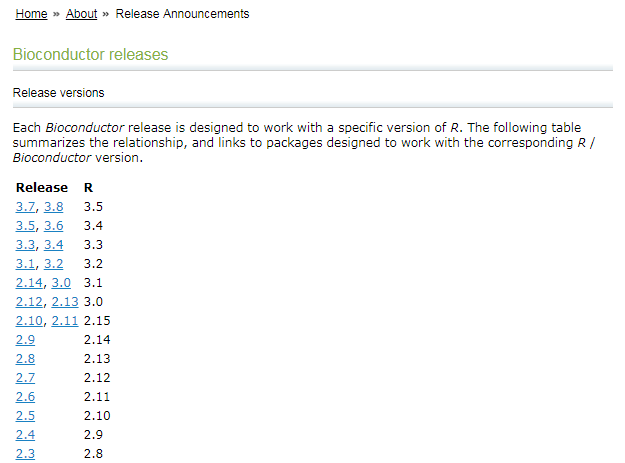
biocLite
在 R==3.5(Bioconductor-3.7 前,Bioconductor 都是通过 biocLite 安装相关的 R 包:
source("https://bioconductor.org/biocLite.R")
biocLite(pkg_name)
但是,从 R-3.5(Bioconductor-3.8)起,Bioconductor 更改了 R 包的安装方式:它们通过发布在 CRAN 的 BiocManager 包来对 Bioconductor 的包进行安装和管理——通过 CRAN 安装 BiocManager,再通过这个包来安装 Bioconductor 的包。
BiocManager
安装 BiocManager 包
chooseCRANmirror()
install.packages("BiocManager")
安装 Bioconductor (or CRAN) 的 R 包
BiocManager::install(c("GenomicRanges", "Organism.dplyr"))
更新所有已经安装的 R 包到最新版本
BiocManager::install()
查看 Bioconductor 的版本
BiocManager::version()
## '3.8'
旧和意外版本的 R 包
当 Bioconductor 的包都来自同一版本时,它们的效果最佳。 使用 valid() 来查看过期(out-of-date)或意外版本(unexpected versions)的 R 包。
BiocManager::valid()

## Warning: 21 packages out-of-date; 2 packages too new
##
## * sessionInfo()
##
## R Under development (unstable) (2018-11-02 r75540)
## Platform: x86_64-pc-linux-gnu (64-bit)
## Running under: Ubuntu 18.04.1 LTS
##
## Matrix products: default
## BLAS: /usr/lib/x86_64-linux-gnu/blas/libblas.so.3.7.1
## LAPACK: /usr/lib/x86_64-linux-gnu/lapack/liblapack.so.3.7.1
##
## locale:
##  [1] LC_CTYPE=en_US.UTF-8       LC_NUMERIC=C
##  [3] LC_TIME=en_US.UTF-8        LC_COLLATE=C
##  [5] LC_MONETARY=en_US.UTF-8    LC_MESSAGES=en_US.UTF-8
##  [7] LC_PAPER=en_US.UTF-8       LC_NAME=C
##  [9] LC_ADDRESS=C               LC_TELEPHONE=C
## [11] LC_MEASUREMENT=en_US.UTF-8 LC_IDENTIFICATION=C
##
## attached base packages:
## [1] stats     graphics  grDevices utils     datasets  methods   base
##
## other attached packages:
## [1] BiocStyle_2.11.0
##
## loaded via a namespace (and not attached):
##  [1] Rcpp_1.0.0         bookdown_0.7       digest_0.6.18
##  [4] rprojroot_1.3-2    backports_1.1.2    magrittr_1.5
##  [7] evaluate_0.12      stringi_1.2.4      rmarkdown_1.10
## [10] tools_3.6.0        stringr_1.3.1      xfun_0.4
## [13] yaml_2.2.0         compiler_3.6.0     BiocManager_1.30.4
## [16] htmltools_0.3.6    knitr_1.20
##
## Bioconductor version '3.9'
##
##   * 21 packages out-of-date
##   * 2 packages too new
##
## create a valid installation with
##
##   BiocManager::install(c(
##     "BiocManager", "GenomicDataCommons", "GenomicRanges", "IRanges",
##     "RJSONIO", "RcppArmadillo", "S4Vectors", "TCGAbiolinks", "TCGAutils",
##     "TMB", "biocViews", "biomaRt", "bumphunter", "curatedMetagenomicData",
##     "dimRed", "dplyr", "flowCore", "ggpubr", "ggtree", "lme4", "rcmdcheck",
##     "shinyFiles", "tximportData"
##   ), update = TRUE, ask = FALSE)
##
## more details: BiocManager::valid()$too_new, BiocManager::valid()$out_of_date
valid() 返回一个对象,可以查询该对象以获取有关无效包的详细信息:
> v <- valid()
Warning message:
6 packages out-of-date; 0 packages too new
> names(v)
[1] "out_of_date" "too_new"
> head(v$out_of_date, 2)
    Package LibPath
bit "bit"   "/home/shenweiyan/R/x86_64-pc-linux-gnu-library/3.5-Bioc-3.8"
ff  "ff"    "/home/shenweiyan/R/x86_64-pc-linux-gnu-library/3.5-Bioc-3.8"
    Installed Built   ReposVer Repository
bit "1.1-12"  "3.5.0" "1.1-13" "https://cran.rstudio.com/src/contrib"
ff  "2.2-13"  "3.5.0" "2.2-14" "https://cran.rstudio.com/src/contrib"
>
适用的 R 包
可以使用 available() 发现适用于我们的 Bioconductor 版本的软件包; 第一个参数是可用于根据正则表达式过滤包名称,例如,可用于 Homo sapiens 的 ‘BSgenome’ 包:
avail <- BiocManager::available()
length(avail)
## [1] 16261

BiocManager::available("BSgenome.Hsapiens")
##  [1] "BSgenome.Hsapiens.1000genomes.hs37d5"
##  [2] "BSgenome.Hsapiens.NCBI.GRCh38"
##  [3] "BSgenome.Hsapiens.UCSC.hg17"
##  [4] "BSgenome.Hsapiens.UCSC.hg17.masked"
##  [5] "BSgenome.Hsapiens.UCSC.hg18"
##  [6] "BSgenome.Hsapiens.UCSC.hg18.masked"
##  [7] "BSgenome.Hsapiens.UCSC.hg19"
##  [8] "BSgenome.Hsapiens.UCSC.hg19.masked"
##  [9] "BSgenome.Hsapiens.UCSC.hg38"
## [10] "BSgenome.Hsapiens.UCSC.hg38.masked"
Bioconductor 中安装旧版本的 R 包
对于 R >= 3.5,Bioconductor-3.8 可以使用 BiocManager 安装相关与版本匹配的 R 包。那么使用 3.5 以下 R 版本的用户是继续使用 biocLite,还是 BiocManager,还是其他的方法安装匹配相关版本的 R 包呢?
首先,biocLite 和 BiocManager 不适用 R < 3.5。
> source("https://bioconductor.org/biocLite.R")
Bioconductor version 3.6 (BiocInstaller 1.28.0), ?biocLite for help
A new version of Bioconductor is available after installing the most recent
  version of R; see http://bioconductor.org/install
> biocLite("clusterProfile")
......

Warning message:
package ‘clusterProfile’ is not available (for R version 3.4.3)

> chooseCRANmirror()
> install.packages("BiocManager")
Warning message:
package ‘BiocManager’ is not available (for R version 3.4.3)
>
其次,对于 R < 3.5.0,Bioconductor 推荐使用以下命令安装相应的 R 包。
source("https://bioconductor.org/biocLite.R")
BiocInstaller::biocLite(c("GenomicFeatures", "AnnotationDbi"))
Bioconductor 安装旧版本 clusterProfiler
在 Aanconda2 环境 R==3.4.3 中安装 clusterProfiler,发现 package ‘clusterProfile’ is not available (for R version 3.4.3)。
> source("https://bioconductor.org/biocLite.R")
Bioconductor version 3.6 (BiocInstaller 1.28.0), ?biocLite for help
A new version of Bioconductor is available after installing the most recent
  version of R; see http://bioconductor.org/install
> biocLite("clusterProfile")
BioC_mirror: https://bioconductor.org
Using Bioconductor 3.6 (BiocInstaller 1.28.0), R 3.4.3 (2017-11-30).
Installing package(s) ‘clusterProfile’
Old packages: 'ade4', 'ape', 'backports', 'caret', ......

Update all/some/none? [a/s/n]: n
Warning message:
package ‘clusterProfile’ is not available (for R version 3.4.3)
使用 BiocInstaller 安装 clusterProfiler:
> source("https://bioconductor.org/biocLite.R")
Bioconductor version 3.6 (BiocInstaller 1.28.0), ?biocLite for help
A new version of Bioconductor is available after installing the most recent
  version of R; see http://bioconductor.org/install

> BiocInstaller::biocLite("clusterProfiler")
BioC_mirror: https://bioconductor.org
Using Bioconductor 3.6 (BiocInstaller 1.28.0), R 3.4.3 (2017-11-30).
Installing package(s) ‘clusterProfiler’
trying URL 'https://bioconductor.org/packages/3.6/bioc/src/contrib/clusterProfiler_3.6.0.tar.gz'
Content type 'application/x-gzip' length 4478098 bytes (4.3 MB)
==================================================
downloaded 4.3 MB

* installing *source* package ‘clusterProfiler’ ...
** R
** data
** inst
** byte-compile and prepare package for lazy loading
** help
*** installing help indices
** building package indices
** installing vignettes
** testing if installed package can be loaded
* DONE (clusterProfiler)

> packageVersion('clusterProfiler')
[1] ‘3.6.0’
本文分享自微信公众号 - 生信科技爱好者(bioitee)。
如有侵权,请联系 support@oschina.cn 删除。
本文参与“OSC源创计划”,欢迎正在阅读的你也加入,一起分享。
Bioconductor 中的 R 包安装教程的更多相关文章
- R 包安装、载入和卸载
生物上的一些包可以这样安装 source("https://bioconductor.org/biocLite.R") biocLite("affy") 一般的 ...
- Linux环境下R和R包安装及其管理
前言 R对windows使用很友好,对Linux来说充满了敌意.小数据可以在windows下交互操作,效果很好很棒.可是当我们要处理大数据,或者要在集群上搭建pipeline时,不得不面对在Linux ...
- Sublime Text 2安装汉化破解、插件包安装教程
原文地址: Sublime Text 2安装汉化破解.插件包安装教程_百度经验 http://jingyan.baidu.com/article/ff4116259b057c12e48237b8.ht ...
- windows系统mysql-5.7官方绿色版zip包安装教程
准备 下载页面:https://dev.mysql.com/downloads/mysql/ 点击 Download 按钮下载zip包到本地,解压(以我本地的解压路径是 D:\db\mysql-5.7 ...
- 如何将R包安装到自定义路径
参考 设置环境变量R_LIBS将R包安装到自定义路径 实际上是可以解决问题的, #环境变量完成以后,启动(重启)R,运行 .libPaths() 加载R包时,发现路径仍然未变成自定义的. 那么参 ...
- R包安装的正确方式
options("repos" = c(CRAN="https://mirrors.tuna.tsinghua.edu.cn/CRAN/")) if(! req ...
- Hadoop学习---Ubuntu中hadoop完全分布式安装教程
软件版本 Hadoop版本号:hadoop-2.6.0-cdh5.7.0: VMWare版本号:VMware 9或10 Linux系统:CentOS 6.4-6.5 或Ubuntu版本号:ubuntu ...
- VirtualBox扩展包安装教程|VirtualBox扩展增强包怎么安装
VirtualBox是一款功能强大的免费虚拟机软件,一般我们安装VirtualBox后要安装扩展增强包,VirtualBox扩展包包含USB2.0和USB3.0控制等支持功能,如果没有装,在使用过程中 ...
- vs中python包安装教程
vs安装python很简单,只需要在vs安装包中选择python就可以了,这里使用的python3.7: 如果有了解,都知道安装python包的指令:"pip install xxx&quo ...
- Xbox360自制系统GOD包安装教程
1.准备工作 U盘或移动硬盘一个,已下载好的GOD包,本教程用一个32G的U盘和游戏<猎天使魔女>为例. 右击U盘,属性,查看你的U盘是否为FAT32格式. 如果是FAT32格式,则可直接 ...
随机推荐
- MySQL8.0 创建用户及授权 - 看这篇就足够了
什么时候会用到 对接外系统时,需要给其余系统开放访问权限 本系统中,分权限管理数据,防止root权限删库跑路 mysql版本 MySql8.0+ 具体步骤 1.命令行进入MySql 使用 mysql ...
- CZHA0黑客游戏
一个自己开发的黑客游戏,里面用到了自研AC库 A0阶段: from ac import* from time import * from sys import * def printf(text): ...
- 快收藏!最全GO语言实现设计模式
https://segmentfault.com/a/1190000042859564
- fastjson很好,但不适合我
记者:大爷您有什么特长呀? fastjson:我很快. 记者:23423乘以4534等于多少? fastjson:等于2343. 记者:?? fastjson:你就说快不快吧! 这个略显马丽苏的标题, ...
- [Linux]网络检测工具之iperf
1 安装网络检测工具 iperf step1.0 iperf的简介 [摘] iperf是一种命令行工具,用于通过测量服务器可以处理的最大网络吞吐量来诊断网络速度问题.它在遇到网络速度问题时特别有用,通 ...
- Linux:进程模型和进程管理
1 进程与程序 在Linux系统中,执行一个程序或命令就可以触发一个进程,系统会给予这个进程一个ID,称为PID,同时根据触发这个进程的用户与相关属性关系,基于这个PID一组有效的权限设置.如下图所示 ...
- 一天吃透MySQL面试八股文
什么是MySQL MySQL是一个关系型数据库,它采用表的形式来存储数据.你可以理解成是Excel表格,既然是表的形式存储数据,就有表结构(行和列).行代表每一行数据,列代表该行中的每个值.列上的值是 ...
- Kubernetes入门实践(环境搭建)
容器技术只是解决了运维部署工作中的一个很小的问题,在现实生产环境中,除了最基本的安装,还会各式各样的需求,比如服务发现.负载均衡.状态监控.健康检查.扩容缩容.应用迁移.高可用等等.这些容器之上的管理 ...
- ASTAR机台(win7 p'rofessional)使用python tool中文显示异常问题解决
1.双击"computer"打开界面如下,再单击"open control panel"打开控制面板. 2.在控制面板中点击"Clock,Langua ...
- C++冒泡排序简单讲解
此文章我已在洛谷博客发布,不算抄袭 什么是冒泡排序 冒泡排序(Bubble Sort)也是一种简单直观的排序算法.它重复地走访过要排序的数列,一次比较两个元素,如果他们的顺序错误就把他们交换过来.走访 ...