
ArgoWorkflow 教程(一)--DevOps 另一选择?云原生 CICD 初体验
本文主要记录了如何使用 ArgoWorkflow 构建流水线,以及 ArgoWorkflow 中 的 Workflow、Template 等概念模型。
本文主要分析以下问题:
- 1)如何创建流水线
- 2)Workflow、Template、template 自己的引用关系
- 3)Workflow 和 Template 之间的参数传递问题
- 4)ArgoWorkflow 流水线最佳实践
1.概念模型
接下来就是如何构建我们的流水线了,ArgoWorkflow 中流水线相关的概念如下:
- Workflow:流水线,真正运行的流水线实例,类似于 Tekton 中的 pipelinerun
- WorkflowTemplate:流水线模板,可以基于模板创建流水线,类似于 Tekton 中的 pipeline
- ClusterWorkflowTemplate:集群级别的流水线模板,和 WorkflowTemplate 的关系类似于 K8s 中的 Role 和 ClusterRole
- templates:Workflow 或者 Template 的最小组成单位,流水线由多个 template 组成。
WorkflowTemplate 和 ClusterWorkflowTemplate 暂时统称为 Template。
Workflow、Template(大写)、template(小写)之间的关系如下:
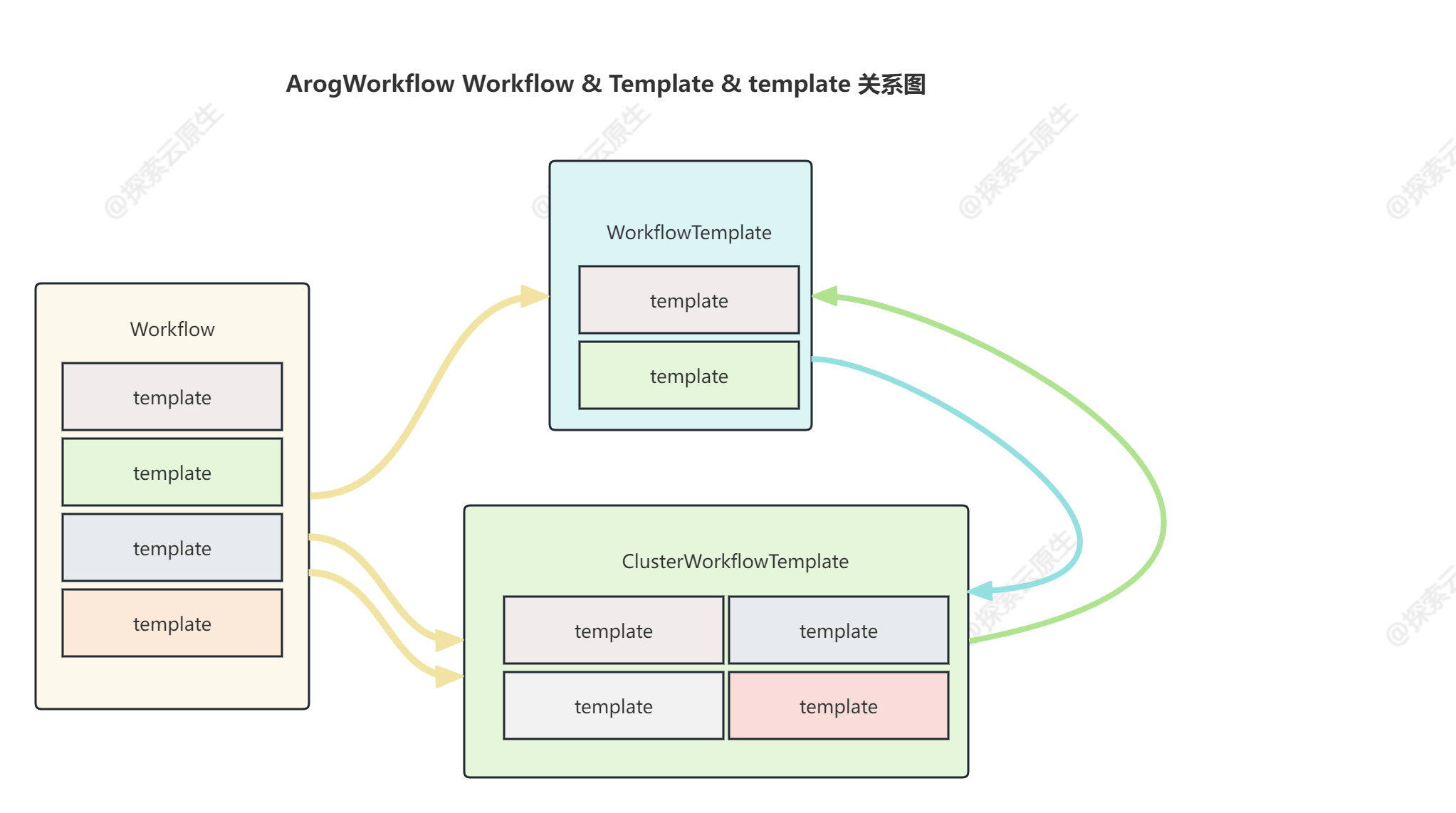
三者间关系比较复杂,官方也有提到这块因为一些历史遗留问题导致命名上比较混乱
个人理解:
- template(小写):为 Template(大写)的基本组成单位,可以理解为流水线中的步骤
- Template(大写):一条完整的流水线,一般由多个 template(小写) 组成
- Workflow:真正运行的流水线实例,一般由 Template 直接创建,类似于流水线运行记录,每一条记录都是一个 Workflow
理清基本概念之后,接下来就看下看具体使用。
2.Workflow
在 ArgoWorkflow 中 Workflow 为流水线运行实例,每创建一个 Workflow 对象,都会触发流水线运行一次。
以下是一个简单的 Workflow 例子:
apiVersion: argoproj.io/v1alpha1

kind: Workflow

metadata:

  generateName: steps-

spec:

  entrypoint: hello           # We reference our first "template" here

  templates:

  - name: hello               # The first "template" in this Workflow, it is referenced by "entrypoint"

    steps:                    # The type of this "template" is "steps"

    - - name: hello

        template: whalesay    # We reference our second "template" here

        arguments:

          parameters: [{name: message, value: "hello"}]

  - name: whalesay             # The second "template" in this Workflow, it is referenced by "hello"

    inputs:

      parameters:

      - name: message

    container:                # The type of this "template" is "container"

      image: docker/whalesay

      command: [cowsay]

      args: ["{{inputs.parameters.message}}"]
整个 Workflow 对象核心内容分为以下三部分:
entrypoint: 流水线入口,类似于代码中的 main 方法,此处一般引用某一个template invocators即可。templates:模板列表,此处定义了流水线中的所有步骤以及步骤之间的先后顺序。parameters:流水线中用到的参数,包括 arguments 块中的全局参数和 inputs 块中的局部参数两种
entrypoint
Workflow 中必须要指定 entrypoint,entrypoint 作为任务的执行起点,类似于程序中的 main 方法。
templates
具体见官方文档:#template-types
模板分为多种类型,根据类型的不同分为 template definitions(模板定义)以及 template invocators(模板调用器)。
- template definitions(模板定义):该类型 template 用于定义具体步骤要执行的内容,例子中的 whalesay 模板就是该类型
- 包含
container,script,resource,suspend等类型
- 包含
- template invocators(模板调用器):该类型 template 用于组合其他 template definitions(模版定义) ,定义步骤间的执行顺序等,例子中的 hello 模板就是该类型。
- 一般 entrypoint 就是该类型的模板
- 包含
dag和steps两种类型,例子中的 hello 模板就是 steps 类型。
吐槽一下:template 这里有点绕,如果能将 模板定义 、模板调用器 拆分为两个不同的对象就比较清晰。
了解完 template 分类之后再回头看之前的 Workflow 例子就比较清晰了:
apiVersion: argoproj.io/v1alpha1

kind: Workflow

metadata:

  generateName: steps-

spec:

  entrypoint: hello           # We reference our first "template" here

  templates:

  - name: hello               # The first "template" in this Workflow, it is referenced by "entrypoint"

    steps:                    # The type of this "template" is "steps"

    - - name: hello

        template: whalesay    # We reference our second "template" here

        arguments:

          parameters: [{name: message, value: "hello"}]

  - name: whalesay             # The second "template" in this Workflow, it is referenced by "hello"

    inputs:

      parameters:

      - name: message

    container:                # The type of this "template" is "container"

      image: docker/whalesay

      command: [cowsay]

      args: ["{{inputs.parameters.message}}"]
- 1)首先 whalesay 模板是一个
container类型的 template,因此是 template definitions(模板定义) - 2)其次 hello 是一个
steps类型的 template,因此是 template invocators(模板调用器)- 在该调用器中 steps 字段中定义了一个名为 hello 的步骤,该步骤引用的就是 whalesay template
- 3)entrypoint 指定的是 hello 这个 template invocators(模板调用器)
小结:entrypoint、template definitions、template invocators 这三个就是一个 Workflow 的必要组成。
parameters
Workflow 支持两种类型的参数:
- arguments:全局参数,Workflow 下所有 template 都可使用
- inputs:局部参数,仅当前 template 可使用
arguments 全局参数
spec.arguments用于定义全局参数,这部分参数在当前 Workflow 下的所有 Template 中都可以使用,可以使用 {{workflow.parameters.$name}} 语法来引用。
例如下面这个例子中指定了一个名为 message 的参数,并赋值为 hello world。
  arguments:

    parameters:

      - name: message

        value: hello world
inputs 局部参数
Template 中可以使用 templates[*].inputs 字段来指定局部参数,这部分参数只有当前 Template 可以使用。可以通过{{inputs.parameters.$name}} 语法来引用参数。
下面这个例子则是声明了 template 需要一个名为 message 的参数,但是未提供具体值。
  templates:

    - name: whalesay-template

      inputs:

        parameters:

          - name: message

      container:

        image: docker/whalesay

        command: [cowsay]

        args: ["{{inputs.parameters.message}}"]
参数传递
Workflow 中的全局参数值由用户指定,而局部参数中的值一般是由全局参数覆盖。
apiVersion: argoproj.io/v1alpha1

kind: Workflow

metadata:

  generateName: steps-

spec:

  entrypoint: hello           # We reference our first "template" here

  templates:

  - name: hello               # The first "template" in this Workflow, it is referenced by "entrypoint"

    steps:                    # The type of this "template" is "steps"

    - - name: hello

        template: whalesay    # We reference our second "template" here

        arguments:

          parameters: [{name: message, value: "hello"}]

  - name: whalesay             # The second "template" in this Workflow, it is referenced by "hello"

    inputs:

      parameters:

      - name: message

    container:                # The type of this "template" is "container"

      image: docker/whalesay

      command: [cowsay]

      args: ["{{inputs.parameters.message}}"]
上述例子中,template whalesay 定义了一个名为 message 的局部参数,但是没有赋值,同时在 template 中又定义了一个名为 message 的参数,因此最终局部参数 message 会被全局参数 message 覆盖。
上述例子可以看成是这样的:
  templates:

  - name: hello               # The first "template" in this Workflow, it is referenced by "entrypoint"

    steps:                    # The type of this "template" is "steps"

    - - name: hello

        template: whalesay    # We reference our second "template" here

        arguments:

          parameters: [{name: message, value: "hello"}]

  - name: whalesay             # The second "template" in this Workflow, it is referenced by "hello"

    inputs:

      parameters:

      - name: message

        value: "{{workflow.parameters.message}}"

    container:                # The type of this "template" is "container"

      image: docker/whalesay

      command: [cowsay]

      args: ["{{inputs.parameters.message}}"]
即:template 引用局部参数,局部参数来自全局参数,用户配置全局参数。
3.Template
根据前面描述可以指定,我们能直接创建 Workflow 对象来运行流水线,不过这种方式存在的一些问题:
- 1)如果 template 比较多的话,Workflow 对象就会特别大,修改起来比较麻烦
- 2)模板无法共享,不同 Workflow 都需要写一样的 template
因此,一般建议将 template 存到 WorkflowTemplate,Workflow 中只引用 Template 并提供参数即可。
而 ArgoWorkflow 中的工作流模板根据范围不同分为 WorkflowTemplate 和 ClusterWorkflowTemplate 两种。
- WorkflowTemplate:命名空间范围,只能在同一命名空间引用
- ClusterWorkflowTemplate:集群范围,任意命名空间都可以引用
WorkflowTemplate
下面是一个简单的 WorkflowTemplate 例子:
apiVersion: argoproj.io/v1alpha1

kind: WorkflowTemplate

metadata:

  name: workflow-template-submittable

  namespace: default

spec:

  entrypoint: whalesay-template

  arguments:

    parameters:

      - name: message

        value: tpl-argument-default

  templates:

    - name: whalesay-template

      inputs:

        parameters:

          - name: message

            value: tpl-input-default

      container:

        image: docker/whalesay

        command: [cowsay]

        args: ["{{inputs.parameters.message}}"]
可以看到 WorkflowTemplate 和 Workflow 参数是一模一样,只是将 yaml 中的 kind 由 Workflow 替换为 WorkflowTemplate 即可,这里就不在赘述了。
workflowMetadata
workflowMetadata 是 Template 中独有的一个字段,主要用于存储元数据,后续由这个 Template 创建出的 Workflow 都会自动携带上这些信息。
通过这些信息可以追踪到 Workflow 是由那个 Template 创建的。
使用方式就像下面这样,workflowMetadata 中指定了一个 label
apiVersion: argoproj.io/v1alpha1

kind: WorkflowTemplate

metadata:

  name: workflow-template-submittable

spec:

  workflowMetadata:

    labels:

      example-label: example-value
然后由该 Template 创建的 Workflow 对象都会携带这个 label:
apiVersion: argoproj.io/v1alpha1

kind: Workflow

metadata:

  annotations:

    workflows.argoproj.io/pod-name-format: v2

  creationTimestamp: "2023-10-27T06:26:13Z"

  generateName: workflow-template-hello-world-

  generation: 2

  labels:

    example-label: example-value

  name: workflow-template-hello-world-5w7ss

  namespace: default
ClusterWorkflowTemplate
类似于 WorkflowTemplate,可以理解为 k8s 中的 Role 和 ClusterRole 的关系。
和 WorkflowTemplate 所有参数都一致,只是将 yaml 中的 kind 替换为 ClusterWorkflowTemplate 即可。
小结
Template 中最好将以下三部分内容都配置好:
- entrypoint:推荐,虽然可以在 Workflow 中指定,但是这样每次创建 Workflow 都需要先看一下 Template 中有哪些 template 了,比较麻烦,因此最好 Template 中直接填好
- templates:必须,Template 的作用就是写模板
- arguments:最好将默认值填上,这样 Workflow 在不指定任何参数时也能使用
当 Template 中将这三个核心内容都填好之后,Workflow 使用时就非常简单了。
4. TemplateRef
创建好 Template 之后就可以在 Workflow 中使用 TemplateRef 直接引用对应模板了,这样 Workflow 对象就会比较干净。
workflowTemplateRef
可以通过workflowTemplateRef字段直接引用 WorkflowTemplate。
注意:这里需要 Workflow 和 WorkflowTemplate 在同一个命名空间。
就像这样:
apiVersion: argoproj.io/v1alpha1

kind: Workflow

metadata:

  generateName: workflow-template-hello-world-

spec:

  arguments:

    parameters:

      - name: message

        value: "from workflow"

  workflowTemplateRef:

    name: workflow-template-submittable
workflowTemplateRef 指定要引用的 Template 名字即可,这一句就相当于把对应 Template 中 spec 字段下的所有内容都搬过来了,包括 entrypoint、template 等。
Workflow 中一般只需要通过 argument 字段来实现参数覆盖,当然也可以不指定,若 Workflow 中不指定参数则会使用 Template 中提供的默认值
一个最精简的 Workflow 如下:
apiVersion: argoproj.io/v1alpha1

kind: Workflow

metadata:

  generateName: workflow-template-hello-world-

spec:

  workflowTemplateRef:

    name: workflow-template-submittable
只有 workflowTemplateRef 字段,未提供 argument 参数。
和前面的 Workflow 对比起来,内容就更少了,因为大部分都写在 WorkflowTemplate 里了,Workflow 中一般只需要指定参数就行。
参数问题:
- 全局参数可以直接在 WorkflowTemplate 中使用,只需要到时候 Workflow 中有定义即可。
- 局部参数则必须在 WorkflowTemplate 中定义并赋值
具体见官方文档:#working-with-parameters
看起来就是 WorkflowTemplate 中最好使用全局参数,因为局部参数的值是直接定义在 WorkflowTemplate 中的,Workflow 中不能覆盖。
clusterWorkflowTemplateRef
和 workflowTemplateRef 类似,只需要增加 clusterScope: true 配置即可。
默认为 false,即 WorkflowTemplate
就像这样:
apiVersion: argoproj.io/v1alpha1

kind: Workflow

metadata:

  generateName: workflow-template-hello-world-

spec:

  entrypoint: whalesay

  templates:

  - name: whalesay

    steps:                              # You should only reference external "templates" in a "steps" or "dag" "template".

      - - name: call-whalesay-template

          templateRef:                  # You can reference a "template" from another "WorkflowTemplate or ClusterWorkflowTemplate" using this field

            name: cluster-workflow-template-whalesay-template   # This is the name of the "WorkflowTemplate or ClusterWorkflowTemplate" CRD that contains the "template" you want

            template: whalesay-template # This is the name of the "template" you want to reference

            clusterScope: true          # This field indicates this templateRef is pointing ClusterWorkflowTemplate

          arguments:                    # You can pass in arguments as normal

            parameters:

            - name: message

              value: "hello world"
核心部分:
  workflowTemplateRef:

    name: cluster-workflow-template-submittable

    clusterScope: true
当指定为集群范围时,ArgoWorkflow 会去搜索 ClusterWorkflowTemplate 对象,否则会在当前命名空间搜索 WorkflowTemplate。
templateRef
除了使用 workflowTemplateRef / clusterWorkflowTemplateRef 引用整个 WorkflowTemplate 之外,还可以使用 templateRef 参数来实现引用 WorkflowTemplate 中的某一个 template。
注意:根据官方文档,最好不要在 steps 和 dag 类型的 template 之外使用 templateRef 。
apiVersion: argoproj.io/v1alpha1

kind: Workflow

metadata:

  generateName: workflow-template-hello-world-

spec:

  entrypoint: whalesay

  templates:

  - name: whalesay

    steps:                              # You should only reference external "templates" in a "steps" or "dag" "template".

      - - name: call-whalesay-template

          templateRef:                  # You can reference a "template" from another "WorkflowTemplate" using this field

            name: workflow-template-1   # This is the name of the "WorkflowTemplate" CRD that contains the "template" you want

            template: whalesay-template # This is the name of the "template" you want to reference

          arguments:                    # You can pass in arguments as normal

            parameters:

            - name: message

              value: "hello world"
5. 参数优先级测试
由于有多个地方都可以设置参数,同时又有全局参数和局部参数等区别,对于参数具体逻辑不是很清晰,因此测试了一下具体的参数传递情况。
一共有三个地方可以设置参数:
- 1)WorkflowTemplate 中 arguments 全局参数
- 2)WorkflowTemplate 中 inputs 局部参数
- 3)Workflow 中 arguments 全局参数
注意:在 workflowTemplateRef 这种引用方式下, Workflow 中是无法指定 input 值的。
对于不同情况做了测试,最终结论如下为:
Workflow 中的 argument > Template 中的 argument > Template 中的 input
只要提供了更高优先级的参数,低优先级的就会覆盖
- Argument > Input 即全局参数优先级高于局部参数
- Workflow > Template 即流水线参数可以覆盖模板中的默认值
6. 小结
ArgoWorkflow 中的工作流包括以下概念:
- Workflow
- Template:WorkflowTemplate、ClusterWorkflowTemplate
- TemplateRef:workflowTemplateRef、clusterWorkflowTemplateRef
- Template
关系如图所示
一个 Workflow / WorkflowTemplate 中包含三部分参数:
- entrypoint:入口,必填的,值是 Template 的名字
- 可以来源于 Workflow,也就是显式写在 Workflow 里面
- 也可以来源于 WorkflowTemplate,即 Workflow 中不写该字段,在 WorkflowTemplate 中写
- 最好直接写在 WorkflowTemplate 中
- arguments:参数,同样 Workflow 和 WorkflowTemplate 都可以指定,且 Workflow 中的 arguments 优先级高于 WorkflowTemplate
- templates:模板,这部分包含了 Workflow 具体要执行的动作
- 这部分建议全定义在 WorkflowTemplate 中,Workflow 中直接引用 WorkflowTemplate 即可
最佳实践:
- 1)使用 Template 来管理流水线,并在 WorkflowTemplate 中定义好 entrypoint 和 templates 以及 arguments
- Template 中指定 entrypoint、templates、arguments 等信息
- 2)Workflow 中 使用 TemplateRef 直接引用已存在的 Template,并指定 arguments 进行覆盖
参数优先级:Workflow 中的 argument > Template 中的 argument > Template 中的 input
【ArgoWorkflow 系列】持续更新中,搜索公众号【探索云原生】订阅,阅读更多文章。

ArgoWorkflow 教程(一)--DevOps 另一选择?云原生 CICD 初体验的更多相关文章
- 【阿里云产品公测】云引擎ACE初体验
作者:阿里云用户蓝色之鹰 :RYYjmG5; 来投票支持我把=i2]qj\ 序号2. [阿里云产品公测]云引擎ACE初体验:作者:蓝色之鹰 e(OKE7 序号10.[阿里云产品公测]结构化数据服 ...
- 不懂 Kubernetes 实现云原生是什么体验?
云原生的本质和最终效果 要明白什么是云原生,就要先弄明白云计算是什么有什么问题,云计算将计算资源.网络.存储等基础设施统一管理,通过资源规模化和自动化管理,实现降低资源的成本和提高资源的管理效率,云计 ...
- Testin云测试平台初体验
这几天偶然接触到了一个叫做Testin的云测试平台,经过一番体验,感觉还是不错的,因为里面提供了大量的测试机型,可以针对Android手机的严重碎片化现象做出比较全面的测试,同时Testin的测试内容 ...
- 云原生时代的DevOps平台设计之道
开发人员与运维人员是 IT 领域很重要的两大人群,他们都会参与到各种业务系统的建设过程中去.DevOps 是近年间火爆起来的一种新理念,这种理念被很多人错误的解读为"由开发人员(Dev)学习 ...
- 【阿里云产品公测】消息队列服务MQS java SDK 机器人应用初体验
[阿里云产品公测]消息队列服务MQS java SDK 机器人应用初体验 作者:阿里云用户啊里新人 初体验 之 测评环境 由于MQS支持外网访问,因此我在本地做了一些简单测试(可能有些业余),之后 ...
- 阿里云如何基于标准 K8s 打造边缘计算云原生基础设施
作者 | 黄玉奇(徙远) 阿里巴巴高级技术专家 关注"阿里巴巴云原生"公众号,回复关键词 1219 即可下载本文 PPT 及实操演示视频. 导读:伴随 5G.IoT 的发展,边缘 ...
- API 管理在云原生场景下的机遇与挑战
作者 | 张添翼 来源 | 尔达Erda公众号 云原生下的机遇和挑战 标准和生态的意义 自从 Kubernetes v1.0 于 2015 年 7 月 21 日发布,CNCF 组织随后建立以来,其 ...
- 云原生时代,为什么基础设施即代码(IaC)是开发者体验的核心?
作者 | 林俊(万念) 来源 |尔达 Erda 公众号 从一个小故事开始 你是一个高级开发工程师. 某天,你自信地写好了自动煮咖啡功能的代码,并在本地调试通过.代码合并入主干分支后,你准备把服务发布到 ...
- 重磅 | 腾讯云服务网格开源项目 Aeraki Mesh 加入 CNCF 云原生全景图
作者 赵化冰,腾讯云工程师,Aeraki Mesh 创始人,Istio member,Envoy contributor,目前负责 Tencent Cloud Mesh 研发工作. 摘要 近日,腾讯云 ...
- 重大升级!灵雀云发布全栈云原生开放平台ACP 3.0
云原生技术的发展正在改变全球软件业的格局,随着云原生技术生态体系的日趋完善,灵雀云的云原生平台也进入了成熟阶段.近日,灵雀云发布重大产品升级,推出全栈云原生开放平台ACP 3.0.作为面向企业级用户的 ...
随机推荐
- windows server 安装.net framework 3.5失败
windows server如果高版本的.net framework 那么在安装.net framework3.5时会提示已安装高版本的不能安装低版本的了 ---------------------- ...
- tampermonkey脚本 百度搜索屏蔽CSDN
// ==UserScript==// @name 屏蔽CSDN// @namespace http://tampermonkey.net/// @version 20 ...
- 一文学完所有的Hive Sql(两万字最全详解)
Hive Sql 大全 本文基本涵盖了Hive日常使用的所有SQL,因为SQL太多,所以将SQL进行了如下分类: 一.DDL语句(数据定义语句): 对数据库的操作:包含创建.修改数据库 对数据表的操作 ...
- Java实现管线拓扑关系连通性分析
管线拓扑关系的连通性分析通常涉及图论(Graph Theory)中的概念,特别是无向图(Undirected Graph)的遍历算法,如深度优先搜索(DFS, Depth-First Search)或 ...
- OpenFOAM v2306 安装
参考 https://develop.openfoam.com/Development/openfoam/-/wikis/precompiled/debian curl https://dl.open ...
- bs4解析-优美图库
import requests from bs4 import BeautifulSoup url = 'http://www.umeituku.com/bizhitupian/meinvbizhi/ ...
- 实测14us,Linux-RT实时性能及开发案例分享—基于全志T507-H国产平台
本文带来的是基于全志T507-H(硬件平台:创龙科技TLT507-EVM评估板),Linux-RT内核的硬件GPIO输入和输出实时性测试及应用开发案例的分享.本次演示的开发环境如下: Windows开 ...
- 使用flume将数据sink到kafka
flume采集过程: #说明:案例是flume监听目录/home/hadoop/flume_kafka采集到kafka: 启动集群 启动kafka, 启动agent,flume-ng agent -c ...
- JDK9之后 Eureka依赖
<!--Eureka添加依赖开始--> <dependency> <groupId>javax.xml.bind</groupId> <artif ...
- Java-JSTL标签简化和替换jsp页面上的java代码
概念:JavaServer Pages Tag Library JSP标准标签库 作用:用于简化和替换jsp页面上的java代码 使用标签: 导入jstl相关jar包 引入标签库:taglib指令:& ...