
ServletContext 学习
ServletContext
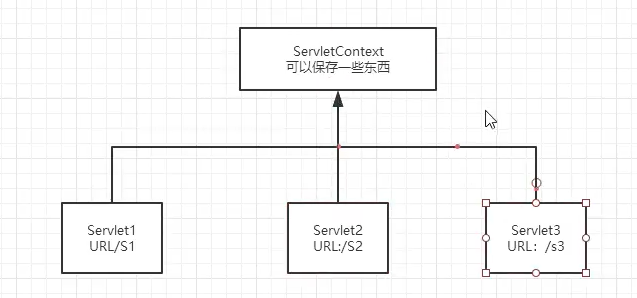
web容器在启动的时候,它会为每个web程序都创建一个对应的ServletContext对象,它代表了当前的web应用;
1、共享数据
在这个Servlet中保存了数据,就可以在另外一个servlet取到
首先将数据存入HelloServlet中,然后可以在另外一个Servlet类中取出
@WebServlet("/hello")

public class HelloServlet extends HttpServlet {

    @Override

    protected void doGet(HttpServletRequest req, HttpServletResponse resp) throws ServletException, IOException {

        //this.getInitParameter()   //初始化参数

        //this.getServletConfig()     Servlet配置

        //this.getServletContext()    Servlet 上下文

        ServletContext context = this.getServletContext();

        String name = "逍遥子";//数据

        context.setAttribute("name",name);//将一个数据保存在了 ServletContext 中

        System.out.println("数据已经存放!!!!");

    }

    @Override

    protected void doPost(HttpServletRequest req, HttpServletResponse resp) throws ServletException, IOException {

        doGet(req, resp);

    }

}
@WebServlet("/getc")

public class ReadServlet extends HttpServlet {

    @Override

    protected void doGet(HttpServletRequest req, HttpServletResponse resp) throws ServletException, IOException {

        //数据

        ServletContext context = this.getServletContext();

        String name = (String) context.getAttribute("name");

        //响应,设置编码

        resp.setContentType("text/html");

        resp.setCharacterEncoding("utf-8");

        resp.getWriter().print("名字"+name);

    }

    @Override

    protected void doPost(HttpServletRequest req, HttpServletResponse resp) throws ServletException, IOException {

        doGet(req, resp);

    }

}
2、获取初始化参数
可以获得在xml中初始化保存的参数
<?xml version="1.0" encoding="UTF-8"?>

<web-app xmlns="http://xmlns.jcp.org/xml/ns/javaee"

         xmlns:xsi="http://www.w3.org/2001/XMLSchema-instance"

         xsi:schemaLocation="http://xmlns.jcp.org/xml/ns/javaee http://xmlns.jcp.org/xml/ns/javaee/web-app_4_0.xsd"

         version="4.0">

        <!-- 配置一些web应用的初始化参数 -->

        <context-param>

            <param-name>url</param-name>

            <param-value>jdbc:mysql://localhost:3306/mybatis</param-value>

        </context-param>

</web-app>
@WebServlet("/gp")

public class ServletDeom03 extends HttpServlet {

    @Override

    protected void doGet(HttpServletRequest req, HttpServletResponse resp) throws ServletException, IOException {

        //数据

        ServletContext context = this.getServletContext();

        String url = context.getInitParameter("url");

        resp.getWriter().print(url);

    }

    @Override

    protected void doPost(HttpServletRequest req, HttpServletResponse resp) throws ServletException, IOException {

        doGet(req, resp);

    }

}
3、请求转发
转发并不会改变请求的路径,重定向才会改变请求的路径
转发是间接获取到资源,重定向是直接拿到资源
@WebServlet("/sd4")

public class Servletdemo04 extends HttpServlet {

    @Override

    protected void doGet(HttpServletRequest req, HttpServletResponse resp) throws ServletException, IOException {

        //数据

        System.out.println("进入了demo04页面");

        ServletContext context = this.getServletContext();

        //RequestDispatcher requestDispatcher = context.getRequestDispatcher("/gp");//转发路径

        //requestDispatcher.forward(req,resp);//调用forward实现请求转发

        context.getRequestDispatcher("/gp").forward(req,resp);//请求转发

    }

    @Override

    protected void doPost(HttpServletRequest req, HttpServletResponse resp) throws ServletException, IOException {

        doGet(req, resp);

    }

}
4、读取资源文件
Properties
- 在java目录下新建properties
- 在resource目录下新建properties
发现:都被打包到了同一路径下:classes,我们俗称这个路径为classpath
注:在java目录下创建的properties文件,若想导出成功,还需配置xml文件
<!--  在build中配置resource,来防止我们资源导出失败的问题-->

  <build>

    <resources>

      <resource>

        <directory>src/main/resources</directory>

        <includes>

          <include>**/*.properties</include>

          <include>**/*.xml</include>

        </includes>

        <filtering>true</filtering>

      </resource>

      <resource>

        <directory>src/main/java</directory>

        <includes>

          <include>**/*.properties</include>

          <include>**/*.xml</include>

        </includes>

        <filtering>true</filtering>

      </resource>

    </resources>

  </build>
读文件思路:需要一个文件流;
@WebServlet("/sd5")

public class ServletDemo05 extends HttpServlet {

    @Override

    protected void doGet(HttpServletRequest req, HttpServletResponse resp) throws ServletException, IOException {

        /**

         * 1、导入properties流,根据项目的相对地址

         * 2、创建properties对象

         * 3、将刚刚的流加载到properties对象中

         * 4、成功引入properties文件

         */

        InputStream is = this.getServletContext().getResourceAsStream("/WEB-INF/classes/db.properties");

        Properties prop = new Properties();

        prop.load(is);

        String username = prop.getProperty("username");

        String password = prop.getProperty("password");

        resp.getWriter().print("username = "+username);

        resp.getWriter().print("password = "+password);

    }

    @Override

    protected void doPost(HttpServletRequest req, HttpServletResponse resp) throws ServletException, IOException {

        doGet(req, resp);

    }

}
ServletContext 学习的更多相关文章
- Servlet-Context学习笔记
介绍 ServletContext其实就是全局作用域对象, 上下文环境对象 利用context可以实现对,当前网站中所有的Servlet共享数据 context对象只能由Tomcat负责创建,在tom ...
- servletconfig和servletcontext学习
servletconfig java.lang.String getInitParameter(java.lang.String name) //根据参数名获取参数值 java.util.Enume ...
- spring定时器中如何获取servletcontext
spring定时器中如何获取servletcontext 学习了:https://zhidao.baidu.com/question/406212574.html @Scheduled(cron = ...
- [原创]java WEB学习笔记47:Servlet 监听器简介, ServletContext(Application 对象), HttpSession (Session 对象), HttpServletRequest (request 对象) 监听器,利用listener理解 三个对象的生命周期
本博客为原创:综合 尚硅谷(http://www.atguigu.com)的系统教程(深表感谢)和 网络上的现有资源(博客,文档,图书等),资源的出处我会标明 本博客的目的:①总结自己的学习过程,相当 ...
- Servlet的学习之ServletContext(2)
本篇接上篇<Servlet的学习(五)>,继续从ServletContext对象中的方法进行学习,在这一篇中,我们重点关注的是ServletContext对象中对于在web工程中的资源文件 ...
- Servlet、ServletConfig、ServletContext深入学习
1.Servlet学习 1.Servlet生命周期 Servlet 加载—>实例化—>服务—>销毁. init(servletConfig):(经过自己的测试发现会先调用这个而不是i ...
- Servlet学习(二):ServletConfig获取参数;ServletContext应用:请求转发,参数获取,资源读取;类装载器读取文件
转载:http://www.cnblogs.com/xdp-gacl/p/3763559.html 一.ServletConfig讲解 1.1.配置Servlet初始化参数 在Servlet的配置文件 ...
- [原创]java WEB学习笔记06:ServletContext接口
本博客为原创:综合 尚硅谷(http://www.atguigu.com)的系统教程(深表感谢)和 网络上的现有资源(博客,文档,图书等),资源的出处我会标明 本博客的目的:①总结自己的学习过程,相当 ...
- 重温Servlet学习笔记--servletContext对象
一个项目中只有一个ServletContext对象,我们可以在多个servlet中获取这个唯一的对象,使用它可以给多个servlet传递数据,我们通常成servletContext为上下文对象.这个对 ...
随机推荐
- 利用sql语句复制一条或多条记录
sql 复制记录insert into article (id,class,title,content) select id,'2',title,content from article where ...
- .NetCore3.1获取文件并重新命名以及大批量更新及写入数据
using Microsoft.AspNetCore.Mvc; using MySql.Data.MySqlClient; using System; using System.Collections ...
- Clean Architecture For RazorPage 实现多语言和本地化
最近终于把多语言功能加上了,这次就再发一篇,讲一下在asp.net core环境下如何实现多语言和本地化(Globalization and localization)功能,主要参看:ASP.NET ...
- Salesforce LWC学习(三十六) Quick Action 支持选择 LWC了
本篇参考: https://developer.salesforce.com/docs/component-library/documentation/en/lwc/lwc.use_quick_act ...
- 剑指offer(一)——二维数组中的查找
题目描述 在一个二维数组中(每个一维数组的长度相同),每一行都按照从左到右递增的顺序排序,每一列都按照从上到下递增的顺序排序.请完成一个函数,输入这样的一个二维数组和一个整数,判断数组中是否含有该整数 ...
- Dockerfile简介及基于centos7的jdk镜像制作
Dockerfile简介 dockerfile 是一个文本格式的配置文件, 用户可以使用 Dockerfile 来快速创建自定义的镜像, 另外,使用Dockerfile去构建镜像好比使用pom去构建m ...
- python 回归分析
一.线性回归 1 绘制散点图 import matplotlib.pyplot as plt x = [5,7,8,7,2,17,2,9,4,11,12,9,6] y = [99,86,87,88,1 ...
- linux 档案权限篇之一
一:预备知识 1.在linux中,任何一个档案都具有.所有者.用户组.其他用户这三种身份的个别权限. 1.所有者:即档案拥有者,由于Linux是多人多任务的系统,因此可能常常会有很多人同时使用这部主机 ...
- 如何写出安全又可靠的PHP脚本
前言 咔咔目前所做的项目是一个saas系统,在开发新功能之后,需要为用户角色添加相应的权限,这时整个系统的所有用户都需要添加相应的权限. 因为以前系统的缺陷现在只能用脚本来处理这些工作,所以接下来咔咔 ...
- 优雅地创建未定义类PHP对象
在PHP中,如果没有事先准备好类,需要创建一个未定义类的对象,我们可以采用下面三种方式: new stdClass() new class{} (object)[] 首先是stdClass,这个类是一 ...