
Consul 服务的注册和发现
Consul 是Hashicorp公司推出的开源工具,用于实现分布式系统的服务发现与配置。Consul是分布式的,高可用的,可横向扩展的。
Consul 的主要特点有:
Service Discovery : 服务注册与发现,Consul 的客户端可以做为一个服务注册到 Consul,也可以通过 Consul 来查找特定的服务提供者,并且根据提供的信息进行调用。
Health Checking: Consul 客户端会定期发送一些健康检查数据和服务端进行通讯,判断客户端的状态、内存使用情况是否正常,用来监控整个集群的状态,防止服务转发到故障的服务上面。
KV Store: Consul 还提供了一个容易使用的键值存储。这可以用来保持动态配置,协助服务协调、建立 Leader 选举,以及开发者想构造的其它一些事务。
Secure Service Communication: Consul 可以为服务生成分布式的 TLS 证书,以建立相互的 TLS 连接。 可以使用 intentions 定义允许哪些服务进行通信。 可以使用 intentions 轻松管理服务隔离,而不是使用复杂的网络拓 扑和静态防火墙规则。
Multi Datacenter: Consul 支持开箱即用的多数据中心,这意味着用户不需要担心需要建立额外的抽象层让业务扩展到多个区域。
Consul 角色
Server: 服务端, 保存配置信息, 高可用集群, 在局域网内与本地客户端通讯, 通过广域网与其它数据中心通讯。 每个数据中心的 Server 数量推荐为 3 个或是 5 个。
Client: 客户端, 无状态, 将 HTTP 和 DNS 接口请求转发给局域网内的服务端集群。
Consul 旨在对 DevOps 社区和应用程序开发人员友好,使其成为现代、弹性基础架构的理想选择。

首先下载Consul服务组件:官网下载:https://www.consul.io/downloads
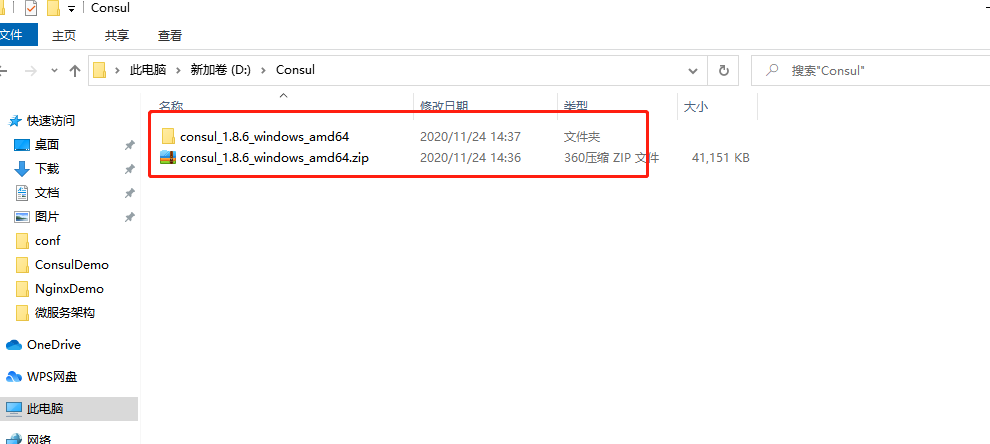
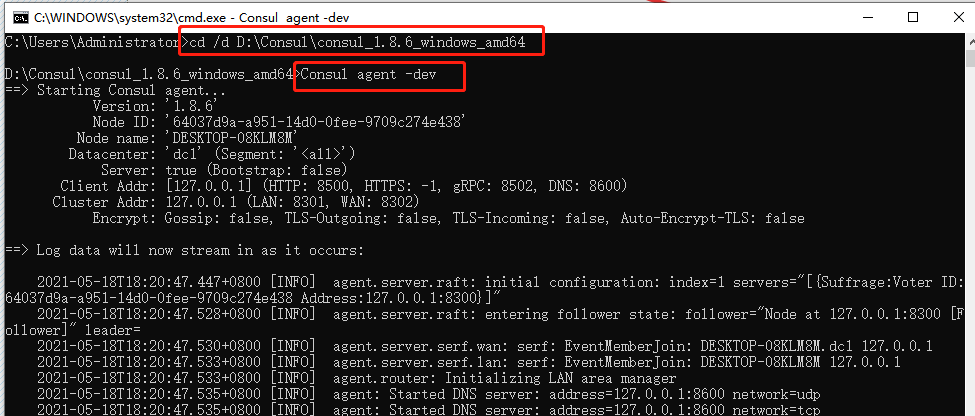
启动Consul:
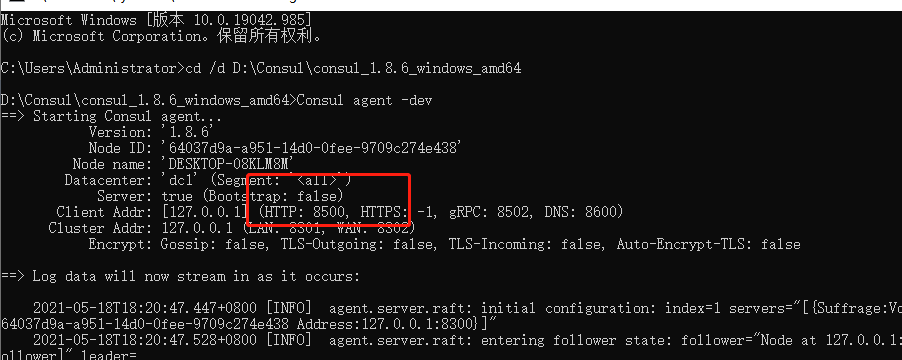
根据启动后的http显示端口8500端口:
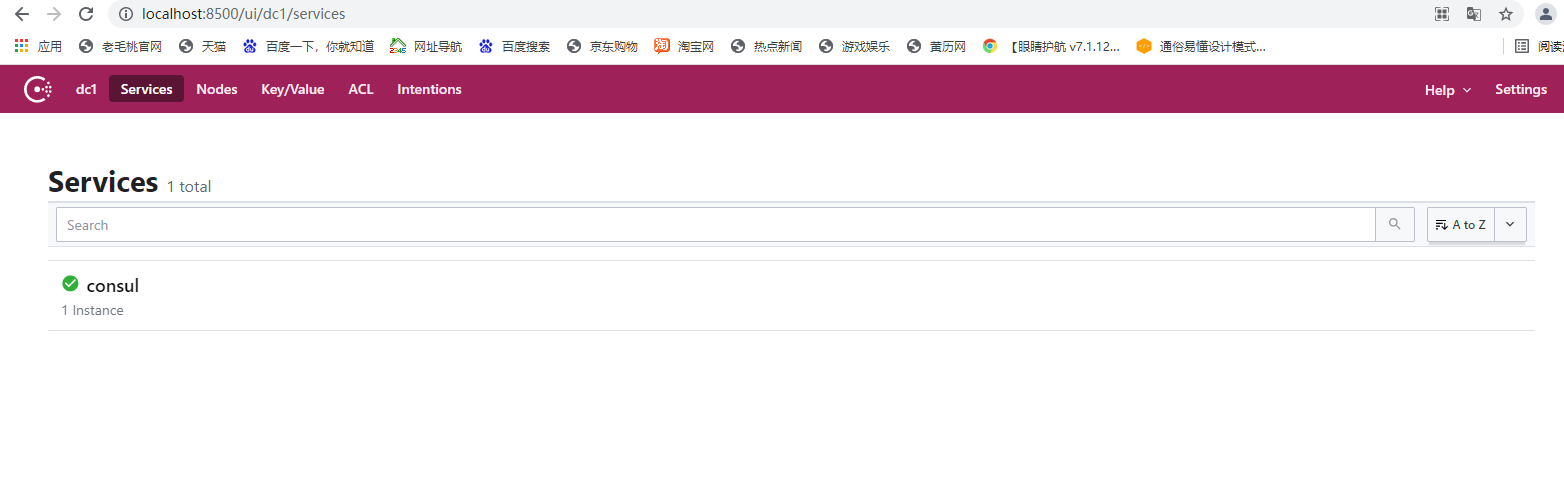
通过浏览器查看 Consul服务中心是否启动成功,地址:http://localhost:8500,如果成功,效果如下:
然后创建一个服务端实例工程:
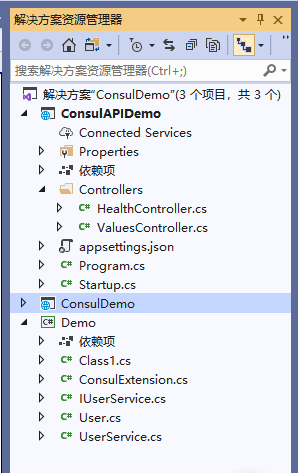
添加必要的测试类:
using System;

using System.Collections.Generic;

using System.Text;

namespace Demo

{

    /// <summary>

    /// 用户模型。

    /// </summary>

    public class User

    {

        /// <summary>

        /// 获取或者设置用户主键。

        /// </summary>

        public int ID { get; set; }

        /// <summary>

        /// 获取或者设置用户姓名。

        /// </summary>

        public string Name { get; set; }

        /// <summary>

        /// 获取或者设置用户账号名称。

        /// </summary>

        public string Account { get; set; }

        /// <summary>

        /// 获取或者设置用户密码。

        /// </summary>

        public string Password { get; set; }

        /// <summary>

        /// 获取或者设置用户的电子邮箱地址。

        /// </summary>

        public string Email { get; set; }

        /// <summary>

        /// 获取或者设置用户角色。

        /// </summary>

        public string Role { get; set; }

        /// <summary>

        /// 获取或者设置用户的登录时间。

        /// </summary>

        public DateTime LoginTime { get; set; }

    }

}
using System;

using System.Collections.Generic;

using System.Text;

namespace Demo

{

    /// <summary>

    /// 用户服务的接口定义。

    /// </summary>

    public interface IUserService

    {

        /// <summary>

        /// 查找指定主键的用户实例对象。

        /// </summary>

        /// <param name="id">用户的主键。</param>

        /// <returns>返回查找到的用户实例对象。</returns>

        User FindUser(int id);

        /// <summary>

        /// 获取所有用户的实例集合。

        /// </summary>

        /// <returns>返回所有的用户实例。</returns>

        IEnumerable<User> UserAll();

    }

}
using System;

using System.Collections.Generic;

using System.Linq;

using System.Text;

namespace Demo

{

    /// <summary>

    /// 实现用户服务接口的实现类型。

    /// </summary>

    public class UserService : IUserService

    {

        private IList<User> dataList;

        /// <summary>

        /// 初始化类型的实例

        /// </summary>

        public UserService()

        {

            dataList = new List<User>()

             {

             new User {ID=1,Name="张三",Account="5435435345",Password="4535435435",Email="4535345345", Role="Admin", LoginTime=DateTime.Now},

             new User {ID=2,Name="李四",Account="5435435345",Password="5435345345",Email="543534535", Role="Admin", LoginTime=DateTime.Now.AddDays(-5) },

             new User { ID = 3, Name = "王二", Account = "45354", Password = "3245345", Email = "54353455", Role = "Admin", LoginTime = DateTime.Now.AddDays(-30) },

             new User { ID = 4, Name = "麻子", Account = "45354", Password = "4534535", Email = "453534534", Role = "Admin", LoginTime = DateTime.Now.AddDays(-90) },

             new User { ID = 5, Name = "陈五", Account = "54353", Password = "5435345", Email = "5435345345", Role = "Admin", LoginTime = DateTime.Now.AddMinutes(-50) }

             };

        }

        /// <summary>

        /// 查找指定主键的用户实例对象。

        /// </summary>

        /// <param name="id">用户的主键。</param>

        /// <returns>返回查找到的用户实例对象。</returns>

        public User FindUser(int id)

        {

            return dataList.FirstOrDefault(user => user.ID == id);

        }

        /// <summary>

        /// 获取所有用户的实例集合。

        /// </summary>

        /// <returns>返回所有的用户实例。</returns>

        public IEnumerable<User> UserAll()

        {

            return dataList;

        }

    }

}
using Consul;

using Microsoft.Extensions.Configuration;

using Microsoft.Extensions.Hosting;

using System;

using System.Collections.Generic;

using System.Text;

namespace Demo

{

   /// <summary>

     /// Consul 静态扩展类。

     /// </summary>

     public static class ConsulExtension

     {

            /// <summary>

                   ///类型初始化器,初始化 Consul 网址和数据中心。

        /// </summary>

         static ConsulExtension()

         {

            Uri = new Uri("http://localhost:8500");

             DataCenter = "dc1";

          }

         /// <summary>

         /// 获取或者设置 Consul 的网址。

         /// </summary>

         public static Uri Uri { get; set; }

         /// <summary>

        /// 获取或者设置数据中心。

         /// </summary>

         public static string DataCenter { get; set; }

         /// <summary>

         /// 向 Consul 服务中心注册服务实例。

         /// </summary>

         /// <param name="configuration">配置对象。</param>

         /// <param name="consulServiceName">在 Consul 服务中心注册的服务类别名称,多个实例的 ID 可以属于一个服务类别名称。</param>

         /// <param name="serviceID">服务实例的主键值,必须唯一。</param>

       public static void ConsulRegist(this IConfiguration configuration, string consulServiceName, string serviceID)

         {

             if (string.IsNullOrEmpty(consulServiceName) || string.IsNullOrWhiteSpace(consulServiceName))

             {

                throw new ArgumentNullException("consulServiceName is null");

            }

            if (string.IsNullOrEmpty(serviceID) || string.IsNullOrWhiteSpace(serviceID))

             {

                 throw new ArgumentNullException("serviceID is null.");

             }

            using (ConsulClient client = new ConsulClient(config =>

             {

                 config.Address = Uri;

                 config.Datacenter = DataCenter;

             }))

             {

                     string ip = configuration["ip"];

                     int port = int.Parse(configuration["port"]);

                     int weight = string.IsNullOrWhiteSpace(configuration["weight"]) ? 1 : int.Parse(configuration["weight"]);

                client.Agent.ServiceRegister(new AgentServiceRegistration()

                {

                            ID = serviceID,

                     Name = consulServiceName,

                    Address = ip,

                     Port = port,

                     Tags = new string[] { weight.ToString() },

                     Check = new AgentServiceCheck()

                     {

                                    Interval = TimeSpan.FromSeconds(12),

                         HTTP = $"http://{ip}:{port}/API/Health/Index",

                         Timeout = TimeSpan.FromSeconds(5),

                         DeregisterCriticalServiceAfter = TimeSpan.FromSeconds(20)

                     }

                        }).Wait();

                    Console.WriteLine($"注册服务:{ip}:{port}--Weight:{weight}");

                 };

         }

         /// <summary>

         /// 向 Consul 服务中心注销服务实例。

         /// </summary>

         /// <param name="applicationLifetime">配置对象。</param>

         /// <param name="serviceID">服务实例的主键值,必须唯一。</param>

         public static void ConsulDown(this IApplicationLifetime applicationLifetime, string serviceID)

         {

                if (string.IsNullOrEmpty(serviceID) || string.IsNullOrWhiteSpace(serviceID))

                     {

                        throw new ArgumentNullException("serviceID is null");

                     }

                 applicationLifetime.ApplicationStopped.Register(() =>

                 {

                         using (var consulClient = new ConsulClient(config => { config.Address = Uri; config.Datacenter = DataCenter; }))

                             {

                                 Console.WriteLine("服务已经退出");

                                consulClient.Agent.ServiceDeregister(serviceID);

                             }

                     });

            }

    }

}
using System;

using System.Collections.Generic;

using System.Linq;

using System.Threading.Tasks;

using Microsoft.AspNetCore.Http;

using Microsoft.AspNetCore.Mvc;

using Microsoft.Extensions.Configuration;

namespace ConsulAPIDemo.Controllers

{

    [Route("api/[controller]")]

    [ApiController]

    public class HealthController : ControllerBase

    {

        private IConfiguration _configuration;

        /// <summary>

         /// 初始化该类型的新实例。

         /// </summary>

         /// <param name="configuration">配置接口。</param>

         public HealthController(IConfiguration configuration)

        {

             _configuration = configuration;

         }

        /// <summary>

         /// 要调用的接口。

         /// </summary>

         [HttpGet]

         [Route("Index")]

         public IActionResult Index()

         {

             Console.WriteLine($"This is HealhController {_configuration["port"]} Invoke");

             return Ok();

         }

    }

}
using System;

using System.Collections.Generic;

using System.Linq;

using System.Threading;

using System.Threading.Tasks;

using Demo;

using Microsoft.AspNetCore.Mvc;

using Microsoft.Extensions.Configuration;

using Microsoft.Extensions.Logging;

namespace ConsulAPIDemo.Controllers

{

    [Route("api/[controller]")]

    [ApiController]

    public class ValuesController : ControllerBase

    {

        /// <summary>

        /// 用户的 API 类型。

        /// </summary>

        [Route("api/[controller]")]

        [ApiController]

        public class UsersController : ControllerBase

        {

            #region 私有字段

            private readonly ILogger<UsersController> _logger;

            private readonly IUserService _userService;

            private IConfiguration _configuration;

            #endregion

            #region 构造函数

            /// <summary>

            /// 初始化该类型的新实例。

            /// </summary>

            /// <param name="logger">日志记录器。</param>

            /// <param name="userService">用户服务接口。</param>

            /// <param name="configuration">配置服务。</param>

            public UsersController(ILogger<UsersController> logger, IUserService userService, IConfiguration configuration)

            {

                _logger = logger;

                _userService = userService;

                _configuration = configuration;

            }

            #endregion

            #region 实例方法

            /// <summary>

            /// 获取一条记录

            /// </summary>

            /// <param name="id"></param>

            /// <returns></returns>

            [HttpGet]

            [Route("Get")]

            public User Get(int id)

            {

                return _userService.FindUser(id);

            }

            /// <summary>

            /// 获取所有记录。

            /// </summary>

            /// <returns></returns>

            [HttpGet]

            [Route("All")]

            //[Authorize]

            public IEnumerable<User> Get()

            {

                Console.WriteLine($"This is UsersController {this._configuration["port"]} Invoke");

                return this._userService.UserAll().Select((user => new User

                {

                    ID = user.ID,

                    Name = user.Name,

                    Account = user.Account,

                    Password = user.Password,

                    Email = user.Email,

                    Role = $"{this._configuration["ip"]}:{this._configuration["port"]}",

                    LoginTime = user.LoginTime

                })); ;

            }

            /// <summary>

            /// 超时处理

            /// </summary>

            /// <returns></returns>

            [HttpGet]

            [Route("Timeout")]

            public IEnumerable<User> Timeout()

            {

                Console.WriteLine($"This is Timeout Start");

                //超时设置。

                Thread.Sleep(3000);

                Console.WriteLine($"This is Timeout End");

                return this._userService.UserAll().Select((user => new User

                {

                    ID = user.ID,

                    Name = user.Name,

                    Account = user.Account,

                    Password = user.Password,

                    Email = user.Email,

                    Role = $"{this._configuration["ip"]}:{this._configuration["port"]}",

                    LoginTime = user.LoginTime

                })); ;

            }

            #endregion

        }

    }

}
startup里面的配置:
using System;

using System.Collections.Generic;

using System.Linq;

using System.Threading.Tasks;

using Demo;

using Microsoft.AspNetCore.Builder;

using Microsoft.AspNetCore.Hosting;

using Microsoft.AspNetCore.HttpsPolicy;

using Microsoft.AspNetCore.Mvc;

using Microsoft.Extensions.Configuration;

using Microsoft.Extensions.DependencyInjection;

using Microsoft.Extensions.Hosting;

using Microsoft.Extensions.Logging;

using Microsoft.Extensions.Options;

namespace ConsulAPIDemo

{

    public class Startup

    {

        public Startup(IConfiguration configuration)

        {

            Configuration = configuration;

        }

        public IConfiguration Configuration { get; }

        // This method gets called by the runtime. Use this method to add services to the container.

        public void ConfigureServices(IServiceCollection services)

        {

            //需要增加的

                       services.AddSingleton<IUserService, UserService>();

            services.AddMvc().SetCompatibilityVersion(CompatibilityVersion.Version_2_2);

        }

        // This method gets called by the runtime. Use this method to configure the HTTP request pipeline.

        public void Configure(IApplicationBuilder app, Microsoft.AspNetCore.Hosting.IHostingEnvironment env, Microsoft.Extensions.Hosting.IApplicationLifetime applicationLifetime)

        {

            if (env.IsDevelopment())

            {

                app.UseDeveloperExceptionPage();

            }

            else

            {

                // The default HSTS value is 30 days. You may want to change this for production scenarios, see https://aka.ms/aspnetcore-hsts.

                app.UseHsts();

            }

            #region Consul 注册,需要增加的

             string serviceID = $"Service:{Configuration["ip"]}:{Configuration["port"]}---{Guid.NewGuid()}";

             string consuleServiceName = "PatrickLiuService";

             //注册服务。

             Configuration.ConsulRegist(consuleServiceName, serviceID);

             //注销服务

            applicationLifetime.ConsulDown(serviceID);

            #endregion

            app.UseHttpsRedirection();

            app.UseMvc();

        }

    }

}
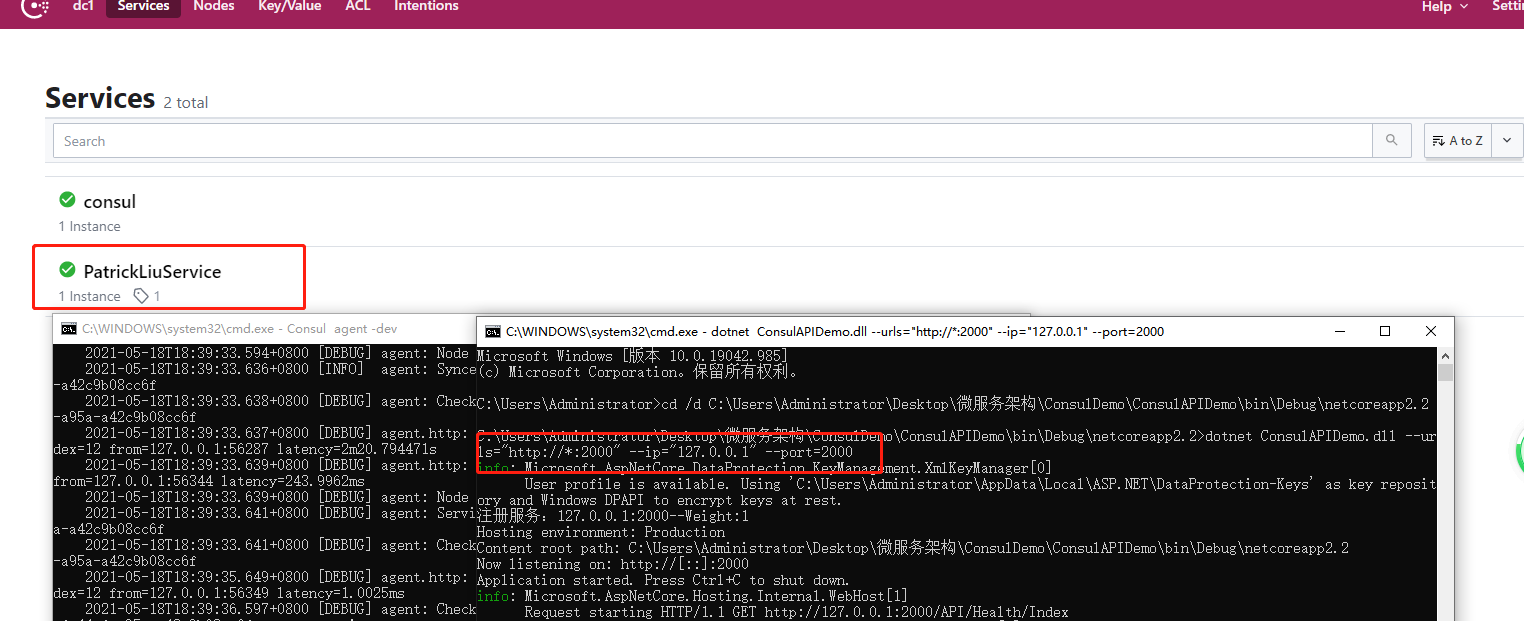
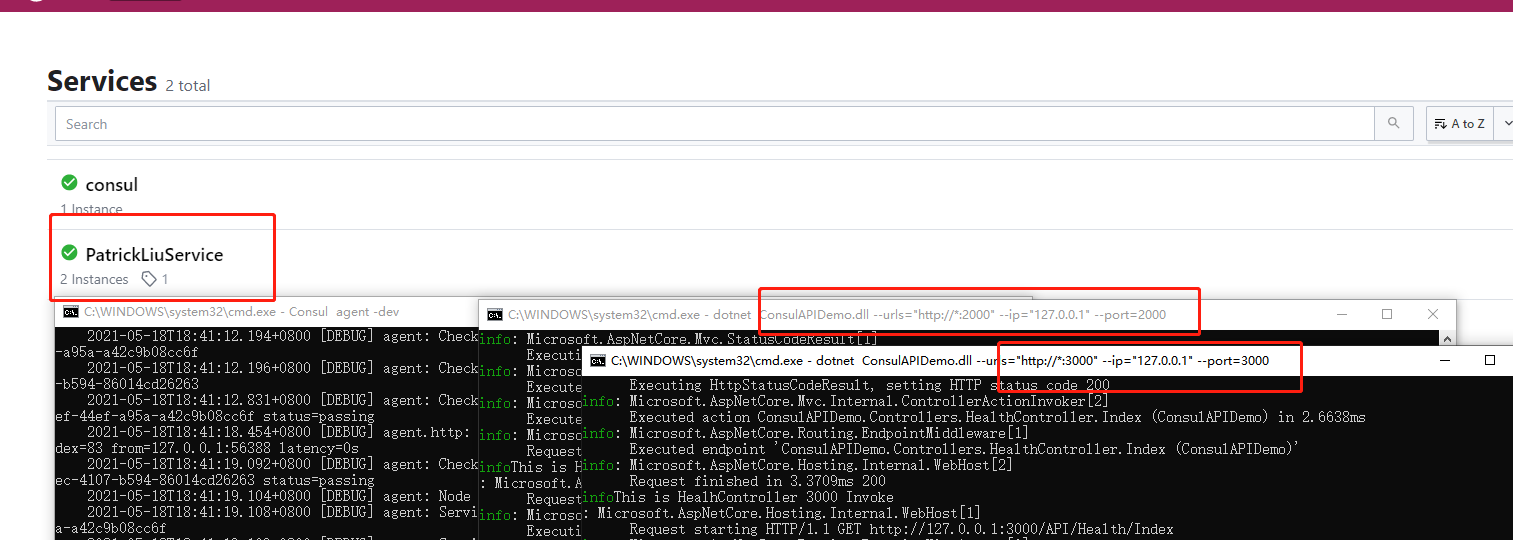
编译一下,根据不同端口启动api接口服务:
API端口设置为2000:
API端口设置为3000:
注册四个实例:
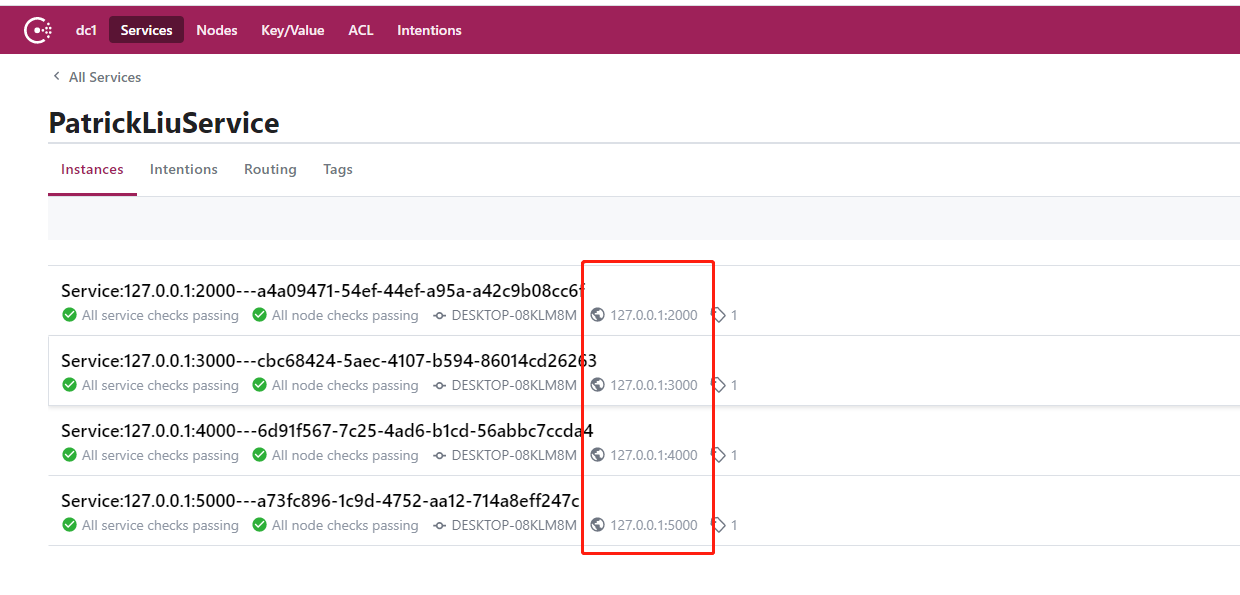
上面整个过程已经完成了服务的注册,至于发现自己可以测一下,自己关掉一个服务,Consul会自动检查各个服务的健康度,如果哪个服务出现异常,consul会自动剔除异常服务。
参考文档:https://www.cnblogs.com/PatrickLiu/p/13939135.html
Consul 服务的注册和发现的更多相关文章
- SpringCloud 教程 | 第一篇: 服务的注册与发现Eureka(转载)
SpringCloud 教程 | 第一篇: 服务的注册与发现Eureka(Finchley版本) 转载请标明出处:http://blog.csdn.net/forezp/article/details ...
- go微服务框架go-micro深度学习(三) Registry服务的注册和发现
服务的注册与发现是微服务必不可少的功能,这样系统才能有更高的性能,更高的可用性.go-micro框架的服务发现有自己能用的接口Registry.只要实现这个接口就可以定制自己的服务注册和发现. go- ...
- 玩转SpringCloud(F版本) 一.服务的注册与发现(Eureka)
一.服务的注册与发现(Eureka) spring cloud 为开发人员提供了快速构建分布式系统的一些工具,包括配置管理.服务发现.断路器.路由.微代理.事件总线.全局锁.决策竞选.分布式会话等等 ...
- SpringCloud-微服务的注册与发现Eureka(二)
一.SpringCloud简介 Spring Cloud是一系列框架的有序集合.它利用Spring Boot的开发便利性巧妙地简化了分布式系统基础设施的开发,如服务发现注册.配置中心.消息总线.负载均 ...
- (转) 史上最简单的 SpringCloud 教程 | 第一篇: 服务的注册与发现(Eureka)
一.spring cloud简介 spring cloud 为开发人员提供了快速构建分布式系统的一些工具,包括配置管理.服务发现.断路器.路由.微代理.事件总线.全局锁.决策竞选.分布式会话等等.它运 ...
- 服务的注册与发现Eureka(二)
1.服务治理概念 在传统rpc远程调用中,服务与服务依赖关系,管理比较复杂,所以需要使用服务治理,管理服务与服务之间依赖关系,可以实现服务调用.负载均衡.容错等,实现服务发现与注册. 2.服务的注册与 ...
- springCloud学习-服务的注册与发现(Eureka)
1.小记 这段时间有空,把springcloud的知识整理一下,好记性不如烂笔头,也让自己对springcloud有个清晰的认识.此次的整理记录主要借鉴了这位大佬的博客 https://blog.cs ...
- Spring Cloud-Eureka实现服务的注册与发现(二)
在Spring Cloud中是使用Eureka来实现服务的注册与发现的 请勿使用eureka2.x 用于生产 2.x已经停止开发了 使用1.x 最新版是1.9 我这里demo是使用1.9 详 ...
- (一)Eureka 服务的注册与发现
(一)服务的注册于发现(eureka); Eureka Server: 服务注册中心,负责服务列表的注册.维护和查询等功能 在Idea里,新建项目,选择Spring initializer. 下面的p ...
随机推荐
- PureMVC学习笔记
一.简介 PureMVC是基于MVC思想和一些基础设计模式建立的一个轻量级的应用框架,免费开源,最初是执行的ActionScript 3语言使用,现在已经移植到几乎所有主流平台.PureMVC官方网站 ...
- 使用C# (.NET Core) 实现模板方法模式 (Template Method Pattern)
本文的概念内容来自深入浅出设计模式一书. 项目需求 有一家咖啡店, 供应咖啡和茶, 它们的工序如下: 咖啡: 茶: 可以看到咖啡和茶的制作工序是差不多的, 都是有4步, 其中有两步它们两个是一样的, ...
- Java学习之路 -- Java怎么学?
@ 目录 java基础怎么学? 学完基础学什么? 几个常用框架学完学什么? MQ JVM的知识跑不掉 微服务等等 其他 数据结构和算法 java基础怎么学? 当时,作为懵懂的小白,大一学习了c和c++ ...
- MySQL5.7和MySQL8.0通用配置文件
MySQL5.7 my.cnf配置 [client] port=3306 socket=/log/mysql/mysql.sock [mysql] socket=/log/mysql/mysql.so ...
- 小白都能学会的Java注解与反射机制
前言 Java注解和反射是很基础的Java知识了,为何还要讲它呢?因为我在面试应聘者的过程中,发现不少面试者很少使用过注解和反射,甚至有人只能说出@Override这一个注解.我建议大家还是尽量能在开 ...
- 【2020.02.01NOIP普及模拟4】怪兽
[2020.02.01NOIP普及模拟4]怪兽 文章目录 [2020.02.01NOIP普及模拟4]怪兽 题目描述 输入 输出 输入输出样例 数据范围限制 提示 解析 code 题目描述 PYWBKT ...
- Java集合--Java核心面试知识整理(二)
目前CSDN,博客园,简书同步发表中,更多精彩欢迎访问我的gitee pages 目录 JAVA集合 2.1 接口继承关系和实现 2.2 List 2.2.1 ArrayList(数组) 2.2.2 ...
- 为什么 Spring Boot 2.3.0 放弃Maven最终拥抱Gradle
在 2.3.0 中对 Spring Boot 进行了相当重大的更改,这是使用 Gradle 而非 Maven 构建的项目的第一个版本. Spring 的每个项目都独立的项目组在开发运营,在用户最常使用 ...
- Vue Hello World
1 Vue介绍 伟大的项目是从Hello World而来的,Hello World尽管没有什么实际性的作用,但是在于意义重大.(哈哈哈哈) 好了不废话了入正题. Vue是一套用于构建用户界面的渐进式J ...
- Linux执行.sh文件,提示No such file or directory的问题
问题描述 在window平台下,写好shell脚本文件,迁移到linux平台,赋过可执行权限,执行该sh文件,却提示NO such file or directory 解决方案 难道是文件格式兼容性问 ...