
ConfigParser_读取配置文件信息
ConfigParse简介
ConfigParser 在python中是用来解析配置文件的内置模块,直接导入使用
import configparser
使用该模块可以对配置文件进行增、读、改、删操作。
配置文件的文件类型可以为任意文本类型,比如:ini、txt、csv等。
配置文件中可以包含一个或多个区域(section),每个区域可以有多个参数(键=值)。
配置文件的格式如下:
[db]

db_host = 127.0.0.1

db_port = 3306

db_user = root

db_pass = 123456
[account]

username = admin

password = admin
说明:[ ]为section,用来区分不同的区域,section下面的key-value为配置内容。
ConfigParse使用
初始化对象并读取配置
import configparser

# 创建实例对象

config = configparser.ConfigParser()

# 读取配置文件

config.clear()  # 读取前清除已读内容。若不清除,多次读取文件会出现非预期内容。

file_path = rf'config/config.ini'

config.read(file_path, encoding="utf-8")
新增/修改配置
使用add_section(section)方法添加section
使用set(section, key, value)方法在指定的section下添加或修改key-value,若key不存在,则添加,若key已存在,则修改
# 新增section

section = "login"

# 新增section时,若section在配置文件已存在,则会抛错:already exists

if not config.has_section(section):

    # 增加section

    config.add_section(section)

# 增加key-value

config.set(section, 'username', '1111')

config.set(section, 'password', '2222')

# 将配置写入文件

with open(file_path, 'w', encording="utf-8") as configfile:

    config.write(configfile)
读取配置
可以用读取字典的两种方法读取指定section中指定key的value
# 读取指定section中指定key的value

# 第一种:使用get方法读取

username = config.get('login', 'username')

password = config.get('login', 'password')

print(username, password)

null_section = config.get('login4', 'username', fallback=u'section 不存在')     # 若section或option不存在,fallback返回后备值

null_option = config.get('login', 'NoneKey', fallback=u'key 不存在')

print(null_section, ",", null_option)

# 第二种:以[]的方式读取

username = config["login"]["username"]

print(username)
除了能获取指定值,还可以用sections()方法读取所有section,读取结果为list
# 读取配置文件所有section

sections = config.sections()

print(sections)
还可以用options()方法读取所有key,读取结果为list
# 读取对应section下所有key

keys = config.options('login')

print(keys)
删除配置
# 删除指定section下的key,key不存不会抛错,但section不存在则抛错:No section,

config.remove_option('login', 'username')

# 删除指定section,section不存在不会抛错

config.remove_section('login')

# 将操作同步到文件中

with open(file_path, 'w', encoding="utf-8") as configfile:

    config.write(configfile)
其他操作
# has_section()方法判断是否存在指定section,存在返回True,不存在返回False

ret = config.has_section('login')

print(ret)

# has_option()方法判断指定section下,是否存在指定key,存在返回True,不存在返回False

ret = config.has_option('login', 'username')

print(ret)
ConfigParse拓展
ConfigParse没有将配置文件读取成dict类型的方法,需要处理转换下
# 暂时没有读取出dict格式的配置文件信息的方法,需要自己处理

# 创建实例对象

config = configparser.ConfigParser()

# 读取配置文件

config.clear()  # 读取前清除已读内容。若不清除,多次读取文件会出现非预期内容。

file_path = rf'config/config.ini'

config.read(file_path, encoding="utf-8")

# 转换配置

login_config = config['account']

login_config_dict = dict(login_config)

print(login_config_dict)
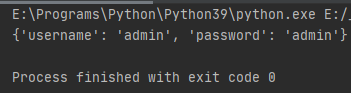
读取结果
ConfigParser_读取配置文件信息的更多相关文章
- Asp.net Core 和类库读取配置文件信息
Asp.net Core 和类库读取配置文件信息 看干货请移步至.net core 读取配置文件公共类 首先开一个脑洞,Asp.net core 被使用这么长时间了,但是关于配置文件(json)的读取 ...
- 在java中读取配置文件信息
public class PropertyUtil { public static final Properties PROP = new Properties(); /** * 读取配置文件的内容( ...
- spring配置:context:property-placeholder 读取配置文件信息 在配置文件中使用el表达式填充值
spring将properties文件读取后在配置文件中直接将对象的配置信息填充到bean中的变量里. 原本使用PropertyPlaceholderConfigurer类进行文件信息配置.Prope ...
- spring boot 读取配置文件信息
1.读取application.properties @Component @ConfigurationProperties(prefix="images.product.column&qu ...
- SpringBoot | 读取配置文件信息
server.port=8081 #修改端口号 server.servlet.context-path= /SpringBoot #修改URL #自定义配置 tz.name = xiaoming tz ...
- java读取配置文件信息
ResourceBundle resource = ResourceBundle.getBundle("shopxx");//不要加.properties后缀,我加了报错 reso ...
- .NET Core2.1获取自定义配置文件信息
前言 .net core来势已不可阻挡.既然挡不了,那我们就顺应它.了解它并学习它.今天我们就来看看和之前.net版本的配置文件读取方式有何异同,这里不在赘述.NET Core 基础知识. ps:更新 ...
- Asp.NetCore 读取配置文件帮助类
/// <summary> /// 读取配置文件信息 /// </summary> public class ConfigExtensions { public static ...
- 1.selenium实战之从txt文档读取配置信息并执行登录
前置条件: 1.本机已搭建ECShop3.0网站 2.在脚本目录创建了user.txt文本如下: 目的:实现从txt中读取配置文件信息,本实战中,包含url地址.用户名.密码,然后进行ESChop的登 ...
随机推荐
- 30个类手写Spring核心原理之Ioc顶层架构设计(2)
本文节选自<Spring 5核心原理> 1 Annotation(自定义配置)模块 Annotation的代码实现我们还是沿用Mini版本的,保持不变,复制过来便可. 1.1 @GPSer ...
- 因Console.Read()导致Centos 后台运行.net core程序报错
.net 控制台程序通常用 Console.Read(),或者Console.ReadKey()让进程阻塞保持,不退出. 但在.net core 需要将程序放在后台执行时 用Console.Read( ...
- C#汽车租赁系统
类图: 父类(车类,抽象类) /// <summary> /// 车辆基本信息类.搞一个抽象类玩玩 /// </summary> public abstract class V ...
- Nginx SERVER块配置
1 Listen 指令 Example Configuration Directives 2 server_name指令 2.1 规则 指令后可以跟多个域名,第一个是主域名 *泛域名:进支持在最前或最 ...
- 攻防世界 pwn welpwn
感觉好久没有水博客了,今天借助这道题来告诉自己做pwn题要多调试!!! 先检查了保护只开启了堆栈不可执行,接下来ida看一下伪代码: 这里可以往buf进行写入,接下来看一下echo函数: 大概意思就是 ...
- MISC常见题型整理
题目打包在这里 提取码:fhkb MISC 流量包分析 流量包_1 流量包_2 流量包_3 图片隐写 图片隐写_1 图片隐写_2 图片隐写_3 图片隐写_4 图片隐写_5 图片隐写_6 音频隐写 音频 ...
- 打印讲义中的幻灯片编号(O365新功能)
以下听听文档小程序
- Offset函数(Excel函数集团)
此处文章均为本妖原创,供下载.学习.探讨! 文章下载源是Office365国内版1Driver,如有链接问题请联系我. 请勿用于商业!谢谢 下载地址:https://officecommunity-m ...
- 小迪安全 Web安全 基础入门 - 第三天 - 抓包&封包&协议&APP&小程序&PC应用&WEB应用
一.抓包工具 1.Fiddler.Fiddler是一个用于HTTP调试的代理服务器应用程序,能捕获HTTP和HTTPS流量,并将其记录下来供用户查看.它通过使用自签名证书实现中间人攻击来进行日志记录. ...
- nim_duilib(8)之combo
introduction 更多控件用法,请参考 here 和 源码. 本文的代码基于这里 combo的更多用法,请参考源码中combo.h提供的函数,文末添加其提供的公有函数 xml文件添加代码 基于 ...