
C#多线程---Event类实现线程同步
一、简介
我们使用类(.net Framework中的类,如 AutoResetEvent, Semaphore类等)的方法来实现线程同步的时候,其实内部是调用操作系统的内核对象来实现的线程同步。
System.Threading命名空间中提供了一个WaitHandle 的抽象基类,此类就是包装了一个Windows内核对象的句柄(句柄可以理解为标示了对象实例的一个数字),在.net Framework中提供了从WaitHandle类中派生的类。继承关系如下所示:
WaitHandle
EventWaitHandle
AutoResetEvent
ManualResetEvent
Semaphore
Mutex
当我们在使用 AutoResetEvent,ManualResetEvent,Semaphore,Mutex这些类的时候,用构造函数来实例化这些类的对象时,其内部都调用了Win32 CreateEvent或CreateEvent函数,或CreateSemaphore或者CreateMutex函数,这些函数调用返回的句柄值都保存在WaitHandle基类定义的SafeWaitHandle字段中。
二、AutoResetEvent (自动重置事件)
AutoResetEvent 在获得信号后,会自动将事件设置为无信号状态。
例1:事件初始化为无信号状态,主线程等待一段时间将事件设置为有信号状态
 1 using System;

 2 using System.Collections.Generic;

 3 using System.Linq;

 4 using System.Text;

 5 using System.Threading;

 6 using System.Threading.Tasks;

 7

 8 namespace ThreadEvent

 9 {

10     class Program

11     {

12         public static AutoResetEvent autoEvent = new AutoResetEvent(false);

13         static void Main(string[] args)

14         {

15             Task task = new Task(ThreadFunc);

16             task.Start();

17             Console.WriteLine($"{DateTime.Now} Printed in main");

18             Thread.Sleep(5000);

19             Console.WriteLine($"{DateTime.Now} Set signal in main");

20             autoEvent.Set();

21             Console.Read();

22         }

23         private static void ThreadFunc()

24         {

25             PrintThreadInfo($"Printed in thread func");

26         }

27         private static void PrintThreadInfo(string info)

28         {

29             if (autoEvent.WaitOne())

30             {

31                 //autoEvent.WaitOne();

32                 Console.WriteLine($"{DateTime.Now} {info}");

33                 Console.WriteLine($"{DateTime.Now} ThreadId:{Thread.CurrentThread.ManagedThreadId}\nIsBackgroundThread:{Thread.CurrentThread.IsBackground}\nIsThreadPoolThread:{Thread.CurrentThread.IsThreadPoolThread}");

34             }

35

36         }

37     }

38 }
运行结果如下:

例2:事件初始化为无信号状态,主线程等待一段时间将事件设置为有信号状态,子线程连续两次Wait,观察第二次Wait的结果
 1 using System;

 2 using System.Collections.Generic;

 3 using System.Linq;

 4 using System.Text;

 5 using System.Threading;

 6 using System.Threading.Tasks;

 7

 8 namespace ThreadEvent

 9 {

10     class Program

11     {

12         public static AutoResetEvent autoEvent = new AutoResetEvent(false);

13         static void Main(string[] args)

14         {

15             Task task = new Task(ThreadFunc);

16             task.Start();

17             Console.WriteLine($"{DateTime.Now} Printed in main");

18             Thread.Sleep(5000);

19             Console.WriteLine($"{DateTime.Now} Set signal in main");

20             autoEvent.Set();

21             Console.Read();

22         }

23         private static void ThreadFunc()

24         {

25             PrintThreadInfo($"Printed in thread func");

26         }

27         private static void PrintThreadInfo(string info)

28         {

29             if (autoEvent.WaitOne())

30             {

31                 if (autoEvent.WaitOne(4000))

32                 {

33                     Console.WriteLine($"{DateTime.Now} {info}");

34                     Console.WriteLine($"{DateTime.Now} ThreadId:{Thread.CurrentThread.ManagedThreadId}\nIsBackgroundThread:{Thread.CurrentThread.IsBackground}\nIsThreadPoolThread:{Thread.CurrentThread.IsThreadPoolThread}");

35                 }

36                 else

37                 {

38                     Console.ForegroundColor = ConsoleColor.Red;

39                     Console.WriteLine($"{DateTime.Now} WaitOne timeout!");

40                     Console.ResetColor();

41                 }

42             }

43

44         }

45     }

46 }
运行结果如下:

三、ManualResetEvent(手动重置事件)
ManualResetEvent在获得信号后,会一直保持有信号状态,除非我们手动调用Reset来将事件设置为无信号状态。
例1:
 1 using System;

 2 using System.Collections.Generic;

 3 using System.Linq;

 4 using System.Text;

 5 using System.Threading;

 6 using System.Threading.Tasks;

 7

 8 namespace ThreadEvent

 9 {

10     class Program

11     {

12         public static ManualResetEvent autoEvent = new ManualResetEvent(false);

13         static void Main(string[] args)

14         {

15             Task task = new Task(ThreadFunc);

16             task.Start();

17             Console.WriteLine($"{DateTime.Now} Printed in main");

18             Thread.Sleep(5000);

19             Console.WriteLine($"{DateTime.Now} Set signal in main");

20             autoEvent.Set();

21             Console.Read();

22         }

23         private static void ThreadFunc()

24         {

25             PrintThreadInfo($"Printed in thread func");

26         }

27         private static void PrintThreadInfo(string info)

28         {

29             if (autoEvent.WaitOne())

30             {

31                 //autoEvent.Reset();

32                 if (autoEvent.WaitOne(4000))

33                 {

34                     Console.WriteLine($"{DateTime.Now} {info}");

35                     Console.WriteLine($"{DateTime.Now} ThreadId:{Thread.CurrentThread.ManagedThreadId}\nIsBackgroundThread:{Thread.CurrentThread.IsBackground}\nIsThreadPoolThread:{Thread.CurrentThread.IsThreadPoolThread}");

36                 }

37                 else

38                 {

39                     Console.ForegroundColor = ConsoleColor.Red;

40                     Console.WriteLine($"{DateTime.Now} WaitOne timeout!");

41                     Console.ResetColor();

42                 }

43             }

44

45         }

46     }

47 }
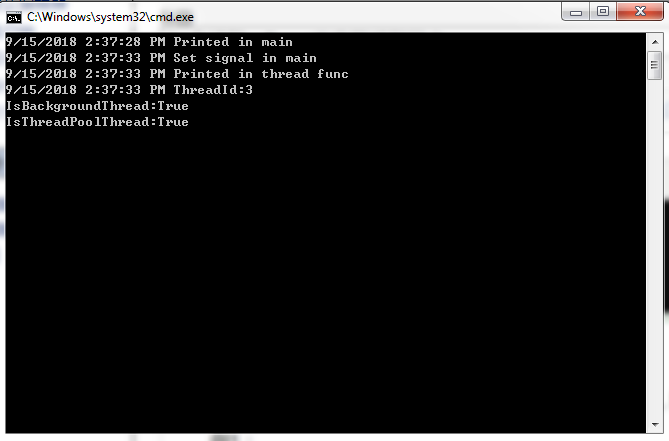
运行结果如下:
C#多线程---Event类实现线程同步的更多相关文章
- C#多线程---Mutex类实现线程同步
一.例子 1 using System; 2 using System.Collections.Generic; 3 using System.Linq; 4 using System.Text; 5 ...
- C#多线程:深入了解线程同步lock,Monitor,Mutex,同步事件和等待句柄(中)
本篇继续介绍WaitHandler类及其子类 Mutex,ManualResetEvent,AutoResetEvent的用法..NET中线程同步的方式多的让人看了眼花缭乱,究竟该怎么去理解呢?其实, ...
- Python多线程(2)——线程同步机制
本文介绍Python中的线程同步对象,主要涉及 thread 和 threading 模块. threading 模块提供的线程同步原语包括:Lock.RLock.Condition.Event.Se ...
- java多线程(2) 线程同步
我们对线程访问同一份资源的多个线程之间,来进行协调的这个东西,就是线程同步. 例子1:模拟了多个线程操作同一份资源,可能带来的问题: package com.cy.thread; public c ...
- Java多线程系列三——实现线程同步的方法
两种实现线程同步的方法 方法 特性 synchronized 不需要显式地加解锁,易实现 ReentrantLock 需要显式地加解锁,灵活性更好,性能更优秀,结合Condition可实现多种条件锁 ...
- Java多线程之简单的线程同步实例
数据类: package Thread.MyCommon; public class Data { public int num = 0; public synchronized int getEve ...
- iOS多线程各种安全锁介绍 - 线程同步
一.atomic介绍 github对应Demo:https://github.com/Master-fd/LockDemo 在iOS中,@property 新增属性时,可以增加atomic选项,ato ...
- win32多线程 (二)线程同步之临界区 (critical sections)
所谓critical sections 意指一小块“用来处理一份被共享之资源”的程序代码.你可能必须在程序的许多地方处理这一块可共享的资源.所有这些程序代码可以被同一个critical sectio ...
- C#线程学习笔记五:线程同步--事件构造
本笔记摘抄自:https://www.cnblogs.com/zhili/archive/2012/07/23/Event_Constructor.html,记录一下学习过程以备后续查用. 前面讲的线 ...
随机推荐
- 前端开发入门到进阶第一集【使用sublime快速编写Html和Css】
1,安装sublime编辑器,下载地址:http://www.sublimetext.com/3 2,要使用sublime的插件机制必须安装package control:https://packag ...
- springboot-4-CRUD开发实战
流程: 创建项目,勾选基本的几个开发工具还有webstarter 再创建包(service,control,config,dao,pojo) 再前往https://www.webjars.org/,选 ...
- GeoServer Rest服务启动匿名认证的配置方法
GeoServer Rest服务数据默认需要进行用户名.密码的认证,如不需进行该认证,则启动匿名认证即可,配置方式如下(针对war包发布的GeoServer应用): 在GeoServer war包的解 ...
- tp phpexcel 导入后台访问方法
public function addall(){ $Water = M('Waterrate'); $config = array( 'maxSize' => 0, 'rootPath' =& ...
- tp3常量
__MODULE__ __CONTROLLER__
- VSCode远程免密登录
VSCode远程免密登录 本地生成密钥 生成命令如下: ssh-keygen -t rsa 会生成id_rsa, id_rsa.pub两个文件 公钥拷贝到服务器 将公钥id_rsa.pub拷贝到服务器 ...
- 打开随身U盘_办公专用盘 2019年11月29日
;;; ; 打开随身U盘_办公专用盘 2019年11月29日 ; https://www.autoahk.com/?p=16553; https://www.cnblogs.com/delphixx/ ...
- 记录21.07.22 —— Vue.js基础(一)
VUE基础 语雀课件地址 Vue.js框架 Vue中文文档 Vue.js 创建vue项目 ①在一个空项目中引入vue的js文件 <script src="https://cdn.jsd ...
- Python 列表解析式竟然支持异步?
PEP原文:https://www.python.org/dev/peps/pep-0530 PEP标题:PEP 530 -- Asynchronous Comprehensions PEP作者:Yu ...
- Spring对Controller、Service、Dao进行Junit单元测试总结
测试类注解 @RunWith(SpringRunner.class) @SpringBootTest(classes={DemoApplication.class}) 以Controller层的的单元 ...