
ASP.NET Core导入导出Excel文件
ASP.NET Core导入导出Excel文件
希望在ASP.NET Core中导入导出Excel文件,在网上搜了一遍,基本都是使用EPPlus插件,EPPlus挺好用,但商用需要授权,各位码友若有好的工具包推荐,请给我留言,谢谢!
本文利用Asp.net core Razor页面实现Excel文件的导入导出,参考大神的文章:ASP.NET Core 导入导出Excel xlsx 文件 - LineZero - 博客园 (cnblogs.com)
下面为详细步骤。
1,创建Razor项目

2,在Nuget包管理器中搜索EPPlus, 安装依赖包。EPPlus.Core已经弃用,EPPlus是支持Net Core的最新版本。
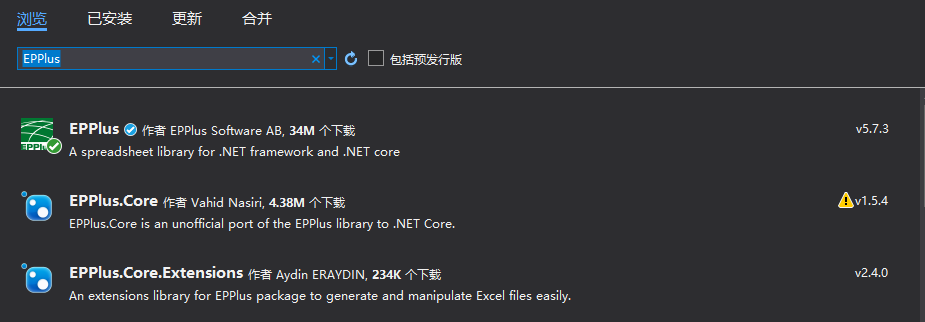
3,修改pages/Index.cshtml文件,创建基本导入导出页面。
@page

@model IndexModel

@{

    ViewData["Title"] = "Home page";

}

<div class="text-center">

    <h1 class="display-4">ASP.NET Core导入导出Excel文件</h1>

</div>

<h2></h2>

<hr />

<div>

    <h4>导入Excel</h4>

    <hr />

    <form enctype="multipart/form-data" method="post" asp-page-handler="Import">

        <input type="file" name="excelFile"/>

        <input type="submit" value="导入"/>

    </form>

    <hr />

</div>

<hr />

<div>

    <h4>导出Excel</h4>

    <form enctype="multipart/form-data" method="post"asp-page-handler="Export">

        <input type="submit" value="导出"/>

    </form>

</div>

<hr />

4,修改Index.cshtml.cs文件中的代码,增加OnPostImport 和OnPostExport方法,分别用于导入、导出文件。
首先在构造函数中注入webHostEnvironment
        private readonly IWebHostEnvironment _webHostEnvironment;

        public IndexModel(IWebHostEnvironment webHostEnvironment)

        {

            _webHostEnvironment = webHostEnvironment;

        }
OnPostImport代码:
public IActionResult OnPostImport(IFormFile excelFile)

        {

            ExcelPackage.LicenseContext = LicenseContext.NonCommercial;

            string sWebRootFolder = _webHostEnvironment.WebRootPath;

            string sFileName = $"{Guid.NewGuid()}.xlsx";

            FileInfo file = new FileInfo(Path.Combine(sWebRootFolder, sFileName));

            try

            {

                using (FileStream fs = new FileStream(file.ToString(), FileMode.Create))

                {

                    excelFile.CopyTo(fs);

                    fs.Flush();

                }

                using(ExcelPackage package = new ExcelPackage(file))

                {

                    StringBuilder sb = new StringBuilder();

                    ExcelWorksheet worksheet = package.Workbook.Worksheets[0];

                    int rowCount = worksheet.Dimension.Rows;

                    int colCount = worksheet.Dimension.Columns;

                    bool bheaderRow = true;

                    for(int row = 1; row <= rowCount; row++)

                    {

                        for(int col = 1; col <= colCount; col++)

                        {

                            if (bheaderRow)

                            {

                                if(worksheet.Cells[row, col].Value != null)

                                {

                                    sb.Append(worksheet.Cells[row, col].Value.ToString() + "\t");

                                }

                                else

                                {

                                    sb.Append("\t");

                                }

                            }

                            else

                            {

                                if(worksheet.Cells[row, col].Value != null)

                                {

                                    sb.Append(worksheet.Cells[row, col].Value.ToString() + "\t");

                                }

                                else

                                {

                                    sb.Append("\t");

                                }

                            }

                        }

                        sb.Append(Environment.NewLine);

                        if (bheaderRow)

                        {

                            sb.Append("-----------------------------------------");

                            sb.Append(Environment.NewLine);

                        }

                        bheaderRow = false;

                    }

                    return Content(sb.ToString());

                }

            }

            catch(Exception ex)

            {

                return Content(ex.Message);

            }

        }
其中必须添加
ExcelPackage.LicenseContext = LicenseContext.NonCommercial 用于指定EPPlus的使用授权为非商用。缺少会报错。

OnPostExport代码:
public IActionResult OnPostExport()

        {

            string sWebRootFolder = _webHostEnvironment.WebRootPath;

            string sFileName = $"{Guid.NewGuid()}.xlsx";

            FileInfo file = new FileInfo(Path.Combine(sWebRootFolder, sFileName));

            ExcelPackage.LicenseContext = LicenseContext.NonCommercial;

            using (ExcelPackage package=new ExcelPackage(file))

            {

                //add worksheet

                ExcelWorksheet workSheet = package.Workbook.Worksheets.Add("AspNetCore");

                //add table header

                workSheet.Cells[1, 1].Value = "ID";

                workSheet.Cells[1, 2].Value = "Name";

                workSheet.Cells[1, 3].Value = "Gender";

                workSheet.Cells[1, 4].Value = "Age";

                workSheet.Cells[1, 5].Value = "Remark";

                //Add value

                workSheet.Cells["A2"].Value = 1000;

                workSheet.Cells["B2"].Value = "张三";

                workSheet.Cells["C2"].Value = "男";

                workSheet.Cells["D2"].Value = 25;

                workSheet.Cells["E2"].Value = "ABCD";

                workSheet.Cells["A3"].Value = 1001;

                workSheet.Cells["B3"].Value = "李四";

                workSheet.Cells["C3"].Value = "女";

                workSheet.Cells["D3"].Value = 35;

                workSheet.Cells["D3"].Style.Font.Bold = true;

                workSheet.Cells["A4"].Value = 1003;

                workSheet.Cells["B4"].Value = "Amy";

                workSheet.Cells["C4"].Value = "Female";

                workSheet.Cells["D4"].Value = 22;

                workSheet.Cells["E4"].Value = "Hello world";

                workSheet.Cells["A5"].Value = 1004;

                workSheet.Cells["B5"].Value = "Jim";

                workSheet.Cells["C5"].Value = "Male";

                workSheet.Cells["D5"].Value = 35;

                workSheet.Cells["E5"].Value = 500;

                package.Save();

            }

            return File(sFileName, "application/vnd.openxmlformats-officedocument.spreadsheetml.sheet");

        }
Index.cshtml.cs的完整代码如下:
using Microsoft.AspNetCore.Hosting;

using Microsoft.AspNetCore.Http;

using Microsoft.AspNetCore.Mvc;

using Microsoft.AspNetCore.Mvc.RazorPages;

using Microsoft.Extensions.Logging;

using OfficeOpenXml;

using System;

using System.Collections.Generic;

using System.IO;

using System.Linq;

using System.Text;

using System.Threading.Tasks;

using WebAppTest.Models;

namespace WebAppTest.Pages

{

    public class IndexModel : PageModel

    {

        private readonly ILogger<IndexModel> _logger;

private readonly IWebHostEnvironment _webHostEnvironment;

        public IndexModel(ILogger<IndexModel> logger,IWebHostEnvironment webHostEnvironment)

        {

            _logger = logger;

            _context = context;

            _webHostEnvironment = webHostEnvironment;

        }

        public void OnGet()

        {

        }

        public IActionResult OnPostImport(IFormFile excelFile)

        {

            ExcelPackage.LicenseContext = LicenseContext.NonCommercial;

            string sWebRootFolder = _webHostEnvironment.WebRootPath;

            string sFileName = $"{Guid.NewGuid()}.xlsx";

            FileInfo file = new FileInfo(Path.Combine(sWebRootFolder, sFileName));

            try

            {

                using (FileStream fs = new FileStream(file.ToString(), FileMode.Create))

                {

                    excelFile.CopyTo(fs);

                    fs.Flush();

                }

                using(ExcelPackage package = new ExcelPackage(file))

                {

                    StringBuilder sb = new StringBuilder();

                    ExcelWorksheet worksheet = package.Workbook.Worksheets[0];

                    int rowCount = worksheet.Dimension.Rows;

                    int colCount = worksheet.Dimension.Columns;

                    bool bheaderRow = true;

                    for(int row = 1; row <= rowCount; row++)

                    {

                        for(int col = 1; col <= colCount; col++)

                        {

                            if (bheaderRow)

                            {

                                if(worksheet.Cells[row, col].Value != null)

                                {

                                    sb.Append(worksheet.Cells[row, col].Value.ToString() + "\t");

                                }

                                else

                                {

                                    sb.Append("\t");

                                }

                            }

                            else

                            {

                                if(worksheet.Cells[row, col].Value != null)

                                {

                                    sb.Append(worksheet.Cells[row, col].Value.ToString() + "\t");

                                }

                                else

                                {

                                    sb.Append("\t");

                                }

                            }

                        }

                        sb.Append(Environment.NewLine);

                        if (bheaderRow)

                        {

                            sb.Append("-----------------------------------------");

                            sb.Append(Environment.NewLine);

                        }

                        bheaderRow = false;

                    }

                    return Content(sb.ToString());

                }

            }

            catch(Exception ex)

            {

                return Content(ex.Message);

            }

        }

        public IActionResult OnPostExport()

        {

            string sWebRootFolder = _webHostEnvironment.WebRootPath;

            string sFileName = $"{Guid.NewGuid()}.xlsx";

            FileInfo file = new FileInfo(Path.Combine(sWebRootFolder, sFileName));

            ExcelPackage.LicenseContext = LicenseContext.NonCommercial;

            using (ExcelPackage package=new ExcelPackage(file))

            {

                //add worksheet

                ExcelWorksheet workSheet = package.Workbook.Worksheets.Add("AspNetCore");

                //add table header

                workSheet.Cells[1, 1].Value = "ID";

                workSheet.Cells[1, 2].Value = "Name";

                workSheet.Cells[1, 3].Value = "Gender";

                workSheet.Cells[1, 4].Value = "Age";

                workSheet.Cells[1, 5].Value = "Remark";

                //Add value

                workSheet.Cells["A2"].Value = 1000;

                workSheet.Cells["B2"].Value = "张三";

                workSheet.Cells["C2"].Value = "男";

                workSheet.Cells["D2"].Value = 25;

                workSheet.Cells["E2"].Value = "ABCD";

                workSheet.Cells["A3"].Value = 1001;

                workSheet.Cells["B3"].Value = "李四";

                workSheet.Cells["C3"].Value = "女";

                workSheet.Cells["D3"].Value = 35;

                workSheet.Cells["D3"].Style.Font.Bold = true;

                workSheet.Cells["A4"].Value = 1003;

                workSheet.Cells["B4"].Value = "Amy";

                workSheet.Cells["C4"].Value = "Female";

                workSheet.Cells["D4"].Value = 22;

                workSheet.Cells["E4"].Value = "Hello world";

                workSheet.Cells["A5"].Value = 1004;

                workSheet.Cells["B5"].Value = "Jim";

                workSheet.Cells["C5"].Value = "Male";

                workSheet.Cells["D5"].Value = 35;

                workSheet.Cells["E5"].Value = 500;

                package.Save();

            }

            return File(sFileName, "application/vnd.openxmlformats-officedocument.spreadsheetml.sheet");

        }

    }

}
5,运行项目,测试导入导出功能。
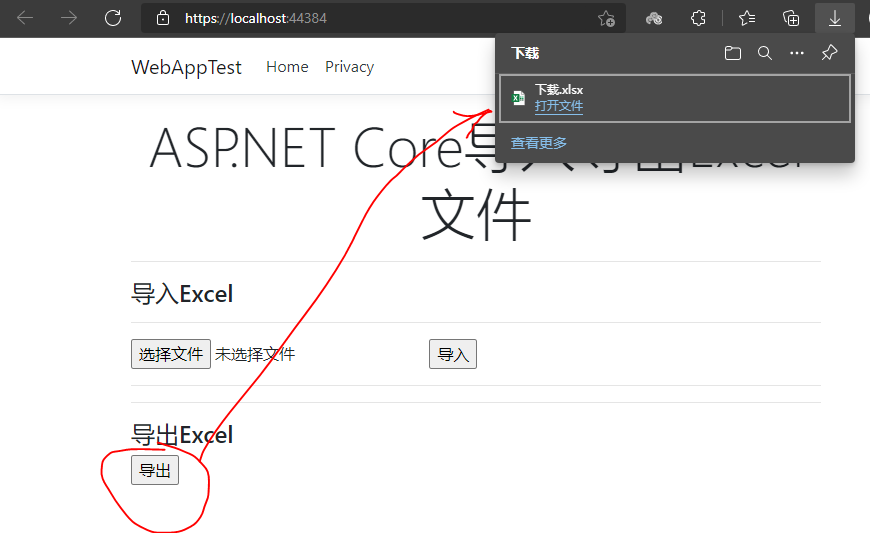
导出功能,单击导出按钮,浏览器会下载excel文件,
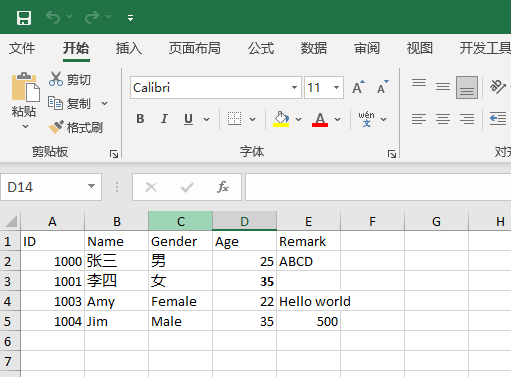
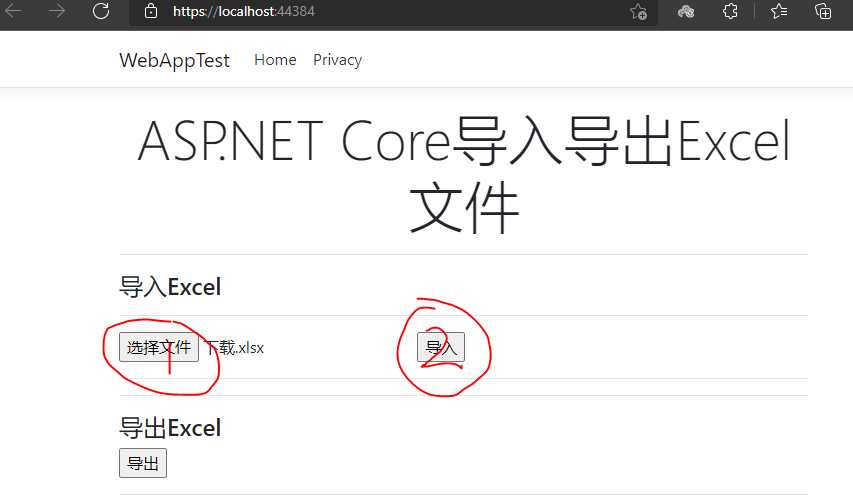
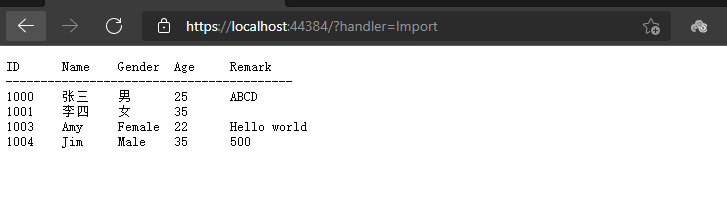
导入功能,点击选择文件按钮,选择刚下载的excel文件,点击导入按钮,跳转到导入结果页面。
------------------------ 完成---------------------
ASP.NET Core导入导出Excel文件的更多相关文章
- ASP.NET Core 导入导出Excel xlsx 文件
ASP.NET Core 使用EPPlus.Core导入导出Excel xlsx 文件,EPPlus.Core支持Excel 2007/2010 xlsx文件导入导出,可以运行在Windows, Li ...
- 【转】 (C#)利用Aspose.Cells组件导入导出excel文件
Aspose.Cells组件可以不依赖excel来导入导出excel文件: 导入: public static System.Data.DataTable ReadExcel(String strFi ...
- (C#)利用Aspose.Cells组件导入导出excel文件
Aspose.Cells组件可以不依赖excel来导入导出excel文件: 导入: public static System.Data.DataTable ReadExcel(String strFi ...
- 导入导出Excel文件
搭建环境 先新建web project ,然后Add Struts Capabilties: 下载导入导出Excel所需的jar包: poi-3.8-20120326.jar包 : http:// ...
- java中使用poi导入导出excel文件_并自定义日期格式
Apache POI项目的使命是创造和保持java API操纵各种文件格式基于Office Open XML标准(OOXML)和微软的OLE复合文档格式(OLE2)2.总之,你可以读写Excel文件使 ...
- C# 导入导出excel文件案例
个人总结导出excel报表的案例: //导出报表 protected void btnExport_Click(object sender, EventArgs e) { List<ProOut ...
- java导入导出Excel文件
package poi.excel; import java.io.IOException; import java.io.InputStream; import java.io.OutputStre ...
- 简单回顾NPOI导入导出excel文件
当前环境.net4.0 去官方下下载: NOPI官网 关于NOPI的详细,这里就不再介绍. 在项目中,我们只需引入 NPOI.dll 就可以了. 接下来..................... ...
- SpringMVC 导入导出Excel文件
/** * 下载Excel模板 创建一个新的文件用于下载,创建的文件放在缓存中 * * @param request * @param response */ /* * @Request ...
随机推荐
- Spring boot中相关的注解
一.相关类中使用的注解 @RestController:REST风格的控制器 @RequestMapping:配置URL和方法之间的映射 @SpringBootApplication:应用程序入口类 ...
- 深入理解Java多线程——ThreadLocal
目录 定义 API 场景分析 场景实验,观察Spring框架在多线程场景的执行情况 10000此请求,单线程 10000次请求,线程数加到100 对c的访问加锁 把c设为ThreadLocal 收集多 ...
- 续PA协商过程
续PA协商过程 当sw3的接口恢复之后会发生2中情况. ①sw3的G0/0/2口先发BPDU ②sw3的G0/0/3口先发BPDU sw3先发送BPDU sw3和sw1的交互过程: sw3的2口恢复后 ...
- bat自动创建快捷方式并更换图标
1 :: 此脚本主要的作用创建1.自动创建快捷方式:2.自动更换快捷方式图标 2 @echo off 3 >nul 2>&1 "%SYSTEMROOT%\system32 ...
- 小哈学Python ----XML
XML XML是实现不同语言或程序之间进行数据交换的协议,XML文件格式如下: <data> <country name="Liechtenstein"> ...
- ctf杂项之easy_nbt
下载附件查看 除了几个文件之外,没有思路 搜索nbt可知,可以使用nbtexplorer工具 果断下载,然后打开题目下载的目录 crrl+f搜索flag 猜测kflag{Do_u_kN0w_nbt?} ...
- C语言:最小公倍数
//求最小公倍数 #include <stdio.h> main() { int m,n,i,k,max,min; scanf("%d,%d",&m,& ...
- 排列组合的实现(js描述)
组合的实现 排列组合描述和公式 犹记得高中数学,组合表示C(m, n),意思为从集合m,选出n个数生成一项,总共有多少个项的可能?组合是无序的,排列是有序的.所以排列的项数量多于组合 排列A(n,m) ...
- MySQL 8.x 新版本特性赶紧学!!Linux 服务器上安装 MySQL 8.x
我是陈皮,一个在互联网 Coding 的 ITer,微信搜索「陈皮的JavaLib」第一时间阅读最新文章,回复[资料],即可获得我精心整理的技术资料,电子书籍,一线大厂面试资料和优秀简历模板. 引言 ...
- Luogu2839 [国家集训队]middle 题解
题目很好,考察对主席树的深入理解与灵活运用. 首先看看一般解决中位数的思路,我们二分一个 \(mid\),将区间中 \(\ge mid\) 的数置为 \(1\),小于的置为 \(-1\),然后求区间和 ...