
swiper tabs综合示例
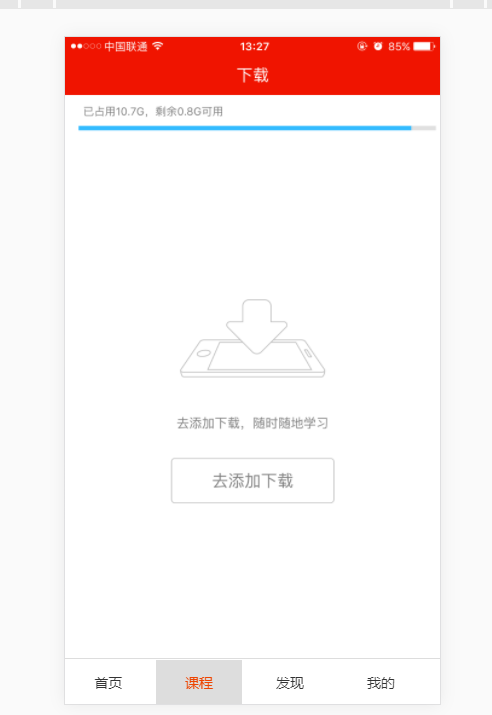
html部分:
<!DOCTYPE html>

<html>

    <head>

        <meta charset="utf-8">

        <meta name="viewport" content="width=device-width, initial-scale=1, maximum-scale=1, minimum-scale=1, user-scalable=no, minimal-ui" />

        <title>3-1 tab切换综合示例</title>

        <link rel="stylesheet" type="text/css" href="js/swiper/idangerous.swiper2.7.6.css" />

        <link rel="stylesheet" type="text/css" href="css/index.css"/>

    </head>

    <body>

        <div class="swiper-container">

            <div class="swiper-wrapper">

                <div class="swiper-slide bg-1png"></div>

                <div class="swiper-slide bg-2png"></div>

                <div class="swiper-slide bg-3png"></div>

                <div class="swiper-slide bg-4png"></div>

            </div>

        </div>

        <div class="tabs">

            <a href="" class="active">首页</a>

            <a href="">课程</a>

            <a href="">发现</a>

            <a href="">我的</a>

        </div>

        <script type="text/javascript" src="js/jquery/jquery-1.10.1.min.js"></script>

        <script type="text/javascript" src="js/swiper/idangerous.swiper2.7.6.min.js"></script>

        <script type="text/javascript" src="js/index.js"></script>

    </body>

</html>
CSS:
@charset "utf-8";

*{

    margin: 0;

    padding: 0;

}

html,body{

    width: 100%;

    height: 100%;

}

.swiper-container,

.swiper-wrapper,

.swiper-slide{

    width:100%;

    height: 100%;

}

.bg-red{

    background: darkred;

}

.bg-blue{

    background: royalblue;

}

.bg-green{

    background: darkgreen;

}

.bg-1png{

    background: url(../image/001.png);

    background-size: cover;

}

.bg-2png{

    background: url(../image/002.png);

    background-size: cover;

}

.bg-3png{

    background: url(../image/003.png);

    background-size: cover;

}

.bg-4png{

    background: url(../image/004.png);

    background-size: cover;

}

.tabs{

    position: fixed;

    left: 0;

    bottom: 0;

    height: 45px;

    line-height: 45px;

    background: white;

    color: black;

    z-index: 999;

    width: 100%;

    border-top: 1px solid #ddd;

}

.tabs a{

    display: inline-block;

    width: 23%;

    text-align: center;

    font-size: 14px;

    color: #333;

    text-decoration: none;

}

.tabs a.active{

    color: #e40;

    background: #ddd;

}

.swiper-scrollbar{

    position: absolute;

    bottom: 5px;

    left: 0;

    width: 100%;

    height: 10px;

    background: #fff;

    z-index: 999;

}
JS:
// demo1 垂直滚动

/* var swiper = new Swiper('.swiper-container',{

    mode:'vertical'

}); */

//demo2 progress插件

/* var swiper = new Swiper('.swiper-container',{

    progress:true,

    onProgressChange:function(swiper){

        //获取每个slide的progress属性,并设定其现在角度以及旋转后角度

        //例如当前活动slide是0,向左拖动则变成1,进行360度旋转,向右拖动则变成-1,进行-360度旋转

        for(var i=0;i<swiper.slides.length;i++){

            var slide = swiper.slides[i];

            var progress = slide.progress;

            swiper.setTransform(slide,'rotate('+ 360*progress +'deg)');

        }

    },

    onSetWrapperTransition:function(swiper,speed){

        for(var i=0;i<swiper.slides.length;i++){

            swiper.setTransition(swiper.slides[i],speed);

        }

    }

}); */

//demo3 3d-flow插件使用

/* var swiper = new Swiper('.swiper-container',{

    tdFlow:{

        rotate:60,

        stretch:40,

        depth:100,

        modifier:1,

        shadows:true

    }

});

 */

//demo4 scroll-bar插件使用

/* var swiper = new Swiper('.swiper-container',{

    scrollbar:{

        container:'.swiper-scrollbar',

        draggable:true,

        hide:true,

        snapOnRelease:true

    }

}); */

//tabs切换综合示例

var swiper = new Swiper('.swiper-container',{

    onSlideChangeStart:function(swiper){

        var index = swiper.activeIndex;

        $('.tabs a').removeClass('active');

        $('.tabs a').eq(index).addClass('active');

    }

});

$('.tabs a').click(function(e){

    e.preventDefault();

    var index = $(this).index();

    $('.tabs a').removeClass('active');

    $(this).addClass('active');

    swiper.swipeTo(index);

    return false;

});
swiper tabs综合示例的更多相关文章
- Spring MVC 学习总结(四)——视图与综合示例
一.表单标签库 1.1.简介 从Spring2.0起就提供了一组全面的自动数据绑定标签来处理表单元素.生成的标签兼容HTML 4.01与XHTML 1.0.表单标签库中包含了可以用在JSP页面中渲染H ...
- C#与数据库访问技术总结(七)综合示例
综合示例 说明:前面介绍了那么多,光说不练假把式,还是做个实例吧. 表:首先你要准备一张表,这个自己准备吧.我们以学生表为例. 1.ExecuteScalar方法 ExecuteScalar方法执行返 ...
- 前端MVC Vue2学习总结(一)——MVC与vue2概要、模板、数据绑定与综合示例
一.前端MVC概要 1.1.库与框架的区别 框架是一个软件的半成品,在全局范围内给了大的约束.库是工具,在单点上给我们提供功能.框架是依赖库的.Vue是框架而jQuery则是库. 1.2.AMD与CM ...
- LayUI后台管理与综合示例
一.LayUI介绍 layui(谐音:类UI) 是一款采用自身模块规范编写的前端 UI 框架,遵循原生 HTML/CSS/JS 的书写与组织形式,门槛极低,拿来即用.其外在极简,却又不失饱满的内在,体 ...
- ElasticSearch7.3学习(三十二)----logstash三大插件(input、filter、output)及其综合示例
1. Logstash输入插件 1.1 input介绍 logstash支持很多数据源,比如说file,http,jdbc,s3等等 图片上面只是一少部分.详情见网址:https://www.elas ...
- retrofit okhttp RxJava bk Gson Lambda 综合示例【配置】
项目地址:https://github.com/baiqiantao/retrofit2_okhttp3_RxJava_butterknife.git <uses-permission andr ...
- 分享我基于NPOI+ExcelReport实现的导入与导出EXCEL类库:ExcelUtility (续2篇-模板导出综合示例)
自ExcelUtility类推出以来,经过项目中的实际使用与不断完善,现在又做了许多的优化并增加了许多的功能,本篇不再讲述原理,直接贴出示例代码以及相关的模板.结果图,以便大家快速掌握,另外这些示例说 ...
- 前端MVC Vue2学习总结(七)——ES6与Module模块化、Vue-cli脚手架搭建、开发、发布项目与综合示例
使用vue-cli可以规范项目,提高开发效率,但是使用vue-cli时需要一些ECMAScript6的知识,特别是ES6中的模块管理内容,本章先介绍ES6中的基础与模块化的内容再使用vue-cli开发 ...
- Spring Boot 2.x 综合示例-整合thymeleaf、mybatis、shiro、logging、cache开发一个文章发布管理系统
一.概述 经过HelloWorld示例(Spring Boot 2.x 快速入门(上)HelloWorld示例)( Spring Boot 2.x 快速入门(下)HelloWorld示例详解)两篇的学 ...
随机推荐
- React中组件之间通信的方式
一.是什么 我们将组件间通信可以拆分为两个词: 组件 通信 回顾Vue系列的文章,组件是vue中最强大的功能之一,同样组件化是React的核心思想 相比vue,React的组件更加灵活和多样,按照不同 ...
- SDN与OpenFlow架构--初识
一,为什么需要SDN 1,传统网络的缺点: a,传统网络及其设备的只可配置,不可编程,只能按照已定义好的协议处理或转发数据,不能适应需求新变化,不能自主开发新功能. 如购买一个电饭煲,可以煮饭,煲汤. ...
- CH1809 匹配统计 题解
看了好久才懂,我好菜啊-- 题意:给两个字符串 \(a\) 与 \(b\),对于 \(q\) 次询问,每次询问给出一个 \(x\),求存在多少个位置使得 \(a\) 从该位置开始的后缀子串与 \(b\ ...
- python程序开机自启动
windows下设置 因为服务器是windows环境 担心黑窗口不小心被关闭 因此想要让python程序在后台运行 只需要一下几步 1. 在启动python启动文件加入以下代码 import win ...
- [考试总结]noip模拟20
第五场,再挂分就没了.. 然后就没了.. 考场上一直想方法. 似乎想到了 \(T1\) 正解. 然而几个 \(k\) 的调试信息都让我迷失了自我. 然后有几句啥都没用的语句加在了上面.. 挂分... ...
- C++第四十二篇 -- CPU Usage
前言 目的:读取并控制CPU占用率 近期在做CPU Usage方面的事情,让CPU以一种高占用率的状态运行一定的时间,需要读取CPU各个核的占用率,网上关于这方面的资料好少,FQ也只找到了一个WMI的 ...
- 基于pygame框架的打飞机小游戏
import pygame from pygame.locals import * import time import random class Base(object): "" ...
- Selenium环境搭建 - Mac电脑
一. JDK安装 1.1.官网下载1.8版本 可参考以下链接步骤: 'https://blog.csdn.net/u014801367/article/details/86288078' 1.2.jd ...
- js--class类、super和estends关键词的学习笔记
前言 JavaScript 语言在ES6中引入了 class 这一个关键字,在学习面试的中,经常会遇到面试官问到谈一下你对 ES6 中class的认识,同时我们的代码中如何去使用这个关键字,使用这个关 ...
- 软件安装管理(RPM)
目录 一.linux应用程序 1.1 应用程序与系统命令关系 1.2 典型应用程序的目录结构 1.3 常见的软件包封装工具 二.RPM软件包管理工具 2.1RPM软件包管理器Red-Hat Packa ...