
CSS3文本样式
文本阴影 text-shadow
应用于阴影文本
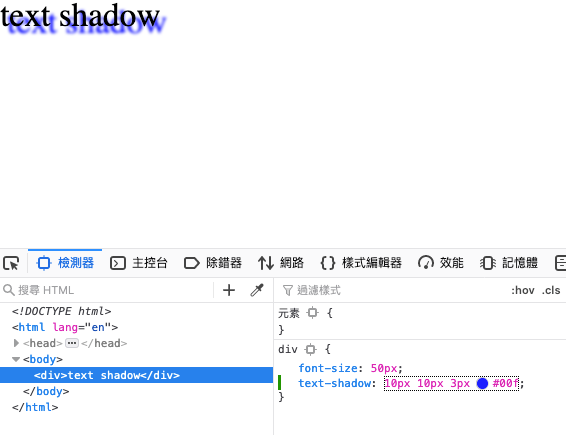
语法: text-shadow: h-shadow v-shadow blur color
- h-shadow 水平偏移
- v-shadow 竖直偏移
- blur 模糊距离,模糊是向外的,不存在负值
- color 阴影颜色
https://www.w3school.com.cn/cssref/pr_text-shadow.asp
例子
<!DOCTYPE html>

<html lang="en">

<head>

    <meta charset="UTF-8">

    <meta name="viewport" content="width=device-width, initial-scale=1.0">

    <title>Document</title>

</head>

<style type="text/css">

    div {

        font-size: 50px;

        text-shadow: 3px 3px 3px #00f;

    }

</style>

<body>

    <div>text shadow</div>

</body>

</html>
文本轮廓 text-outline
https://www.w3school.com.cn/cssref/pr_text-outline.asp
文本换行
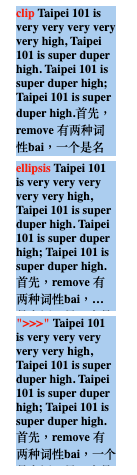
word-break
定义自动换行的处理方法
语法: word-break: normal | break-all | keep-all
例子
<!DOCTYPE html>

<html lang="en">

<head>

    <meta charset="UTF-8">

    <meta name="viewport" content="width=device-width, initial-scale=1.0">

    <title>Document</title>

</head>

<style type="text/css">

    p {

        width: 150px;

        height: 100px;

        background: #abcdef;

        font-size: 12px;

    }

    .en-normal {

            word-break: normal;

    }

    .en-break-all {

        word-break: break-all;

    }

    .en-keep-all {

        word-break: keep-all;

    }

    .cn-normal {

        word-break: normal;

    }

    .cn-break-all {

        word-break: break-all;

    }

    .cn-keep-all {

        word-break: keep-all;

    }

</style>

<body>

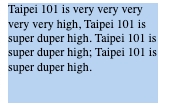
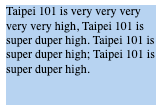
    <p class="en-normal" >Taipei 101 is very very very very very high, Taipei 101 is super duper high. Taipei 101 is super duper high; Taipei 101 is super duper high.</p>

    <p class="en-break-all" >Taipei 101 is very very very very very high, Taipei 101 is super duper high. Taipei 101 is super duper high; Taipei 101 is super duper high.</p>

    <p class="en-keep-all" >Taipei 101 is very very very very very high, Taipei 101 is super duper high. Taipei 101 is super duper high; Taipei 101 is super duper high.</p>

    <p class="cn-normal" >首先,remove 有两种词性bai,一个是名词,另一个是动du词,而zhiremove可以是及物动dao词和不及物动词。</p>

    <p class="cn-break-all;" >首先,remove 有两种词性bai,一个是名词,另一个是动du词,而zhiremove可以是及物动dao词和不及物动词。</p>

    <p class="cn-keep-all" >首先,remove 有两种词性bai,一个是名词,另一个是动du词,而zhiremove可以是及物动dao词和不及物动词。</p>

</body>

</html>
normal
浏览器默认的换行规则,当放不下时换行
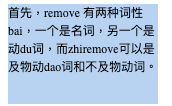
break-all
允许单词换行

中文情况下,不存在单词,文字的宽度基本一致,在中文中显示效果与normal一致。
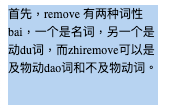
keep-all
仅在半角空格或连字符处换行。
标点符号后如无空格,将不会换行
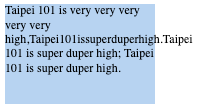
中文中无连字符和空格,默认情况下将离换行边界最近的一个标点符号当做连字符

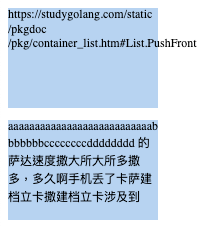
word-wrap
允许长单词或URL地址换行到下一行,仅限于拉丁文本才其效果。
语法: word-wap: normal | break-word
新文本属性
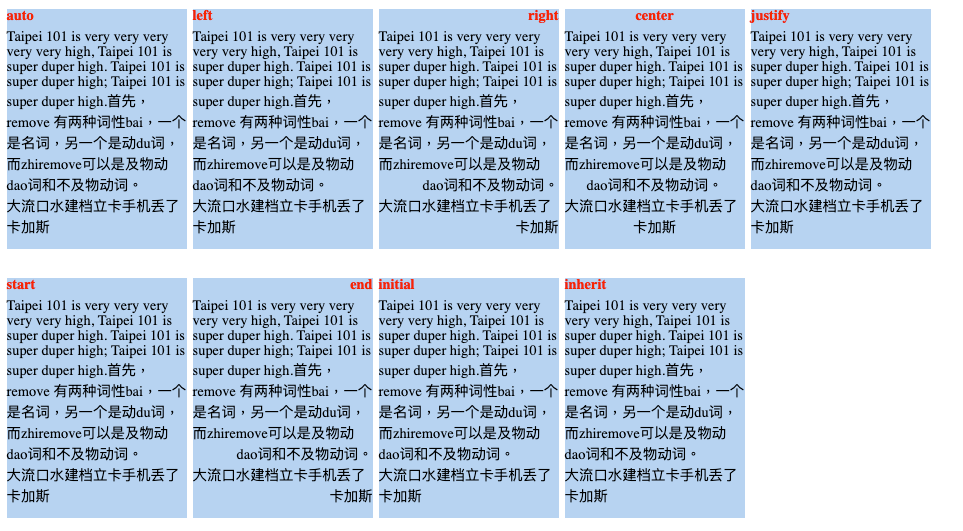
text-align-last
如何对其文本最后一行。只有在 text-align: justify 才会起作用。
语法: text-align-last: auto | left | right | center | justify | start | end | initial | inherit
https://www.runoob.com/try/playit.php?f=playcss_text-align-last&preval=justify
例子
<!DOCTYPE html>
<html lang="en">
<head>
<meta charset="UTF-8">
<meta name="viewport" content="width=device-width, initial-scale=1.0">
<title>Document</title>
</head>
<style type="text/css">
p {
width: 150px;
height: 200px;
background: #abcdef;
font-size: 12px;
float: left;
margin-right: 5px;
}
span {
font-weight: bold;
color: #f00;
display: block;
margin-bottom: 5px;
}
p:nth-child(1) {
text-align-last: auto;
}
p:nth-child(2) {
text-align-last: left;
}
p:nth-child(3) {
text-align-last: right;
}
p:nth-child(4) {
text-align-last: center;
}
p:nth-child(5) {
text-align-last: justify;
}
p:nth-child(6) {
text-align-last: start;
}
p:nth-child(7) {
text-align-last: end;
}
p:nth-child(8) {
text-align-last: initial;
}
p:nth-child(9) {
text-align-last: inherit;
}
</style>
<body>
<div>
<p> <span> auto </span>Taipei 101 is very very very very very high, Taipei 101 is super duper high. Taipei 101 is super duper high; Taipei 101 is super duper high.首先,remove 有两种词性bai,一个是名词,另一个是动du词,而zhiremove可以是及物动dao词和不及物动词。<br>大流口水建档立卡手机丢了卡加斯</p>
<p> <span> left </span>Taipei 101 is very very very very very high, Taipei 101 is super duper high. Taipei 101 is super duper high; Taipei 101 is super duper high.首先,remove 有两种词性bai,一个是名词,另一个是动du词,而zhiremove可以是及物动dao词和不及物动词。<br>大流口水建档立卡手机丢了卡加斯</p>
<p> <span> right </span>Taipei 101 is very very very very very high, Taipei 101 is super duper high. Taipei 101 is super duper high; Taipei 101 is super duper high.首先,remove 有两种词性bai,一个是名词,另一个是动du词,而zhiremove可以是及物动dao词和不及物动词。<br>大流口水建档立卡手机丢了卡加斯</p>
<p> <span> center </span>Taipei 101 is very very very very very high, Taipei 101 is super duper high. Taipei 101 is super duper high; Taipei 101 is super duper high.首先,remove 有两种词性bai,一个是名词,另一个是动du词,而zhiremove可以是及物动dao词和不及物动词。<br>大流口水建档立卡手机丢了卡加斯</p>
<p> <span> justify </span>Taipei 101 is very very very very very high, Taipei 101 is super duper high. Taipei 101 is super duper high; Taipei 101 is super duper high.首先,remove 有两种词性bai,一个是名词,另一个是动du词,而zhiremove可以是及物动dao词和不及物动词。<br>大流口水建档立卡手机丢了卡加斯</p>
<p> <span> start </span>Taipei 101 is very very very very very high, Taipei 101 is super duper high. Taipei 101 is super duper high; Taipei 101 is super duper high.首先,remove 有两种词性bai,一个是名词,另一个是动du词,而zhiremove可以是及物动dao词和不及物动词。<br>大流口水建档立卡手机丢了卡加斯</p>
<p> <span> end </span>Taipei 101 is very very very very very high, Taipei 101 is super duper high. Taipei 101 is super duper high; Taipei 101 is super duper high.首先,remove 有两种词性bai,一个是名词,另一个是动du词,而zhiremove可以是及物动dao词和不及物动词。<br>大流口水建档立卡手机丢了卡加斯</p>
<p> <span> initial </span>Taipei 101 is very very very very very high, Taipei 101 is super duper high. Taipei 101 is super duper high; Taipei 101 is super duper high.首先,remove 有两种词性bai,一个是名词,另一个是动du词,而zhiremove可以是及物动dao词和不及物动词。<br>大流口水建档立卡手机丢了卡加斯</p>
<p> <span> inherit </span>Taipei 101 is very very very very very high, Taipei 101 is super duper high. Taipei 101 is super duper high; Taipei 101 is super duper high.首先,remove 有两种词性bai,一个是名词,另一个是动du词,而zhiremove可以是及物动dao词和不及物动词。<br>大流口水建档立卡手机丢了卡加斯</p>
</div>
</body>
</html>
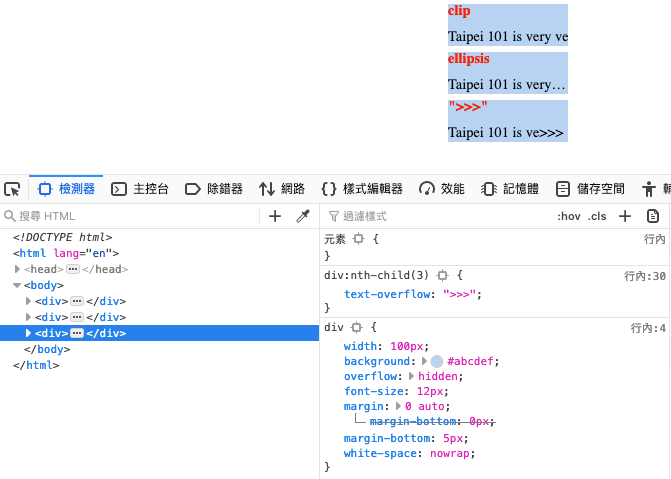
text-overflow 文本属性溢出
当文本溢出包含元素时发生的事情,仅适用于 over-flow: hidden
语法: text-overflow: clip | ellipsis| string
- clip 修剪溢出文本
- ellipsis 修剪溢出文本,以省略号
- string 修剪溢出文本,以string提醒 仅firefox兼容
例子
<!DOCTYPE html>

<html lang="en">

<head>

    <meta charset="UTF-8">

    <meta name="viewport" content="width=device-width, initial-scale=1.0">

    <title>Document</title>

</head>

<style type="text/css">

    div {

        width: 100px;

        background: #abcdef;

        overflow: hidden;

        font-size: 12px;

        margin: 0 auto;

        margin-bottom: 5px;

        white-space:nowrap;

    }

    div > span {

        font-weight: bold;

        color: #f00;

        margin-bottom: 5px;

        display: block;

    }

    div:nth-child(1) {

        text-overflow: clip;

    }

    div:nth-child(2) {

        text-overflow: ellipsis;

    }

    div:nth-child(3) {

        text-overflow: ">>>";

    }

</style>

<body>

        <div> <span> clip </span>Taipei 101 is very very very very very high, Taipei 101 is super duper high. Taipei 101 is super duper high; Taipei 101 is super duper high.首先,remove 有两种词性bai,一个是名词,另一个是动du词,而zhiremove可以是及物动dao词和不及物动词。大流口水建档立卡手机丢了卡加斯</div>

        <div> <span> ellipsis </span>Taipei 101 is very very very very very high, Taipei 101 is super duper high. Taipei 101 is super duper high; Taipei 101 is super duper high.首先,remove 有两种词性bai,一个是名词,另一个是动du词,而zhiremove可以是及物动dao词和不及物动词。大流口水建档立卡手机丢了卡加斯</div>

        <div> <span> ">>>" </span>Taipei 101 is very very very very very high, Taipei 101 is super duper high. Taipei 101 is super duper high; Taipei 101 is super duper high.首先,remove 有两种词性bai,一个是名词,另一个是动du词,而zhiremove可以是及物动dao词和不及物动词。大流口水建档立卡手机丢了卡加斯</div>

</body>

</html>
火狐浏览器
CSS3文本样式的更多相关文章
- 前端开发CSS3——文本样式和盒子及样式
博主废话少说,直接介绍css常用的属性和属性值:属性和值只需过一遍,页面的结构还是需要布局,布局的只是后期会更新的. 提供一些图标的网站:font-awesome: http://fontaw ...
- CSS3 新增文本样式
CSS3 对原来的 CSS2 版本中已定义的属性取值进行修补,增加了更多的属性值,来适应复杂环境中文本的呈现. 一.定义文本阴影 可以给文字添加阴影效果了 Shadow 影子 语法: text-sha ...
- CSS/CSS3常用样式小结
1.强制文本单行显示: white-space:nowrap; 多行文本最后省略号: display: -webkit-box; -webkit-line-clamp:2; overflow: hid ...
- 第 21 章 CSS3 文本效果
学习要点: 1.文本阴影 2.文本裁剪 3.文本描边 4.文本填充 主讲教师:李炎恢 本章主要探讨 HTML5 中 CSS3 中文本效果,其中也包含一些之前讲过的 CSS3 文本属性. 一.文本阴影 ...
- 第 15 章 CSS 文本样式[下]
学习要点: 1.文本总汇 2.文本样式 3.文本控制 主讲教师:李炎恢 本章主要探讨 HTML5 中 CSS 文本样式,通过文本样式的设置,更改字体的大小.样式以及文本的方位. 一.文本总汇 本节课, ...
- HTML 学习笔记 CSS3 (文本效果)
text-shadow 语法 text-shadow : none | <length> none | [<shadow>, ] * <shadow> 或none ...
- 6.css文本样式
文本样式,只要针对的是文本的效果和文本的方位,即文本样式和文本控制总结起来有一表中的属性可用: 属性名 说明 CSS 版本 text-decoration 装饰文本出现各种划线 1 text-tran ...
- CSS3 文本装饰
浏览器对CSS3文本特性的支持情况,如下表所示: 浏览器 text-shadow text-overflow word-wrap hyphens Opera 9.5+ 9+.带前缀-o- 10.5+ ...
- 第七十八节,CSS3文本效果
CSS3文本效果 一.文本阴影 CSS3提供了text-shadow文本阴影效果,这个属性在之前讲过,只是没有涉及浏览器 支持情况. 浏览器支持情况 text-shadow Opera ...
随机推荐
- 使用Drone构建Docker映像
使用Drone构建Docker映像 实践所用软件: Git Gogs Drone Docker 私有镜像仓库 实践链接:https://www.katacoda.com/courses/cicd/bu ...
- MySQL巩固学习记录(一)
mysql下载安装 一.采用图形化界面安装 (初期只安装server服务端就可以了,别的不多赘述) 二.采用压缩版安装 1.将文件解压缩到自己想要的路径 2. 添加环境变量,即mysql的bin目录 ...
- 以Aliyun体验机为例,从零搭建LNMPR环境(下)
使用云服务器搭建 Web 运行环境,尤其是搭建常见的 LNMPR(Linux+Nginx+MySQL+PHP+Redis) 环境,对于开发人员是必备的职场基本技能之一.在这里,借着搭建我的" ...
- 死磕Spring之AOP篇 - 初识JDK、CGLIB两种动态代理
该系列文章是本人在学习 Spring 的过程中总结下来的,里面涉及到相关源码,可能对读者不太友好,请结合我的源码注释 Spring 源码分析 GitHub 地址 进行阅读. Spring 版本:5.1 ...
- 黑马 - poi Excel
3.poi入门操作 3.1 搭建环境 1 <dependency> 2 <groupId>org.apache.poi</groupId> 3 <artifa ...
- Day05_24_继承
继承 什么是继承? 继承本质上是对某一批类的抽象,从而实现对现实世界更好的建模.继承是类和类之间的一种关系,除此之外类和类之间的关系还有依赖.组合.聚合等. 继承就是子类(派生类)继承父类(基类)的特 ...
- openpyxl 库
1. 简介与安装 2.具体示例 2.1 获取workbook与sheet对象 2.2 访问单元格及其值 2.3 写数据 2.4 设置样式 1. 简介与安装 openpyxl 简介 openpyxl 是 ...
- 10276 - Hanoi Tower Troubles Again!(思维,模拟)
People stopped moving discs from peg to peg after they know the number of steps needed to complete t ...
- 让vim显示空格,tab字符,及vim多行注释
1.显示 TAB 键 文件中有 TAB 键的时候,你是看不见的.要把它显示出来: :set list 现在 TAB 键显示为 ^I,而 $显示在每行的结尾,以便你能找到可能会被你忽略的空白字符在哪里 ...
- composer 遇见问题 整理
修改镜像源:改为阿里云镜像 composer config -g repo.packagist composer https://mirrors.aliyun.com/composer/ 报错:Con ...