
python数据结构之quick_sort
Quick sort , also known as partition-exchange sort, divides the data to be sorted into two separate parts by a single sort, in which all the data of one part is smaller than all the other parts. Then, according to this method, the two parts of the data are sorted separately, and the whole sorting process can be recursively, so that the entire data becomes an ordered sequence. The steps are: 1. Pick an element from the series, called "pivot", 2. Reorder the series, all elements are placed in front of the reference smaller than the reference value, and all elements are placed larger than the reference value. Behind the benchmark (the same number can go to either side). After the end of this partition, the benchmark is in the middle of the sequence. This is called a partition operation. 3. Recursively sorts sub-columns that are smaller than the reference value element and sub-columns that are larger than the reference value element. The bottommost case of recursion is that the size of the series is zero or one, that is, it has always been sorted. Although it has been recursively, this algorithm will always end, because in each iteration, it will at least put an element to its final position.
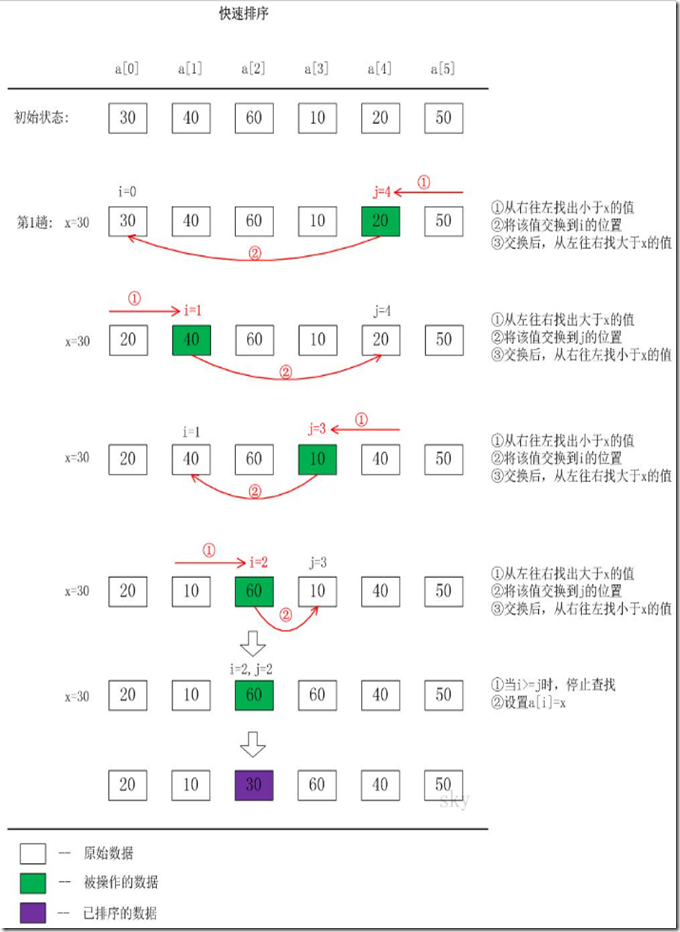
代码如下:
def quick_sort(alist,start,end):

    if start >= end:

       return

    mid = alist[start]

    #设置初始元素

    low = start

    high = end

    while low < high :

        #判断是否排序完成

        # 后面元素左移

        while low < high and alist[high] >= mid:

            high -=1

        alist[low]=alist[high]

        #后面元素左移

        # 前面元素右移

        while low < high and alist[low]< mid:

            low +=1

        alist[high]=alist[low]

    alist[low]=mid

    #分开排序

    quick_sort(alist,start,low-1)

    quick_sort(alist,low+1,end)

# 执行函数打印

alist = [54,26,93,17,77,31,44,55,20]

quick_sort(alist,0,len(alist)-1)

print(alist)
python数据结构之quick_sort的更多相关文章
- python数据结构与算法
最近忙着准备各种笔试的东西,主要看什么数据结构啊,算法啦,balahbalah啊,以前一直就没看过这些,就挑了本简单的<啊哈算法>入门,不过里面的数据结构和算法都是用C语言写的,而自己对p ...
- python数据结构与算法——链表
具体的数据结构可以参考下面的这两篇博客: python 数据结构之单链表的实现: http://www.cnblogs.com/yupeng/p/3413763.html python 数据结构之双向 ...
- python数据结构之图的实现
python数据结构之图的实现,官方有一篇文章介绍,http://www.python.org/doc/essays/graphs.html 下面简要的介绍下: 比如有这么一张图: A -> B ...
- Python数据结构与算法--List和Dictionaries
Lists 当实现 list 的数据结构的时候Python 的设计者有很多的选择. 每一个选择都有可能影响着 list 操作执行的快慢. 当然他们也试图优化一些不常见的操作. 但是当权衡的时候,它们还 ...
- Python数据结构与算法--算法分析
在计算机科学中,算法分析(Analysis of algorithm)是分析执行一个给定算法需要消耗的计算资源数量(例如计算时间,存储器使用等)的过程.算法的效率或复杂度在理论上表示为一个函数.其定义 ...
- Python数据结构与循环语句
# Python数据结构与循环语句: 首先编程是一项技能,类似跑步,期初不必在意细节,能使用起来就行,等学的游刃有余了再回过头来关注细节问题也不迟. 关于买书: 学会python之后,才需要买书 ...
- python数据结构之栈与队列
python数据结构之栈与队列 用list实现堆栈stack 堆栈:后进先出 如何进?用append 如何出?用pop() >>> >>> stack = [3, ...
- python数据结构之树和二叉树(先序遍历、中序遍历和后序遍历)
python数据结构之树和二叉树(先序遍历.中序遍历和后序遍历) 树 树是\(n\)(\(n\ge 0\))个结点的有限集.在任意一棵非空树中,有且只有一个根结点. 二叉树是有限个元素的集合,该集合或 ...
- Python数据结构之四——set(集合)
Python版本:3.6.2 操作系统:Windows 作者:SmallWZQ 经过几天的回顾和学习,我终于把Python 3.x中的基础知识介绍好啦.下面将要继续什么呢?让我想想先~~~嗯,还是 ...
随机推荐
- CentOS7图形界面与命令行界面切换(转载)
在图形界面使用 ctrl+alt+F2切换到dos界面 dos界面 ctrl+alt+F2切换回图形界面 在命令上 输入 init 3 命令 切换到dos界面 输入 init 5命令 切换到图形界面 ...
- 解决kali linux 升级后安装w3af 问题
1.在kali linux 下安装w3af 会出现很多问题,因为新版的kaliLinux ,以及python 环境的配置问题和 库的安装问题会出现很多报错 kali linux环境一般都自带git安装 ...
- MySQL基于ROW格式的数据恢复
大家都知道MySQL Binlog 有三种格式,分别是Statement.Row.Mixd.Statement记录了用户执行的原始SQL,而Row则是记录了行的修改情况,在MySQL 5.6以上的版本 ...
- Loadrunner11.0 录制手机App脚本的方法二
lr11安装一个移动补丁以后,就可以支持抓包文件直接转换为http/html协议的脚本.下面简单说一下过程. 1.工作思路:手机连接可上外网wifi,在手机wifi中设置本机ip的网络地址,然后在本机 ...
- C/C++中二进制与文本方式打开文件的区别
二进制与文本文件主要有两个大的区别: 1.换行符的区别: Windows平台下 对于Windows文本文件,它们使用回车和换行来表示换行符:如果以“文本”方式打开文件,当读取文件的时候,系统会将所有 ...
- linux基础练习题(3)
关卡三 练习题 在家路径下创建A文件夹 在上一步创建的A文件夹中,创建B/C/D文件夹 在上一步所在的路径中,创建C/E/F文件夹 使用目录树查看文件夹结构 A/B/C中创建一个hello.py文件 ...
- 史上最简单的 SpringCloud 教程
史上最简单的 SpringCloud 教程 | 第一篇: 服务的注册与发现(Eureka)史上最简单的SpringCloud教程 | 第二篇: 服务消费者(rest+ribbon)史上最简单的Spri ...
- 009-Python-面向对象
1.面向对象: 1.1什么是类? 类:把一类事物的相同的特征和动作整合到一起就是类,类是一个抽象的概念: 1.2什么是对象? 对象:就是基于类而创建的一个具体事物(具体存在的)也是特征和动作整合到一起 ...
- 如何设置Navicat的显示字体与字体大小?
方法/步骤 打开Navicat 点击[工具]菜单,再选择[选项] 在[选项]界面,点击[外观]下的[字体] 设置网格字体和大小 设置编辑器字体和大小 设置命令列界面字体和大 ...
- .Net页面缓存OutPutCache详解
一 它在Web.Config中的位置 <system.web> <!--页面缓存--> <caching> <outputCacheSettings> ...