
input时间表单默认样式修改(input[type="date"])
一、时间选择的种类:
HTML代码:
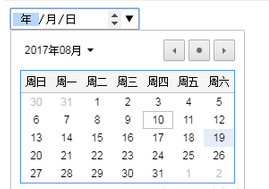
选择日期:<input type="date" value="2018-11-15" />
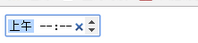
选择时间:<input type="time" value="22:52" />
选择星期:<input type="week" />

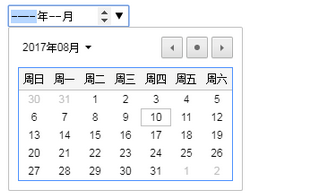
选择月份:<input type="month" />
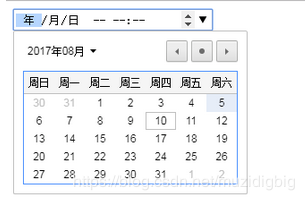
DateTime-Local类型:<input type="datetime-local"/>
二、.对日期时间控件的样式进行修改
目前WebKit下有如下9个伪元素可以改变日期控件的UI:
::-webkit-datetime-edit – 控制编辑区域的
::-webkit-datetime-edit-fields-wrapper – 控制年月日这个区域的
::-webkit-datetime-edit-text – 这是控制年月日之间的斜线或短横线的
::-webkit-datetime-edit-month-field – 控制月份
::-webkit-datetime-edit-day-field – 控制具体日子
::-webkit-datetime-edit-year-field – 控制年文字, 如2017四个字母占据的那片地方
::-webkit-inner-spin-button – 这是控制上下小箭头的
::-webkit-calendar-picker-indicator – 这是控制下拉小箭头的
::-webkit-clear-button –这是控制清除按钮的
实例
1.问题--------date类型改变行高和高度那个小三角并不会根据大小调整,实在太丑了,所以决定把它隐藏掉。
/* 去掉date中上下小三角,但是保留input类型为number的小三角。 */
input[type=date]::-webkit-inner-spin-button { visibility: hidden; }
/*----------用来移除叉叉按钮 鼠标移上去还会显示----------*/
input[type="date"]::-webkit-clear-button{ display:none; }
代码
  <style>

             /* 控制编辑区域的 */

           input[type="date"]::-webkit-datetime-edit{

             /* content: '起始时间'; */

             color: rgb(,,);

             padding-left: 10px;

           }

           /* 控制年月日这个区域的 */

           input[type="date"]::-webkit-datetime-edit-fields-wrapper {

             background-color: #eee;

           }

           /* 这是控制年月日之间的斜线或短横线的 */

           input[type="date"]::-webkit-datetime-edit-text {

             color: blue;

             padding:  .3em;

           }

           /* 控制年字 */

           input[type="date"]::-webkit-datetime-edit-year-field {

             color: purple;

           }

           /* 控制月字 */

           input[type="date"]::-webkit-datetime-edit-month-field {

             color: red;

           }

           /* 控制日字 */

           input[type="date"]::-webkit-datetime-edit-day-field  {

             color: pink;

           }

         /*控制下拉小箭头的*/

         input[type="date"]::-webkit-calendar-picker-indicator {

           display: inline-block;

           width: 15px;

           height: 15px;

           /* position: absolute;

           top: 12px;

           right: 0px; */

           border: 1px solid #ccc;

           border-radius: 2px;

           box-shadow: inset  1px #fff,  1px #eee;

           background-color: #eee;

           /* background:url('../images/icon.png') -188px -99px; */

           background-image: -webkit-linear-gradient(top, #f0f0f0, #e6e6e6);

           color: #;

         }

         /* 去掉date中上下小三角,但是保留input类型为number的小三角。 */

         input[type=date]::-webkit-inner-spin-button {

           visibility: hidden;

         }

         /*----------用来移除叉叉按钮 鼠标移上去还会显示----------*/

         /* input[type="date"]::-webkit-clear-button{

          display:none;

         } */

     </style>

 </head>

 <body>

     <div class="time_box">

         <input type="date">

     </div>

 </body>
默认---点击时间表单的效果
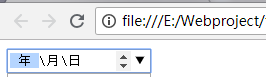
修改完后

三、以下的囊括了date,datetime,week,time等所用的伪元素:
input::-webkit-datetime-edit{}
input::-webkit-datetime-edit-fields-wrapper{}
input::-webkit-datetime-edit-ampm-field{}
input::-webkit-datetime-edit-day-field{}
input::-webkit-datetime-edit-hour-field{}
input::-webkit-datetime-edit-millisecond-field{}
input::-webkit-datetime-edit-minute-field{}
input::-webkit-datetime-edit-month-field{}
input::-webkit-datetime-edit-second-field{}
input::-webkit-datetime-edit-week-field{}
input::-webkit-datetime-edit-year-field{}
input::-webkit-datetime-edit-ampm-field:focus{}
input::-webkit-datetime-edit-day-field:focus{}
input::-webkit-datetime-edit-hour-field:focus{}
input::-webkit-datetime-edit-millisecond-field:focus{}
input::-webkit-datetime-edit-minute-field:focus{}
input::-webkit-datetime-edit-month-field:focus{}
input::-webkit-datetime-edit-second-field:focus{}
input::-webkit-datetime-edit-week-field:focus{}
input::-webkit-datetime-edit-year-field:focus{}
input::-webkit-datetime-edit-year-field[disabled]{}
input::-webkit-datetime-edit-month-field[disabled]{}
input::-webkit-datetime-edit-week-field[disabled]{}
input::-webkit-datetime-edit-day-field[disabled]{}
input::-webkit-datetime-edit-ampm-field[disabled]{}
input::-webkit-datetime-edit-hour-field[disabled]{}
input::-webkit-datetime-edit-millisecond-field[disabled]{}
input::-webkit-datetime-edit-minute-field[disabled]{}
input::-webkit-datetime-edit-second-field[disabled]{}
input::-webkit-datetime-edit-text{}
input::-webkit-inner-spin-button{}
input::-webkit-calendar-picker-indicator{}
input::-webkit-calendar-picker-indicator:hover{}
input时间表单默认样式修改(input[type="date"])的更多相关文章
- css修改input表单默认样式重置与自定义大全
链接地址: 伪元素表单控件默认样式重置与自定义大全 http://www.zhangxinxu.com/wordpress/?p=3381 Chrome 现在不支持通过伪元素修改 meter 元素样式 ...
- input选择框默认样式修改
input选择框是无法直接修改样式,我们只能间接来改变它样式. 原理:用图片来代替原来的input选择框,原来的input选择框定位到图片上方并让它opacity为0,鼠标点击时用js来改变图片,这样 ...
- 在vue组件的stylus样式总 取消search类型的input按钮中默认样式
在vue组件的stylus样式中 取消search类型的input按钮中默认样式 记录一个坑 环境 Vue组件 使用了Stylus的CSS风格. 问题 input输入框使用了 type="s ...
- 利用CSS 修改input=radio的默认样式(改成选择框)
html部分: <input id="item2" type="radio" name="item"> <label fo ...
- chrome浏览器默认样式覆盖input背景
问题描述:input表单添加了背景图片,结果自动填充是,编程了一个淡黄色矩形方框. 解决方案:网上查询了很多的解决方式,基本都不管用,这里我简单说两个. 1.去除黄色背景 input:-webkit- ...
- input框改变默认样式
input[type="radio"] { width: 2rem; height: 2rem; -webkit-appearance: none; /*清除复选框默认样式*/ ...
- 去除移动端苹果手机(ios)的input默认样式与input禁止键盘出现的方式
样式: input{-webkit-appearance: none;} 在iPhone plus点击input框出生日期时会出现如下图: 为了去掉下面那条苹果自带的,可以这样处理:在HTML中的in ...
- 伪元素改变date类型input框的默认样式实例页面
CSS代码: ::-webkit-datetime-edit { padding: 1px; background: url(/study/image/selection.gif); } ::-web ...
- HTML复选框checkbox默认样式修改
此方法可以将复选框的默认样式替换成任意样式.如图: 未选择: 选择时: 思路:将复选框隐藏,利用lebal元素的焦点传递特性,用lebal的样式替代复选框. 代码如下: <!DOCTYPE ht ...
随机推荐
- nginx负载均衡优化配置
针对nginx做负载均衡时其中一台服务器挂掉宕机时响应速度慢的问题解决 nginx会根据预先设置的权重转发请求,若给某一台服务器转发请求时,达到默认超时时间未响应,则再向另一台服务器转发请求. 默认超 ...
- Callcenter 模块解析
CallCenter模块详细介绍 一. Callcenter模块说明: 提供了呼叫中心的ACD功能,把客户端通过不同的”方案”和”等级”分配给来电,一个以”评分”为基础的系统是用来分配这些呼入.来电者 ...
- 【原创】大数据基础之Presto(1)简介、安装、使用
presto 0.217 官方:http://prestodb.github.io/ 一 简介 Presto is an open source distributed SQL query engin ...
- git 创建分支
- iOS 运行时使用(交换两个方法)
举例 在创建了如下代码 NSString *str=nil; NSURL *url =[NSURL URLWithString:str]; NSLog(@"%@",url); 但是 ...
- 统计nginx日志里访问次数最多的前十个IP
awk '{print $1}' /var/log/nginx/access.log | sort | uniq -c | sort -nr -k1 | head -n 10
- CHENGDU3-Restful API 接口规范、django-rest-framework框架
Restful API 接口规范.django-rest-framework框架 问题:什么是API? 答:API是接口,提供url. 接口有两个用途: 为别人提供服务,前后端分离. 为什么使用前后端 ...
- 步步为营-76-用户登录(Session+Cookie)
说明:cookie是保存在浏览器的.Session是存储在服务器的 1 同样UI页面还是web前端提供 1.1 首先,经过验证码校验:将系统产生的验证码放入到Session中,然后取Session值注 ...
- B: Ocean的游戏(前缀和)
B: Ocean的游戏 Time Limit: 1 s Memory Limit: 128 MB Submit My Status Problem Description 给定一个字符串s, ...
- Tensorflow生成唐诗和歌词(上)
整个工程使用的是Windows版pyCharm和tensorflow. 源码地址:https://github.com/Irvinglove/tensorflow_poems/tree/master ...