
liunx安装nginx
参考 https://blog.csdn.net/dyllove98/article/details/41120789
1,去官网下载最新的包
官网地址:http://nginx.org/download/
也可以直接 wget http://nginx.org/download/nginx-1.9.9.tar.gz (我这下载很慢所有直接去官网下,在上传到服务器)
2,下载相关依赖包
[root@localhost src] wget http://www.openssl.org/source/openssl-fips-2.0.10.tar.gz

[root@localhost src] tar zxvf pcre-8.40.tar.gz

[root@localhost src] cd pcre-8.40

[root@localhost pcre-8.40]# ./configure && make && make install

下面两个安装步骤和上面的一致

[root@localhost src] wget http://zlib.net/zlib-1.2.11.tar.gz

[root@localhost src] wget ftp://ftp.csx.cam.ac.uk/pub/software/programming/pcre/pcre-8.40.tar.gz
3,解压nginx
tar zxvf nginx-1.9.9.tar.gz

cd nginx-1.9.9/
./configure --prefix=/usr/local/nginx --with-http_realip_module --with-http_sub_module --with-http_gzip_static_module --with-http_stub_status_module
4,编译nginx
make && make install
添加一个nginx主程序的符号链接 ln -sf /usr/local/nginx/sbin/nginx /usr/sbin
检查配置是否正常
nginx -t
首先把原来的配置文件清空:
> /usr/local/nginx/conf/nginx.conf
“>” 这个符号之前阿铭介绍过,为重定向的意思,单独用它,可以把一个文本文档快速清空。
vim /usr/local/nginx/conf/nginx.conf

写入如下内容:
user nobody nobody;

worker_processes 2;

error_log /usr/local/nginx/logs/nginx_error.log crit;

pid /usr/local/nginx/logs/nginx.pid;

worker_rlimit_nofile 51200;

events

{

    use epoll;

    worker_connections 6000;

}

http

{

    include mime.types;

    default_type application/octet-stream;

    server_names_hash_bucket_size 3526;

    server_names_hash_max_size 4096;

    log_format combined_realip '$remote_addr $http_x_forwarded_for [$time_local]'

    '$host "$request_uri" $status'

    '"$http_referer" "$http_user_agent"';

    sendfile on;

    tcp_nopush on;

    keepalive_timeout 30;

    client_header_timeout 3m;

    client_body_timeout 3m;

    send_timeout 3m;

    connection_pool_size 256;

    client_header_buffer_size 1k;

    large_client_header_buffers 8 4k;

    request_pool_size 4k;

    output_buffers 4 32k;

    postpone_output 1460;

    client_max_body_size 10m;

    client_body_buffer_size 256k;

    client_body_temp_path /usr/local/nginx/client_body_temp;

    proxy_temp_path /usr/local/nginx/proxy_temp;

    fastcgi_temp_path /usr/local/nginx/fastcgi_temp;

    fastcgi_intercept_errors on;

    tcp_nodelay on;

    gzip on;

    gzip_min_length 1k;

    gzip_buffers 4 8k;

    gzip_comp_level 5;

    gzip_http_version 1.1;

    gzip_types text/plain application/x-javascript text/css text/htm application/xml;

server

{

    listen 80;

    server_name localhost;

    index index.html index.htm index.php;

    root /usr/local/nginx/html;

    location ~ \.php$ {

        include fastcgi_params;

        fastcgi_pass 127.0.0.1:9000;

        fastcgi_index index.php;

        fastcgi_param SCRIPT_FILENAME /usr/local/nginx/html$fastcgi_script_name;

    }

}

}
5,启动nginx
/usr/local/nginx/sbin/nginx
在检查下配置
nginx -t
查看nginx 是否启动
ps -ef | grep nginx
6,测试
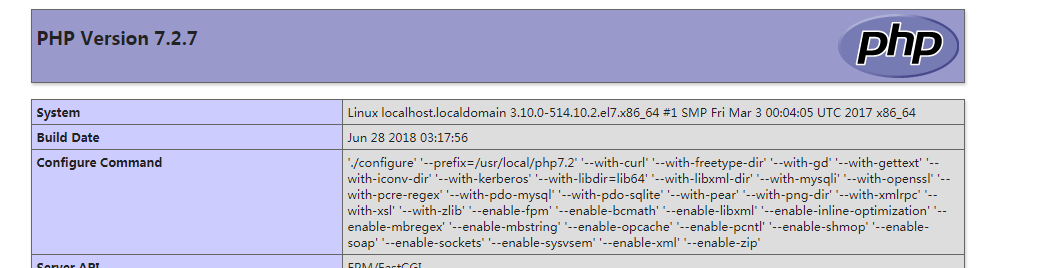
php安装参考 : https://www.cnblogs.com/chancy/p/9238149.html
vim /usr/local/nginx/html/index.php

内容如下:
<?php

    echo phpinfo();

?>
liunx安装nginx的更多相关文章
- LIUNX 安装 nginx
安装依赖 yum install gcc yum install pcre-devel yum install zlib zlib-devel yum install openssl openssl- ...
- liunx 利用nginx 实现负载均衡
一般采用软件实现负载均衡的有Nginx.apache.nginx 近年来使用频繁,其官网上面显示可以承载5万并发访问量,太牛了. nginx 相比 apache优势明显:Nginx 服务程序比较稳定, ...
- linux系统虚拟机下安装nginx基础
虽然安装nginx什么的 .以及如何配置等等一系列的资料案例已经很多了 但是作为菜鸟的我还是搞了半天哈 官网上面也有.但是一些细节方面的并没有说明.导致踩了半天坑才搞好 本案例的系统环境 wi ...
- (转)AIX7.1安装Nginx 1.13的方法
原文:https://blog.csdn.net/lvshaorong/article/details/79401860 https://blog.csdn.net/lvshaorong/articl ...
- Liunx之nginx配置
一.nginx安装 卸载yum安装的ngjnx yum remove nginx -y 编译安装nginx步骤 编译安装nginx的步骤 1.解决软件依赖 yum install gcc patch ...
- centos直接yum安装nginx
Ubuntu下安装nginx,直接apt-get install nginx就行了,很方便. 但是今天装了CentOS6.2,直接yum install nginx不行,要先处理下源,下面是安装完整流 ...
- 安装Nginx服务
Nginx最大特点: 静态小文件(1M),支持高并发,同时占用系统资源很少.3W并发,10个进程,内存150M. Nginx特点: 1.配置简单,灵活,轻量. 2.高并发(静态小文件),静态几万的并发 ...
- Linux下安装nginx
一直会使用nginx,也学习了好多nginx知识.也在本地安装过nginx,这次是第一次在正式的环境安装nginx,把这些记录下来总结经验. 一.安装环境 操作系统:CentOS release 6. ...
- centos系统编译安装nginx+php环境另加独立mysql教程
以前看过的安装nginx+php环境都带了mysql数据库了,这个是因为很多站长都是nginx+php+mysql都在同一台服务器了,那么今天我们是单独处理了,一个是nginx+php环境,然后mys ...
随机推荐
- 有时间研究一下Maven打包插件细节
Maven工作分为多个阶段,具体阶段参考:https://maven.apache.org/guides/introduction/introduction-to-the-lifecycle.html ...
- GoldenGate OGG-01032 There Is a Problem in Network Communication Error in Writing to Rmt Remote Trail Rmttrail (Doc ID 1446621.1)
GoldenGate OGG-01032 There Is a Problem in Network Communication Error in Writing to Rmt Remote Trai ...
- RMAN_RAC归档日志备份包恢复到单机
恢复归档日志的方法: RAC是ASM的存储且是OMF创建的格式,所以RAC的日志名为如下+ARCH/mioa/archive/1_73554_875548170.dbf.+ARCH/mioa/arch ...
- Caused by: java.sql.SQLException: Value '0000-00-00 00:00:00' can not be represented as java.sql.Timestamp
错误信息如下: Caused by: java.sql.SQLException: Value '0000-00-00 00:00:00' can not be represented as java ...
- Spring Boot 之整合 EasyUI 打造 Web 应用
SpringBootTutorial :: Web :: UI :: EasyUI EasyUI 是一个简单的用户界面组件的集合.由于 EasyUI 已经封装好大部分 UI 基本功能,能帮用户减少大量 ...
- Express+MongoDB开发web后台接口MongoDB
摘要: Express开发web接口; 安装MongoDB,启动.连接MongoDB服务台; 使用nodejs和mongoose模块链接和操作MongoDB; 一.Express开发web接口 exp ...
- CRectTracker类的使用
CRectTracker(俗称“橡皮筋”类)是一个非常有意思的类.你在Windows中经常看到这样的情况:它可以用做显示边界,你也可以扽它的八个角用来放大缩小,或做框选使用.如何通过编程来实现这种功能 ...
- JVM-自动内存管理机制
关于GC: 垃圾收集通常被称为"GC",经过半个世纪的发展,内存动态分配与内存回收技术已经相当成熟.那我们为何还要了解GC和内存分配呢? 当我们需要排除各种内存溢出.内存泄露问题时 ...
- Json的生成和解析
json是常见的数据格式,生成和解析是常用的操作.Android中,默认提供orgJson供我们使用,除此之外,google也提供了Gson库方便我们开发. Json样例类 package com.f ...
- 【JS小技巧】JavaScript 函数用作对象的隐藏问题(F.ui.name)
用户反馈 @消失的键盘 在论坛反馈了一个问题,在 AppBoxMvc 中的 Title 模型中,如果将 Name 属性改名为小写的 name 属性,就会报错: 因为这是一个 ASP.NET MVC 的 ...