
软工作业1—java实现wc.exe
github项目地址
https://github.com/liyizhu/wc.exe
WC 项目要求
- 基本功能列表:
wc.exe -c file.c //返回文件 file.c 的字符数(实现)
wc.exe -w file.c //返回文件 file.c 的词的数目 (实现)
wc.exe -l file.c //返回文件 file.c 的行数(实现)
- 扩展功能:
-s 递归处理目录下符合条件的文件。(实现)
-a 返回更复杂的数据(代码行 / 空行 / 注释行)。(实现)
[file_name]: 文件或目录名,可以处理一般通配符。(实现)
空行:本行全部是空格或格式控制字符,如果包括代码,则只有不超过一个可显示的字符,例如“{”。
代码行:本行包括多于一个字符的代码。
注释行:本行不是代码行,并且本行包括注释。
- 高级功能:
-x 参数。这个参数单独使用。如果命令行有这个参数,则程序会显示图形界面,用户可以通过界面选取单个文件,
程序就会显示文件的字符数、行数等全部统计信息。(未实现)
PSP表格
|
PSP2.1 |
Personal Software Process Stages |
预估耗时(分钟) |
实际耗时(分钟) |
|
Planning |
计划 |
20 |
20 |
|
· Estimate |
· 估计这个任务需要多少时间 |
10 |
10 |
|
Development |
开发 |
500 |
420 |
|
· Analysis |
· 需求分析 (包括学习新技术) |
150 |
120 |
|
· Design Spec |
· 生成设计文档 |
30 |
40 |
|
· Design Review |
· 设计复审 (和同事审核设计文档) |
20 |
30 |
|
· Coding Standard |
· 代码规范 (为目前的开发制定合适的规范) |
10 |
5 |
|
· Design |
· 具体设计 |
30 |
10 |
|
· Coding |
· 具体编码 |
200 |
300 |
|
· Code Review |
· 代码复审 |
30 |
30 |
|
· Test |
· 测试(自我测试,修改代码,提交修改) |
60 |
90 |
|
Reporting |
报告 |
120 |
120 |
|
· Test Report |
· 测试报告 |
40 |
80 |
|
· Size Measurement |
· 计算工作量 |
10 |
10 |
|
· Postmortem & Process Improvement Plan |
· 事后总结, 并提出过程改进计划 |
30 |
30 |
|
合计 |
1250 |
1315 |
解题思路描述
功能:wc.exe -c file.c //返回文件 file.c 的字符数
思路:逐行读取文件,去掉每行空字符后,统计个数,累加,直到文件读取完毕
功能:wc.exe -w file.c //返回文件 file.c 的词的数目
思路:逐行读取文件,将非字母替换为空格,然后按空格切割字符串为字符串数组,累加字符串数组长度,直到文件读取完毕
功能:wc.exe -l file.c //返回文件 file.c 的行数
思路:逐行读取文件,没读取一行,行数加一,知道文件读取完毕
功能:-a 返回更复杂的数据(代码行 / 空行 / 注释行)。
思路:逐行读取文件,判断是否存在//,/*,*/若存在,判定为注释行行数加一,判断是否只存在一个字符,或者为空,若是,判定为空行,若判断行中存在/*,则将标志域设置为true,直到读取到*/,将标志域设置为false,当标志域为true,判定为注释行,若非以上情况,判定为代码行
功能:[file_name]: 文件或目录名,可以处理一般通配符。
思路:将通配符*替换为\\.+表示多个任意字符,将通配符?替换为\\.表示一个任意字符,将文件名与该正则表达式匹配,若匹配,执行相应操作
功能:-s 递归处理目录下符合条件的文件。
思路:列举目录下的所有文件,若为目录,则递归调用函数,若为文件且符合文件格式,则执行相应操作,否则不作任何操作
设计实现过程
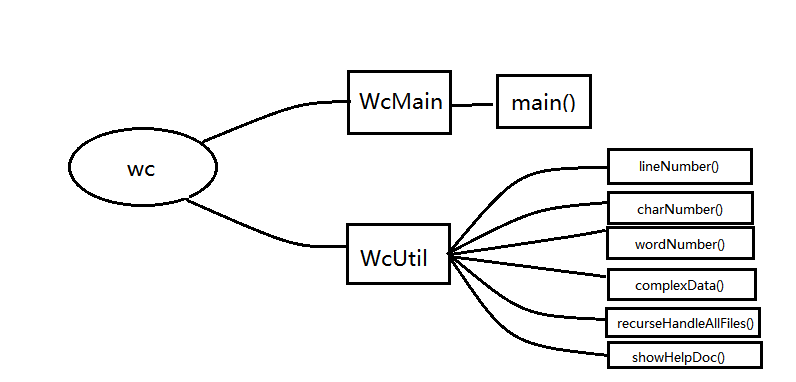
说明:
一共有两个类:WcUtil是工具类,WcMain类中只有main方法,用于处理控制台输入的参数,解析,判断是否合法,
并调用WcUtil类中相应的方法
代码说明
main() 功能:循环处理命令行参数,解析,判断参数的合法性,调用相应的处理方法
 public class WcMain {

     /*

      *  主方法

      */

     public static void main(String[] args) {

         BufferedReader br = new BufferedReader(new InputStreamReader(System.in));

         //当前命令

         String currentCommand = null;

         //当前命令切分后的数组

         String[] currentCommandStrings = null;

         while(true) {

             try {

                 //读取命令

                  if((currentCommand=br.readLine())!=null) {

                     currentCommandStrings = currentCommand.split(" ");

                     //命令字符串数组长度小于二或者长度大于四,为错误命令

                     if(currentCommandStrings.length<2||currentCommandStrings.length>4) {

                         //空命令直接跳过

                         if(currentCommandStrings.length==1&&"".equals(currentCommandStrings[0])) {

                         }else {

                             System.out.println("错误命令");

                             System.out.println("输入\"wc.exe help\"或\"wc.exe ?\"查看帮助文档");

                         }

                     }else {

                         //命令第一个字段必须为wc.exe

                         if("wc.exe".equals(currentCommandStrings[0])){

                             //查看具体命令

                             if(currentCommandStrings.length==3) {

                                 switch (currentCommandStrings[1]) {

                                 case "-c":

                                     WcUtil.charNumber(currentCommandStrings[2]);

                                     break;

                                 case "-w":

                                     WcUtil.wordNumber(currentCommandStrings[2]);

                                     break;

                                 case "-l":

                                     WcUtil.lineNumber(currentCommandStrings[2]);

                                     break;

                                 case "-a":

                                     WcUtil.complexData(currentCommandStrings[2]);

                                     break;

                                 default:

                                     System.out.println("错误命令");

                                     System.out.println("输入\"wc.exe help\"或\"wc.exe ?\"查看帮助文档");

                                     break;

                                 }

                             }else if(currentCommandStrings.length==2) {

                                 switch (currentCommandStrings[1]) {

                                 case "help":

                                 case "?":

                                     WcUtil.showHelpDoc();

                                     break;

                                 default:

                                     System.out.println("错误命令");

                                     System.out.println("输入\"wc.exe help\"或\"wc.exe ?\"查看帮助文档");

                                     break;

                                 }

                             }else if(currentCommandStrings.length==4&&"-s".equals(currentCommandStrings[1])) {

                                 String currentDirectory = currentCommandStrings[2];

                                 //路径是否存在

                                 if(new File(currentDirectory).isDirectory()) {

                                     String wildcardChar = currentCommandStrings[3].replaceAll("\\*","\\.+").replaceAll("\\?","\\.");

                                     //System.out.println(wildcardChar);

                                     WcUtil.recurseHandleAllFiles(currentDirectory,wildcardChar);

                                     System.out.println("遍历结束");

                                 }else {

                                     System.out.println("错误:找不到指定路径");

                                 }

                             }else {

                                 System.out.println("错误命令");

                                 System.out.println("输入\"wc.exe help\"或\"wc.exe ?\"查看帮助文档");

                             }

                         }else {

                             System.out.println("错误命令");

                             System.out.println("输入\"wc.exe help\"或\"wc.exe ?\"查看帮助文档");

                         }

                     }

                 }else {

                     System.out.println("错误命令");

                     System.out.println("输入\"wc.exe help\"或\"wc.exe ?\"查看帮助文档");

                 }

             } catch (IOException e) {

                 e.printStackTrace();

             }

         }

     }

 }
lineNumber() 功能:计算文件行数
 public static void lineNumber(String fileName) {

         //判断文件是否存在且是否为c文件

         if(new File(fileName).isFile()&&!fileName.endsWith(".c")) {

             System.out.println("不支持该文件类型");

             return;

         }

         int lineNumber = 0;

         try {

             BufferedReader br = new BufferedReader(new FileReader(fileName));

             while((br.readLine())!=null) {

                 lineNumber++;

             }

             br.close();

             System.out.println("文件:"+fileName+"  行数:"+lineNumber);

         }catch (FileNotFoundException e1) {

             System.out.println("错误:文件不存在");

             return;

             //e1.printStackTrace();

         }catch(IOException e2) {

             System.out.println("错误:文件读取出错");

             //e2.printStackTrace();

         }

     }
charNumber() 功能:计算文件字符数
 public static void charNumber(String fileName) {

         if(new File(fileName).isFile()&&!fileName.endsWith(".c")) {

             System.out.println("不支持该文件类型");

             return;

         }

         int charNumber = 0;

         try {

             BufferedReader br = new BufferedReader(new FileReader(fileName));

             String currentLine = null;

             String[] currentLineStrings = null;

             while((currentLine=br.readLine())!=null) {

                 currentLineStrings = currentLine.trim().split("\\s+");

                 for(int i=0;i<currentLineStrings.length;i++) {

                     charNumber = charNumber+currentLineStrings[i].length();

                     //System.out.println(currentLineStrings[i]+currentLineStrings[i].length());

                 }

             }

             br.close();

             System.out.println("文件:"+fileName+"  字符数数:"+charNumber);

         } catch (FileNotFoundException e1) {

             System.out.println("错误:文件不存在");

             return;

             //e1.printStackTrace();

         }catch(IOException e2) {

             System.out.println("错误:文件读取出错");

             //e2.printStackTrace();

         }

     }
wordNumber() 功能:计算文件单词数
 public static void wordNumber(String fileName) {

         if(new File(fileName).isFile()&&!fileName.endsWith(".c")) {

             System.out.println("不支持该文件类型");

             return;

         }

         //单词数

         int wordNumber = 0;

         try {

             BufferedReader br = new BufferedReader(new FileReader(fileName));

             //当前行字符串

             String currentLine = null;

             //当前行切分后的数组

             String[] currentLineStrings = null;

             Pattern p = Pattern.compile("[_a-zA-Z0-9]+");

             Matcher m = null;

             while((currentLine=br.readLine())!=null) {

                 //将当前字符串中非字母下划线的字符全部替换为空格

                 currentLine = currentLine.replaceAll("[^_a-zA-Z]"," ");

                 currentLineStrings = currentLine.trim().split("\\s+");

                 for(int i=0;i<currentLineStrings.length;i++) {

                     m = p.matcher(currentLineStrings[i]);

                     if(m.matches()) {

                         wordNumber++;

                     }

                     //System.out.println(currentLineStrings[i]);

                 }

             }

             br.close();

             System.out.println("文件:"+fileName+"  单词数:"+wordNumber);

         } catch (FileNotFoundException e1) {

             System.out.println("错误:文件不存在");

             return;

             //e1.printStackTrace();

         }catch(IOException e2) {

             System.out.println("错误:文件读取出错");

             //e2.printStackTrace();

         }

     }
complexData() 功能:计算文件更复杂的数据(代码行,空行,注释行)
 public static void complexData(String fileName) {

         if(new File(fileName).isFile()&&!fileName.endsWith(".c")) {

             System.out.println("不支持该文件类型");

             return;

         }

         //代码行

         int codeLineNumber = 0;

         //空行

         int blankLineNumber = 0;

         //注释行

         int annotationLine = 0;

         //记录多行注释是否结束

         boolean annotationBegin = false;

         try {

             BufferedReader br = new BufferedReader(new FileReader(fileName));

             String currentLine = null;

             while((currentLine=br.readLine())!=null) {

                 if(annotationBegin) {

                     annotationLine++;

                     //多行注释结束

                     if(currentLine.contains("*/")) {

                         annotationBegin = false;

                     }

                     //多行注释开始

                 }else if(currentLine.contains("/*")){

                     annotationLine++;

                     annotationBegin = true;

                 }else if(currentLine.contains("//")) {

                     annotationLine++;

                 }else if(currentLine.trim().length()>1) {

                     codeLineNumber++;

                 }else {

                     blankLineNumber++;

                 }

             }

             br.close();

             System.out.print("文件:"+fileName+"  ");

             System.out.println("代码行:"+codeLineNumber+" 空行:"+blankLineNumber+" 注释行:"+annotationLine);

         }catch (FileNotFoundException e1) {

             System.out.println("错误:文件不存在");

             return;

             //e1.printStackTrace();

         }catch(IOException e2) {

             System.out.println("错误:文件读取出错");

             //e2.printStackTrace();

         }

     }
recurseHandleAllFiles() 功能:递归处理目录下的所有文件
 public static void recurseHandleAllFiles(String directory,String wildcardChar) {

         Pattern p = Pattern.compile(wildcardChar);

         Matcher m = null;

         File file = new File(directory);

         if(file.isDirectory()) {

             if(file.listFiles()!=null) {

                 for(File item:file.listFiles()) {

                     if(item.isDirectory()) {

                         recurseHandleAllFiles(directory+"\\"+item.getName(),wildcardChar);

                     }else {

                         m = p.matcher(item.getName());

                         if(m.matches()&&item.getName().endsWith(".c")) {

                             complexData(directory+"\\"+item.getName());

                         }

                     }

                 }

             }

         }

     }
showHelpDoc() 功能:显示帮助文档
 public static void showHelpDoc() {

         System.out.println("本程序仅支持c程序文件,即.c文件");

         System.out.println("wc.exe -c file.c 返回文件 file.c 的字符数");

         System.out.println("wc.exe -w file.c 返回文件 file.c 的单词数");

         System.out.println("wc.exe -l file.c 返回文件 file.c 的行数");

         System.out.println("wc.exe -a file.c 返回文件 file.c 的代码行数、空行数、注释行数");

         System.out.println("wc.exe -s directory *.c (支持通配符,*代表多个任意字符,?代表一个任意字符) 返回directory路径下所有符合条件的文件的代码行数、
        空行数、注释行数");

         System.out.println("wc.exe -x 显示图形界面,选取单个文件,显示文件的字符数、行数等全部统计信息");

     }
测试运行
运行测试
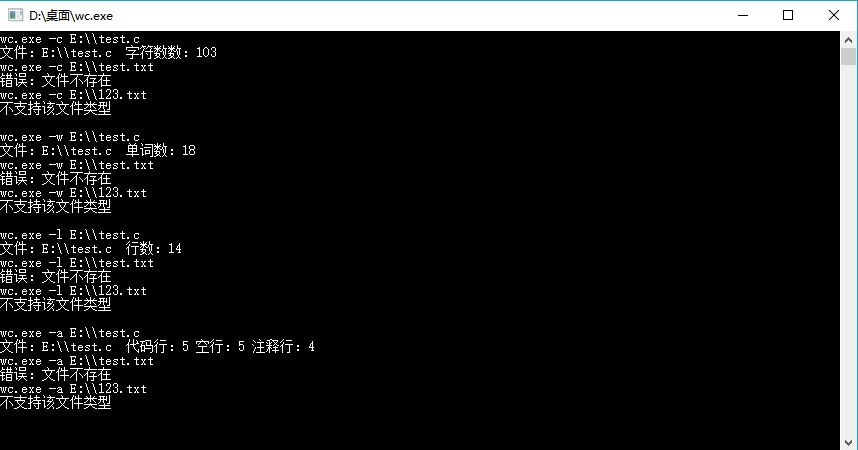
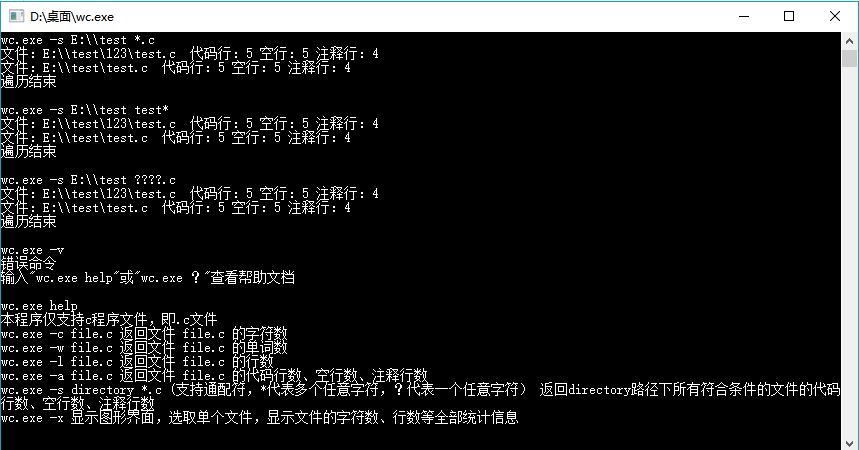
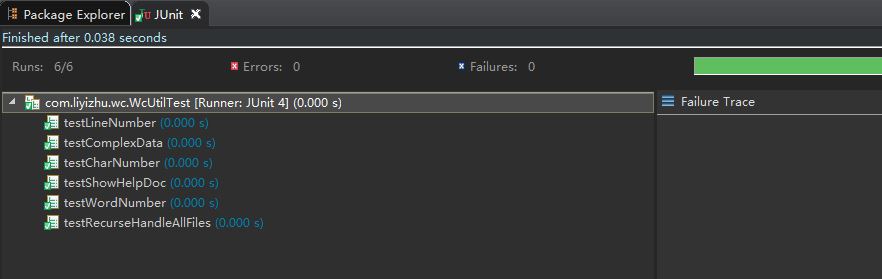
单元测试
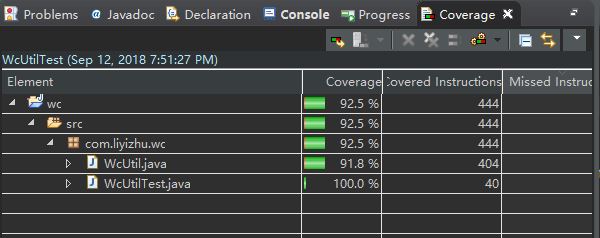
代码覆盖率
项目小结
1、首次使用软件工程的方法,虽然前期花费的时间稍多,但是后面编码思路更加清晰,改善过程不需要大幅度修改代码
2、首次使用JUnit进行单元测试,回归测试,单元测试覆盖率检测,认识到单元测试的重要性
3、重新学习了git和github的使用,更加熟悉git的各种操作
4、学习了exe4j的使用
软工作业1—java实现wc.exe的更多相关文章
- 软工作业(JAVA)
github传送门:https://github.com/hhg52516/WC.git 项目要求 wc.exe 是一个常见的工具,它能统计文本文件的字符数.单词数和行数.这个项目要求写一个命令行程序 ...
- 小白のjava实现wc.exe功能
GitHub地址 项目完成情况 基本功能列表(已实现) wc.exe -c file.c //返回文件 file.c 的字符数 wc.exe -w file.c //返回文件 file. ...
- 软工作业-----Alpha版本第一周小结
软工作业-----Alpha版本第一周小结 Part1.第一周周计划记录 姓名 学号 周前计划安排 每周工作记录 自我打分 yrz(队长) 1417 1.进行任务分析 2.任务分配 ...
- [软工作业]-软件案例分析-CSDN
[软工作业]-软件案例分析-CSDN(app) 项目 内容 这个作业属于哪个课程 2020春季计算机学院软件工程(罗杰 任健) 这个作业的要求在哪里 个人博客作业-软件案例分析 我在这个课程的目标是 ...
- 软工作业No.1。Java实现WC.exe
网址:https://github.com/a249970271/WC WC 项目要求 wc.exe 是一个常见的工具,它能统计文本文件的字符数.单词数和行数.这个项目要求写一个命令行程序,模仿已有w ...
- 软工作业1:wc.exe项目开发(java)
Github地址:https://github.com/Zzhaomin/learngit 项目相关要求 : wc.exe 是一个常见的工具,它能统计文本文件的字符数.单词数和行数.这个项目要求写一个 ...
- 软工作业-wc(Python实现)
GitHub地址:GitHub PSP2.1 Personal Software Process Stages 预估耗时(分钟) 实际耗时(分钟) Planning 计划 30 40 · Esti ...
- 软工作业-Wc
Wc.exe wc.exe是一个常见的工具,它能统计文本文件的字符数.单词数和行数.这个项目要求写一个命令行程序,模仿已有wc.exe 的功能,并加以扩充,给出某程序设计语言源文件的字符数.单词数和行 ...
- java实现wc.exe
Github地址:https://github.com/ztz1998/wc/tree/master 项目相关要求 实现一个统计程序,它能正确统计程序文件中的字符数.单词数.行数,以及还具备其他扩展功 ...
随机推荐
- 使用gitblit搭建git服务器
前言 一直在学习新技术,我想都整理到博客上.公司还在坚持用svn,之前学过git都快要忘记了,此篇博客记录搭建基于gitblit的git服务器.当然直接使用linux也可以,不过我不是很熟悉,考虑到我 ...
- Python第10天
装饰器:本质上是函数,为其他函数添加附件功能. 装饰器 = 高阶函数 + 函数嵌套 + 闭包 原则(开放封闭原则):1,不修改被修饰函数代码.2,不修改被修饰函数调用方式. @方法名
- ubuntu装bochs的常见问题
1.Message: dlopen failed for module ‘x’: file not found 原因 未安装bochs-x的缘故 解决办法 sudo apt-get install b ...
- [WSGI]WSGI的服务端怎么实现?
WSGI ( Python Web Server GateWay Interface) 是一个用在python web server 跟web application 之间的协议,遵从WSGI协议设计 ...
- React列表
const numbers = [1, 2, 3, 4, 5]; const listItems = numbers.map((numbers) => <li>{numbers}&l ...
- 侧脸生成正脸概论与精析(一)Global and Local Perception GAN
侧脸生成正脸我一直很感兴趣,老早就想把这块理一理的.今天来给大家分享一篇去年的老文章,如果有不对的地方,请斧正. Beyond Face Rotation: Global and Local Perc ...
- 初探LaTeX
第一次使用LaTeX 步骤 1 安装LaTeX 通过官网http://www.tug.org/mactex/mactex-download.html下载Mac版LaTeX. 安装成功后会出现 步骤 ...
- Idea安装lombok插件【转载】
参照:http://www.cnblogs.com/holten/p/5729226.html https://yq.aliyun.com/articles/59972 lombok是一个可以通过简单 ...
- SpringBoot之基础
简介 背景 J2EE笨重的开发 / 繁多的配置 / 低下的开发效率 / 复杂的部署流程 / 第三方技术集成难度大 特点 ① 快速创建独立运行的spring项目以及主流框架集成 ② 使用嵌入式的Serv ...
- Binder吐槽学习
通过 ProcessState::self()->startThreadPool()新加了一个Binder线程,然后通过IPCThreadState::self()->joinThread ...