
电商门户网站商品品类多级联动SpringBoot+Thymeleaf实现
在淘宝、京东等电商网站,其门户网站都有一个商品品类的多级联动,鼠标移动,就显示,因为前端不是我做的,所以不说明前端实现,只介绍后端实现。
搭建部署SpringBoot环境
配置文件配置:
开启了对Thymeleaf模块引擎的支持
server:

  port: 8081

#logging:

#  config: classpath:logback_spring.xml

#  level:

#    com.muses.taoshop: debug

#  path: /data/logs

spring:

  datasource:

    # 主数据源

    shop:

      url: jdbc:mysql://127.0.0.1:3306/taoshop?autoReconnect=true&useUnicode=true&characterEncoding=utf8&characterSetResults=utf8&useSSL=false

      username: root

      password: root

    driver-class-name: com.mysql.jdbc.Driver

    type: com.alibaba.druid.pool.DruidDataSource

    # 连接池设置

    druid:

      initial-size: 5

      min-idle: 5

      max-active: 20

      # 配置获取连接等待超时的时间

      max-wait: 60000

      # 配置间隔多久才进行一次检测,检测需要关闭的空闲连接,单位是毫秒

      time-between-eviction-runs-millis: 60000

      # 配置一个连接在池中最小生存的时间,单位是毫秒

      min-evictable-idle-time-millis: 300000

      # Oracle请使用select 1 from dual

      validation-query: SELECT 'x'

      test-while-idle: true

      test-on-borrow: false

      test-on-return: false

      # 打开PSCache,并且指定每个连接上PSCache的大小

      pool-prepared-statements: true

      max-pool-prepared-statement-per-connection-size: 20

      # 配置监控统计拦截的filters,去掉后监控界面sql无法统计,'wall'用于防火墙

      filters: stat,wall,slf4j

      # 通过connectProperties属性来打开mergeSql功能;慢SQL记录

      connection-properties: druid.stat.mergeSql=true;druid.stat.slowSqlMillis=5000

      # 合并多个DruidDataSource的监控数据

      use-global-data-source-stat: true

#  jpa:

#    database: mysql

#    hibernate:

#      show_sql: true

#      format_sql: true

#      ddl-auto: none

#      naming:

#        physical-strategy: org.hibernate.boot.entity.naming.PhysicalNamingStrategyStandardImpl

#  mvc:

#    view:

#      prefix: /WEB-INF/jsp/

#      suffix: .jsp

  #添加Thymeleaf配置

  thymeleaf:

    cache: false

    prefix: classpath:/templates/

    suffix: .html

    mode: HTML5

    encoding: UTF-8

    content-type: text/html

  #Jedis配置

#  jedis :

#    pool :

#      host : 127.0.0.1

#      port : 6379

#      password : redispassword

#      timeout : 0

#      config :

#        maxTotal : 100

#        maxIdle : 10

#        maxWaitMillis : 100000
SpringBoot启动类:
package com.muses.taoshop;

import org.mybatis.spring.boot.autoconfigure.MybatisAutoConfiguration;

import org.springframework.boot.*;

import org.springframework.boot.autoconfigure.*;

import org.springframework.boot.autoconfigure.jdbc.DataSourceAutoConfiguration;

import org.springframework.boot.autoconfigure.jdbc.DataSourceTransactionManagerAutoConfiguration;

import org.springframework.boot.web.servlet.ServletComponentScan;

import org.springframework.cache.annotation.EnableCaching;

import org.springframework.scheduling.annotation.EnableAsync;

import org.springframework.scheduling.annotation.EnableScheduling;

import org.springframework.stereotype.*;

import org.springframework.transaction.annotation.EnableTransactionManagement;

import org.springframework.web.bind.annotation.*;

/**

 *

 * <pre>

 *  SpringBoot启动配置类

 * </pre>

 * @author nicky

 * @version 1.00.00

 * <pre>

 * 修改记录

 *    修改后版本:     修改人:  修改日期:     修改内容:

 * </pre>

 */

@Controller

@EnableScheduling//开启对计划任务的支持

@EnableTransactionManagement//开启对事务管理配置的支持

@EnableCaching

@EnableAsync//开启对异步方法的支持

@EnableAutoConfiguration

@ServletComponentScan

@SpringBootApplication(exclude={DataSourceAutoConfiguration.class,

        MybatisAutoConfiguration.class,

        DataSourceTransactionManagerAutoConfiguration.class})

public class PortalApplication {

    @RequestMapping("/")

    @ResponseBody

    String home() {

        return "portal web!";

    }

    @RequestMapping("/doTest")

    @ResponseBody

    String doTest(){

        System.out.println(Thread.currentThread().getName());

        String threadName = Thread.currentThread().getName();

        return threadName;

    }

    public static void main(String[] args) throws Exception {

        SpringApplication.run(PortalApplication.class, args);

    }

}
写个Controller类跳转到门户网站:
ps:品类多级联动思路其实就是先构建一个树,我这里的做法就是先查询处理,然后通过工具类,进行递归遍历,待会给出工具类代码,仅供参考。listCategory方法其实就是获取所有的品类信息
package com.muses.taoshop.web.controller.portal;

import com.alibaba.fastjson.JSON;

import com.muses.taoshop.item.entity.ItemBrand;

import com.muses.taoshop.item.entity.ItemCategory;

import com.muses.taoshop.item.entity.ItemPortal;

import com.muses.taoshop.item.service.IItemBrankService;

import com.muses.taoshop.item.service.IItemCategoryService;

import com.muses.taoshop.item.service.IItemService;

import com.muses.taoshop.util.CategoryTreeUtils;

import com.muses.taoshop.web.controller.BaseController;

import org.springframework.beans.factory.annotation.Autowired;

import org.springframework.stereotype.Controller;

import org.springframework.util.CollectionUtils;

import org.springframework.web.bind.annotation.*;

import org.springframework.web.servlet.ModelAndView;

import java.util.Date;

import java.util.List;

/**

 * <pre>

 *  门户网站控制类

 * </pre>

 *

 * @author nicky

 * @version 1.00.00

 * <pre>

 * 修改记录

 *    修改后版本:     修改人:  修改日期:     修改内容:

 * </pre>

 */

@Controller

@RequestMapping("/portal")

public class IndexController extends BaseController{

    @Autowired

    IItemService iItemService;

    @Autowired

    IItemBrankService iItemBrankService;

    @Autowired

    IItemCategoryService iItemCategoryService;

    /**

     * 跳转到门户网站

     * @return

     */

    @GetMapping(value = "/toIndex.do")

    public ModelAndView toIndex(){

        info("跳转到门户网站");

        ModelAndView mv = this.getModelAndView();

        mv.setViewName("index");

        List<ItemPortal> items = iItemService.listItemPortal();

        CategoryTreeUtils treeUtil = new CategoryTreeUtils();

        List<ItemCategory> list = iItemCategoryService.listCategory();

        List<ItemCategory> categories = treeUtil.buildCategoryTree(list);

        mv.addObject("items" , items);

        mv.addObject("categories" , categories);

        return mv;

    }

    @GetMapping(value = "/doTest")

    @ResponseBody

    public  String doTest(){

        List<ItemBrand> itemBrands = iItemBrankService.listItemBrand();

        String str = JSON.toJSON(itemBrands).toString();

        return str;

    }

}
业务接口类:
 package com.muses.taoshop.item.service;

import com.muses.taoshop.item.entity.ItemCategory;

import com.muses.taoshop.item.entity.ItemList;

import java.util.List;

/**

 * <pre>

 *  商品品类信息接口

 * </pre>

 *

 * @author nicky

 * @version 1.00.00

 * <pre>

 * 修改记录

 *    修改后版本:     修改人:  修改日期: 2018.06.17 10:59    修改内容:

 * </pre>

 */

public interface IItemCategoryService {

    /**

     * 查询所有商品品类信息

     * @return

     */

    List<ItemCategory> listCategory();
业务服务实现类:
  package com.muses.taoshop.item.service;

import com.muses.taoshop.item.entity.ItemCategory;

import com.muses.taoshop.item.entity.ItemList;

import com.muses.taoshop.item.mapper.ItemCategoryMapper;

import org.springframework.beans.factory.annotation.Autowired;

import org.springframework.stereotype.Service;

import java.util.List;

/**

 * <pre>

 *  商品品类信息服务实现类

 * </pre>

 *

 * @author nicky

 * @version 1.00.00

 * <pre>

 * 修改记录

 *    修改后版本:     修改人:  修改日期: 2018.06.17 11:01    修改内容:

 * </pre>

 */

@Service

public class ItemCategoryServiceImpl implements IItemCategoryService{

    @Autowired

    ItemCategoryMapper itemCategoryMapper;

    /**

     * 查询所有的商品品类信息

     * @return

     */

    @Override

    public List<ItemCategory> listCategory() {

        return itemCategoryMapper.listCategory();

    }

}
Mybatis相关代码:
<?xml version="1.0" encoding="UTF-8" ?>

<!DOCTYPE mapper PUBLIC "-//mybatis.org//DTD Mapper 3.0//EN" "http://mybatis.org/dtd/mybatis-3-mapper.dtd" >

<mapper namespace="com.muses.taoshop.item.mapper.ItemCategoryMapper" >

  <resultMap id="BaseResultMap" type="com.muses.taoshop.item.entity.ItemCategory" >

    <id column="id" property="id" jdbcType="BIGINT" />

    <result column="category_name" property="categoryName" jdbcType="VARCHAR" />

    <result column="sjid" property="sjid" jdbcType="BIGINT" />

    <result column="last_modify_time" property="lastModifyTime" jdbcType="TIMESTAMP" />

    <result column="create_time" property="createTime" jdbcType="TIMESTAMP" />

  </resultMap>

  <sql id="BaseColumnList" >

    id,

        category_name as categoryName,

        sjid,

        last_modify_time as lastModifyTime,

        create_time as createTime

  </sql>

    <!-- 获取所有的商品品类信息-->

    <select id="listCategory" resultType="ItemCategory">

        SELECT

        <include refid="BaseColumnList" />

        FROM item_category t

    </select>

</mapper>
Mapper接口类:
package com.muses.taoshop.item.mapper;

import com.muses.taoshop.item.entity.ItemCategory;

import com.muses.taoshop.item.entity.ItemList;

import org.apache.ibatis.annotations.Mapper;

import org.apache.ibatis.annotations.Param;

import java.util.List;

@Mapper

public interface ItemCategoryMapper {

    List<ItemCategory> listCategory();

}
实体类:
这里用了lombok的jar来实现,所有不用set和get方法
package com.muses.taoshop.item.entity;

import com.alibaba.fastjson.annotation.JSONField;

import com.fasterxml.jackson.annotation.JsonFormat;

import com.fasterxml.jackson.databind.annotation.JsonSerialize;

import lombok.Data;

import org.springframework.format.annotation.DateTimeFormat;

import javax.validation.constraints.NotNull;

import java.util.Date;

import java.util.List;

/**

 * <pre>

 *  商品品类

 * </pre>

 * @author nicky

 * @version 1.00.00

 * <pre>

 * 修改记录

 *    修改后版本:     修改人:  修改日期: 2018.06.09 21:49    修改内容:

 * </pre>

 */

@Data

public class ItemCategory {

    /**

     * 商品品类id

     */

    private Long id;

    /**

     * 商品品类名称

     */

    private String categoryName;

    /**

     * 上级id

     */

    private Long sjid;

    /**

     * 上次修改时间

     */

    @JSONField(format ="yyyy-MM-dd HH:mm:ss")

    private Date lastModifyTime;

    /**

     * 创建时间

     */

    @JSONField(format ="yyyy-MM-dd HH:mm:ss")

    private Date createTime;

    /**

     * 子菜单

     */

    private List<ItemCategory> subCategorys;

}
构建品类树的工具类:
package com.muses.taoshop.util;

import com.muses.taoshop.item.entity.ItemCategory;

import javax.mail.FetchProfile;

import java.util.ArrayList;

import java.util.List;

/**

 * <pre>

 *  构造一棵品类树

 * </pre>

 *

 * @author nicky

 * @version 1.00.00

 * <pre>

 * 修改记录

 *    修改后版本:     修改人:  修改日期: 2018.06.24 17:12    修改内容:

 * </pre>

 */

public class CategoryTreeUtils {

    public List<ItemCategory> commonCategorys;

    public List<ItemCategory> list = new ArrayList<ItemCategory>();

    public List<ItemCategory> buildCategoryTree(List<ItemCategory> categories ) {

        this.commonCategorys = categories;

        for (ItemCategory c : categories){

            ItemCategory category = new ItemCategory();

            if(c.getSjid() == 0){

                category.setSjid(c.getSjid());

                category.setId(c.getId());

                category.setCategoryName(c.getCategoryName());

                category.setSubCategorys(treeChild(c.getId()));

                list.add(category);

            }

        }

        return list;

    }

    public List<ItemCategory> treeChild(long id){

        List<ItemCategory> list = new ArrayList<ItemCategory>();

        for(ItemCategory c : commonCategorys){

            ItemCategory category = new ItemCategory();

            if(c.getSjid() == id){

                category.setSjid(c.getSjid());

                category.setId(c.getId());

                category.setCategoryName(c.getCategoryName());

                category.setSubCategorys(treeChild(c.getId()));//递归循环

                list.add(category);

            }

        }

        return list;

    }

}
前端代码:
<div class="headerNav" xmlns:th="http://www.thymeleaf.org">

    <div class="layout">

        <dl class="all-brands">

            <dt class="all-brands-head"> <a href="#">全部商品分类</a> </dt>

            <dd class="all-brands-list">

                <div class="wrap" th:each="c : ${categories}">

                    <div class="all-sort-list">

                        <div class="item bo">

                            <h3>

                                <a href="" th:text="${c.categoryName}"></a></h3>

                            <div class="item-list clearfix">

                                <div class="close">x</div>

                                <div class="subitem" th:each="s: ${c.subCategorys}">

                                    <dl class="fore1">

                                        <dt th:text="${s.categoryName}"><a th:href="@{'/portal/category/toCategoryList/'+${s.id}}"></a></dt>

                                        <dd>

                                            <em th:each="ss : ${s.subCategorys} "><a th:href="@{'/portal/category/toCategoryList/'+${ss.id}}" th:text="${ss.categoryName}"></a></em>

                                        </dd>

                                    </dl>

                                </div>

                            </div>

                        </div>

                    </div>

                </div>

            </dd>

        </dl>

        </div>

    </div>

</div>
实现的效果如图:可以说是3级联动
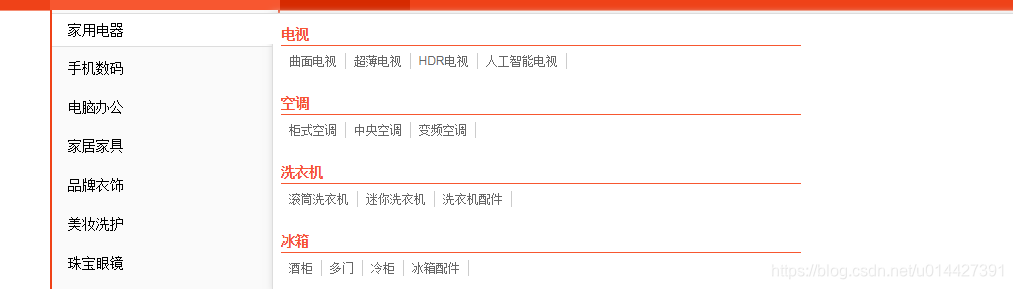
这是在开发中的开源项目的一个小功能,源码已经开源,github链接
电商门户网站商品品类多级联动SpringBoot+Thymeleaf实现的更多相关文章
- SpringBoot电商项目实战 — 商品的SPU/SKU实现
最近事情有点多,所以系列文章已停止好多天了.今天我们继续Springboot电商项目实战系列文章.到目前为止,整个项目的架构和基础服务已经全部实现,分布式锁也已经讲过了.那么,现在应该到数据库设计及代 ...
- 电商ERP系统——商品SKU与库存设计
面试题经常问道,如何设计库存,哪些库存呢?分类属性的库存:不同颜色 不同尺码的属性的库存,这时候需要针对具体的SKU商品创建表. 总体思路 1.商品关联商品类别,商品类别关联多个商品属性,其中指定某几 ...
- Django电商项目---完成商品主页显示day2
利用DjangoAdmin初始化数据库 创建项目 python manage.py startapp df_goods 添加配置 manas/urls.py manas/settings.py 新创建 ...
- Android开发之TextView中间设置横线,适用于电商项目,商品原价之类的功能。
textview.getPaint().setFlags(Paint. STRIKE_THRU_TEXT_FLAG ); //中间横线 textview.getPaint().setFlags(Pai ...
- Java生鲜电商平台-商品基础业务架构设计-商品设计
Java生鲜电商平台-商品基础业务架构设计-商品设计 在生鲜电商的商品中心,在电子商务公司一般是后台管理商品的地方.在前端而言,是商家为了展示商品信息给用户的地方,它是承担了商品的数据,订单,营销活动 ...
- 42、生鲜电商平台-商品的spu和sku数据结构设计与架构
说明:Java开源生鲜电商平台中商品的spu和sku数据结构设计与架构,包括数据库图标与架构分析. 1. 先说明几个概念. 电商网站采用在商品模块,常采用spu+sku的数据结构算法,这种算法可以将商 ...
- Java生鲜电商平台-生鲜电商中商品类目、属性、品牌、单位架构设计与实战
Java生鲜电商平台-生鲜电商中商品类目.属性.品牌.单位架构设计与实战 说明:Java生鲜电商平台-生鲜电商中商品类目.属性.品牌.单位架构设计与实战经验分享 凡是涉及到购物,必然是建立在商品的基础 ...
- 14 微服务电商【黑马乐优商城】:day04-项目搭建(一)
本项目的笔记和资料的Download,请点击这一句话自行获取. day01-springboot(理论篇) :day01-springboot(实践篇) day02-springcloud(理论篇一) ...
- 电商类Web原型制作分享-IKEA
IKEA是一个家居整合大型零售商,属于电商类官网.电商以展示商品.售后服务.购物流程为主.根据网站的图文方式排版,主导航栏使用的标签组,区域导航栏使用的是垂直选项卡,实现下拉弹出面板交互的功能. 本原 ...
随机推荐
- 利用mybatis generator实现数据库之间的表同步
项目背景: 项目需要对两个服务器上的表进行同步,表的结构可能不一样.比如服务器A上的表i同步数据到服务器B上的表j,i和j的结构可能不一样,当然大部分字段是一样的.项目看起来很简单,网上一搜也是很多, ...
- Markdown使用小总结[不定时更新]
title: Markdown使用小总结 date: 2019-03-27 10:09:19 tags: Markdown --- 鸽了这么久,Markdown使用下降,因此写一篇博客来总结一下至今( ...
- EasyPR源码剖析(2):车牌定位
上一篇主要介绍了车牌识别的整体框架和流程,车牌识别主要划分为了两个过程:即车牌检测和字符识别,而车牌识别的核心环节就是这一节主要介绍的车牌定位,即 Plate Locate.车牌定位主要是将图片中有可 ...
- MybatisMapper 动态映射(增删改查)
//接口内容以及注意事项 package cn.jy.mybatis.mapper; import java.util.List; import cn.jy.mybatis.pojo.User; pu ...
- Flask 学习目录
Flask 学习目录 Flask 的学习过程是一个了解如何从单个模块搭建一个 Web 框架的过程. Python.Flask 的安装和设置 简单的 Hello World 程序 使用 Jinjia2 ...
- sourceInsight4 完美破解
sourceInsight4 完美破解 参考路径: https://blog.csdn.net/zxy020/article/details/75047670 首先确保你在官网下载了原版4.0并安装好 ...
- LeetCode —— 移动零
给定一个数组 nums,编写一个函数将所有 0 移动到数组的末尾,同时保持非零元素的相对顺序. 示例: 输入: [0,1,0,3,12] 输出: [1,3,12,0,0] 说明: 必须在原数组上操作, ...
- 解决Chrome 70及以上版本的证书问题:Failed to load resource: net::ERR_CERT_SYMANTEC_LEGACY
1.桌面必须要有Chrome 快捷方式 2.进入快捷方式属性 3.修改目标为:"C:\Program Files (x86)\Google\Chrome\Application\chrome ...
- IOS 视频.图片上传服务器
//上传视频 AFHTTPSessionManager *manager = [AFHTTPSessionManager manager]; manager.requestSerializer. ...
- 学习Acegi应用到实际项目中(12)- Run-As认证服务
有这样一些场合,系统用户必须以其他角色身份去操作某些资源.例如,用户A要访问资源B,而用户A拥有的角色为AUTH_USER,资源B访问的角色必须为AUTH_RUN_AS_DATE,那么此时就必须使用户 ...