
【Teradata】块压缩(ferret工具)
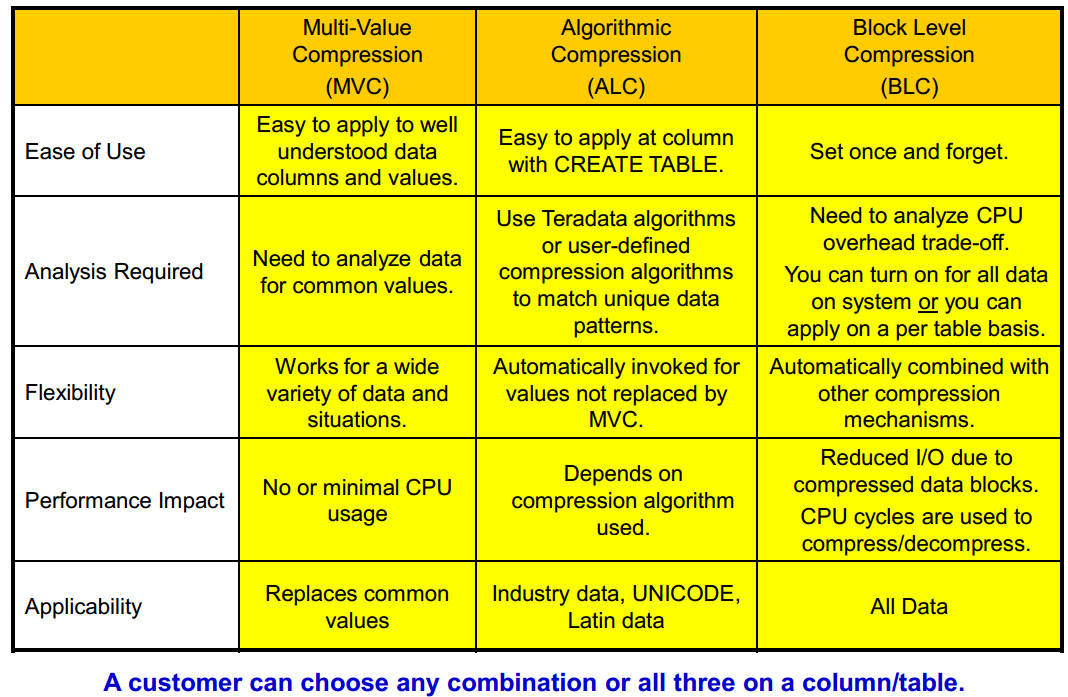
多值压缩(MVC)
Enhanced Multi-Value Compression (MVC) or Value-List Compression
• Compress VARCHAR, VARBYTE, or VARGRAPHIC columns
• Number of characters in a compressed value is increased to 510.
算法压缩(ALC)
Algorithmic Compression (ALC) or Column Level Compression
• Allows users to apply a compression algorithm to data at the column level in a row.
– One example is to compress two-byte Unicode into one byte when the data is Latin (ASCII).
• Compression/decompression is done by specifying a UDF function.
– Teradata provides some UDFs to do compression for UNICODE and LATIN data columns.
– User can create and apply their own compression/decompression algorithms to columns.
块压缩(BLC)
Block Level Compression :在数据块实际写入/读取存储设备之前,Teradata在文件系统级别对整个数据块执行压缩。
压缩/解压缩整个数据块会增加CPU成本,但会减少IO。目前CPU成本在不断下降,IO成本还比较高,所以CPU换IO非常划算。
可以在系统上打开所有数据块压缩,也可以按表申请块压缩。
自动与其它压缩机制结合。
BLC将只压缩/解压缩数据块,但不会用于任何文件系统结构,如主/柱面索引、WAL日志和表头。
• How is BLC set for a specific table?
• When loading data, SET QUERY_BAND = 'BLOCKCOMPRESSION=YES/NO;' FOR SESSION;
• Ferret utility has new commands – COMPRESS/UNCOMPRESS table
• DBSControl settings
1.在dbscontrol中开启块压缩
display compression

modify compression  = on

write
2.启动ferret
方法一:使用admin用户登录viewpoint,选择remote console,选择ferret工具
方法二:使用root用户登录节点
cnsterm

start ferret

日志提示started ferret in window

Ctrl + C 退出当前窗口

cnsterm   //2为start ferret命令显示窗口编号
3.记录ferret所有屏显日志
//启动ferret后执行

output into /tmp/file.out
4.查看某表是否已经压缩,C代表全压缩,U代表无压缩
scope table ("ds.orders" *)   //单表

scope table ("ds.orders" *,"ds.orders_2016" *)   //多表

showblock

tableid "ds.orders" //查看表ID
5.进行块压缩
同一时间仅能启动一个compress命令,/y参数代表无需确认。
compress  /y "ds.orders"      //压缩某张表

compress  /y "ds.*"   //压缩全库
6.解压缩
uncompress /y "ds.orders"
7.更新dbc的数据表大小信息
使用ferret工具进行压缩处理,dbc的空间信息不会及时更新,需要通过updatesapce工具进行处理,由于这个工具是针对整个库进行的,所以最好在一个库下面的所有表都压缩处理完成后,再统一执行一次。
如果某个表数据发生变更,也会自动更新DBC空间信息。
cnsterm

start updatespace

日志提示started update space in window

Ctrl + C 退出当前窗口

cnsterm   //3为start updatespace命令显示窗口编号

update all space for ds;
IDKCS001442
Space
accounting is not immediate but the tables should be compressed immediately.
Please check the "showblock /m" output in ferret to confirm if the table is
compressed. as soon as the tables are created with compress option or if
manual compression is done on the particular table using ferret then running
updatespace is required to reflect the space change immediately or will reflect
with next auto updatespace run.
【Teradata】块压缩(ferret工具)的更多相关文章
- Linux中常用压缩打包工具
Linux中常用压缩打包工具 压缩打包是常用的功能,在linux中目前常用的压缩工具有gzip,bzip2以及后起之秀xz.本文将介绍如下的工具常见压缩.解压缩工具以及打包工具tar. gzip2 直 ...
- Java压缩和解压缩文件工具
Java压缩和解压缩文件工具 学习了: https://www.oschina.net/code/snippet_1021818_48130 http://blog.csdn.net/gaowen_h ...
- PHP的LZF压缩扩展工具
这次为大家带来的是另外一个 PHP 的压缩扩展,当然也是非常冷门的一种压缩格式,所以使用的人会比较少,而且在 PHP 中提供的相关的函数也只是对字符串的编码与解码,并没有针对文件的操作.因此,就像 B ...
- 【Teradata】磁盘碎片整理(ferret工具)
DEFRAGMENTcombines free sectors and moves them to the end of a cylinder.PACKDISKfill (or packs) cyli ...
- 【Teradata Utility】系统工具使用
List two ways in which a system utility can be started. Explain how to use the following utilities t ...
- C#照片批量压缩小工具
做了一个照片批量压缩工具,其实核心代码几分钟就完成了,但整个小工具做下来还是花了一天的时间.中间遇到了大堆问题,并寻求最好的解决方案予以解决.现在就分享一下这个看似简单的小工具所使用的技术. 软件界面 ...
- Java操作zip压缩和解压缩文件工具类
需要用到ant.jar(这里使用的是ant-1.6.5.jar) import java.io.File; import java.io.FileInputStream; import java.io ...
- Linux下方便的块设备查看工具lsblk
之前在Linux下看有什么块设备,通常都用fdisk什么的或者直接ls /dev/ 去看很不方便. 这个工具属于util-linux-ng包,在RHEL 6.1上是安装好的啦,直接用就好. ubunt ...
- 图片压缩java工具类
package com.net.util; import java.awt.Image; import java.awt.image.BufferedImage; import java.io.Fil ...
随机推荐
- JavaScript数组入门。
JavaScript中的array对象就是数组,首先是一个动态数组,而且是一个像c#中 数组 arraylist hashtable等的综合体. var arr = [1, 7, 3, 4, 5]; ...
- 【转载】ASP.NET工具类:文件夹目录Directory操作工具类
在ASP.NET开发网站的过程中,有时候会涉及到文件夹相关操作,如判断文件夹目录是否存在.删除文件夹目录.创建文件.删除文件.复制文件夹等等.这一批有关文件目录的操作可以通过Directory类.Fi ...
- Jquery里的特定小技巧
jQuery 动态设置样式: https://blog.csdn.net/xiaoyuncc/article/details/70854925 jquery如 ...
- .net core部署在iis上
部署在Windows Server 2008 R2上,一直安装失败,网上找的资料一直无法解决问题,后来找到了官方的文档, 原来是要安装sp1,大概2g左右,同时也要安装Microsoft Visual ...
- .NET MVC项目设置包含Areas中的页面为默认启动页
利用vs创建一个MVC项目后,一般的默认启动页是根目录下-->Controllers-->HomeController-->Index这个方法对应的页面. 我先说下创建Areas的流 ...
- 谈谈mysql的悲观和乐观锁
悲观锁与乐观锁是两种常见的资源并发锁设计思路,也是并发编程中一个非常基础的概念.之前有写过一篇文章关于并发的处理思路和解决方案,这里我单独将对这两种常见的锁机制在数据库数据上的实现进行比较系统的介绍一 ...
- (6)Microsoft office Word 2013版本操作入门_文件封面,页首,页尾
1插入封面: 1.1光标移动到首段,按住 Ctrl+Enter键可以插入一个新页面. 1.2 插入--->封面 可以在封面插入一个文件封面,里面的图片可以自己修改,文字标题也可以自己修改. 1. ...
- Java并发编程-ReentrantReadWriteLock
基于AQS的前世今生,来学习并发工具类ReentrantReadWriteLock.本文将从ReentrantReadWriteLock的产生背景.源码原理解析和应用来学习这个并发工具类. 1. 产生 ...
- img图像标签和超链接标签a
图像标签语法:<img src="" alt="".../> img属性:src="" 显示图像的URLalt="& ...
- margin:0 auto是什么意思
一.margin设置对象外边距 二.margin后面如果只有两个参数的话,第一个表示top和bottom,第二个表示left和right 因为0 auto