
python多线程与多进程--存活主机ping扫描以及爬取股票价格
python多线程与多进程
多线程:
案例:扫描给定网络中存活的主机(通过ping来测试,有响应则说明主机存活)
普通版本:
#扫描给定网络中存活的主机(通过ping来测试,有响应则说明主机存活)
import sys

import subprocess

import time

def ping(net,start=100,end=200,n=2,w=5):

    for i in range(start,end+1):

        ip=net+"."+str(i)

        command="ping %s -n %d -w %d"%(ip,n,w)

        print(ip,("通","不通")[subprocess.call(command,stdout=open("nul","w"))]) #stdout=open("nul","w") #不显示命令执行返回的结果

t1=time.time()

if len(sys.argv)!=2:

    print("参数输入错误!")

    print("运行示例:")

    print("test01.py 123.125.114")

elif len(sys.argv)==2:

    net=sys.argv[1]

    ping(net)

t2=time.time()

print("程序耗时%f秒!"%(t2-t1))   #195.091611秒
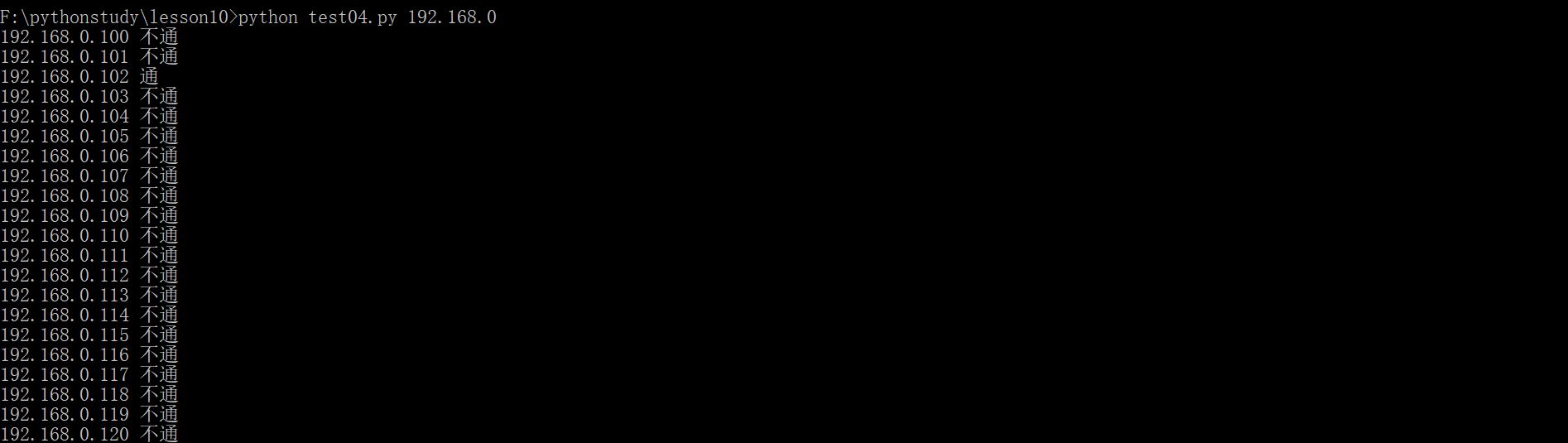
运行效果如下:
在python里面,线程的创建有两种方式,其一使用Thread类创建
导入Python标准库中的Thread模块
from threading import Thread
创建一个线程
mthread = threading.Thread(target=function_name, args=(function_parameter1, function_parameterN))
启动刚刚创建的线程
mthread .start()
function_name: 需要线程去执行的方法名
args: 线程执行方法接收的参数,该属性是一个元组,如果只有一个参数也需要在末尾加逗号。
多线程版:
import sys

import subprocess

import time

from threading import Thread

#在python里面,线程的创建有两种方式,其一使用Thread类创建

# 导入Python标准库中的Thread模块

#from threading import Thread #

# 创建一个线程

#mthread = threading.Thread(target=function_name, args=(function_parameter1, function_parameterN))

# 启动刚刚创建的线程

#mthread .start()

#function_name: 需要线程去执行的方法名

#args: 线程执行方法接收的参数,该属性是一个元组,如果只有一个参数也需要在末尾加逗号。

result=[]

def ping1(ip):

    command="ping %s -n 1 -w 20"%(ip)

    result.append([ip,subprocess.call(command)])

def ping(net,start=100,end=200):

    for i in range(start,end+1):

        ip=net+"."+str(i)

        th=Thread(target=ping1,args=(ip,))

        th.start()

def main():

    if len(sys.argv)!=2:

        print("参数输入错误!")

        print("运行示例:")

        print("test01.py 123.125.114")

    elif len(sys.argv)==2:

        net=sys.argv[1]

        ping(net)

if __name__=='__main__':

    t1=time.time()

    main()

    while len(result)!=101:

        time.sleep(1)

print(result)

t2=time.time()

print("程序耗时%f秒!"%(t2-t1))   #1.585263秒
多线程案例2:爬取股票的价格
多线程

#爬取股票的价格

import requests

import re

import time

from threading import Thread

code=[600016,600000,601939,600036,603683,600050,601890,600795,601857,600584,601231,603165,600644,603005,601198,603690,600643,600131,600776,603609,601377]

m1=re.compile(r"price: '(\d{1,3}\.\d{2}')")

def getprice(id):

    url="http://quotes.money.163.com/0%s.html"%id

    txt=requests.get(url).text

    price=m1.search(txt).group(1)

    print(id,price)

if __name__=="__main__":

    ts=[]

    start=time.time()

    for id in code:

        t=Thread(target=getprice,args=(id,))

        ts.append(t)

        t.start()

    for t in ts:

        t.join()    #等待子线程运行完,主线程再运行

    print("程序耗时:",time.time()-start)
多进程:
爬取股票的价格(多进程版)
#多进程

#爬取股票的价格

import requests

import re

import time

from multiprocessing import Process

from threading import Thread

code=[600016,600000,601939,600036,603683,600050,601890,600795,601857,600584,601231,603165,600644,603005,601198,603690,600643,600131,600776,603609,601377]

m1=re.compile(r"price: '(\d{1,3}\.\d{2}')")

def getprice(id):

    url="http://quotes.money.163.com/0%s.html"%id

    txt=requests.get(url).text

    price=m1.search(txt).group(1)

    print(id,price)

ps=[]   #进程池

if __name__=="__main__":

    start=time.time()

    for id in code:

        p=Process(target=getprice,args=(id,))

        ps.append(p) #把进程放入列表(进程池)

        p.start()   #启动进程

    for p in ps:

        p.join()

    print(time.time()-start)
爬取股票的价格(多进程版)带Pool
#爬取股票的价格

import requests

import re

import time

from multiprocessing import Pool

#多进程带Pool

code=[600016,600000,601939,600036,603683,600050,601890,600795,601857,600584,601231,603165,600644,603005,601198,603690,600643,600131,600776,603609,601377]

m1=re.compile(r"price: '(\d{1,3}\.\d{2}')")

def getprice(id):

    url="http://quotes.money.163.com/0%s.html"%id

    txt=requests.get(url).text

    price=m1.search(txt).group(1)

    print(id,price)

if __name__=="__main__":

    start=time.time()

    p=Pool(4)

    for id in code:

        p.apply_async(getprice,args=(id,))  #async异步,第一个参数是函数名,第二个是此函数的参数

    p.close()

    p.join()    #等待子线程运行完,主线程再运行

    print("程序耗时:",time.time()-start)
python多线程与多进程--存活主机ping扫描以及爬取股票价格的更多相关文章
- Python多线程和多进程谁更快?
python多进程和多线程谁更快 python3.6 threading和multiprocessing 四核+三星250G-850-SSD 自从用多进程和多线程进行编程,一致没搞懂到底谁更快.网上很 ...
- python多线程与多进程及其区别
个人一直觉得对学习任何知识而言,概念是相当重要的.掌握了概念和原理,细节可以留给实践去推敲.掌握的关键在于理解,通过具体的实例和实际操作来感性的体会概念和原理可以起到很好的效果.本文通过一些具体的例子 ...
- Python 多线程、多进程 (三)之 线程进程对比、多进程
Python 多线程.多进程 (一)之 源码执行流程.GIL Python 多线程.多进程 (二)之 多线程.同步.通信 Python 多线程.多进程 (三)之 线程进程对比.多线程 一.多线程与多进 ...
- Python 多线程、多进程 (一)之 源码执行流程、GIL
Python 多线程.多进程 (一)之 源码执行流程.GIL Python 多线程.多进程 (二)之 多线程.同步.通信 Python 多线程.多进程 (三)之 线程进程对比.多线程 一.python ...
- Python 多线程、多进程 (二)之 多线程、同步、通信
Python 多线程.多进程 (一)之 源码执行流程.GIL Python 多线程.多进程 (二)之 多线程.同步.通信 Python 多线程.多进程 (三)之 线程进程对比.多线程 一.python ...
- 基于Windows平台的Python多线程及多进程学习小结
python多线程及多进程对于不同平台有不同的工具(platform-specific tools),如os.fork仅在Unix上可用,而windows不可用,该文仅针对windows平台可用的工具 ...
- 使用 Python 查看局域网内存活主机
1 安装 (如果误用了 pip insatll nmap的话,要先 pip uninstall nmap) pip install python-nmap Nmap 是一款用于网络发现和安全审计的网络 ...
- python 多线程、多进程
一.首先说下多线程.多进程用途及异同点,另外还涉及到队列的,memcache.redis的操作等: 1.在python中,如果一个程序是IO密集的操作,使用多线程:运算密集的操作使用多进程. 但是,其 ...
- python多线程,多进程
线程是公用内存,进程内存相互独立 python多线程只能是一个cpu,java可以将多个线程平均分配到其他cpu上 以核为单位,所以GIL(全局锁,保证线程安全,数据被安全读取)最小只能控制一个核,很 ...
随机推荐
- Tomcat:At least one JAR was scanned for TLDs yet contained no TLDs
启动Tomcat的时候,经常见到这样的BUG: 14-Apr-2019 13:53:25.198 信息 [localhost-startStop-1] org.apache.jasper.serv ...
- Web笔记(一) Web 简介与开发环境搭建
Web应用程序的工作原理 大多数的Web应用程序结构都是采用最为流行的B/S软件开发体系结构,将Web应用程序部署在Web服务器上,只要Web服务器启动,用户就可以通过客户端浏览器发送HTTP请求到W ...
- [转]node-sass 安装失败的各种坑
本文转自:https://blog.csdn.net/weixin_42406046/article/details/80604623?tdsourcetag=s_pctim_aiomsg 版权声明: ...
- 记录.net使用ueditor富文本编辑器
UEditor是什么 最近在在项目的时候使用到了百度的富文本编辑器.官网有详细的操作流程文档.这里我只是记录项目中常用到的一些事件.以便日后可以方便查询. UEditor是百度的一个javascrip ...
- php opcodes运行原理
谈下php的运行原理--Opcodes. 比如以下一段简单的代码: <?php echo '周伯通‘: ?> 执行这段代码会经过如下4个步骤(确切的来说,应该是PHP的语言引擎Zend) ...
- Spring Bean的生命周期相关博客
最近得面试题一直 问 Spring 得生命周期,鉴于自己还未阅读过源码 所以只能是自己 背一波了.属实不懂硬背得作用,但是无奈被各位面试官打败了.等以后有时间了 一定要阅读几遍spring的 源码 有 ...
- 阿里云oss,简单上传
描述:oss比较方便,省去了自己搭建文件服务器的时间,价格比较便宜,下面是java基于oss的简单上传代码 a.添加maven依赖 <dependency> <groupId> ...
- python面向对象学习(二)基本语法
目录 1. dir内置函数 2. 定义简单的类(只包含方法) 2.1 定义只包含方法的类 2.2 创建对象 2.3 编写第一个面向对象程序 3. 方法中的self参数 3.1 案例改造 -- 给对象添 ...
- 通过示例学习JavaScript闭包
译者按: 在上一篇博客,我们通过实现一个计数器,了解了如何使用闭包(Closure),这篇博客将提供一些代码示例,帮助大家理解闭包. 原文: JavaScript Closures for Dummi ...
- 枚举getClass、getDeclaringClass区别
枚举getClass.getDeclaringClass区别 1):“不含抽象方法”,所有枚举常量未重写方法,的class getClass与getDeclaringClass方法输出结果相同 cla ...