
Dynamics 365 Customer Engagement导入解决方案时出错:Microsoft.Crm.CrmException: Plug-in assembly does not contain the required types or assembly content cannot be updated.
我是微软Dynamics 365 & Power Platform方面的工程师罗勇,也是2015年7月到2018年6月连续三年Dynamics CRM/Business Solutions方面的微软最有价值专家(Microsoft MVP),欢迎关注我的微信公众号 MSFTDynamics365erLuoYong ,回复373或者20191101可方便获取本文,同时可以在第一间得到我发布的最新博文信息,follow me!
Dynamics 365 Customer Engagement使用解决方案来迁移解决方案,手工导出导入很便捷,也可以用程序来做(程序做法请参考我的博文 为Dynamics 365写一个简单程序实现解决方案一键迁移 ),so easy。导入解决方案时有时候会遇到错误,我的博文 导入解决方案错误及其解决办法 总结了一些,我这里在列一个错误如下:
导入解决方案时出错。 :

 Microsoft.Crm.CrmException: Plug-in assembly does not contain the required types or assembly content cannot be updated.

at Microsoft.Crm.CrmPluginAssemblyMetadata.GetPluginTypeMetadata(String typeName)    at Microsoft.Crm.ObjectModel.PluginTypeServiceInternal`1.SetIsWorkFlowActivityAttribute(PluginType _pluginType, IBusinessEntity PluginAssembly, SandboxCustomActivityInfo& customActivityInfo, CrmPluginTypeMetadata& typeMetadata,

ExecutionContext Context)    at Microsoft.Crm.ObjectModel.AssemblyDataCanBeUpdatedValidator.ValidateInternal()

at Microsoft.Crm.ObjectModel.PluginValidatorBase.Validate()

at Microsoft.Crm.ObjectModel.PluginAssemblyServiceInternal`1.VerifyRegistrationAbility(IBusinessEntity pluginAssembly, Boolean createCall, ExecutionContext context, CrmPluginAssemblyMetadata assemblyMetadata)

 at Microsoft.Crm.ObjectModel.PluginAssemblyServiceInternal`1.ValidateOperation(String operationName, IBusinessEntity entity, ExecutionContext context)    at Microsoft.Crm.ObjectModel.SdkEntityServiceBase.UpdateInternal(IBusinessEntity entity, ExecutionContext context, Boolean verifyAction)

at Microsoft.Crm.ObjectModel.PluginAssemblyServiceInternal`1.Update(IBusinessEntity entity, ExecutionContext context)

at Microsoft.Crm.Tools.ImportExportPublish.ImportPluginAssemblyHandler.UpdateExistingPluginAssembly(PluginAssembly pluginAssembly, String fileContent, BusinessProcessObject bpoService, BusinessProcessObject pluginTypeService, List`1 importingPluginTypes, Boolean skipValidation, BusinessEntityCollection existingPluginAssembly)

at Microsoft.Crm.Tools.ImportExportPublish.ImportPluginAssemblyHandler.ImportItem()
如果你用插件注册工具来更新,也会碰到类似错误,我这里截图如下:
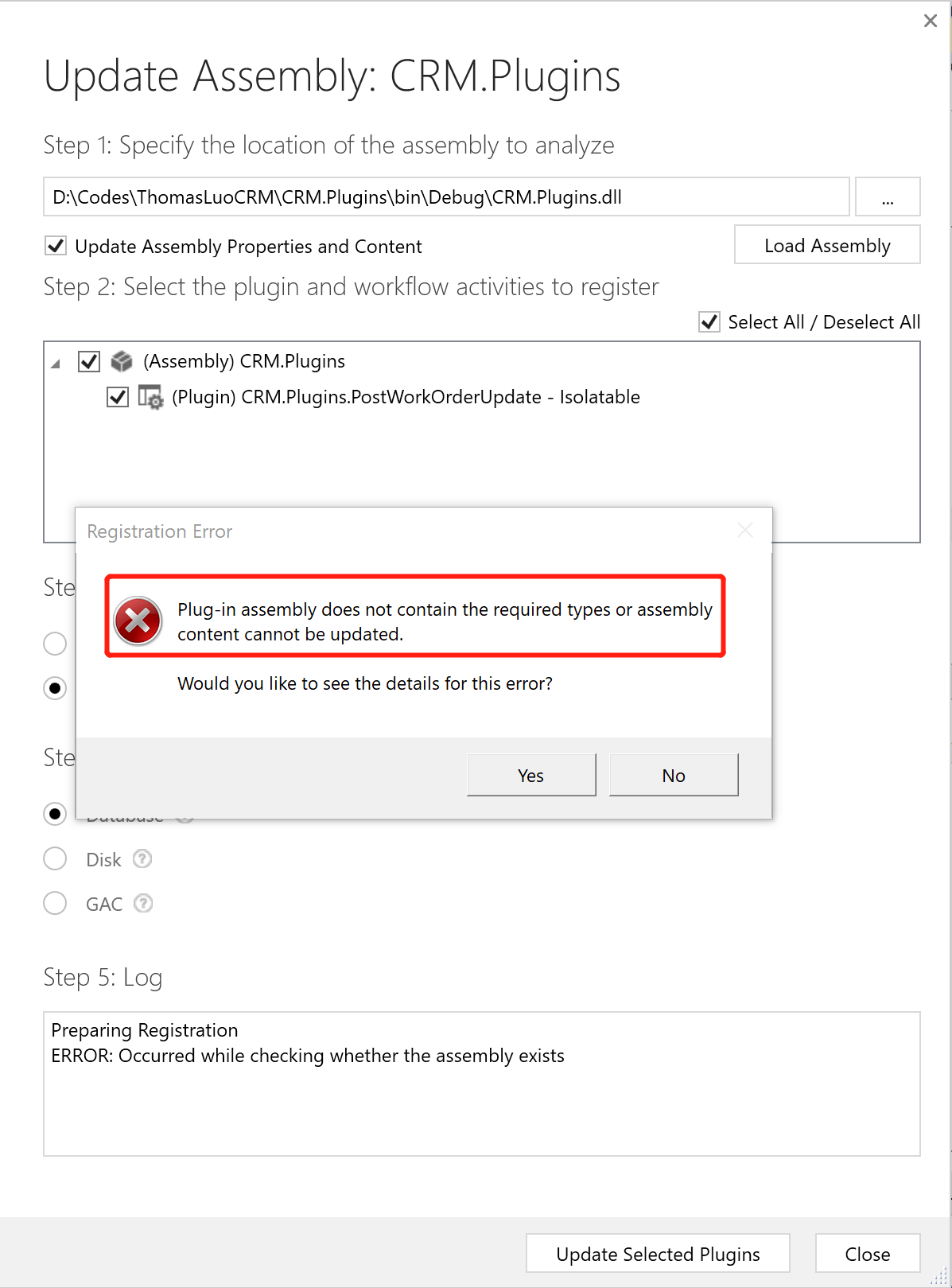
如果点击【Yes】按钮,看到的详细错误信息如下:
Unhandled Exception: System.ServiceModel.FaultException`1[[Microsoft.Xrm.Sdk.OrganizationServiceFault, Microsoft.Xrm.Sdk, Version=9.0.0.0, Culture=neutral, PublicKeyToken=31bf3856ad364e35]]: Plug-in assembly does not contain the required types or assembly content cannot be updated.
Detail: <OrganizationServiceFault xmlns="http://schemas.microsoft.com/xrm/2011/Contracts" xmlns:i="http://www.w3.org/2001/XMLSchema-instance">
<ActivityId>2af01c55-c6ff-41ed-9e2a-5fbed45b0a8a</ActivityId>
<ErrorCode>-2147204725</ErrorCode>
<ErrorDetails xmlns:a="http://schemas.datacontract.org/2004/07/System.Collections.Generic">
<KeyValuePairOfstringanyType>
<a:key>ApiExceptionSourceKey</a:key>
<a:value i:type="b:string" xmlns:b="http://www.w3.org/2001/XMLSchema">Plugin/Microsoft.Crm.ObjectModel.PluginAssemblyService</a:value>
</KeyValuePairOfstringanyType>
<KeyValuePairOfstringanyType>
<a:key>ApiOriginalExceptionKey</a:key>
<a:value i:type="b:string" xmlns:b="http://www.w3.org/2001/XMLSchema">Microsoft.Crm.CrmException: Plug-in assembly does not contain the required types or assembly content cannot be updated. ---> Microsoft.Crm.CrmException: Plug-in assembly does not contain the required types or assembly content cannot be updated.
at Microsoft.Crm.CrmPluginAssemblyMetadata.GetPluginTypeMetadata(String typeName)
at Microsoft.Crm.ObjectModel.PluginTypeServiceInternal`1.SetIsWorkFlowActivityAttribute(PluginType _pluginType, IBusinessEntity PluginAssembly, SandboxCustomActivityInfo& customActivityInfo, CrmPluginTypeMetadata& typeMetadata, ExecutionContext Context)
at Microsoft.Crm.ObjectModel.AssemblyDataCanBeUpdatedValidator.ValidateInternal()
at Microsoft.Crm.ObjectModel.PluginValidatorBase.Validate()
at Microsoft.Crm.ObjectModel.PluginAssemblyServiceInternal`1.VerifyRegistrationAbility(IBusinessEntity pluginAssembly, Boolean createCall, ExecutionContext context, CrmPluginAssemblyMetadata assemblyMetadata)
at Microsoft.Crm.ObjectModel.PluginAssemblyServiceInternal`1.ValidateOperation(String operationName, IBusinessEntity entity, ExecutionContext context)
at Microsoft.Crm.ObjectModel.SdkEntityServiceBase.UpdateInternal(IBusinessEntity entity, ExecutionContext context, Boolean verifyAction)
at Microsoft.Crm.ObjectModel.PluginAssemblyServiceInternal`1.Update(IBusinessEntity entity, ExecutionContext context)
--- End of inner exception stack trace ---
at Microsoft.Crm.Extensibility.VersionedPluginProxyStepBase.Execute(PipelineExecutionContext context)
at Microsoft.Crm.Extensibility.PipelineInstrumentationHelper.Execute(Boolean instrumentationEnabled, String stopwatchName, ExecuteWithInstrumentation action, PipelineExecutionContext context)
at Microsoft.Crm.Extensibility.Pipeline.<>c__DisplayClass2_1.<Execute>b__0()</a:value>
</KeyValuePairOfstringanyType>
<KeyValuePairOfstringanyType>
<a:key>ApiStepKey</a:key>
<a:value i:type="b:guid" xmlns:b="http://schemas.microsoft.com/2003/10/Serialization/">a0cdbb1b-ea3e-db11-86a7-000a3a5473e8</a:value>
</KeyValuePairOfstringanyType>
<KeyValuePairOfstringanyType>
<a:key>ApiDepthKey</a:key>
<a:value i:type="b:int" xmlns:b="http://www.w3.org/2001/XMLSchema">1</a:value>
</KeyValuePairOfstringanyType>
<KeyValuePairOfstringanyType>
<a:key>ApiActivityIdKey</a:key>
<a:value i:type="b:guid" xmlns:b="http://schemas.microsoft.com/2003/10/Serialization/">2af01c55-c6ff-41ed-9e2a-5fbed45b0a8a</a:value>
</KeyValuePairOfstringanyType>
<KeyValuePairOfstringanyType>
<a:key>ApiPluginSolutionNameKey</a:key>
<a:value i:type="b:string" xmlns:b="http://www.w3.org/2001/XMLSchema">System</a:value>
</KeyValuePairOfstringanyType>
<KeyValuePairOfstringanyType>
<a:key>ApiStepSolutionNameKey</a:key>
<a:value i:type="b:string" xmlns:b="http://www.w3.org/2001/XMLSchema">System</a:value>
</KeyValuePairOfstringanyType>
</ErrorDetails>
<Message>Plug-in assembly does not contain the required types or assembly content cannot be updated.</Message>
<Timestamp>2019-11-01T00:58:25.6382232Z</Timestamp>
<ExceptionRetriable>false</ExceptionRetriable>
<ExceptionSource i:nil="true" />
<InnerFault>
<ActivityId>2af01c55-c6ff-41ed-9e2a-5fbed45b0a8a</ActivityId>
<ErrorCode>-2147204725</ErrorCode>
<ErrorDetails xmlns:a="http://schemas.datacontract.org/2004/07/System.Collections.Generic" />
<Message>Plug-in assembly does not contain the required types or assembly content cannot be updated.</Message>
<Timestamp>2019-11-01T00:58:25.6382232Z</Timestamp>
<ExceptionRetriable>false</ExceptionRetriable>
<ExceptionSource i:nil="true" />
<InnerFault i:nil="true" />
<OriginalException i:nil="true" />
<TraceText i:nil="true" />
</InnerFault>
<OriginalException i:nil="true" />
<TraceText i:nil="true" />
</OrganizationServiceFault> Server stack trace:
at System.ServiceModel.Channels.ServiceChannel.HandleReply(ProxyOperationRuntime operation, ProxyRpc& rpc)
at System.ServiceModel.Channels.ServiceChannel.Call(String action, Boolean oneway, ProxyOperationRuntime operation, Object[] ins, Object[] outs, TimeSpan timeout)
at System.ServiceModel.Channels.ServiceChannelProxy.InvokeService(IMethodCallMessage methodCall, ProxyOperationRuntime operation)
at System.ServiceModel.Channels.ServiceChannelProxy.Invoke(IMessage message) Exception rethrown at [0]:
at Microsoft.Crm.Tools.Libraries.RegistrationHelper.UpdateAssembly(CrmOrganization org, String pathToAssembly, CrmPluginAssembly assembly, PluginType[] type)
at Microsoft.Crm.Tools.AssemblyRegistration.PluginRegistrationViewModel.btnregisterClick()
这个错误啥原因?我见到的常见原因就是在开发环境有人将插件的SDK 消息步骤 或者自定义工作流活动删除了,在向目标环境(如SIT,UAT,生产环境)导入就会报错。因为目标环境备删除的插件的SDK 消息步骤 或者自定义工作流活动还存在,你要导入的程序集不包括这些系统就会报错。
如何解决?解决办法很简单,找出来这些被删除的插件的SDK 消息步骤 或者自定义工作流活动,使用插件注册工具连接目标环境,将这些被删除的插件的SDK 消息步骤 或者自定义工作流活动也做一个删除就行了。
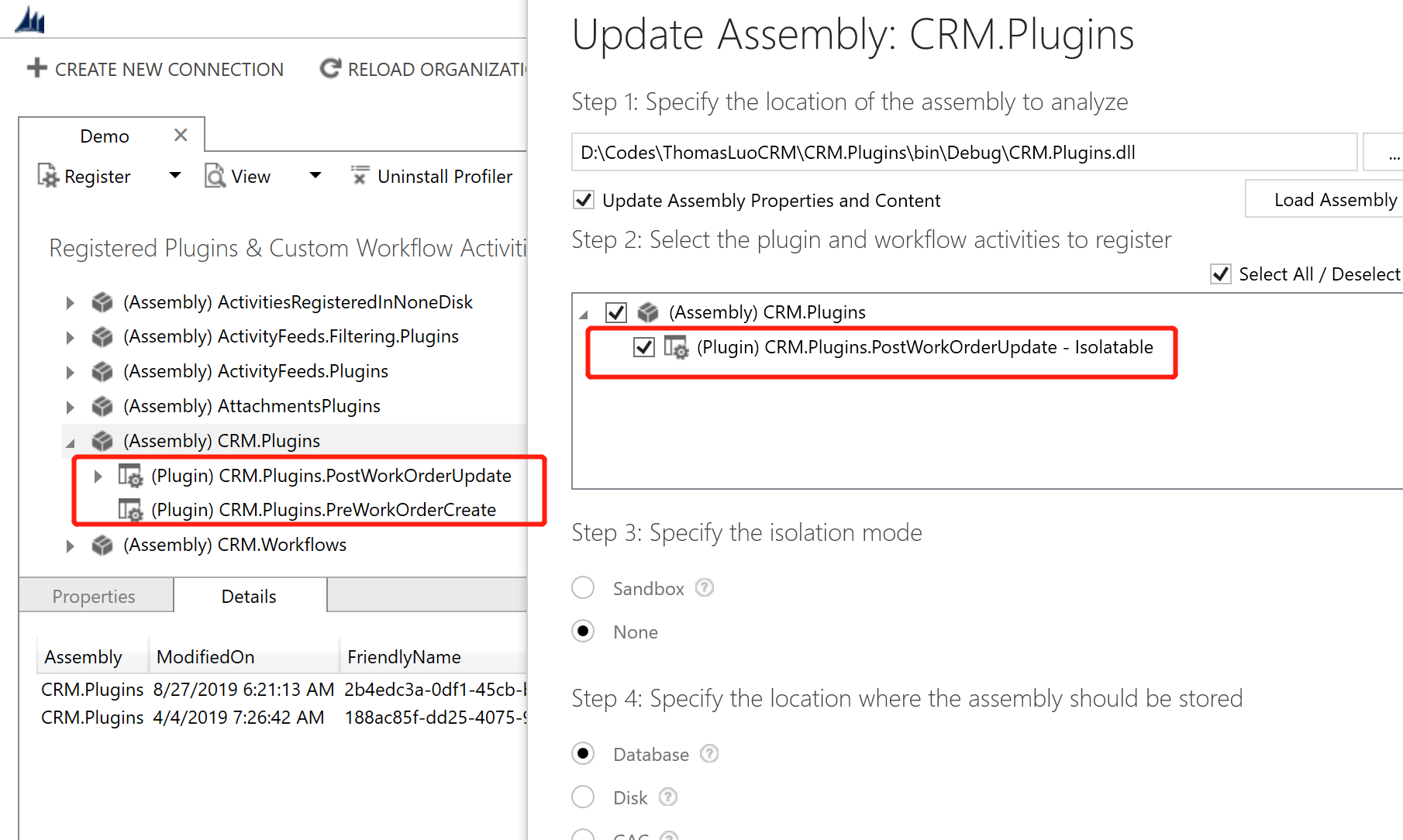
比如我用于演示的环境,这样眼睛简单以看就知道有一个名称为 CRM.Plugins.PreWorkOrderCreate的插件的SDK 消息步骤被删除了。
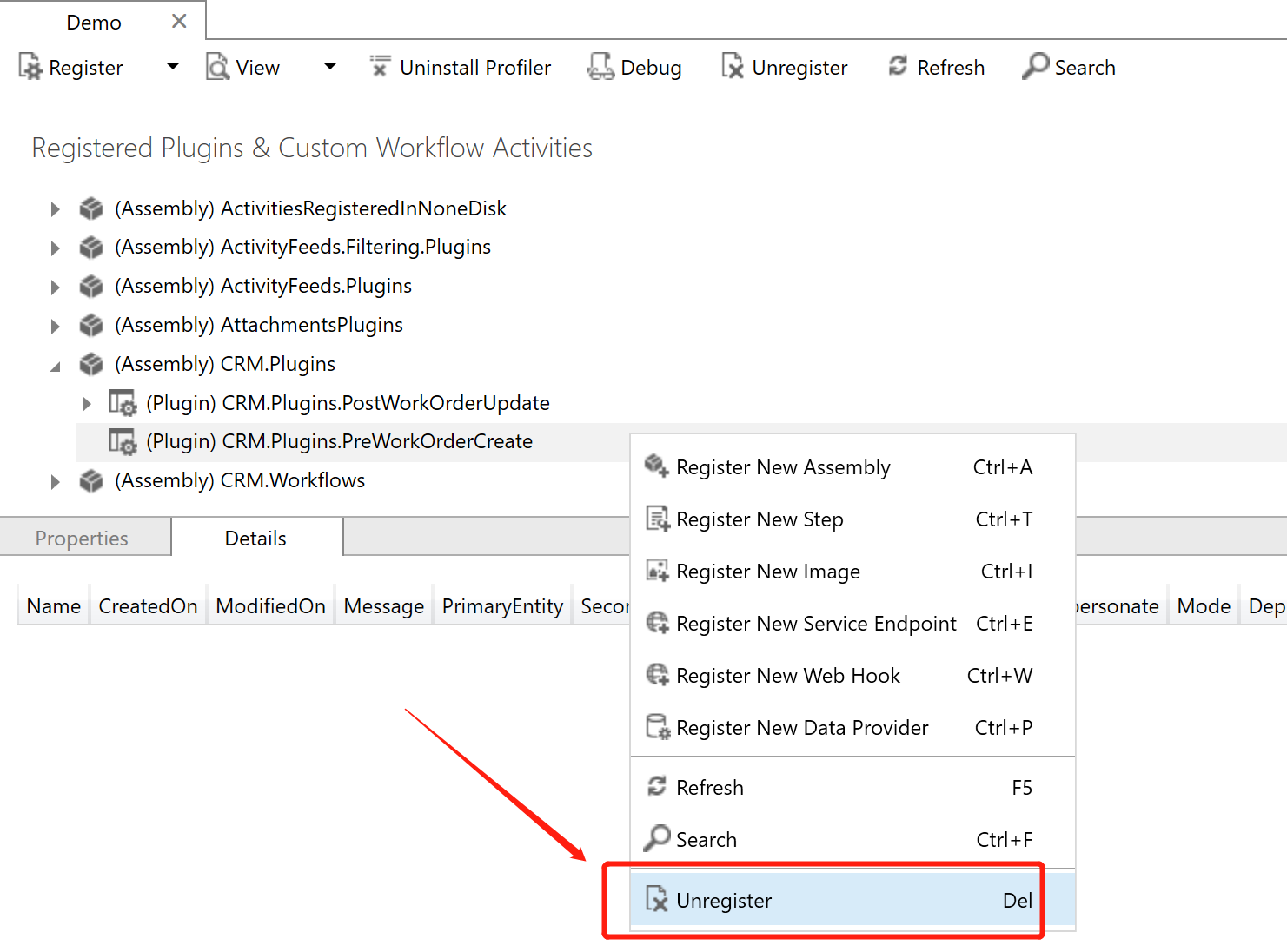
解决办法就是右击它,选择【Unregister】操作成功后再导入解决方案或者这个插件程序集。
因为我是Demo环境,注册的插件SDK 消息步骤 或者自定义工作流活动比较少,眼睛一看就看出来了。真实的项目实施中可能比较多,靠眼神比较比较耗时费力。有没有工具来做呢?
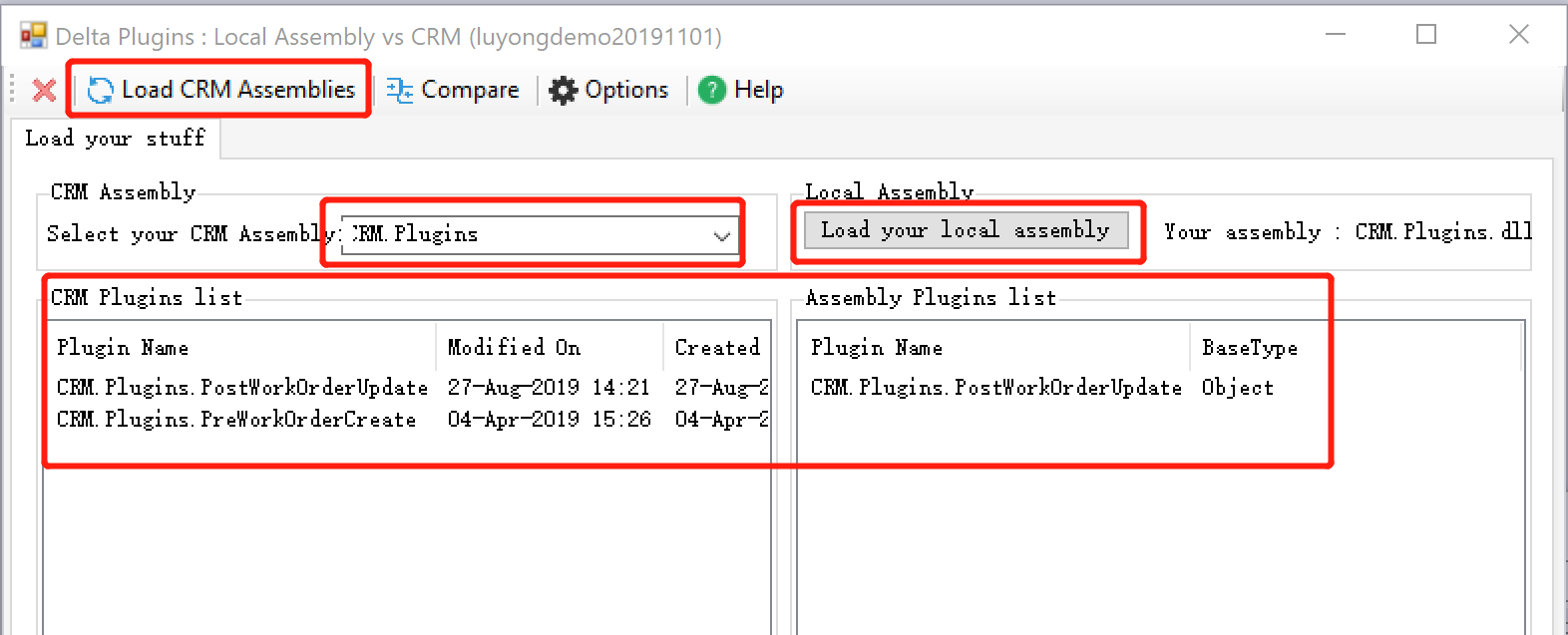
答案是有的,XrmToolBox 有这个工具,名称叫 Delta Plugins: Local Assembly vs CRM
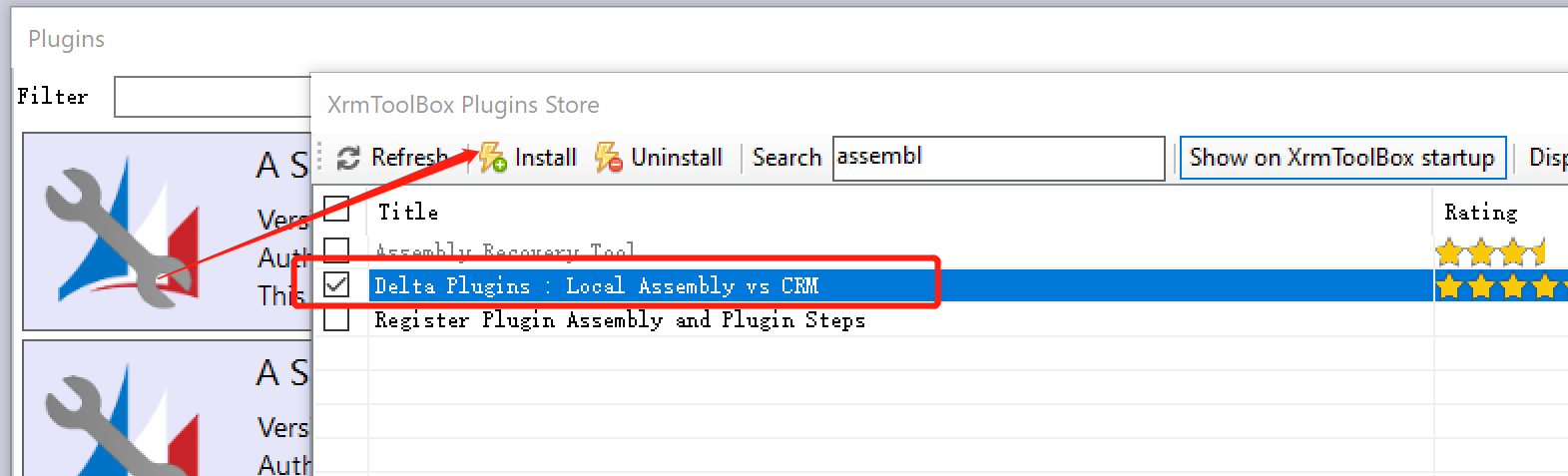
使用起来也不难,打开该工具后,点击【Load CRM Assemblies】,然后选择要比较的CRM系统中的程序集,再点击【Load your local assembly】加载下你的程序集,
下面的【CRM Plugins list】和【Assebly Plugins list】就显示了两者的内容,比较容易看出来不同。
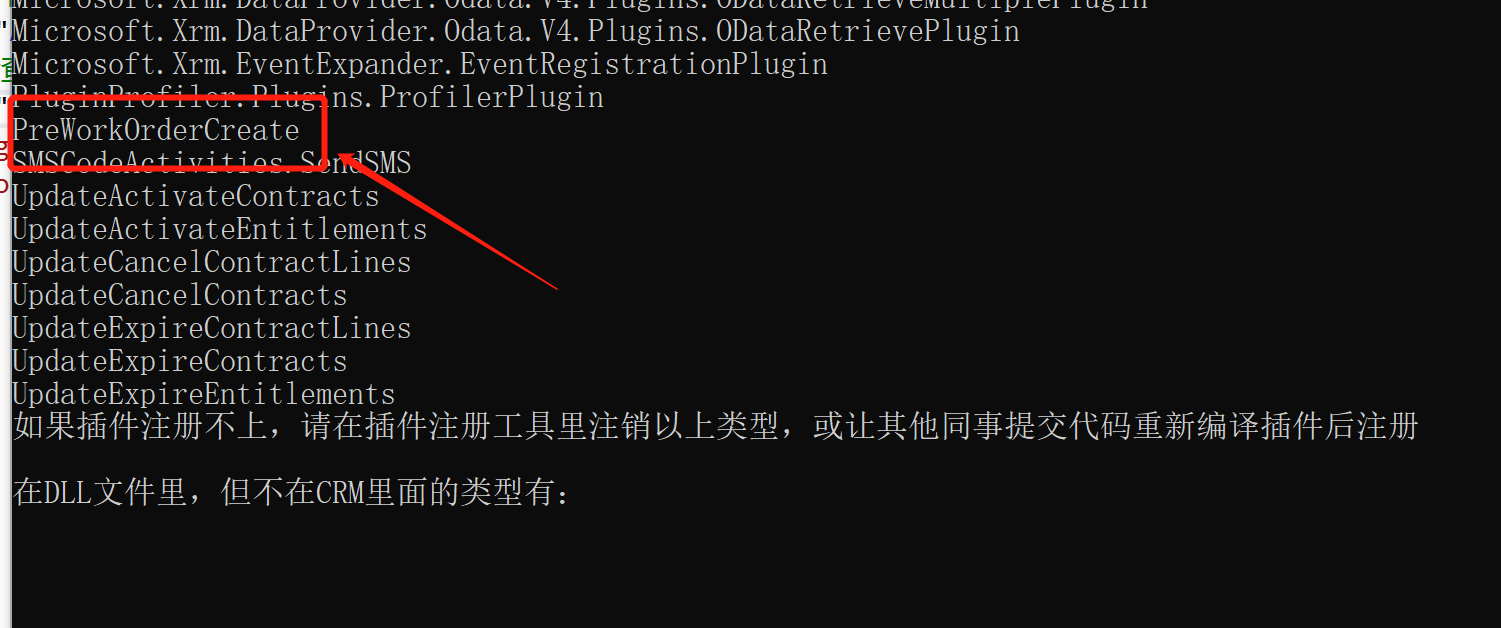
还有,我的同事自己写了一个程序,挣得他的同意,我这里将代码贴出来,运行效果如下。
代码如下:
using Microsoft.Xrm.Sdk;

using Microsoft.Xrm.Sdk.Client;

using Microsoft.Xrm.Sdk.Query;

using System;

using System.Collections.Generic;

using System.Configuration;

using System.IO;

using System.Linq;

using System.Reflection;

using System.Text;

using System.Threading.Tasks;

namespace PluginOrWorkflowAssemblyChecking

{

    class Program

    {

        static void Main(string[] args)

        {

            #region 获取文件的程序集

            string assemblyFileName = ConfigurationManager.AppSettings["AssemblyFileName"];

            string isWorkflow = ConfigurationManager.AppSettings["IsWorkflow"];

            string pluginFile = Environment.CurrentDirectory + "\\" + assemblyFileName;

            if (File.Exists(pluginFile) == false)

            {

                Console.WriteLine("Plugin file:{0} not exists!", pluginFile);

                Console.Read();

                return;

            }

            Assembly assembly = Assembly.LoadFile(pluginFile);

            string assemblyFullName = assembly.FullName.IndexOf(',') >  ? assembly.FullName.Split(',')[] : assembly.FullName;

            Console.WriteLine("检查的程序集合名称是:{0}", assemblyFullName);

            List<string> assembliesFromFile = null;

            if (isWorkflow == "")

            {

                assembliesFromFile = assembly.GetTypes()

                    .Where(x => x.IsPublic == true

                        && x.IsSubclassOf(typeof(System.Activities.CodeActivity))

                        )

                .Select(x => x.FullName.Replace(assemblyFullName + ".", "")).OrderBy(x => x).ToList<string>();

            }

            else

            {

                assembliesFromFile = assembly.GetTypes().Where(x => x.IsPublic == true && x.GetInterface("IPlugin") != null && x.Name != "PluginBase")

                    .Select(x => x.FullName.Replace(assemblyFullName + ".", "")).ToList<string>();

            }

            #endregion

            #region 获取CRM插件程序集合

            List<string> pluginAssemblies = GetPluginTypes(assemblyFullName).OrderBy(x => x).ToList();

            if (pluginAssemblies == null)

            {

                Console.WriteLine("plugin assembly could not be found!");

                Console.Read();

                return;

            }

            #endregion

            #region 计算程序集合的差集

            List<string> excepts = pluginAssemblies.Except<string>(assembliesFromFile, new myCompare()).ToList();

            if (excepts.Count == )

            {

                Console.WriteLine("插件程序集合完全一致");

            }

            else

            {

                Console.WriteLine("注册在插件程序集里但不在DLL文件里的类型有:");

                foreach (string s in excepts)

                {

                    Console.WriteLine(s);

                }

                Console.WriteLine("如果插件注册不上,请在插件注册工具里注销以上类型,或让其他同事提交代码重新编译插件后注册");

                Console.WriteLine("");

                excepts = assembliesFromFile.Except<string>(pluginAssemblies, new myCompare()).ToList();

                Console.WriteLine("在DLL文件里,但不在CRM里面的类型有:");

                foreach (string s in excepts)

                {

                    Console.WriteLine(s);

                }

            }

            Console.ReadKey();

            #endregion

        }

        /// <summary>

        /// 获取CRM的插件程序集

        /// </summary>

        /// <param name="assemblyFullName"></param>

        /// <returns></returns>

        private static List<string> GetPluginTypes(string assemblyFullName)

        {

            System.ServiceModel.Description.ClientCredentials clientCredentials = new System.ServiceModel.Description.ClientCredentials();

            clientCredentials.UserName.UserName = ConfigurationManager.AppSettings["UserName"];

            clientCredentials.UserName.Password = ConfigurationManager.AppSettings["Password"];

            string orgServiceUrl = ConfigurationManager.AppSettings["OrganizationService"];

            IOrganizationService serviceProxy = new OrganizationServiceProxy(new Uri(orgServiceUrl), null, clientCredentials, null);

            Console.WriteLine("正在获取CRM程序集");

            QueryExpression qe = new QueryExpression("pluginassembly");

            qe.ColumnSet = new ColumnSet("name", "pluginassemblyid");

            qe.NoLock = true;

            qe.Criteria.AddCondition(new ConditionExpression("ismanaged", ConditionOperator.Equal, false));

            qe.Criteria.AddCondition(new ConditionExpression("name", ConditionOperator.Equal, assemblyFullName));

            EntityCollection ec = serviceProxy.RetrieveMultiple(qe);

            Entity ent_PluginAssembly = ec.Entities.FirstOrDefault();

            if (ent_PluginAssembly == null) return null;

            string assemblyName = ent_PluginAssembly.GetAttributeValue<string>("name");

            Guid pluginAssemblyId = ent_PluginAssembly.GetAttributeValue<Guid>("pluginassemblyid");

            QueryExpression qe_PluginType = new QueryExpression("plugintype");

            qe_PluginType.NoLock = true;

            qe_PluginType.ColumnSet = new ColumnSet("name");

            qe.Criteria.AddCondition(new ConditionExpression("pluginassemblyid", ConditionOperator.Equal, pluginAssemblyId));

            var pluginAssemblies = from x in serviceProxy.RetrieveMultiple(qe_PluginType).Entities

                                   select x.GetAttributeValue<string>("name").Replace(assemblyFullName + ".", "");

            return pluginAssemblies.ToList<string>();

        }

    }

    internal class myCompare : IEqualityComparer<string>

    {

        public bool Equals(string x, string y)

        {

            if (x == y) return true;

            return false;

        }

        public int GetHashCode(string obj)

        {

            return obj.GetHashCode();

        }

    }

}
App.config的示例如下,运行之前请修改对应参数,DLL文件需要放到本程序的Bin\Debug文件夹中,IsWorkflow根据需要设置为0或者1,0代表是插件程序集,1代表是自定义工作流活动程序集。
<?xml version="1.0" encoding="utf-8" ?>

<configuration>

    <startup>

        <supportedRuntime version="v4.0" sku=".NETFramework,Version=v4.6.2" />

    </startup>

  <appSettings>

    <add key="OrganizationService" value="https://demo.luoyong.me/xrmservices/2011/organization.svc"/>

    <add key="UserName" value="crmadmin@luoyong.me"/>

    <add key="Password" value="Pass"/>

    <!--DLL文件名称-->

    <add key="AssemblyFileName" value="CRM.Plugins.dll"/>

    <!--是否检查工作流-->

    <add key="IsWorkflow" value="0"/>

  </appSettings>

</configuration>
最后有个建议,插件使用的程序集中不要包括自定义工作流活动,反之亦然。
Dynamics 365 Customer Engagement导入解决方案时出错:Microsoft.Crm.CrmException: Plug-in assembly does not contain the required types or assembly content cannot be updated.的更多相关文章
- Dynamics 365 Customer Engagement的标准导入不支持并行导入了吗?
我是微软Dynamics 365 & Power Platform方面的工程师罗勇,也是2015年7月到2018年6月连续三年Dynamics CRM/Business Solutions方面 ...
- 利用Dynamics 365 Customer Engagement的标准导入功能导入附件。
我是微软Dynamics 365 & Power Platform方面的工程师罗勇,也是2015年7月到2018年6月连续三年Dynamics CRM/Business Solutions方面 ...
- Dynamics 365 Customer Engagement V9.X新引入的自动编号属性介绍
我是微软Dynamics 365 & Power Platform方面的工程师罗勇,也是2015年7月到2018年6月连续三年Dynamics CRM/Business Solutions方面 ...
- Dynamics 365 Customer Engagement V9 活动源功能报错的解决方法
微软动态CRM专家罗勇 ,回复300或者20190120可方便获取本文,同时可以在第一间得到我发布的最新博文信息,follow me!我的网站是 www.luoyong.me . 安装好Dynamic ...
- 嵌入Canvas App到Dynamics 365 Customer Engagement(Model-Driven App)中,创造更多可能!
我是微软Dynamics 365 & Power Platform方面的工程师罗勇,也是2015年7月到2018年6月连续三年Dynamics CRM/Business Solutions方面 ...
- 利用Azure虚拟机安装Dynamics 365 Customer Engagement之四:组织单位服务安装账号设置
我是微软Dynamics 365 & Power Platform方面的工程师罗勇,也是2015年7月到2018年6月连续三年Dynamics CRM/Business Solutions方面 ...
- 如何让用户登录Dynamics 365 Customer Engagement后自动登录到Unified Interface App?
微软动态CRM专家罗勇 ,回复324或者20190422可方便获取本文,同时可以在第一间得到我发布的最新博文信息,follow me! Dynamics 365 Customer Engagement ...
- Dynamics 365 Customer Engagement中插件的调试
微软动态CRM专家罗勇 ,回复319或者20190319可方便获取本文,同时可以在第一间得到我发布的最新博文信息,follow me!我的网站是 www.luoyong.me . 本文主要根据官方的教 ...
- 下载Dynamics 365 Customer Engagement 工具
微软动态CRM专家罗勇 ,回复312或者20190311可方便获取本文,同时可以在第一间得到我发布的最新博文信息,follow me!我的网站是 www.luoyong.me . 从Dynamics ...
随机推荐
- 转:linux 安装 Elasticsearch5.6.x 详细步骤以及问题解决方案
在网上有很多那种ES步骤和问题的解决 方案的,不过没有一个详细的整合,和问题的梳理:我就想着闲暇之余,来记录一下自己安装的过程以及碰到的问题和心得:有什么不对的和问题希望及时拍砖. 第一步:环境 li ...
- KETTLE多表关联的同步一张表的两种实现方式
以下操作都在5.0.1版本下进行开发,其余版本可以进行自动比对 在平时工作当中,会遇到这种情况,而且很常见.比如:读取对方的多个视图或者表,写入目标库的一张表中,就涉及到多表的同步. 多表同步可以有以 ...
- eNSP 简介及基础操作
eNSP 一. eNSP简介 eNSP是一款由华为自主研发的.免费的.可扩展的.图形化操作的网络仿真工具平台,主要对企业网络路由器.交换机及相关物理设备进行软件仿真,支持大型网络模拟.界面如下: 界面 ...
- 登录oracle数据库
1.windows (cmd)命令行登录: 下载命令行工具 点击这里进入官网下载,下载其中三个文件 instantclient-basic-windows.x64-19.3.0.0.0dbru.zip ...
- [TimLinux] Linux LVM逻辑卷操作指南
1. 新磁盘创建分区 $ fdisk /dev/newdisk n 创建分区 p 显示分区表 t 使用8e分区类型 d 删除已经存在的分区 w 将分区表写入并退出 q 不写入直接退出 如果使用整个磁盘 ...
- 167. 两数之和 II - 输入有序数组
给定一个已按照升序排列的有序数组,找到两个数使得它们相加之和等于目标数. 函数应该返回这两个下标值 index1 和 index2,其中 index1 必须小于 index2. 说明: 返回的下标值( ...
- selenium处理弹窗
处理登录弹窗:https://www.cnblogs.com/TD1900/p/11938573.html #定位弹窗 ale = driver.switch_to.alert #处理方式 ale.a ...
- Django ContentType 的使用
引入 一切优化,最终都是关于需求的优化.本文介绍需求确定之后的数据库表结构设计优化. 程序员应该都知道,编程是数据结构和算法的结合.所谓数据就是用户需要访问和操作的资源,比如购物类App里面的商品,图 ...
- 解决oracle11g数据库监听连接不上问题
java连接数据库报错12514,无法识别监听,但是PL客户端可以连接 oracle 监听 添加ip 同时修改tnsnames.ora.listener.ora将这两个文件中HOST后面的主机都修改为 ...
- 使用脚本安装 Docker
使用脚本安装 Docker 1.使用 sudo 或 root 权限登录 Centos. 2.确保 yum 包更新到最新. $ sudo yum update 3.执行 Docker 安装脚本. $ c ...