
0基础入门学习Python(第1-2章)
第一章:就这么愉快的开始吧
1.1获取Python
Python3.7
1.2从idle启动
Python 3.7.3 (default, Mar 27 2019, 09:23:39)
[Clang 10.0.0 (clang-1000.11.45.5)] on darwin
Type "help", "copyright", "credits" or "license" for more information.
>>> print("I Love China")
I Love China
>>>
1.3失败的尝试
Python2
Python 2.7.16 (default, Mar 4 2019, 09:02:22)
[GCC 4.2.1 Compatible Apple LLVM 10.0.0 (clang-1000.11.45.5)] on darwin
Type "help", "copyright", "credits" or "license" for more information.
>>> print "I Love China"
I Love China
>>>
Python 3.7.3 (default, Mar 27 2019, 09:23:39)
[Clang 10.0.0 (clang-1000.11.45.5)] on darwin
Type "help", "copyright", "credits" or "license" for more information.
>>> print("I Love China")
I Love China
>>> print "I Love China"
File "<stdin>", line 1
print "I Love China"
^
SyntaxError: Missing parentheses in call to 'print'. Did you mean print("I Love China")?
>>>
1.4尝试点新的东西
>>> print(5+3)
8
>>> 5+3
8
>>> 1234567890987654321 * 9876543210123456789
12193263121170553265523548251112635269
>>> print("Well water " + "River")
Well water River
>>>
1.5 为什么会这样
>>> print("I Love China\n" * 3)
I Love China
I Love China
I Love China
>>> print("I Love China\n" + 3)
Traceback (most recent call last):
File "<stdin>", line 1, in <module>
TypeError: can only concatenate str (not "int") to str
>>>
第二章:用Python设计第一个游戏
猜数字游戏
# date: 2019/8/13

'''----第一个小游戏---'''

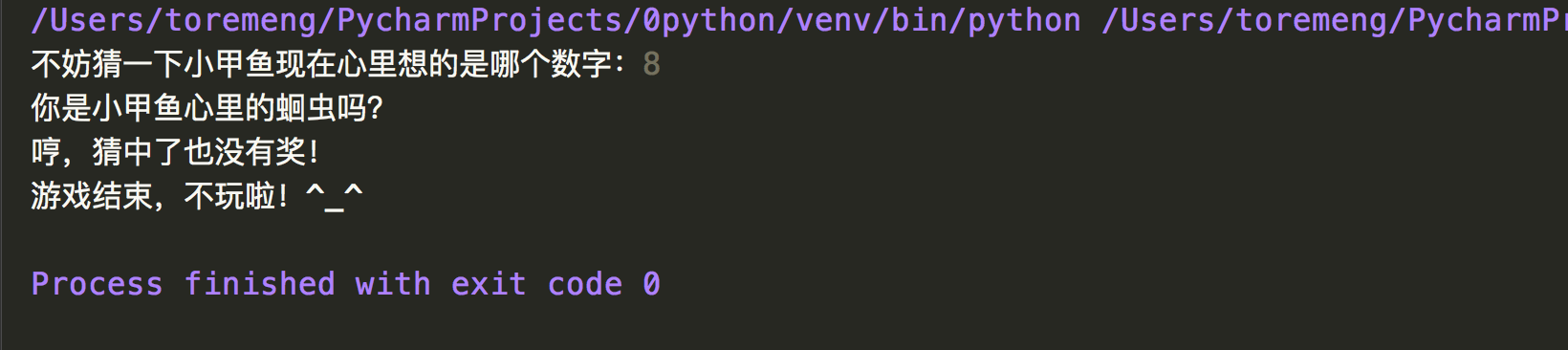
temp = input("不妨猜一下小甲鱼现在心里想的是哪个数字:")

guess = int(temp)

if guess == 8:

    print("你是小甲鱼心里的蛔虫吗?")

    print("哼,猜中了也没有奖!")

else:

    print("猜错了,小甲鱼现在心里想的是8!")

print("游戏结束,不玩啦!^_^")
游戏运行下:
BIF 概念
BIF 就是built-in function 内置函数的意思。为了方便程序员快速的编写脚本,Python提供了非常丰富的内置函数,只需要直接引用即可。
print() 就是一个内置函数,他的功能就是,打印到屏幕。
查看Python内置的函数。
>>> dir(__builtins__)
['ArithmeticError', 'AssertionError', 'AttributeError', 'BaseException', 'BlockingIOError', 'BrokenPipeError', 'BufferError', 'BytesWarning', 'ChildProcessError', 'ConnectionAbortedError', 'ConnectionError', 'ConnectionRefusedError', 'ConnectionResetError', 'DeprecationWarning', 'EOFError', 'Ellipsis', 'EnvironmentError', 'Exception', 'False', 'FileExistsError', 'FileNotFoundError', 'FloatingPointError', 'FutureWarning', 'GeneratorExit', 'IOError', 'ImportError', 'ImportWarning', 'IndentationError', 'IndexError', 'InterruptedError', 'IsADirectoryError', 'KeyError', 'KeyboardInterrupt', 'LookupError', 'MemoryError', 'ModuleNotFoundError', 'NameError', 'None', 'NotADirectoryError', 'NotImplemented', 'NotImplementedError', 'OSError', 'OverflowError', 'PendingDeprecationWarning', 'PermissionError', 'ProcessLookupError', 'RecursionError', 'ReferenceError', 'ResourceWarning', 'RuntimeError', 'RuntimeWarning', 'StopAsyncIteration', 'StopIteration', 'SyntaxError', 'SyntaxWarning', 'SystemError', 'SystemExit', 'TabError', 'TimeoutError', 'True', 'TypeError', 'UnboundLocalError', 'UnicodeDecodeError', 'UnicodeEncodeError', 'UnicodeError', 'UnicodeTranslateError', 'UnicodeWarning', 'UserWarning', 'ValueError', 'Warning', 'ZeroDivisionError', '_', '__build_class__', '__debug__', '__doc__', '__import__', '__loader__', '__name__', '__package__', '__spec__', 'abs', 'all', 'any', 'ascii', 'bin', 'bool', 'breakpoint', 'bytearray', 'bytes', 'callable', 'chr', 'classmethod', 'compile', 'complex', 'copyright', 'credits', 'delattr', 'dict', 'dir', 'divmod', 'enumerate', 'eval', 'exec', 'exit', 'filter', 'float', 'format', 'frozenset', 'getattr', 'globals', 'hasattr', 'hash', 'help', 'hex', 'id', 'input', 'int', 'isinstance', 'issubclass', 'iter', 'len', 'license', 'list', 'locals', 'map', 'max', 'memoryview', 'min', 'next', 'object', 'oct', 'open', 'ord', 'pow', 'print', 'property', 'quit', 'range', 'repr', 'reversed', 'round', 'set', 'setattr', 'slice', 'sorted', 'staticmethod', 'str', 'sum', 'super', 'tuple', 'type', 'vars', 'zip']
>>>
help() 用于显示BIF的功能描述
>>> help(print)
Help on built-in function print in module builtins:
print(...)
print(value, ..., sep=' ', end='\n', file=sys.stdout, flush=False)
Prints the values to a stream, or to sys.stdout by default.
Optional keyword arguments:
file: a file-like object (stream); defaults to the current sys.stdout.
sep: string inserted between values, default a space.
end: string appended after the last value, default a newline.
flush: whether to forcibly flush the stream.
完!
0基础入门学习Python(第1-2章)的更多相关文章
- 0基础入门学习Python(第3章)
第三章 成为高手前必须知道的一些基础知识 3.1 变量 一个值的名字,存储在内存中,我把把这块内存称为变量,大多数语言,把这个过程称之为,给变量赋值,把值存储在变量中. Python这里的做法稍有不同 ...
- 0基础入门学习Python(第5章)
列表,元组和字符串 5.1 列表:一个打了激素的数组 有时候可能需要将一些相互之间有关联的数据保存在一起,这个就叫数组.Python将其称为列表. 5.1.1 创建列表 >>> [1 ...
- 0基础入门学习Python(第4章)
第四章,了不起的分支和循环 4.1 分支和循环 Python主要依靠缩进来区分代码块 4.2 快速上手 成绩按照分数来划分等级,90分以上为A,80~90 为B,60~80 为C,60以下为D p4_ ...
- 《零基础入门学习Python》【第一版】视频课后答案第001讲
测试题答案: 0. Python 是什么类型的语言? Python是脚本语言 脚本语言(Scripting language)是电脑编程语言,因此也能让开发者藉以编写出让电脑听命行事的程序.以简单的方 ...
- 【Python教程】《零基础入门学习Python》(小甲鱼)
[Python教程]<零基础入门学习Python>(小甲鱼) 讲解通俗易懂,诙谐. 哈哈哈. https://www.bilibili.com/video/av27789609
- 零基础入门学习Python(1)--我和Python的第一次亲密接触
前言 最近在学习Python编程语言,于是乎就在网上找资源.其中小甲鱼<零基础入门学习Python>试听了几节课,感觉还挺不错,里面的视频都是免费下载,小甲鱼讲话也挺幽默风趣的,所以呢,就 ...
- 学习参考《零基础入门学习Python》电子书PDF+笔记+课后题及答案
国内编写的关于python入门的书,初学者可以看看. 参考: <零基础入门学习Python>电子书PDF+笔记+课后题及答案 Python3入门必备; 小甲鱼手把手教授Python; 包含 ...
- 学习《零基础入门学习Python》电子书PDF+笔记+课后题及答案
初学python入门建议学习<零基础入门学习Python>.适合新手入门,很简单很易懂.前一半将语法,后一半讲了实际的应用. Python3入门必备,小甲鱼手把手教授Python,包含电子 ...
- 零基础入门学习Python(36)--类和对象:给大家介绍对象
知识点 Python3 面向对象 Python从设计之初就已经是一门面向对象的语言,正因为如此,在Python中创建一个类和对象是很容易的.本章节我们将详细介绍Python的面向对象编程. 如果你以前 ...
随机推荐
- JDK1.8源码分析02之阅读源码顺序
序言:阅读JDK源码应该从何开始,有计划,有步骤的深入学习呢? 下面就分享一篇比较好的学习源码顺序的文章,给了我们再阅读源码时,一个指导性的标志,而不会迷失方向. 很多java开发的小伙伴都会阅读jd ...
- electronr进行签名与公证
windows: 1.设置package.json的有关window打包的相关内容 "win": { "icon": "build/icons/ico ...
- 解决npm下载慢的问题
方法一:使用淘宝定制的cnpm命令行工具替代默认安装npm npm install -g cnpm --registry=https://registry.npm.taobao.org 方法二:将np ...
- Java - IO System类支持和缓冲流
System类的支持和缓冲流 System类对IO的支持 在System类中,为了支持IO操作提供了三个常量: 错误输出: public static final PrintStream err; 输 ...
- 利用phpqrcode二维码生成类库合成带logo的二维码并且用合成的二维码生成海报(二)
前期准备 引入phpqrcode类库(下载地址:https://download.csdn.net/download/weixin_37557729/11891240:支持彩色二维码的下载地址:htt ...
- Linux—软连接与硬连接
软链接的创建,删除,修改 创建软链接:ln -s[目标文件或目录][软链接地址] 解释:软链接地址相当于快捷方式,目标文件或目录才是真正的内容.[软链接地址]指“快捷键”文件名称,该文件是被指令创建的 ...
- Modbus 协议
转载:https://www.cnblogs.com/DreamRecorder/p/9081127.html 一.Modbus 协议简介 Modbus 协议是应用于电子控制器上的一种通用语言 ...
- HTML标记一览表
- ajax给全局变量设置值,请先关掉异步上传效果
$.ajax({ type: 'POST', url: "/downloadExcelInfo", timeout: 0, async: false, contentType: & ...
- SP1043 GSS1 - Can you answer these queries I 线段树
问题描述 LG-SP1043 题解 GSS 系列第一题. \(q\) 个询问,求 \([x,y]\) 的最大字段和. 线段树,维护 \([x,y]\) 的 \(lmax,rmax,sum,val\) ...