
Dapr 运用之集成 Asp.Net Core Grpc 调用篇
前置条件: 《Dapr 运用》
改造 ProductService 以提供 gRPC 服务
从 NuGet 或程序包管理控制台安装 gRPC 服务必须的包
- Grpc.AspNetCore
配置 Http/2
gRPC 服务需要 Http/2 协议
public static IHostBuilder CreateHostBuilder(string[] args)
{
return Host.CreateDefaultBuilder(args)
.ConfigureWebHostDefaults(webBuilder =>
{
webBuilder.ConfigureKestrel(options =>
{
options.Listen(IPAddress.Loopback, 50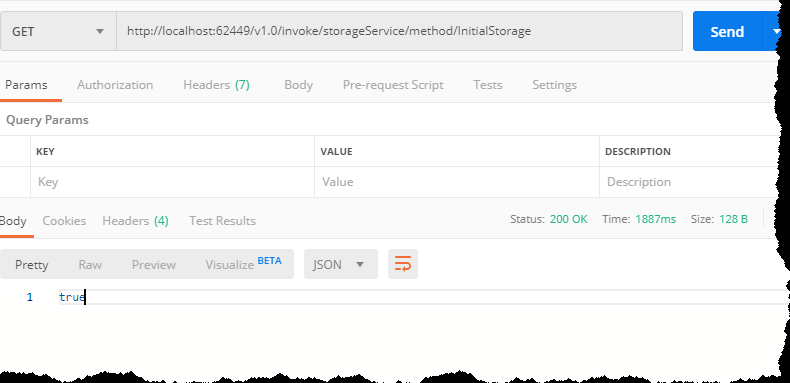
01, listenOptions =>
{
listenOptions.Protocols = HttpProtocols.Http2;
});
});
webBuilder.UseStartup();
});
}
```
新建了 product.proto 以定义 GRPC 服务,它需要完成的内容是返回所有产品集合,当然目前产品内容只有一个 ID
定义产品 proto
syntax = "proto3";

package productlist.v1;

option csharp_namespace = "ProductList.V1";

service ProductRPCService{

    rpc GetAllProducts(ProductListRequest) returns(ProductList);

}

message ProductListRequest{

}

message ProductList {

    repeated Product results = 1;

}

message Product {

    string ID=1;

}
说明
- 定义产品列表 gRPC 服务,得益于宇宙第一 IDE Visual Studio ,只要添加 Grpc.Tools 包就可以自动生成 gRPC 所需的代码,这里不再需要手动去添加 Grpc.Tools ,官方提供的 Grpc.AspNetCore 中已经集成了
- 定义了一个服务 ProductRPCService
- 定义了一个函数 ProductRPCService
- 定义了一个请求构造 ProductListRequest ,内容为空
- 定义了一个请求返回构造 ProductList ,使用 repeated 表明返回数据是集合
- 定义了一个数据集合中的一个对象 Product
添加 ProductListService 文件,内容如下
    public class ProductListService : ProductRPCService.ProductRPCServiceBase

    {

        private readonly ProductContext _productContext;

        public ProductListService(ProductContext productContext)

        {

            _productContext = productContext;

        }

        public override async Task<ProductList.V1.ProductList> GetAllProducts(ProductListRequest request, ServerCallContext context)

        {

            IList<Product> results = await _productContext.Products.ToListAsync();

            var productList = new ProductList.V1.ProductList();

            foreach (Product item in results)

            {

                productList.Results.Add(new ProductList.V1.Product

                {

                    ID = item.ProductID.ToString()

                });

            }

            return productList;

        }

    }
在 Startup.cs 修改代码如下
public void ConfigureServices(IServiceCollection services)

{

    //启用 gRPC 服务

    services.AddGrpc();

    services.AddTransient<ProductListService>();

    ...

}
这里的 services.AddTransient(); 的原因是在 Dapr 中需要使用构造器注入,以完成
GetAllProducts(...)函数的调用public void Configure(IApplicationBuilder app, IWebHostEnvironment env)
{
if (env.IsDevelopment())
{
app.UseDeveloperExceptionPage();
} app.UseRouting(); app.UseEndpoints(endpoints =>
{
... //添加 gRPC 到路由管道中
endpoints.MapGrpcService<DaprClientService>();
});
}
这里添加的代码的含义分别是启用 gRPC 服务和添加 gRPC 路由。得益于
ASP.NET Core中间件的优秀设计,ASP.NET Core可同时支持 Http 服务。添加 daprclient.proto 文件以生成 Dapr Grpc 服务,daprclient.proto 内容如下
syntax = "proto3";

package daprclient;

import "google/protobuf/any.proto";

import "google/protobuf/empty.proto";

import "google/protobuf/duration.proto";

option java_outer_classname = "DaprClientProtos";

option java_package = "io.dapr";

// User Code definitions

service DaprClient {

rpc OnInvoke (InvokeEnvelope) returns (google.protobuf.Any) {}

rpc GetTopicSubscriptions(google.protobuf.Empty) returns (GetTopicSubscriptionsEnvelope) {}

rpc GetBindingsSubscriptions(google.protobuf.Empty) returns (GetBindingsSubscriptionsEnvelope) {}

rpc OnBindingEvent(BindingEventEnvelope) returns (BindingResponseEnvelope) {}

rpc OnTopicEvent(CloudEventEnvelope) returns (google.protobuf.Empty) {}

}

message CloudEventEnvelope {

string id = 1;

string source = 2;

string type = 3;

string specVersion = 4;

string dataContentType = 5;

string topic = 6;

google.protobuf.Any data = 7;

}

message BindingEventEnvelope {

    string name = 1;

    google.protobuf.Any data = 2;

    map<string,string> metadata = 3;

}

message BindingResponseEnvelope {

google.protobuf.Any data = 1;

repeated string to = 2;

repeated State state = 3;

string concurrency = 4;

}

message InvokeEnvelope {

    string method = 1;

    google.protobuf.Any data = 2;

    map<string,string> metadata = 3;

}

message GetTopicSubscriptionsEnvelope {

repeated string topics = 1;

}

message GetBindingsSubscriptionsEnvelope {

repeated string bindings = 1;

}

message State {

string key = 1;

google.protobuf.Any value = 2;

string etag = 3;

map<string,string> metadata = 4;

StateOptions options = 5;

}

message StateOptions {

string concurrency = 1;

string consistency = 2;

RetryPolicy retryPolicy = 3;

}

message RetryPolicy {

int32 threshold = 1;

string pattern = 2;

google.protobuf.Duration interval = 3;

}
说明
- 此文件为官方提供,Dapr 0.3 版本之前提供的已经生成好的代码,现在看源码可以看出已经改为提供 proto 文件了,这里我认为提供 proto 文件比较合理
- 此文件定义了5个函数,此文主要讲的就是
OnInvoke()函数 OnInvoke()请求构造为InvokeEnvelope- method 提供调用方法名称
- data 请求数据
- metadata 额外数据,此处使用键值对形式体现
创建 DaprClientService.cs 文件,此文件用于终结点路由,内容为
public class DaprClientService : DaprClient.DaprClientBase

{

    private readonly ProductListService _productListService;

    /// <summary>

    /// Initializes a new instance of the <see cref="ProductService" /> class.

    /// </summary>

    /// <param name="productListService"></param>

    public DaprClientService(ProductListService productListService)

    {

        _productListService = productListService;

    }

    public override async Task<Any> OnInvoke(InvokeEnvelope request, ServerCallContext context)

    {

        switch (request.Method)

        {

            case "GetAllProducts":

                ProductListRequest productListRequest = ProductListRequest.Parser.ParseFrom(request.Data.Value);

                ProductList.V1.ProductList productsList = await _productListService.GetAllProducts(productListRequest, context);

                return Any.Pack(productsList);

        }

        return null;

    }

}
说明
- 使用构造器注入已定义好的
ProductListService InvokeEnvelope中的Method用于路由数据- 使用
ProductListRequest.Parser.ParseFrom转换请求构造 - 使用
Any.Pack()打包需要返回的数据
- 使用构造器注入已定义好的
运行 productService
dapr run --app-id productService --app-port 5001 --protocol grpc dotnet run
小结
至此,ProductService 服务完成。此时 ProductService.Api.csproj Protobuf 内容为<ItemGroup>
<Protobuf Include="Protos\daprclient.proto" GrpcServices="Server" />
<Protobuf Include="Protos\productList.proto" GrpcServices="Server" />
</ItemGroup>
改造 StorageService 服务以完成 Dapr GRPC 服务调用
添加 productList.proto 文件,内容同 ProductService 中的 productList.proto
添加 dapr.proto 文件,此文件也为官方提供,内容为
syntax = "proto3";

package dapr;

import "google/protobuf/any.proto";

import "google/protobuf/empty.proto";

import "google/protobuf/duration.proto";

option java_outer_classname = "DaprProtos";

option java_package = "io.dapr";

option csharp_namespace = "Dapr.Client.Grpc";

// Dapr definitions

service Dapr {

rpc PublishEvent(PublishEventEnvelope) returns (google.protobuf.Empty) {}

rpc InvokeService(InvokeServiceEnvelope) returns (InvokeServiceResponseEnvelope) {}

rpc InvokeBinding(InvokeBindingEnvelope) returns (google.protobuf.Empty) {}

rpc GetState(GetStateEnvelope) returns (GetStateResponseEnvelope) {}

rpc SaveState(SaveStateEnvelope) returns (google.protobuf.Empty) {}

rpc DeleteState(DeleteStateEnvelope) returns (google.protobuf.Empty) {}

}

message InvokeServiceResponseEnvelope {

google.protobuf.Any data = 1;

map<string,string> metadata = 2;

}

message DeleteStateEnvelope {

string key = 1;

string etag = 2;

StateOptions options = 3;

}

message SaveStateEnvelope {

repeated StateRequest requests = 1;

}

message GetStateEnvelope {

    string key = 1;

    string consistency = 2;

}

message GetStateResponseEnvelope {

google.protobuf.Any data = 1;

string etag = 2;

}

message InvokeBindingEnvelope {

string name = 1;

google.protobuf.Any data = 2;

map<string,string> metadata = 3;

}

message InvokeServiceEnvelope {

string id = 1;

string method = 2;

google.protobuf.Any data = 3;

map<string,string> metadata = 4;

}

message PublishEventEnvelope {

    string topic = 1;

    google.protobuf.Any data = 2;

}

message State {

string key = 1;

google.protobuf.Any value = 2;

string etag = 3;

map<string,string> metadata = 4;

StateOptions options = 5;

}

message StateOptions {

string concurrency = 1;

string consistency = 2;

RetryPolicy retryPolicy = 3;

}

message RetryPolicy {

int32 threshold = 1;

string pattern = 2;

google.protobuf.Duration interval = 3;

}

message StateRequest {

string key = 1;

google.protobuf.Any value = 2;

string etag = 3;

map<string,string> metadata = 4;

StateRequestOptions options = 5;

}

message StateRequestOptions {

string concurrency = 1;

string consistency = 2;

StateRetryPolicy retryPolicy = 3;

}

message StateRetryPolicy {

int32 threshold = 1;

string pattern = 2;

google.protobuf.Duration interval = 3;

}
说明
- 此文件提供6个 GRPC 服务,此文介绍的函数为
InvokeService()- 请求构造为 InvokeServiceEnvelope
- id 请求的服务的 --app-id ,比如 productService
- method 请求的方法
- data 请求函数的签名
- metadata 元数据键值对
- 请求构造为 InvokeServiceEnvelope
- 此文件提供6个 GRPC 服务,此文介绍的函数为
修改 StorageController 中的
InitialStorage()函数为/// <summary>
/// 初始化仓库.
/// </summary>
/// <returns>是否成功.</returns>
[HttpGet("InitialStorage")]
public async Task<bool> InitialStorage()
{
string defaultPort = Environment.GetEnvironmentVariable("DAPR_GRPC_PORT") ?? "5001"; // Set correct switch to make insecure gRPC service calls. This switch must be set before creating the GrpcChannel.
AppContext.SetSwitch("System.Net.Http.SocketsHttpHandler.Http2UnencryptedSupport", true); // Create Client
string daprUri = $"http://127.0.0.1:{defaultPort}";
GrpcChannel channel = GrpcChannel.ForAddress(daprUri);
var client = new Dapr.Client.Grpc.Dapr.DaprClient(channel); InvokeServiceResponseEnvelope result = await client.InvokeServiceAsync(new InvokeServiceEnvelope
{
Method = "GetAllProducts",
Id = "productService",
Data = Any.Pack(new ProductListRequest())
});
ProductList.V1.ProductList productResult = ProductList.V1.ProductList.Parser.ParseFrom(result.Data.Value); var random = new Random(); foreach (Product item in productResult.Results)
{
_storageContext.Storage.Add(new Storage
{
ProductID = Guid.Parse(item.ID),
Amount = random.Next(1, 1000)
});
} await _storageContext.SaveChangesAsync();
return true;
}
启动 StorageService
dapr run --app-id storageService --app-port 5003 dotnet run
使用 Postman 请求 StorageService 的 InitialStorage

使用 MySql Workbench 查看结果

小结
至此,以 Dapr 框架使用 GRPC 客户端在 StorageService 中完成了对 ProductService 服务的调用。
Dapr 运用之集成 Asp.Net Core Grpc 调用篇的更多相关文章
- 旧 WCF 项目迁移到 asp.net core + gRPC 的尝试
一个月前,公司的运行WCF的windows服务器down掉了,由于 AWS 没有通知,没有能第一时间发现问题. 所以,客户提出将WCF服务由C#改为JAVA,在Linux上面运行:一方面,AWS对Li ...
- ASP.NET Core gRPC 入门全家桶
一. 说明 本全家桶现在只包含了入门级别的资料,实战资料更新中. 二.官方文档 gRPC in Asp.Net Core :官方文档 gRPC 官网:点我跳转 三.入门全家桶 正片: ASP.NET ...
- ASP.NET Core gRPC 健康检查的实现方式
一. 前言 gRPC 服务实现健康检查有两种方式,前面在此文 ASP.NET Core gRPC 使用 Consul 服务注册发现 中有提到过,这里归纳整理一下.gRPC 的健康检查,官方是定义了标准 ...
- 从零搭建一个IdentityServer——集成Asp.net core Identity
前面的文章使用Asp.net core 5.0以及IdentityServer4搭建了一个基础的验证服务器,并实现了基于客户端证书的Oauth2.0授权流程,以及通过access token访问被保护 ...
- ASP.NET Core GRPC 和 Dubbo 互通
一.前言 Dubbo 是比较流行的服务治理框架,国内不少大厂都在使用.以前的 Dubbo 使用的是私有协议,采集用的 hessian 序列化,对于多语言生态来说是极度的不友好.现在 Dubbo 发布了 ...
- .NET Core实战项目之CMS 第二章 入门篇-快速入门ASP.NET Core看这篇就够了
作者:依乐祝 原文链接:https://www.cnblogs.com/yilezhu/p/9985451.html 本来这篇只是想简单介绍下ASP.NET Core MVC项目的(毕竟要照顾到很多新 ...
- net core体系-web应用程序-4asp.net core2.0 项目实战(CMS)-第二章 入门篇-快速入门ASP.NET Core看这篇就够了
.NET Core实战项目之CMS 第二章 入门篇-快速入门ASP.NET Core看这篇就够了 原文链接:https://www.cnblogs.com/yilezhu/p/9985451.ht ...
- ASP.NET Core gRPC 使用 Consul 服务注册发现
一. 前言 gRPC 在当前最常见的应用就是在微服务场景中,所以不可避免的会有服务注册与发现问题,我们使用gRPC实现的服务可以使用 Consul 或者 etcd 作为服务注册与发现中心,本文主要介绍 ...
- 5. abp集成asp.net core
一.前言 参照前篇<4. abp中的asp.net core模块剖析>,首先放张图,这也是asp.net core框架上MVC模块的扩展点 二.abp的mvc对象 AbpAspNetCor ...
随机推荐
- 前端与算法 leetcode 8. 字符串转换整数 (atoi)
目录 # 前端与算法 leetcode 8. 字符串转换整数 (atoi) 题目描述 概要 提示 解析 解法一:正则 解法二:api 解法二:手搓一个api 算法 传入测试用例的运行结果 执行结果 G ...
- 领扣(LeetCode)二叉树的右视图 个人题解
给定一棵二叉树,想象自己站在它的右侧,按照从顶部到底部的顺序,返回从右侧所能看到的节点值. 示例: 输入: [1,2,3,null,5,null,4] 输出: [1, 3, 4] 解释: 1 < ...
- 【Spring】简述@Configuration配置类注册BeanDefinition到Spring容器的过程
概述 本文以SpringBoot应用为基础,尝试分析基于注解@Configuration的配置类是如何向Spring容器注册BeanDefinition的过程 其中主要分析了 Configuratio ...
- 达梦"记录超长"警告
出现"记录超长"背景介绍: 导入数据库时,出现数据库记录超长警告,导致数据无法正常导入! 1.重新建库,把页大小改大 这种方式是在建立数据库实例的时候进行的 修改[页大小] 2.把 ...
- PostGIS mysql_fdw使用(Linux)
##前文讲了mysql_fdw的安装,此文主要讲mysql_fdw的配置以及使用 ##附上前文链接:https://www.cnblogs.com/giser-s/p/11208803.html 背景 ...
- 使用Publisher2016快速给图片添加水印
打开Publisher,根据图片大小及形状选择空白页面大小,此处选择纵向: 点击图标选择图片: 点击绘制文本框: 在文本框中编辑水印内容,对文字大小.字体.颜色进行调整,此处将水印颜色调整为灰色,拖动 ...
- Spring与Shiro整合
Spring整合篇--Shiro 作者 : Stanley 罗昊 [转载请注明出处和署名,谢谢!] 什么是Shiro? 链接:https://www.cnblogs.com/StanleyBlogs/ ...
- 解决failed to push some refs to 'git@github.com:TQBX/GIT-Github-.git'问题
解决以下问题问题: git pull origin master --allow-unrelated-histories 进入vim界面->ESC->:wq 重复第一步->git p ...
- day48天jQuary
今日内容 jQuery jQuery引入 下载链接:[jQuery官网](https://jquery.com/),首先需要下载这个jQuery的文件,然后在HTML文件中引入这个文件,就可以使用这个 ...
- Linux如何切换图形界面和命令行界面
在命令行,输入 init 3 命令,并按回车键执行,切换到命令行界面 切换到命令行界面后,在界面上只显示一个闪烁的光标,按下 Ctrl+Alt+F6(非虚拟机)或者 Alt+F6(虚拟机),显示用户登 ...