
spring学习笔记之---bean管理的注解方式
bean管理的注解方式
(一)使用注解定义bean
(1)常用注解
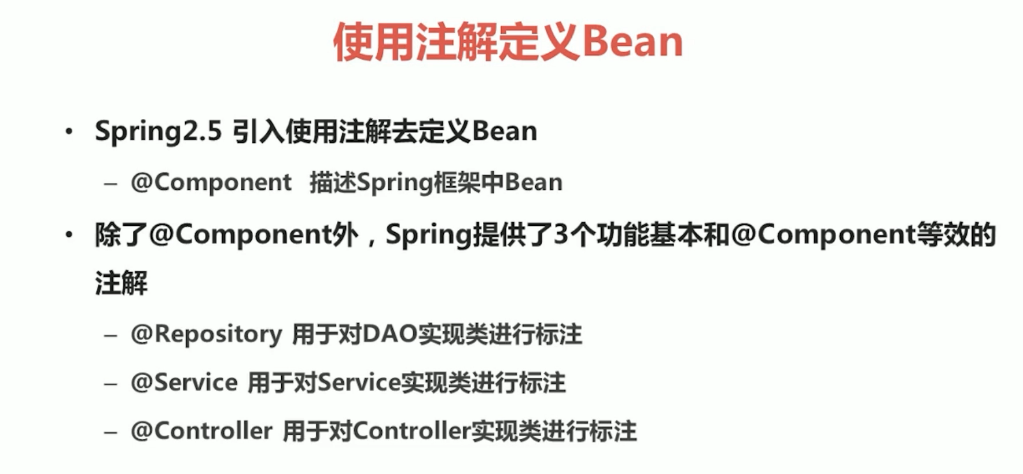
(2)实例
1.在pom.xml中进行配置
<dependencies>

  <dependency>

    <groupId>org.springframework</groupId>

    <artifactId>spring-jdbc</artifactId>

    <version>5.1.5.RELEASE</version>

  </dependency>

  <dependency>

    <groupId>org.springframework</groupId>

    <artifactId>spring-context</artifactId>

    <version>5.1.5.RELEASE</version>

  </dependency>

  <dependency>

    <groupId>org.springframework</groupId>

    <artifactId>spring-aop</artifactId>

    <version>5.1.5.RELEASE</version>

  </dependency>

  <dependency>

    <groupId>org.springframework</groupId>

    <artifactId>spring-core</artifactId>

    <version>5.1.5.RELEASE</version>

  </dependency>

  <dependency>

    <groupId>org.springframework</groupId>

    <artifactId>spring-beans</artifactId>

    <version>5.1.5.RELEASE</version>

  </dependency>

  <dependency>

    <groupId>org.springframework</groupId>

    <artifactId>spring-tx</artifactId>

    <version>5.1.5.RELEASE</version>

  </dependency>

  <dependency>

    <groupId>junit</groupId>

    <artifactId>junit</artifactId>

    <version>4.11</version>

  </dependency>

</dependencies>
2.创建一个类,在类中写一个方法,在类上加一个注解@Component
package service;

import org.junit.Test;

import org.springframework.stereotype.Component;

import sun.misc.Contended;

@Component("UserService")

public class UserService {

    public String Hello(){

        return "hello";

    }

}
3.创建一个applicationContext.xml,在里面配置包扫描
<?xml version="1.0" encoding="UTF-8"?>

<beans xmlns="http://www.springframework.org/schema/beans"

       xmlns:xsi="http://www.w3.org/2001/XMLSchema-instance"

       xmlns:context="http://www.springframework.org/schema/context" xsi:schemaLocation="

        http://www.springframework.org/schema/beans http://www.springframework.org/schema/beans/spring-beans.xsd

        http://www.springframework.org/schema/context http://www.springframework.org/schema/context/spring-context.xsd">

    <!--开启注解扫描=======================-->

    <context:component-scan base-package="service"></context:component-scan>

        </beans>
4.创建一个log4j.properties
### direct log messages to stdout ###

log4j.appender.stdout=org.apache.log4j.ConsoleAppender

log4j.appender.stdout.Target=System.err

log4j.appender.stdout.layout=org.apache.log4j.PatternLayout

log4j.appender.stdout.layout.ConversionPattern=%d{ABSOLUTE} %5p %c{1}:%L - %m%n

### direct messages to file mylog.log ###

log4j.appender.file=org.apache.log4j.FileAppender

log4j.appender.file.File=c\:mylog.log

log4j.appender.file.layout=org.apache.log4j.PatternLayout

log4j.appender.file.layout.ConversionPattern=%d{ABSOLUTE} %5p %c{1}:%L - %m%n

### set log levels - for more verbose logging change 'info' to 'debug' ###

log4j.rootLogger=info, stdout
5.创建一个测试类
package test;

import org.junit.Test;

import org.springframework.context.ApplicationContext;

import org.springframework.context.support.ClassPathXmlApplicationContext;

import service.UserService;

public class UserTest {

    @Test

    public void hellotest(){

        ApplicationContext applicationContext=new ClassPathXmlApplicationContext("applicationContext.xml");

        UserService userService=(UserService)applicationContext.getBean("UserService");

        String s=userService.Hello();

        System.out.println(s);

    }

}
(二)属性注入的注解
(1)常用注解
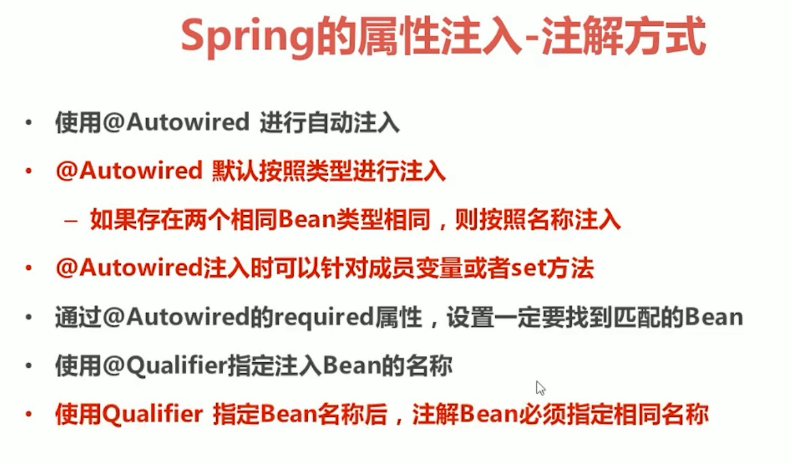
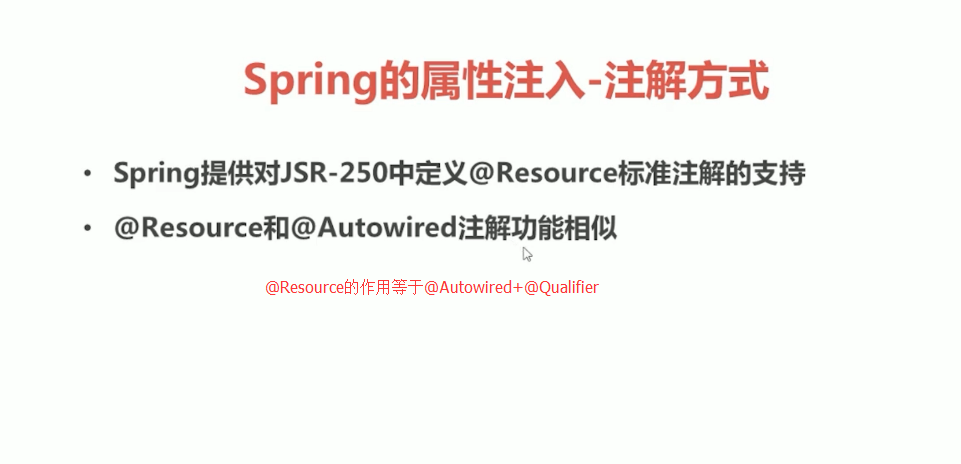
1.属性注入
package service;

import org.junit.Test;

import org.springframework.beans.factory.annotation.Value;

import org.springframework.stereotype.Component;

import sun.misc.Contended;

@Component("UserService")

public class UserService {

    @Value("小欢")

    private String name;

    public String Hello(){

        return "hello"+name;

    }

}
2.类注入
(a)UserService.java
package service;

import dao.UserDao;

import org.junit.Test;

import org.springframework.beans.factory.annotation.Value;

import org.springframework.stereotype.Component;

import sun.misc.Contended;

import javax.annotation.Resource;

@Component("UserService")

public class UserService {

    @Value("小欢")

    private String name;

    @Resource(name="UserDao")

    private UserDao userDao;

    public String Hello(){

        System.out.println("service中的hello");

        return "hello"+name;

    }

}
(b)UserDao.java
package dao;

import org.springframework.stereotype.Repository;

@Repository("UserDao")

public class UserDao {

    public void Hello(){

        System.out.println("dao 中的hello");

    }

}
(c)applicationContext.xml
<?xml version="1.0" encoding="UTF-8"?>

<beans xmlns="http://www.springframework.org/schema/beans"

       xmlns:xsi="http://www.w3.org/2001/XMLSchema-instance"

       xmlns:context="http://www.springframework.org/schema/context" xsi:schemaLocation="

        http://www.springframework.org/schema/beans http://www.springframework.org/schema/beans/spring-beans.xsd

        http://www.springframework.org/schema/context http://www.springframework.org/schema/context/spring-context.xsd">

    <!--开启注解扫描=======================-->

    <context:component-scan base-package="service,dao"></context:component-scan>

        </beans>
(d)UserTest.java
package test;

import org.junit.Test;

import org.springframework.context.ApplicationContext;

import org.springframework.context.support.ClassPathXmlApplicationContext;

import service.UserService;

public class UserTest {

    @Test

    public void hellotest(){

        ApplicationContext applicationContext=new ClassPathXmlApplicationContext("applicationContext.xml");

        UserService userService=(UserService)applicationContext.getBean("UserService");

        String s=userService.Hello();

        System.out.println(s);

    }

}
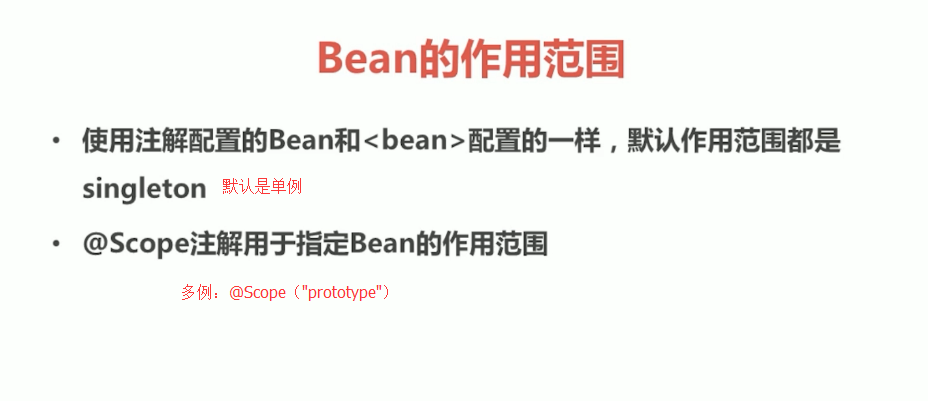
(三)其他注解
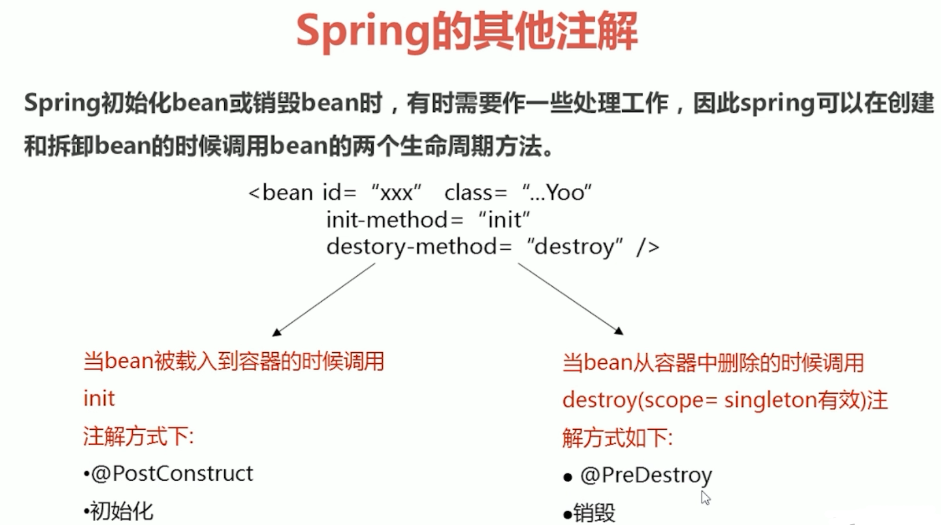
(四)xml和注解整合开发
1.UserService2.java
package service;

import dao.UserDao2;

import org.springframework.stereotype.Repository;

import javax.annotation.Resource;

public class UserService2 {

    @Resource(name="UserDao2")

    private UserDao2 userDao2;

    public void He(){

        userDao2.He();

        System.out.println("userservice2中的he");

    }

}
2.UserDao2.java
package dao;

public class UserDao2 {

    public void He(){

        System.out.println("userdao2中的he");

    }

}
3.applicationContext.xml
<?xml version="1.0" encoding="UTF-8"?>

<beans xmlns="http://www.springframework.org/schema/beans"

       xmlns:xsi="http://www.w3.org/2001/XMLSchema-instance"

       xmlns:context="http://www.springframework.org/schema/context" xsi:schemaLocation="

        http://www.springframework.org/schema/beans http://www.springframework.org/schema/beans/spring-beans.xsd

        http://www.springframework.org/schema/context http://www.springframework.org/schema/context/spring-context.xsd">

    <context:annotation-config/>

    <bean id="UserService2" class="service.UserService2"/>

    <bean id="UserDao2" class="dao.UserDao2"/>

        </beans>
4.UserTest.java
package test;

import org.junit.Test;

import org.springframework.context.ApplicationContext;

import org.springframework.context.support.ClassPathXmlApplicationContext;

import service.UserService;

import service.UserService2;

public class UserTest {

    @Test

    public void hetest(){

        ApplicationContext applicationContext=new ClassPathXmlApplicationContext("applicationContext.xml");

        UserService2 userService2=(UserService2)applicationContext.getBean("UserService2");

        userService2.He();

    }

}
spring学习笔记之---bean管理的注解方式的更多相关文章
- spring学习笔记之---bean管理
bean管理(xml) (一)spring的工厂类 FileSystemXmlApplicationContext 读取磁盘配置文件 (二)bean实例化的三种方式 (1)使用类构造器实例化(默认无参 ...
- (转)Spring的bean管理(注解方式)
http://blog.csdn.net/yerenyuan_pku/article/details/69663779 Spring的bean管理(注解方式) 注解:代码中的特殊标记,注解可以使用在类 ...
- Spring 的 Bean 管理(注解方式)
Spring 的 Bean 管理(注解方式) 1. 导入必要的 jar 包和 xml 文件 使用注解需要导入 spring-aop 的 jar 包. applicationContext.xml 文件 ...
- Spring学习笔记1——IOC: 尽量使用注解以及java代码(转)
在实战中学习Spring,本系列的最终目的是完成一个实现用户注册登录功能的项目. 预想的基本流程如下: 1.用户网站注册,填写用户名.密码.email.手机号信息,后台存入数据库后返回ok.(学习IO ...
- Spring学习笔记1——IOC: 尽量使用注解以及java代码
在实战中学习Spring,本系列的最终目的是完成一个实现用户注册登录功能的项目. 预想的基本流程如下: 1.用户网站注册,填写用户名.密码.email.手机号信息,后台存入数据库后返回ok.(学习IO ...
- Spring的bean管理(注解方式)
注解:代码中的特殊标记,注解可以使用在类.方法.属性上面,使用注解可实现一些基本的功能.注解的写法是@注解名称(属性=属性值). 使用注解创建对象 第一步,创建Web项目,引入Spring的开发包 第 ...
- Spring学习笔记(三)—— 使用注解配置spring
一.使用步骤 1.1 导包 1.2 为主配置文件引入新的命名空间(约束) 在applicationContext.xml中引入context约束 1.3 编写相关的类 public class Use ...
- (四)Spring 的 bean 管理(注解方式)
目录 前言 使用 aop 的配置文件写法 开启注解扫描 利用注解创建对象 注解方式注入属性 配置文件和注解混合使用 前言 注解可以写在 类.方法.属性 上 : 使用 注解,需要导入 aop 包: 使用 ...
- Spring学习笔记(3)——Bean的注入方式
依赖注入 依赖注入支持属性注入.构造函数注入.工厂注入. 属性注入: 属性注入即通过setXxx()方法注入Bean的属性值或依赖对象 属性注入要求Bean提供一个默认的构造函数(无参构造函数),并为 ...
随机推荐
- visudo 与 /etc/sudoers
增加多个用户免密码登录 User_Alias USER_OPS = zouyi,hanerhui,shibeibei,gaoxudong,xiaoyuelin,wangsongfeng,sunjian ...
- Fiddler如何过滤无用的链接
场景:现在是移动端的天下,测试过程中,抓包工具肯定必不可少,如何使用这里就不赘述,这里给大家讲述下如何过滤那些没有的链接,js ,png等无用的信息 工具:fiddler-use Filters功能: ...
- SQL高度优化
受同事dd之托,优化一条boss看的报表SQL.dd写复杂疑难SQL无数,如何写出优雅的SQL自有一番心得体会.能将一条7表含inner join,left join并含有关联子查询的.返回结果集 ...
- Django用户头像上传
1 将文件保存到服务器本地 upload.html ? 1 2 3 4 5 6 7 8 9 10 11 12 13 14 15 16 17 <!DOCTYPE html> <html ...
- 侦听器watch 监听单个属性
<!DOCTYPE html> <html lang="en"> <head> <meta charset="UTF-8&quo ...
- scrapy基础知识之 CrawlSpiders:
通过下面的命令可以快速创建 CrawlSpider模板 的代码: scrapy genspider -t crawl spidername xx.com LinkExtractors class sc ...
- 微信开发:微信js_sdk 分享,前端部分(二)
微信开发:微信js-sdk前端分享,代码如下: <script src="http://res.wx.qq.com/open/js/jweixin-1.0.0.js"> ...
- 19.linux文件属性
1.linux文件属性 ls -lih i查看文件inode,h查看文件大小 文件总共10个属性 inode索引节点编号(唯一的) 文件类型和权限,第一个字符为类型,后面字符为权限 硬链接的数量 文件 ...
- JSP之BBS论坛网站的创建
游戏论坛 工具:myeclipse10.0版本 Tomacat是在外部导入的apache-tomcat-7.0.93 JDK版本为1.6.0_13 字符编码统一为utf-8 一.建立数据库(chat) ...
- windows开机自启python服务(任务计划程序+bat脚本)
需求:根据上海某银行 的需求,使用到获取数据服务的软件 只能在windows上运行,所以有 windows系统开机用户登录后自启动python flask服务 的需求: 相关工具:win10系统中,使 ...