
使用elasticsearch启动项目报错failed to load elasticsearch nodes 。。。。。No type specified for field [name]
failed to load elasticsearch nodes 。。。。。No type specified for field [name]
翻译: 加载ElasticSearch节点失败。。。。。没有为字段[名称]指定类型
所使用elasticsearch版本为5.6.15
原因一:
如果是使用java类来映射elasticsearch中index下的type
那么当使用@Field注解时,请指定属性的类型
// 引入的包

import org.springframework.data.elasticsearch.annotations.Field;

import org.springframework.data.elasticsearch.annotations.FieldType;

// 像这样

@Field(type = FieldType.Long)

private Long id;

// 不可这样, 启动项目时由于不知道属性的类型,所以无法创建index下的type

@Field

private Long id;
但是在做新增操作时,elasticsearch会自动创建类型, 而这个类型下的属性下的参数是有问题的(也可能是我看不懂)
如下图部门名称是自动生成的
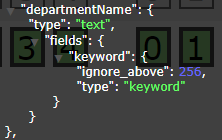
其实我们只需要指定部门的类型即可,像这样
@Field(type = FieldType.Text)

private String departmentName;
我们不需要fields这个属性
注意每当我们改变elasticsearch中的index下的type下的属性名的类型或参数时,就我所知只能删除index重新生成(我不知道如何删除index下的type)
否则便会报如下错
You can't change existing mapping type, you need to create a new index with the correct mapping and index the data again
翻译: 不能更改现有的映射类型,需要使用正确的映射创建新的索引,然后重新索引数据。
需要怎么做呢?
删除有问题的索引,为每个属性指定相应的类型。重新索引数据。
使用elasticsearch启动项目报错failed to load elasticsearch nodes 。。。。。No type specified for field [name]的更多相关文章
- Eclipse启动 报错[Failed to load the JNI shared library jvm.dll
准备要做java服务器,在安装开发环境时,启动Eclipse报错[Failed to load the JNI shared library jvm.dll] 研究了下,造成错误的原因是由于eclip ...
- tomcat7 启动项目报错 java.lang.NoSuchMethodError: javax.servlet.ServletContext.getSessionCookieConfig()
JDK版本:jdk1.8.0_77 Tomcat 版本:apache-tomcat-7.0.47 异常重现步骤: 1.完成项目部署 2.启动Tomcat 异常头部信息:java.lang.NoSuch ...
- eclipse启动项目报错:java.lang.ClassNotFoundException: ContextLoaderListener
eclipse 启动项目报错:找不到 Spring 监听器类 org.springframework.web.context.ContextLoaderListener 严重: Error confi ...
- 解决:启动项目报错 java.lang.UnsatisfiedLinkError: D:\Java\apache-tomcat-8.0.17\bin\tcnative-1.dll: Can't load IA 32-bit .dll on a AMD 64-bit platform
启动项目报错如下: java.lang.UnsatisfiedLinkError: D:\Java\apache-tomcat-8.0.17\bin\tcnative-1.dll: Can't loa ...
- 启动项目报错:org.springframework.beans.factory.UnsatisfiedDependencyException
dubbo项目: 启动项目报错:(web端) org.springframework.beans.factory.UnsatisfiedDependencyException: Error creat ...
- junit单元测试报错Failed to load ApplicationContext,但是项目发布到tomcat浏览器访问没问题
junit单元测试报错Failed to load ApplicationContext,但是项目发布到tomcat浏览器访问没问题,说明代码是没问题的,配置也没问题.开始时怀疑是我使用junit版本 ...
- IDEA启动项目报错:Cannot open URL.Please check this URL is correct
IDEA启动项目报错:Cannot open URL.Please check this URL is correct 问题:IDEA启动SSM项目,使用的Tomcat,报错 Cannot open ...
- Springboot项目 配置数据库连接属性后,启动项目报错
Springboot项目 配置数据库连接属性后,启动项目报错,错误如下: 错误原因分析: 1.连接信息配置错误 当使用properties为配置文件时,如图所示,上面的 spring.datasour ...
- 使用laravel-admin后台sdk报错Failed to load resource: net::ERR_CERT_AUTHORITY_INVALID、Provisional headers are shown
报错Failed to load resource: net::ERR_CERT_AUTHORITY_INVALID请先确定自己的资源url是否可以确实访问到(地址正确与否.访问权限是否开启等) 若n ...
随机推荐
- SQLSERVER使用Spring Data JPA实现模糊查询like
mysql下可以使用 CONCAT函数 @Query("SELECT u.username FROM User u WHERE u.username LIKE CONCAT('%',:use ...
- top(k,n)—db kernel队解题思路
0. 比赛 公司里的第三届XX中间件性能挑战赛 我和另外两个P5组队参加,队名为"db kernel".最后获得了第八,应该是P5里的最高排名. 以下简单扼要地介绍一下题目,以及我 ...
- CefSharp中ChromiumWebBrowser打开新页面处理(_blank)
原文:CefSharp中ChromiumWebBrowser打开新页面处理(_blank) 版权声明:欢迎转载,但是请保留出处说明 https://blog.csdn.net/lanwilliam/a ...
- Angular使用echarts
安装 npm install echarts --save npm install @types/echarts --save 基本使用 定义一个dom <div id="chart& ...
- C# 获取系统Icon、获取文件相关的Icon
原文:C# 获取系统Icon.获取文件相关的Icon 1.获取系统Icon工具下载SystemIcon.exe using System; using System.Collections.Gener ...
- Angular路由守卫 canDeactivate
目的 离开页面时,做出逻辑判断 以ng-alain的项目为基础做演示 效果如图: 关键代码 定义一个CanDeactivateGuardService export class CanDeactiva ...
- 【msdn wpf forum翻译】如何在wpf程序(程序激活时)中捕获所有的键盘输入,而不管哪个元素获得焦点?
原文:[msdn wpf forum翻译]如何在wpf程序(程序激活时)中捕获所有的键盘输入,而不管哪个元素获得焦点? 原文链接:http://social.msdn.microsoft.com/Fo ...
- C# API 获取系统DPI缩放倍数跟分辨率大小
原文:C# API 获取系统DPI缩放倍数跟分辨率大小 using System; using System.Drawing; using System.Runtime.InteropServices ...
- vxworks下libpcap的移植
linux下的libpcap应用能够成熟的使用在第三方的应用中,但基于vxworks开发的项目中需要使用libpcap的部分功能则无相应的实现. 研究了下libpcap向vxworks的移植,并且小有 ...
- linux自动挂载远程网盘到本地
sudo vim /etc/fstab 添加如下内容 //192.168.1.110/MyFiles /path/to/mount cifs username=adminz,password=pas ...