
Neo4j 爬坑笔记for3.2.6
官网语法,非常详尽:http://neo4j.com/docs/developer-manual/current/cypher/clauses/match/
A:请对应版本号,不同大版本可能会有很大区别
B:我会对我学习过程中遇到的难点详细说明,有些基本的东西会带过
C: 初学,有错误我以后会修改
=============================2017.11.02============================================
1、是什么:
简单来说就是用于图形计算的非关系行数据库。
2、安装:略
linux与windows版本,学习的话装windows即可,安装非常简单,这里不说了,百度会有好多。
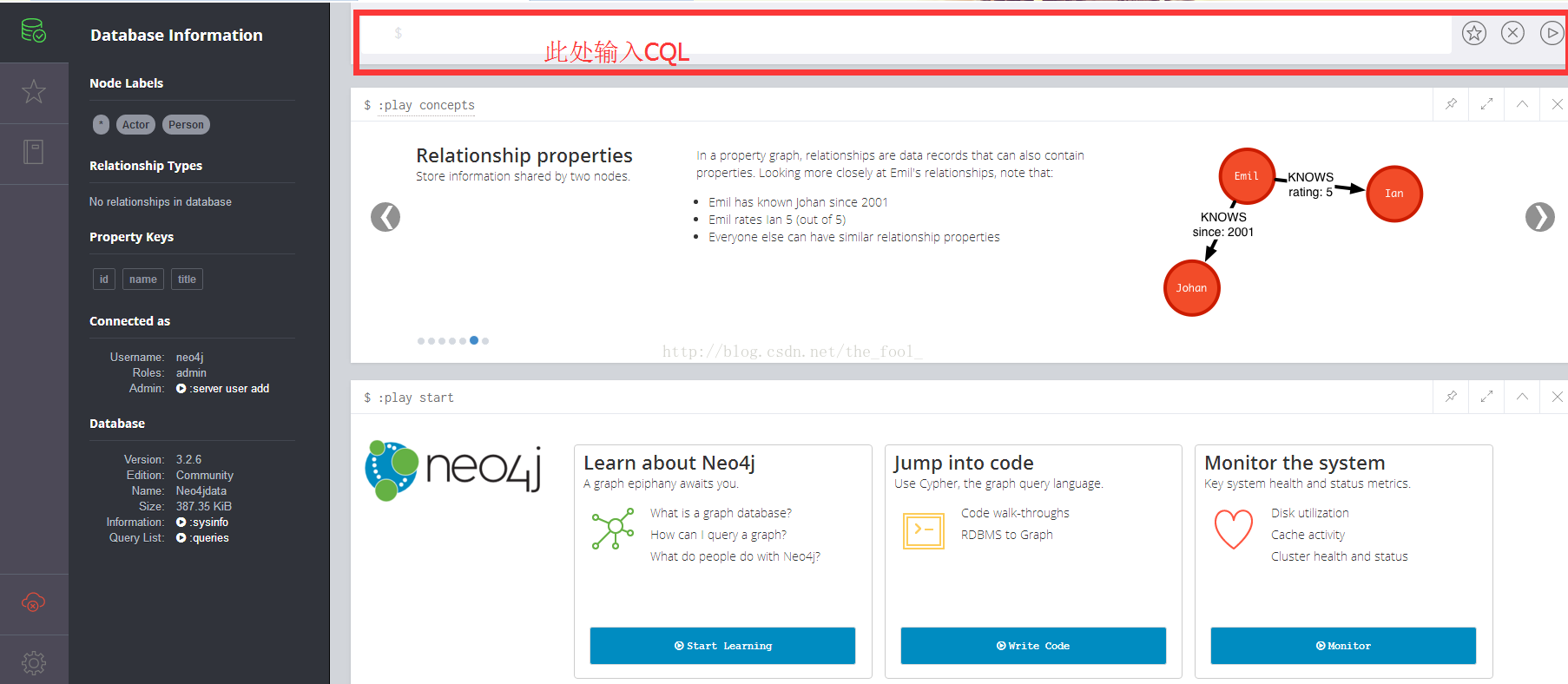
进入如图:
3、使用:
版本:v3.2.6 2017.11.2日最新版本
a、基础语法CQL(网上语法很多,但都没有解释什么是什么):
节点
增:create (a:aDemo{dId:"001",name:"zhangsan"})
create:创建(创建出来的点叫节点);
a:我开始理解的是类似表别名、变量名(很可能不对,好像没有什么意义,先一放);
aDemo:经试验类似于表名,或者说一个类型的集合
create (a:aDemo{dId:"001",name:"zhangsan"})
create (a:aDemo{dId:"002",name:"lisi"})
create (a:aDemo{dId:"003",name:"wamhwu"})
create (a:aDemo{dId:"003",name:"wamhwu"})
create (a:aDemo{dId:"003",name:"wamhwu"})
依次执行,我创建了五个节点,每个节点内置了一个自增的唯一id
删:MATCH(n:aDemo
{name:"lisi"}) DETACH DELETE n
查:MATCH
(n) RETURN n 也可:start
a = node(*) return a//查询所有集合中所有数据
MATCH (n:aDemo) RETURN n LIMIT 25//查询 aDemo集合中所有数据
MATCH (n:aDemo{name:"zhangsan"}) RETURN n LIMIT 25
改:MATCH
(dc:aDemo{name:"zhangsan"})SET dc.newAttr = "new attr" RETURN dc
关系:
摘抄地址:W3C:https://www.w3cschool.cn/neo4j/neo4j_cql_relationship_basics.html
语法:
CREATE (<node1-details>)-[<relationship-details>]->(<node2-details>)
<node1-details>是“From Node”节点详细信息
<node2-details>是“到节点”节点详细信息
relationship-details>是关系详细信息
CREATE (n1:aDemo{name:"zhangsan"})-[r1:Relationship]->(n2:aDemo{name:"wangwu"})
此处值得注意的是,我有多个张三一个李四,只建立了一条关系(最后一条张三(id最大))
=========================================================================
基础语法不准备再补充了,有这点基础,就可以边百度边用了,下面是尝试集成到Spring4中,网上只有
集成到Spring-boot的资源与教程,但是为了加一个图数据库改动框架实在有些得不偿失。
首先看一下简单的JDBC:
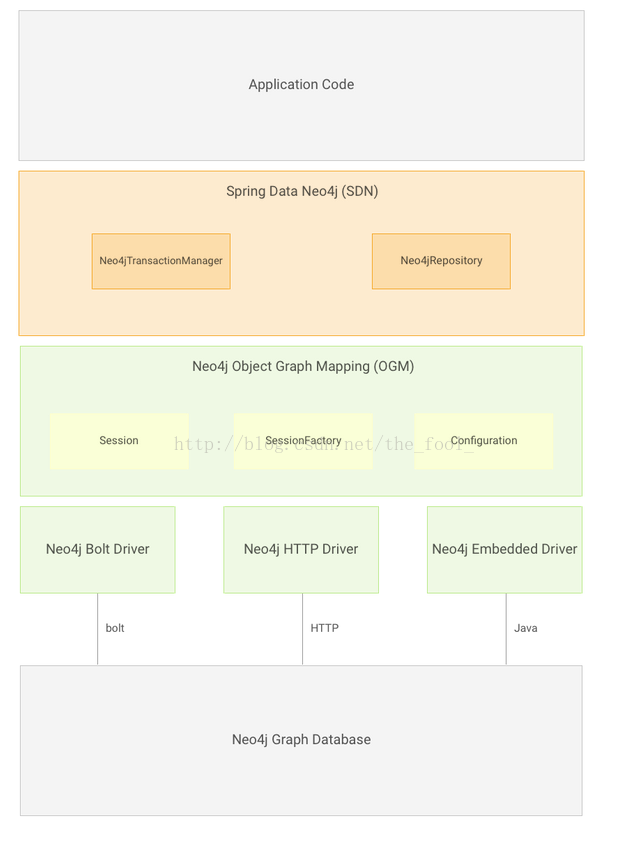
demo写完就找不到了,那就不管了,下面是需求,结合SpringMVC使用Neo4j
===================================================================================20171110
今天正式填完了所有坑,下面记录下过程:
官方文档祭天:
https://docs.spring.io/spring-data/data-neo4j/docs/4.2.0.RELEASE/reference/html/#preface.requirements
首先对应版本:
3. Requirements
Spring Data Neo4j 4.2.x at minimum, requires:
JDK Version 8 and above.
Neo4j Graph Database 2.3.x / 3.0.x / 3.1.x and above.
Spring Framework 4.3.6.RELEASE and above.
If you plan on altering the version of the OGM make sure it is only in the 2.1.1+
release family.
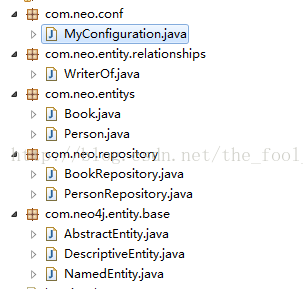
项目结构:
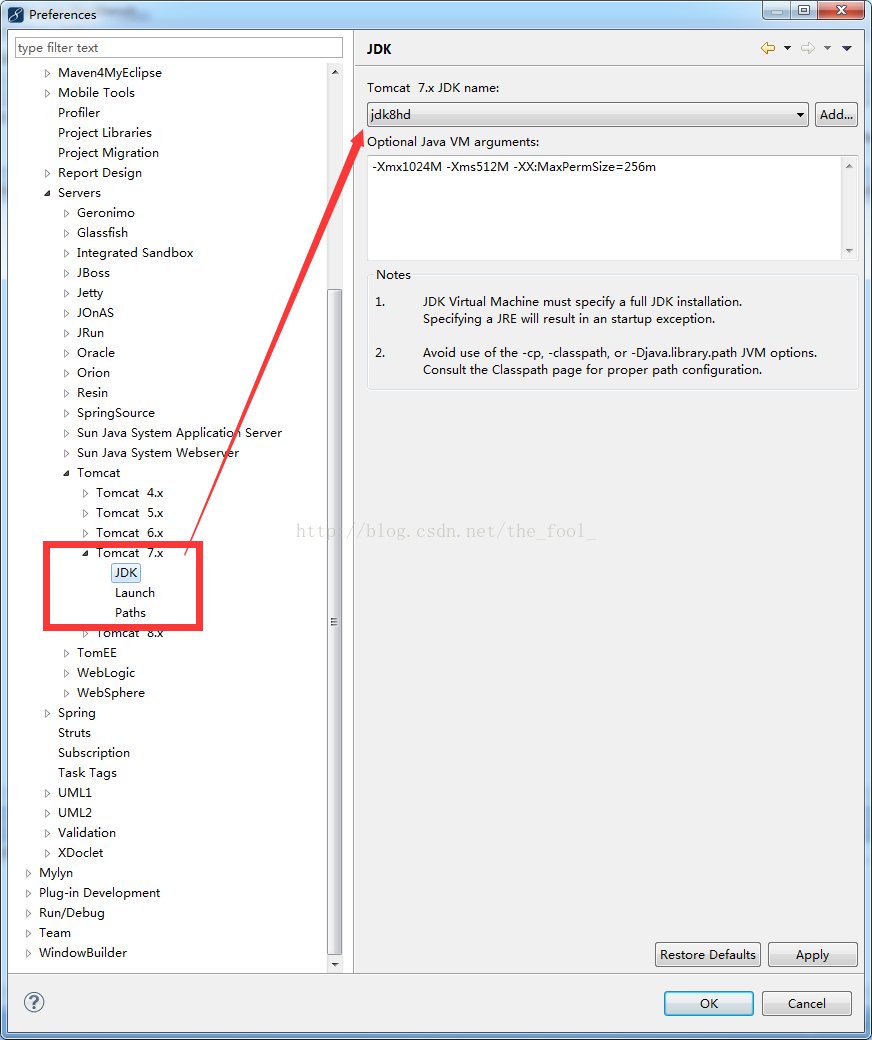
升级jdk(主要是把编译器换成1.8的):
根据要求配置依赖包:
	<properties>

		<project.build.sourceEncoding>UTF-8</project.build.sourceEncoding>

		<spring.version>4.3.12.RELEASE</spring.version><!-- 声明版本号,以后统一在这里进行管理 -->

	</properties>

	<dependencies>

		<!-- neo4j-data以及依赖包 -->

		<dependency>

			<groupId>org.springframework.data</groupId>

			<artifactId>spring-data-neo4j</artifactId>

			<version>4.2.8.RELEASE</version><!-- 4.1.1.RELEASE -->

		</dependency>

		<dependency>

			<groupId>org.neo4j</groupId>

			<artifactId>neo4j-ogm-core</artifactId>

			<version>2.1.1</version>

			<scope>compile</scope>

		</dependency>

		<!-- Only add if you're using the Bolt driver这里我选择了bolt协议 -->

		<dependency>

			<groupId>org.neo4j</groupId>

			<artifactId>neo4j-ogm-bolt-driver</artifactId>

			<version>2.1.1</version>

			<scope>runtime</scope>

		</dependency>

		<!-- Only add if you're using the HTTP driver -->

		<!-- <dependency> <groupId>org.neo4j</groupId> <artifactId>neo4j-ogm-http-driver</artifactId>

			<version>2.1.1</version> <scope>runtime</scope> </dependency> -->

		<!-- Only add if you're using the Embedded driver -->

		<!-- <dependency> <groupId>org.neo4j</groupId> <artifactId>neo4j-ogm-embedded-driver</artifactId>

			<version>2.1.1 RELEASE</version> <scope>runtime</scope> </dependency> -->

因为升级了spring版本,对其它组件版本进行了微调,这个不难,也就不列举了
配置启动类(有xml与方法配置的方式,这里使用了后者):
MyConfiguration类:

package com.neo.conf;

import org.neo4j.ogm.session.SessionFactory;

import org.springframework.context.annotation.Bean;

import org.springframework.context.annotation.Configuration;

import org.springframework.data.neo4j.repository.config.EnableNeo4jRepositories;

import org.springframework.transaction.annotation.EnableTransactionManagement;

@Configuration

@EnableNeo4jRepositories(basePackages = "com.neo.repository")//相当于service、执行库的位置

@EnableTransactionManagement

public class MyConfiguration {

   @Bean

   public org.neo4j.ogm.config.Configuration getConfiguration() {

      org.neo4j.ogm.config.Configuration config =

               new org.neo4j.ogm.config.Configuration();

      // TODO: Temporary uses the embedded driver. We need to switch to http

      // driver. Then we can horizontally scale neo4j

      config.driverConfiguration()

      .setDriverClassName("org.neo4j.ogm.drivers.bolt.driver.BoltDriver")

      .setURI("bolt://neo4j:123456@localhost")

      .setConnectionPoolSize(150);

      return config;

   }

   @Bean

   public SessionFactory getSessionFactory() {

      // Return the session factory which also includes the persistent entities

      return new SessionFactory(getConfiguration(), "com.neo.entitys");

   }

}

Repository类:

/**

 * @author Michael Hunger

 * @author Mark Angrish

 */

public interface MovieRepository  extends GraphRepository<Movie>{

	Movie findByTitle(@Param("title") String title);

	Collection<Movie> findByTitleLike(@Param("title") String title);

	@Query("MATCH (m:Movie)<-[r:ACTED_IN]-(a:Person) RETURN m,r,a LIMIT {limit}")

	Collection<Movie> graph(@Param("limit") int limit);

}

@Repository

public interface PersonRepository extends GraphRepository<PersonBak> {

}

public interface RoleRepository extends GraphRepository<Role> {}

Entity类:

@JsonIdentityInfo(generator=ObjectIdGenerators.PropertyGenerator.class, property="id")

@NodeEntity

public class Movie {

	@GraphId

	private Long id;

	private String title;

	private int released;

	private String tagline;

	@Relationship(type = "ACTED_IN", direction = Relationship.INCOMING)

	private List<Role> roles = new ArrayList<>();

	public Movie() {

	}

	public Movie(Long id,String title, int released) {

		this.id=id;

		this.title = title;

		this.released = released;

	}

	public Movie(String title, int released) {

		this.title = title;

		this.released = released;

	}

	public Long getId() {

		return id;

	}

	public void setId(Long id) {

		this.id = id;

	}

	public String getTitle() {

		return title;

	}

	public int getReleased() {

		return released;

	}

	public String getTagline() {

		return tagline;

	}

	public Collection<Role> getRoles() {

		return roles;

	}

	public void addRole(Role role) {

		this.roles.add(role);

	}

}

@JsonIdentityInfo(generator=ObjectIdGenerators.PropertyGenerator.class, property="id")

@NodeEntity

public class Person {

	@GraphId

	private Long id;

	private String name;

	private int born;

	@Relationship(type = "ACTED_IN")

	private List<Movie> movies = new ArrayList<>();

	public Person() {

	}

	public Person(String name) {

		this.name = name;

	}

	public Person( Long id,String name) {

		this.id = id;

		this.name = name;

	}

	public Long getId() {

		return id;

	}

	public String getName() {

		return name;

	}

	public int getBorn() {

		return born;

	}

	public List<Movie> getMovies() {

		return movies;

	}

}

@JsonIdentityInfo(generator=ObjectIdGenerators.PropertyGenerator.class, property="id")

@RelationshipEntity(type = "ACTED_IN")

public class Role {

	@GraphId

	private Long id;

	private Collection<String> roles = new ArrayList<>();

	@StartNode

	private Person person;

	@EndNode

	private Movie movie;

	public Role() {

	}

	public Role(Movie movie, Person actor) {

		this.movie = movie;

		this.person = actor;

	}

	public Long getId() {

		return id;

	}

	public Collection<String> getRoles() {

		return roles;

	}

	public Person getPerson() {

		return person;

	}

	public Movie getMovie() {

		return movie;

	}

	public void addRoleName(String name) {

		this.roles.add(name);

	}

}

使用:

@Autowired

	private PersonRepository personRepository;

	@Autowired

	MovieRepository movieRepository;

	@Autowired

	RoleRepository roleRepository;

    Public void test(){

		Person persontmp1=new Person("anmuxi12222");

		Movie movieTmp=new Movie(66l,"title22222222",1);

		Role ro = new Role(movieTmp,persontmp1);

		roleRepository.save(ro);

Collection<Movie> graph = movieRepository.graph(10);

		Iterator<Movie> iterator = graph.iterator();

		while (iterator.hasNext()) {

			Movie next = iterator.next();

			System.out.println(next.getId());

		}

}
这时候发现,存在中文乱码情况:
查看源码,打印了下系统编码
String csn = Charset.defaultCharset().name();
System.err.println(csn);//结果是GBK
配置环境变量:
Neo4j 爬坑笔记for3.2.6的更多相关文章
- 【爬坑笔记】c# 如何通过EF Core读写sql server的类似double型字段
=============================================== 2019/8/31_第1次修改 ccb_warlock == ...
- WIFI Deauth攻击-爬坑笔记
这里用Aircrack这款工具进行介绍: 准备工作:无线网卡连接电脑或者虚拟机(免驱的最好),如需驱动请自行安装驱动 1.将无线网卡接入测试电脑Linux虚拟机(装有Aircrack-ng) 2.测试 ...
- 安卓易学,爬坑不易—腾讯老司机的RecyclerView局部刷新爬坑之路
前言 安卓开发者都知道,RecyclerView比ListView要灵活的多,但不可否认的里面的坑也同样埋了不少人.下面让我们看看腾讯开发工程师用实例讲解自己踩坑时的解决方案和心路历程. 话说有图有真 ...
- 多线程爬坑之路-Thread和Runable源码解析之基本方法的运用实例
前面的文章:多线程爬坑之路-学习多线程需要来了解哪些东西?(concurrent并发包的数据结构和线程池,Locks锁,Atomic原子类) 多线程爬坑之路-Thread和Runable源码解析 前面 ...
- 安卓易学,爬坑不易——腾讯老司机的RecyclerView局部刷新爬坑之路
针对手游的性能优化,腾讯WeTest平台的Cube工具提供了基本所有相关指标的检测,为手游进行最高效和准确的测试服务,不断改善玩家的体验.目前功能还在免费开放中. 点击地址:http://wetest ...
- Android爬坑之路
做了那么久前端,现在终于可以回到我的老本行, 今天我用了一天的时间配置里Android开发环境,mac和windows双平台,eclipse和IDEA双平台,别问为什么,我就喜欢,中间大坑不断,再加上 ...
- EntityFramework CodeFirst SQLServer转Oracle踩坑笔记
接着在Oracle中使用Entity Framework 6 CodeFirst这篇博文,正在将项目从SQLServer 2012转至Oracle 11g,目前为止遇到的问题在此记录下. SQL Se ...
- kali linux安装virtualbox虚拟机之爬坑经历
很多kali爱好者想把kali linux作为系统使用,但是有些win下的程序有时候也需要用到,此时需要虚拟机. kali系统在安装虚拟机的时候也会遇到一大堆坑,接下来是我的爬坑过程. 一波三折. 环 ...
- 从Ueditor跨域上传,总结的一次跨域上传的爬坑经历
项目内其中一个管理后台需要发布文章,需要一个富文本编辑器,经过一番选择后,最终选择了百度的Ueditor. 由于上传的文件是上传到另一台专门存放图片等静态资源的服务器上面的,所以就涉及到了跨域上传. ...
随机推荐
- WPF在3D Cad模型中利用TextureCoordinates实现颜色渐变显示偏差值的变化
原文:WPF在3D Cad模型中利用TextureCoordinates实现颜色渐变显示偏差值的变化 注:最近在做3D机械模型重建方面的软件,需要根据光栅传感器采集的数据绘制3D图形,并显示出色差以及 ...
- SQL之Grant(分配权限)和Revoke(回收权限)
Grant Grant可以把指定的权限分配给特定的用户,如果这个用户不存在,则会创建一个用户 命令格式 grant 权限 on 数据库名.表名 to 用户名@登陆方式 identified by 'p ...
- 解压压缩文件报错gzip: stdin: not in gzip format tar: Child returned status 1 tar: Error is not recoverable: exiting now
压缩包是直接weget 后面加官网上的tar包地址获取的 [root@xuegod43 ~]# tar -zxvf /home/hadoop/hadoop-2.6.5-src.tar.gz gzip ...
- jquery获取选中的值和设置单选扭选中
<!DOCTYPE html><html><head><meta http-equiv="Content-Type" content=&q ...
- Visual Studio更改编码格式为“UTF-8”
原文:Visual Studio更改编码格式为"UTF-8" 用VS2015新建了个Python文件,在VS2015打开时中文显示正常, 用Visual Studio Code文本 ...
- swift 如何控制view的显示与隐藏
swift 如何控制view的显示与隐藏 UIView有一个属性 hidden let line: UILabel = UILabel() 默认是显示的 需要显示它的时候:line.hidden = ...
- C#基础加强篇—委托、Lambda表达式和事件(下)
3.事件 事件作为C#中的一种类型,为类和类的实例定义发出通知的能力,从而将事件和可执行代码捆绑在了一起.事件是对象发送的消息,以发信号通知操作的发生.操作可能是由用户交互引起的,也可能是由某些其他的 ...
- C# DataGridView合计行
在网上搜了很多关于DataGridView合计行的设计及源码,都不是很合我心意.于是自己写了一个关于合计行的DLL.以后每次要用到合计行的时候只要引用这个DLL就可以了. 效果图如下: 引用Dll: ...
- Rails 最佳实践
在你业务简单的时候,让你简简单单用 ActiveRecord 模型. 复杂的时候,你可以用官方推荐的 Concerns. 更复杂的时候,可以通过 gem 和 API 来拆分. 极端复杂的时候,由于 R ...
- 零元学Expression Blend 4 - Chapter 8 用实例了解布局容器系列-「Grid」
原文:零元学Expression Blend 4 - Chapter 8 用实例了解布局容器系列-「Grid」 本系列将教大家以实做案例认识Blend 4 的布局容器,此章介绍的是Blend 4 里的 ...