
C# 中yield关键字解析
前言
前段时间了解到yield关键字,一直觉得还不错。今天给大家分享一下yield关键字的用法。yield return 返回集合不是一次性返回所有集合元素,而是一次调用返回一个元素。具体如何使用yield return 返回集合呢?我们一起往下面看吧。
yield使用介绍
yield return 和yield break:
我们看下平常循环返回集合的使用操作(返回1-100中的偶数):
  class Program

    {

        static private List<int> _numArray; //用来保存1-100 这100个整数

        Program() //构造函数。我们可以通过这个构造函数往待测试集合中存入1-100这100个测试数据

        {

            _numArray = new List<int>(); //给集合变量开始在堆内存上开内存,并且把内存首地址交给这个_numArray变量

            for (int i = ; i <= ; i++)

            {

                _numArray.Add(i);  //把1到100保存在集合当中方便操作

            }

        }

        static void Main(string[] args)

        {

            new Program();

            TestMethod();

        }

        //测试求1到100之间的全部偶数

        static public void TestMethod()

        {

            foreach (var item in GetAllEvenNumberOld())

            {

                Console.WriteLine(item); //输出偶数测试

            }

        }

        /// <summary>

        /// 使用平常返回集合方法

        /// </summary>

        /// <returns></returns>

        static IEnumerable<int> GetAllEvenNumberOld()

        {

            var listNum = new List<int>();

            foreach (int num in _numArray)

            {

                if (num %  == ) //判断是不是偶数

                {

                    listNum.Add(num); //返回当前偶数

                }

            }

            return listNum;

        }

    }
然后我们再看看使用yield return返回集合操作:
 class Program

    {

        static private List<int> _numArray; //用来保存1-100 这100个整数

        Program() //构造函数。我们可以通过这个构造函数往待测试集合中存入1-100这100个测试数据

        {

            _numArray = new List<int>(); //给集合变量开始在堆内存上开内存,并且把内存首地址交给这个_numArray变量

            for (int i = ; i <= ; i++)

            {

                _numArray.Add(i);  //把1到100保存在集合当中方便操作

            }

        }

        static void Main(string[] args)

        {

            new Program();

            TestMethod();

        }

        //测试求1到100之间的全部偶数

        static public void TestMethod()

        {

            foreach (var item in GetAllEvenNumber())

            {

                Console.WriteLine(item); //输出偶数测试

            }

        }

        //使用Yield Return情况下的方法

        static IEnumerable<int> GetAllEvenNumber()

        {

            foreach (int num in _numArray)

            {

                if (num %  == ) //判断是不是偶数

                {

                    yield return num; //返回当前偶数

                }

            }

            yield break;  //当前集合已经遍历完毕,我们就跳出当前函数,其实你不加也可以

            //这个作用就是提前结束当前函数,就是说这个函数运行完毕了。

        }

    }
与平常return比较
上面我们看到了yield return 的使用方法,那么这个与return返回集合有什么区别呢?我们看下面一个案例来进行分析:
我们首先先看通过returun返回集合的一个案例:
    class Program

    {

        static void Main(string[] args)

        {

            foreach (var item in GetNums())

            {

                Console.WriteLine($"  common return:{item}");

            }

        }

        /// <summary>

        /// 平常return 返回集合

        /// </summary>

        /// <returns></returns>

        public static IEnumerable<int> GetNums()

        {

            var listNum = new List<int>();

            for (int i = ; i < ; i++)

            {

                Console.WriteLine($"yield return:{i}");

                listNum.Add(i);

            }

            return listNum;

        }

    }
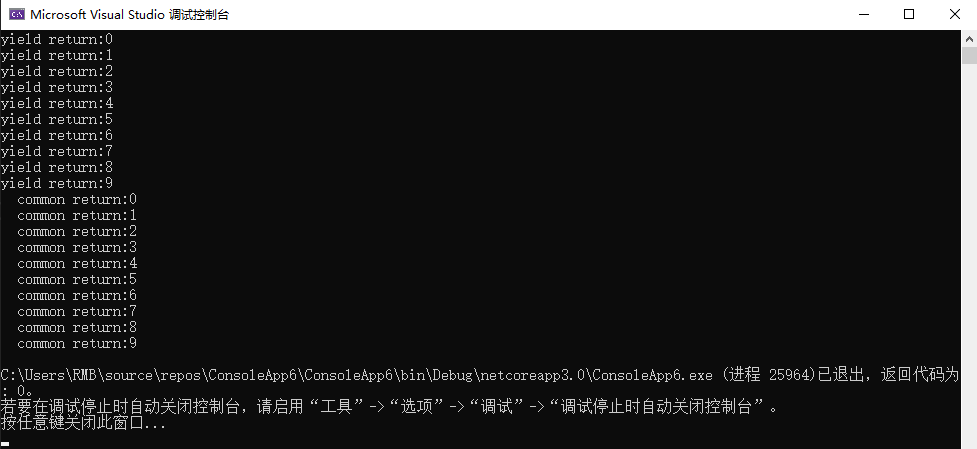
通过代码的运行结果,我们可以看到这里返回的结果 yield return 和comment return是分成两边的。先执行完一个然后开始执行另外一个。不干涉。
我们接着看下使用yield return返回集合:
    class Program

    {

        static void Main(string[] args)

        {

            foreach (var item in GetNumsYield())

            {

                Console.WriteLine($"  common return:{item}");

            }

        }

        /// <summary>

        /// 通过yield return 返回集合

        /// </summary>

        /// <returns></returns>

        public static IEnumerable<int> GetNumsYield()

        {

            for (int i = ; i < ; i++)

            {

                Console.WriteLine($"yield return:{i}");

                yield return i;

            }

        }

    }

我们看这个运行结果,这里yield return 和comment return 的输出完全交替了。这里说明是一次调用就返回了一个元素。
通过上面的案例我们可以发现,yield return 并不是等所有执行完了才一次性返回的。而是调用一次就返回一次结果的元素。这也就是按需供给。
解析定义类
我们已经大致了解了yield 的用法和它与平常的返回的区别。我们可以继续查看其运行原理。我们首先看这么一个案例(在0-10中随机返回五个数字):
我们通过SharpLab反编译其代码,我们进行查看发现yield具体详细实现:
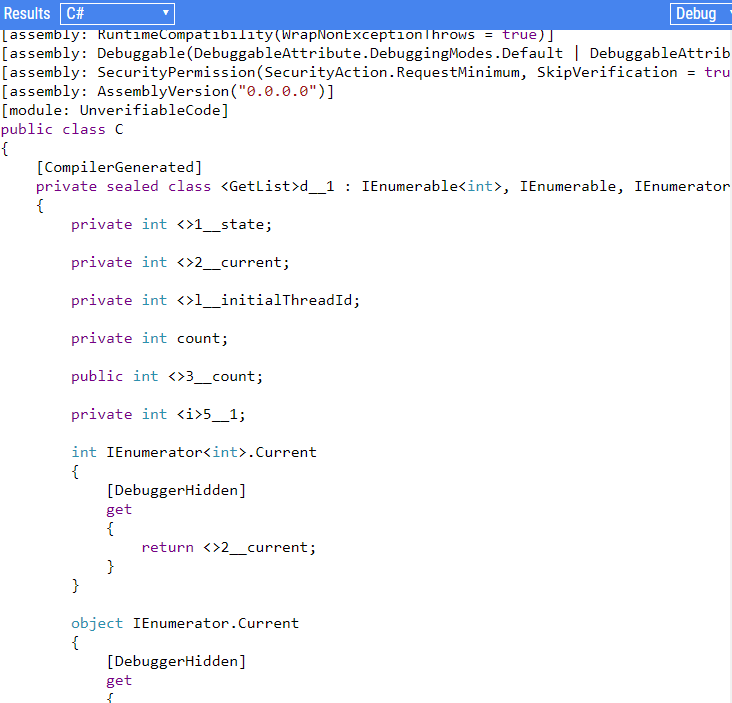
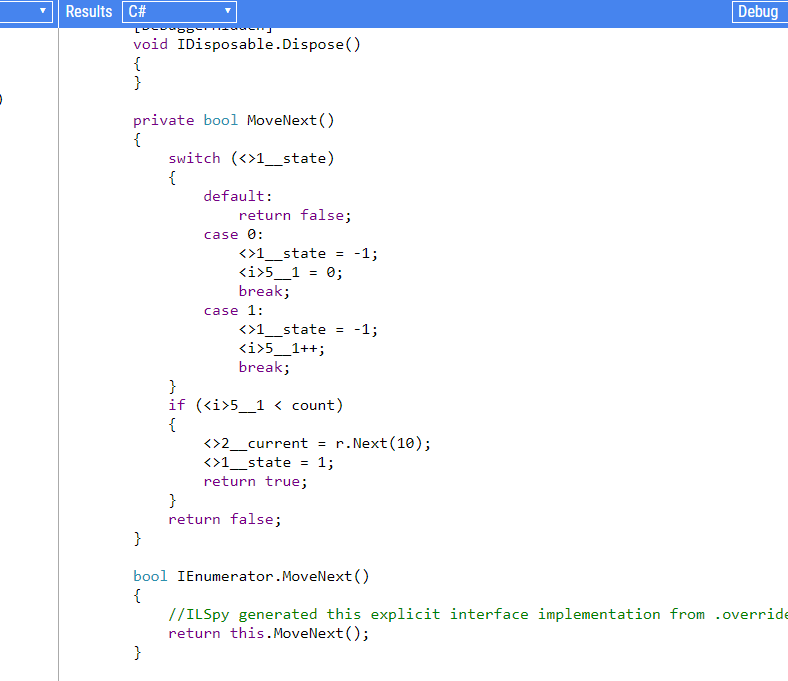
我们看到yield内部含有一个迭代器。这样去实现的迭代遍历。同时包含_state字段、用来存储上一次的记录。_current包含当前的值、也通过_initialThreadId获取当前线程id。其中主要的方法是迭代器方法MoveNext()。我们根据反编译结果来实现一个与yiled相似的类:
    /// <summary>

    /// 解析yield并定义相似类

    /// </summary>

    public sealed class GetRandomNumbersClass : IEnumerable<int>, IEnumerable, IEnumerator<int>, IDisposable, IEnumerator

    {

        public static Random r = new Random();

        /// <summary>

        /// 状态

        /// </summary>

        private int _state;

        /// <summary>

        ///储存当前值

        /// </summary>

        private int _current;

        /// <summary>

        /// 线程id

        /// </summary>

        private int _initialThreadId;

        /// <summary>

        /// 集合元素数量

        /// </summary>

        private int count;

        /// <summary>

        /// 集合元素数量

        /// </summary>

        public int _count;

        /// <summary>

        /// 当前指针

        /// </summary>

        private int i;

        int IEnumerator<int>.Current

        {

            [DebuggerHidden]

            get

            {

                return _current;

            }

        }

        object IEnumerator.Current

        {

            [DebuggerHidden]

            get

            {

                return _current;

            }

        }

        [DebuggerHidden]

        public GetRandomNumbersClass(int state)

        {

            this._state = state;

            _initialThreadId = Environment.CurrentManagedThreadId;

        }

        [DebuggerHidden]

        void IDisposable.Dispose()

        {

        }

        private bool MoveNext()

        {

            switch (_state)

            {

                default:

                    return false;

                case :

                    _state = -;

                    i = ;

                    break;

                case :

                    _state = -;

                    i++;

                    break;

            }

            if (i < count)

            {

                _current = r.Next();

                _state = ;

                return true;

            }

            return false;

        }

        bool IEnumerator.MoveNext()

        {

            //ILSpy generated this explicit interface implementation from .override directive in MoveNext

            return this.MoveNext();

        }

        [DebuggerHidden]

        void IEnumerator.Reset()

        {

            throw new NotSupportedException();

        }

        [DebuggerHidden]

        public IEnumerator<int> GetEnumerator()

        {

            GetRandomNumbersClass _getRandom;

            if (_state == - && _initialThreadId == Environment.CurrentManagedThreadId)

            {

                _state = ;

                _getRandom = this;

            }

            else

            {

                _getRandom = new GetRandomNumbersClass();

            }

            _getRandom.count = _count;

            return _getRandom;

        }

        [DebuggerHidden]

        IEnumerator IEnumerable.GetEnumerator()

        {

            return GetEnumerator();

        }

        [IteratorStateMachine(typeof(GetRandomNumbersClass))]

        private static IEnumerable<int> GetList(int count)

        {

            GetRandomNumbersClass getRandomNumbersClass = new GetRandomNumbersClass(-);

            getRandomNumbersClass._count = count;

            return getRandomNumbersClass;

        }

        private static void Main(string[] args)

        {

            IEnumerator<int> enumerator = GetList().GetEnumerator();

            try

            {

                foreach (int item in GetList())

                    Console.WriteLine(item);

                //while (enumerator.MoveNext())

                //{

                //    int current = enumerator.Current;

                //    Console.WriteLine(current);

                //}

            }

            finally

            {

                if (enumerator != null)

                {

                    enumerator.Dispose();

                }

            }

            Console.ReadKey();

        }

    }
用爱生活,你会使自己幸福!用爱工作,你会使很多人幸福!
欢迎大家扫描下方二维码,和我一起学习更多的知识
yield关键字之前用得较少,但是在做项目开发的过程中也遇到了,当时有点迷惑,就顺便研究学习了一下,以下是个人理解,不到之处欢迎拍砖!废话就到这,上代码: class Program { static ... 在 ES6 中新增了生成器函数的语法,本文解释了生成器函数内 yield 关键字的返回值. 描述 根据语法规范,yield 关键字用来暂停和继续执行一个生成器函数.当外部调用生成器的 next() 方 ... 在 ES6 中新增了生成器函数的语法,本文解释了与生成器函数有关的 yield* 关键字,及其使用场景. 描述 根据语法规范,yield* 的作用是代理 yield 表达式,将需要函数本身产生(yie ... 1 基本解释:extern可以置于变量或者函数前,以标示变量或者函数的定义在别的文件中,提示编译器遇到此变量和函数时在其他模块中寻找其定义.此外extern也可用来进行链接指定. 也就是说extern ... 一.内存模型的相关概念 大家都知道,计算机在执行程序时,每条指令都是在CPU中执行的,而执行指令过程中,势必涉及到数据的读取和写入.由于程序运行过程中的临时数据是存放在主存(物理内存)当中的,这时就存 ... static关键字是很多朋友在编写代码和阅读代码时碰到的比较难以理解的一个关键字,也是各大公司的面试官喜欢在面试时问到的知识点之一.下面就先讲述一下static关键字的用法和平常容易误解的地方,最后列 ... 由于this关键字在Java程序中经常见到,笔者索性把它的用法总结一下,来和大家一到互相学习一下.总的来说this用在下面几个地方: (1)当局部变量和成员变量同名的时候,需要用this来加以区分 如 ... 浅谈yield http://www.cnblogs.com/qlb5626267/archive/2009/05/08/1452517.html .NET中yield关键字的用法 http://bl ... 转自: http://python.jobbole.com/83610/ 本文作者: 伯乐在线 - wklken .未经作者许可,禁止转载!欢迎加入伯乐在线 专栏作者. 翻译 来源于stackover ... CentOS7下LVM的基本操作-创建LVM 环境 物理主机:windows10 虚拟软件:VMWare14 虚拟机:CentOS Linux release 7.6.1810 (Core) 软件环境 ... 公司项目比较多,每天上班第一件事就是拉取代码,cd A 目录 git pull cd .. cd B ...... 一个项目一个项目的拉取,感觉也是很费劲的,那么有没有什么一键操作呢 现在执行一个命令 ... I.构造函数: public String() {} 默认构造函数 public String(String original) {} 使用原有字符串构造 public String(char va ... 上线部署文档 数据库部分1.下载Mysql服务 #yum install mysql-server 2.更改 /etc/my.cnf 3.启动Mysql ... 类与对象 类.对象和引用的关系 类和对象的关系 类是对象的模版,对象是类的一个实例,一个类可以有很多对象 一个Java程序中类名相同的类只能有一个,也就是类型不会重名 一个对象只能根据一个类来创建 引 ... 什么是链表 维基百科:链表(Linked list)是一种常见的基础数据结构,是一种线性表,但是并不会按线性的顺序存储数据,而是在每一个节点里存到下一个节点的指针(Pointer).由于不必须按顺序存 ... Conditions: For the data set D, there exists a $\displaystyle W_{f}$ which satisfies that for every ... $str="你好<我>(爱)[北京]{天安门}"; echo f1($str); //返回你好 echo f2($str); //返回我 echo f3($str); ... 目录 1 概述 2 BufferedReader源码分析 3 意外发现 1 概述 最近研究JDK IO流这一块源码,发现真的比较简单,而且还有很多意外发现,如果大家对JDK源码感兴趣,不妨从IO流这一 ... 在当前网站,按下F12键进入开发者模式,在console控制台输入:document.cookie获取cookie值如: 复制你得到cookie值,你或通过每种方式获取Cookie,例如:当别人点击你 ...C# 中yield关键字解析的更多相关文章
随机推荐