
Spring、SpringMVC、Hibernate整合 ----超详细教程
一.数据库表
/*

Navicat MySQL Data Transfer

Source Server         : 本地连接

Source Server Version : 50720

Source Host           : localhost:3306

Source Database       : ssh_demo

Target Server Type    : MYSQL

Target Server Version : 50720

File Encoding         : 65001

Date: 2019-10-07 14:19:04

*/

SET FOREIGN_KEY_CHECKS=0;

-- ----------------------------

-- Table structure for `t_user`

-- ----------------------------

DROP TABLE IF EXISTS `t_user`;

CREATE TABLE `t_user` (

  `id` int(11) NOT NULL AUTO_INCREMENT,

  `address` varchar(255) DEFAULT NULL,

  `username` varchar(50) DEFAULT NULL,

  `phone` varchar(50) DEFAULT NULL,

  PRIMARY KEY (`id`)

) ENGINE=InnoDB AUTO_INCREMENT=8 DEFAULT CHARSET=utf8;

-- ----------------------------

-- Records of t_user

-- ----------------------------

INSERT INTO `t_user` VALUES ('6', 'GZ', '张三', '13456789487');

INSERT INTO `t_user` VALUES ('7', 'GZ', '张三', '15674635267');
二.使用idea创建一个maven项目,然后创建如下的目录
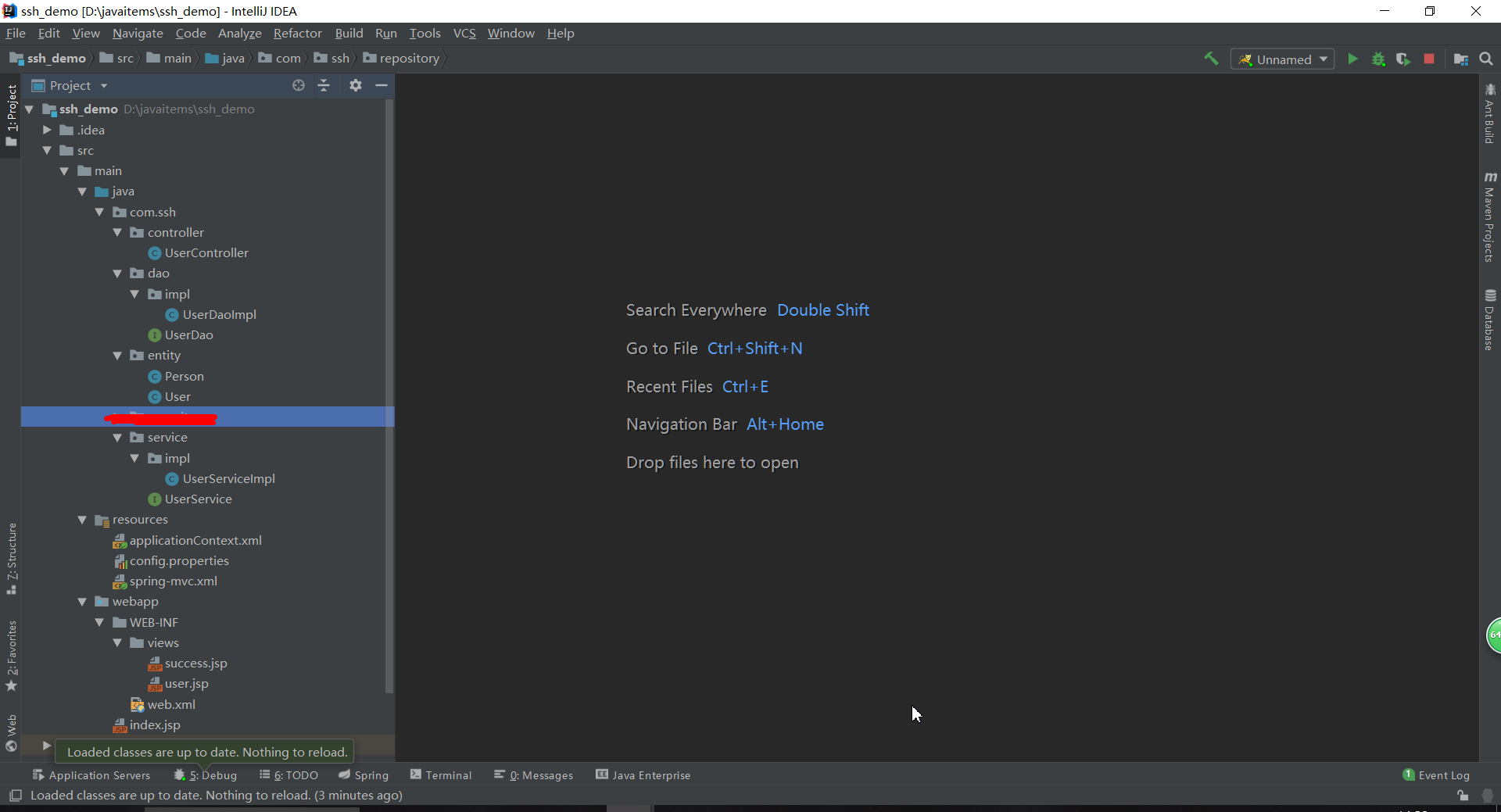
三.各种配置文件如下
1.web.xml
<?xml version="1.0" encoding="UTF-8"?>

<web-app xmlns:xsi="http://www.w3.org/2001/XMLSchema-instance"

         xmlns="http://java.sun.com/xml/ns/javaee"

         xsi:schemaLocation="http://java.sun.com/xml/ns/javaee http://java.sun.com/xml/ns/javaee/web-app_3_0.xsd"

         version="3.0">

  <!-- 地址为http://localhost:8080/  显示的默认网页-->

  <welcome-file-list>

    <welcome-file>/index.jsp</welcome-file>

  </welcome-file-list>

  <!--加载Spring的配置文件到上下文中去-->

  <context-param>

    <param-name>contextConfigLocation</param-name>

    <param-value>

      classpath:applicationContext.xml

    </param-value>

  </context-param>

  <!-- spring MVC config start-->

  <servlet>

    <servlet-name>spring</servlet-name>

    <servlet-class>org.springframework.web.servlet.DispatcherServlet</servlet-class>

    <init-param>

      <param-name>contextConfigLocation</param-name>

      <!-- 此处指向的的是SpringMVC的配置文件 -->

      <param-value>classpath:spring-mvc.xml</param-value>

    </init-param>

    <!--配置容器在启动的时候就加载这个servlet并实例化-->

    <load-on-startup>1</load-on-startup>

  </servlet>

  <servlet-mapping>

    <servlet-name>spring</servlet-name>

    <url-pattern>/</url-pattern>

  </servlet-mapping>

  <!-- spring MVC config end-->

  <!-- Spring监听器 -->

  <listener>

    <listener-class>org.springframework.web.context.ContextLoaderListener</listener-class>

  </listener>

  <!--  字符集过滤  -->

  <filter>

    <filter-name>encodingFilter</filter-name>

    <filter-class>org.springframework.web.filter.CharacterEncodingFilter</filter-class>

    <init-param>

      <param-name>encoding</param-name>

      <param-value>UTF-8</param-value>

    </init-param>

    <init-param>

      <param-name>forceEncoding</param-name>

      <param-value>true</param-value>

    </init-param>

  </filter>

  <filter-mapping>

    <filter-name>encodingFilter</filter-name>

    <url-pattern>/*</url-pattern>

  </filter-mapping>

</web-app>
2.applicationContext.xml
<beans xmlns="http://www.springframework.org/schema/beans"

       xmlns:xsi="http://www.w3.org/2001/XMLSchema-instance"

       xmlns:context="http://www.springframework.org/schema/context"

       xmlns:mvc="http://www.springframework.org/schema/mvc"

       xsi:schemaLocation="http://www.springframework.org/schema/beans

        http://www.springframework.org/schema/beans/spring-beans-4.1.xsd

        http://www.springframework.org/schema/context

        http://www.springframework.org/schema/context/spring-context-4.1.xsd

        http://www.springframework.org/schema/mvc

        http://www.springframework.org/schema/mvc/spring-mvc-4.1.xsd">

    <!--********************************************配置Spring***************************************-->

    <!-- 自动扫描 -->

    <context:component-scan base-package="com.ssh">

        <!-- 扫描时跳过 @Controller 注解的JAVA类(控制器) -->

        <context:exclude-filter type="annotation" expression="org.springframework.stereotype.Controller"/>

    </context:component-scan>

    <!--********************************************配置hibernate********************************************-->

    <!--扫描配置文件(这里指向的是之前配置的那个config.properties)-->

    <context:property-placeholder location="classpath:config.properties" />

    <!--配置数据源-->

    <bean id="dataSource" class="com.mchange.v2.c3p0.ComboPooledDataSource" destroy-method="close">

        <property name="driverClass" value="${jdbc.driver}" />  <!--数据库连接驱动-->

        <property name="jdbcUrl" value="${jdbc.url}" />     <!--数据库地址-->

        <property name="user" value="${jdbc.username}" />   <!--用户名-->

        <property name="password" value="${jdbc.password}" />   <!--密码-->

        <property name="maxPoolSize" value="40" />      <!--最大连接数-->

        <property name="minPoolSize" value="1" />       <!--最小连接数-->

        <property name="initialPoolSize" value="10" />      <!--初始化连接池内的数据库连接-->

        <property name="maxIdleTime" value="20" />  <!--最大空闲时间-->

    </bean>

    <!--配置session工厂-->

    <bean id="sessionFactory" class="org.springframework.orm.hibernate4.LocalSessionFactoryBean">

        <property name="dataSource" ref="dataSource" />

        <property name="packagesToScan" value="com.ssh.entity" />

        <property name="hibernateProperties">

            <props>

                <prop key="hibernate.hbm2ddl.auto">${hibernate.hbm2ddl.auto}</prop> <!--hibernate根据实体自动生成数据库表-->

                <prop key="hibernate.dialect">${hibernate.dialect}</prop>   <!--指定数据库方言-->

                <prop key="hibernate.show_sql">${hibernate.show_sql}</prop>     <!--在控制台显示执行的数据库操作语句-->

                <prop key="hibernate.format_sql">${hibernate.format_sql}</prop>     <!--在控制台显示执行的数据哭操作语句(格式)-->

            </props>

        </property>

    </bean>

    <!-- 事物管理器配置  -->

    <bean id="transactionManager" class="org.springframework.orm.hibernate4.HibernateTransactionManager">

        <property name="sessionFactory" ref="sessionFactory" />

    </bean>

</beans>
3.config.properties
#database connection config

jdbc.driver = com.mysql.jdbc.Driver

jdbc.url = jdbc:mysql://localhost:3306/ssh_demo?useUnicode=true&characterEncoding=utf-8

jdbc.username = root

jdbc.password = ???

#hibernate config

hibernate.dialect = org.hibernate.dialect.MySQLDialect

hibernate.show_sql = true

hibernate.format_sql = true

hibernate.hbm2ddl.auto = update
4.spring-mvc.xml
<?xml version="1.0" encoding="UTF-8"?>

<beans xmlns="http://www.springframework.org/schema/beans"

       xmlns:xsi="http://www.w3.org/2001/XMLSchema-instance"

       xmlns:context="http://www.springframework.org/schema/context"

       xmlns:mvc="http://www.springframework.org/schema/mvc"

       xsi:schemaLocation="http://www.springframework.org/schema/beans

        http://www.springframework.org/schema/beans/spring-beans-4.1.xsd

        http://www.springframework.org/schema/context

        http://www.springframework.org/schema/context/spring-context-4.1.xsd

        http://www.springframework.org/schema/mvc

        http://www.springframework.org/schema/mvc/spring-mvc-4.1.xsd">

    <!-- 启动注解驱动的spring MVC功能,注册请求url和注解POJO类方法的映射-->

    <mvc:annotation-driven />

    <context:component-scan base-package="com.ssh" />

    <!-- 对模型视图名称的解析,在请求时模型视图名称添加前后缀 -->

    <bean id="viewResolver" class="org.springframework.web.servlet.view.InternalResourceViewResolver">

        <property name="viewClass" value="org.springframework.web.servlet.view.JstlView" />

        <property name="prefix" value="/WEB-INF/views/" />      <!-- 前缀 -->

        <property name="suffix" value=".jsp" />   <!-- 后缀 -->

    </bean>

    <!--这里是对静态资源的映射-->

    <!--<mvc:resources mapping="/js/**" location="/resources/js/" />

    <mvc:resources mapping="/css/**" location="/resources/css/" />

    <mvc:resources mapping="/img/**" location="/resources/img/" />-->

</beans>
5.UserController.java
package com.ssh.controller;

import com.ssh.entity.User;

import com.ssh.service.UserService;

import org.springframework.beans.factory.annotation.Autowired;

import org.springframework.stereotype.Controller;

import org.springframework.ui.Model;

import org.springframework.web.bind.annotation.RequestMapping;

import java.util.List;

@Controller

@RequestMapping("/user")

public class UserController {

    @Autowired

    private UserService userService;

    @RequestMapping("/getUsers")

    public String findUsers(Model model){

        List<User> users = userService.findUsers();

        model.addAttribute("users",users);

        return "user";

    }

    @RequestMapping("/saveUser")

    public String saveUsser(){

        User user = new User();

        userService.saveUser(user);

        return "success";

    }

}
6.User.java
package com.ssh.entity;

import javax.persistence.*;

@Entity

@Table(name = "t_user")

public class User {

    @Id

    @GeneratedValue(strategy = GenerationType.IDENTITY)

    private Integer id;

    @Column(name = "username")

    private String username;

    @Column(name = "address")

    private String address;

    @Column(name = "phone")

    private String phone;

    public Integer getId() {

        return id;

    }

    public void setId(Integer id) {

        this.id = id;

    }

    public String getAddress() {

        return address;

    }

    public void setAddress(String address) {

        this.address = address;

    }

    public String getUsername() {

        return username;

    }

    public void setUsername(String username) {

        this.username = username;

    }

    public String getPhone() {

        return phone;

    }

    public void setPhone(String phone) {

        this.phone = phone;

    }

    @Override

    public String toString() {

        return "Person{" +

                "id=" + id +

                ", address='" + address + '\'' +

                '}';

    }

}
7.UserDao.java
package com.ssh.dao;

import com.ssh.entity.User;

import java.util.List;

public interface UserDao {

    List<User> findUsers();

    int saveUser(User entity);

}
8.UserDaoImpl.java
package com.ssh.dao.impl;

import com.ssh.dao.UserDao;

import com.ssh.entity.User;

import org.hibernate.Session;

import org.hibernate.SessionFactory;

import org.hibernate.query.Query;

import org.springframework.beans.factory.annotation.Autowired;

import org.springframework.stereotype.Repository;

import java.util.List;

@Repository

public class UserDaoImpl implements UserDao {

    @Autowired

    private SessionFactory sessionFactory;

    private Session getCurrentSession() {

        return this.sessionFactory.openSession();

    }

    @Override

    public int saveUser(User entity) {

        int id = (Integer) getCurrentSession().save(entity);

        return id;

    }

    @Override

    public List<User> findUsers() {

        Query query = getCurrentSession().createQuery("from User");

        List<User> list = query.list();

        return list;

    }

}
9.UserService.java
package com.ssh.service;

import com.ssh.entity.User;

import java.util.List;

public interface UserService {

    List<User> findUsers();

    int saveUser(User entity);

}
10.UserServiceImpl.java
package com.ssh.service.impl;

import com.ssh.dao.UserDao;

import com.ssh.entity.User;

import com.ssh.service.UserService;

import org.springframework.beans.factory.annotation.Autowired;

import org.springframework.stereotype.Service;

import java.util.List;

@Service

public class UserServiceImpl implements UserService {

    @Autowired

    private UserDao userDao;

    @Override

    public List<User> findUsers() {

        return userDao.findUsers();

    }

    @Override

    public int saveUser(User entity) {

        entity.setAddress("GZ");

        entity.setUsername("张三");

        entity.setPhone("15674635267");

        return userDao.saveUser(entity);

    }

}
11.success.jsp
<%@ page contentType="text/html;charset=UTF-8" language="java" %>

<html>

<head>

    <title>Title</title>

</head>

<body>

    save user success

</body>

</html>
12.user.jsp
<%@ taglib prefix="c" uri="http://java.sun.com/jsp/jstl/core" %>

<%@ page contentType="text/html;charset=UTF-8" language="java" %>

<html>

<head>

    <title>用户信息</title>

</head>

<body>

    <table>

        <thead>

            <tr>

                <th>ID</th>

                <th>姓名</th>

                <th>地址</th>

                <th>电话号码</th>

            </tr>

        </thead>

        <tbody>

            <c:forEach items="${users}" var="obj">

                <tr>

                    <th>${obj.id}</th>

                    <th>${obj.username}</th>

                    <th>${obj.address}</th>

                    <th>${obj.phone}</th>

                </tr>

            </c:forEach>

        </tbody>

    </table>

</body>

</html>
四.启动tomcat
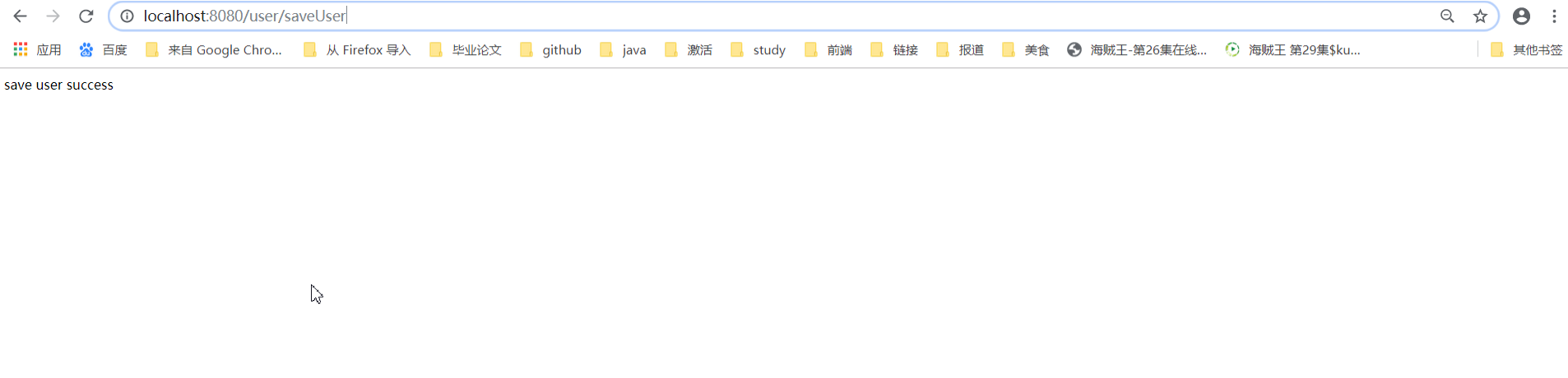
1.输入http://localhost:8080/user/saveUser结果如下
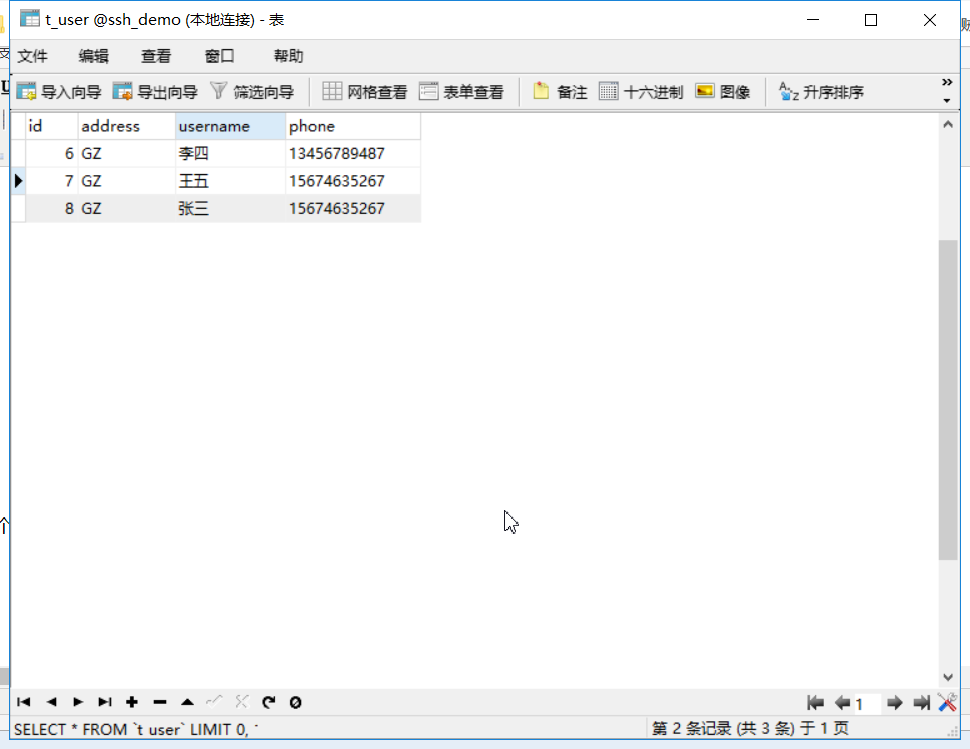
表中数据增加了一个用户
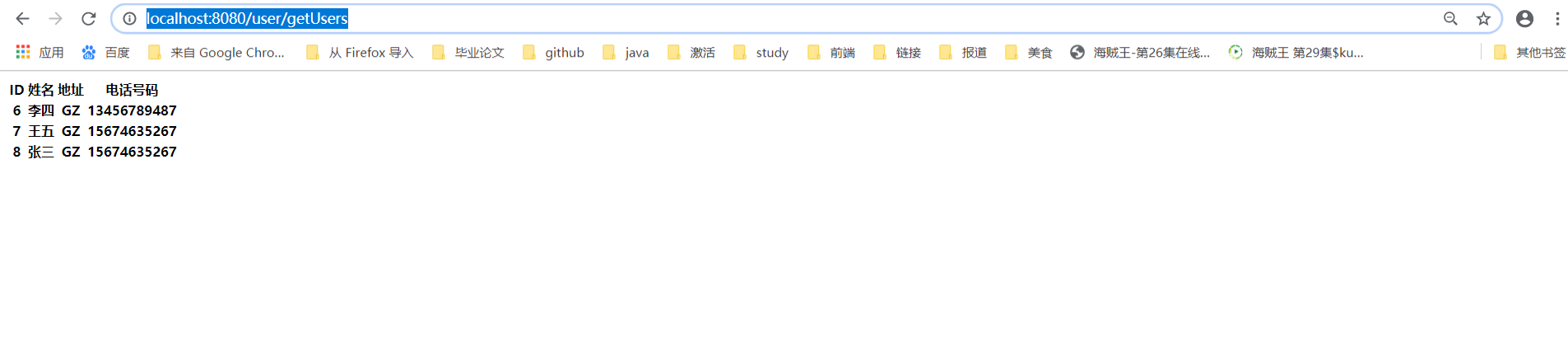
2.浏览器输入http://localhost:8080/user/getUsers
Spring、SpringMVC、Hibernate整合 ----超详细教程的更多相关文章
- Struts2+Spring4+Hibernate4整合超详细教程
Struts2.Spring4.Hibernate4整合 超详细教程 Struts2.Spring4.Hibernate4整合实例-下载 项目目的: 整合使用最新版本的三大框架(即Struts2.Sp ...
- 框架篇:Spring+SpringMVC+hibernate整合开发
前言: 最近闲的蛋疼,搭个框架写成博客记录下来,拉通一下之前所学知识,顺带装一下逼. 话不多说,我们直接步入正题. 准备工作: 1/ IntelliJIDEA的安装配置:jdk/tomcat等..(本 ...
- spring+springmvc+hibernate整合遇到的问题
spring+springmvc+hibernate整合遇到的问题2016年10月20日 23:24:03 守望dfdfdf 阅读数:702 标签: ssh学习经历的异常exception异常框架更多 ...
- springmvc框架(Spring SpringMVC, Hibernate整合)
直接干货 model 考虑给用户展示什么.关注支撑业务的信息构成.构建成模型. control 调用业务逻辑产生合适的数据以及传递数据给视图用于呈献: view怎样对数据进行布局,以一种优美的方式展示 ...
- spring+springmvc+hibernate 整合
三大框架反反复复搭了很多次,虽然每次都能搭起来,但是效率不高.最近重新搭了一次,理顺了思路,整理了需要注意的地方,分享出来. 工具:Eclipse(jdk 1.7) spring和hibernate版 ...
- Spring MVC基础知识整理➣Spring+SpringMVC+Hibernate整合操作数据库
概述 Hibernate是一款优秀的ORM框架,能够连接并操作数据库,包括保存和修改数据.Spring MVC是Java的web框架,能够将Hibernate集成进去,完成数据的CRUD.Hibern ...
- Spring+SpringMvc+Hibernate整合记录
Spring+SpringMvc+Hibernate+Maven整合各大配置文件记录 1.Idea新建的Maven架构 2.Maven的对象模型的内容 <project xmlns=" ...
- 笔记48 Spring+SpringMVC+Hibernate整合
搭建Spring+SpringMVC+Hibernate的框架的思路如下: 1.创建Maven项目,按需映入Maven包依赖. 2.搭建Spring:配置Spring对控件层Bean的注入. 3.搭建 ...
- spring+springmvc+hibernate整合实例
最近要弄一个自动化生成表及其实体对应的增删改查的框架,于是我想到了hibernate,hibernate就有根据实体自动建表,而且增删改查,都不需要想mybatis那样在xml文件中配置. 不过怎样让 ...
随机推荐
- jQuery 源码分析(十六) 事件系统模块 底层方法 详解
jQuery事件系统并没有将事件监听函数直接绑定到DOM元素上,而是基于数据缓存模块来管理监听函数的,事件模块代码有点多,我把它分为了三个部分:分底层方法.实例方法和便捷方法.ready事件来讲,好理 ...
- java基础(11):接口、多态
1. 接口 1.1 接口概念 接口是功能的集合,同样可看做是一种数据类型,是比抽象类更为抽象的”类”. 接口只描述所应该具备的方法,并没有具体实现,具体的实现由接口的实现类(相当于接口的子类)来完成. ...
- GO基础之变量的使用
Go语言:是静态类型语言,因此变量(variable)是有明确类型的,编译器也会检查变量类型的正确性. 一.基本类型 变量的声明:全局变量必须有关键字var var name [type] 指定数据 ...
- django7-cookie与session
1.有状态服务与无状态服务 服务实例存储了客户端的数据 ,那么这就是个有状态服务 服务实例不存储客户端数据 ,让其他缓存存储客户端数据 ,这就是无状态服务 ,http就是无状态的 2.什么是cooki ...
- 2019CCPC网络选拔赛 hdu6703 array(主席树+set)
题意 给你一个1~n的排列,由两种操作: 1 pos:将a[pos]+10 000 000 2 r k:求大于等于k且不等于a[1~r]的数的最小值. 强制在线. 思路 如果没有1操作,那么我们直接主 ...
- window系统下的pycharm对虚拟机中的Ubuntu系统操作MySQL数据库
问题:程序员和数据库的爱情故事:程序为了追一个叫MySQL数据库的姑娘,先苦练功夫,自己模拟泡妹过程积累经验,于是想到一个解决方法:[解决虚拟机跑需要连接数据库的程序卡的问题,通过在物理机Window ...
- TeamyinyinFish->鱼嘤嘤小分队软件工程beta迭代作业
Github项目的链接 github工作组链接 github后台部分项目代码,issue提交在这个项目 github小程序前端部分项目代码链接 scrum会议时间 链接 第十一周 十一周博客 第十二周 ...
- JAVA字符串转换整数
public class compint { /** * @param args */ public static void main(String[] args) { // TODO Auto-ge ...
- 题解:T103180 しろは的军训列队
题目链接 solution: 按题目随便假设找到了一个x,它的位置的ap,属性bp 看下图 $$$$$$$$$$$$$$$$|||||P &&&&&&& ...
- 剑指Offer-11.二进制中1的个数(C++/Java)
题目: 输入一个整数,输出该数二进制表示中1的个数.其中负数用补码表示. 分析: 将数字和1先做与运算,然后将1右移一位,现在是判断数字的第二位是不是1,这样循环的做下去即可.也可以转换成字符串再统计 ...