
Spring、SpringMVC、Hibernate整合 ----超详细教程
一.数据库表
/*

Navicat MySQL Data Transfer

Source Server         : 本地连接

Source Server Version : 50720

Source Host           : localhost:3306

Source Database       : ssh_demo

Target Server Type    : MYSQL

Target Server Version : 50720

File Encoding         : 65001

Date: 2019-10-07 14:19:04

*/

SET FOREIGN_KEY_CHECKS=0;

-- ----------------------------

-- Table structure for `t_user`

-- ----------------------------

DROP TABLE IF EXISTS `t_user`;

CREATE TABLE `t_user` (

  `id` int(11) NOT NULL AUTO_INCREMENT,

  `address` varchar(255) DEFAULT NULL,

  `username` varchar(50) DEFAULT NULL,

  `phone` varchar(50) DEFAULT NULL,

  PRIMARY KEY (`id`)

) ENGINE=InnoDB AUTO_INCREMENT=8 DEFAULT CHARSET=utf8;

-- ----------------------------

-- Records of t_user

-- ----------------------------

INSERT INTO `t_user` VALUES ('6', 'GZ', '张三', '13456789487');

INSERT INTO `t_user` VALUES ('7', 'GZ', '张三', '15674635267');
二.使用idea创建一个maven项目,然后创建如下的目录
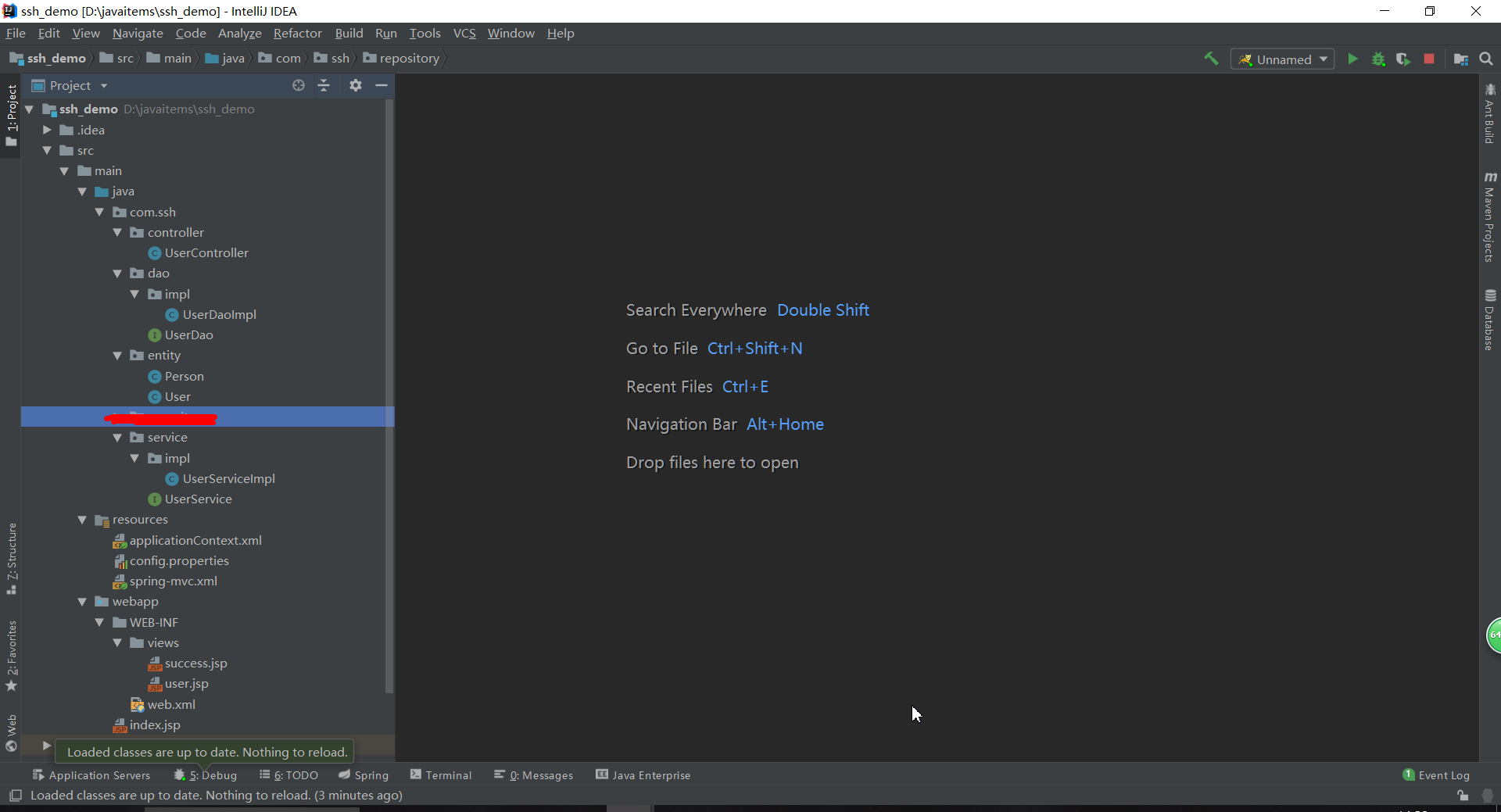
三.各种配置文件如下
1.web.xml
<?xml version="1.0" encoding="UTF-8"?>

<web-app xmlns:xsi="http://www.w3.org/2001/XMLSchema-instance"

         xmlns="http://java.sun.com/xml/ns/javaee"

         xsi:schemaLocation="http://java.sun.com/xml/ns/javaee http://java.sun.com/xml/ns/javaee/web-app_3_0.xsd"

         version="3.0">

  <!-- 地址为http://localhost:8080/  显示的默认网页-->

  <welcome-file-list>

    <welcome-file>/index.jsp</welcome-file>

  </welcome-file-list>

  <!--加载Spring的配置文件到上下文中去-->

  <context-param>

    <param-name>contextConfigLocation</param-name>

    <param-value>

      classpath:applicationContext.xml

    </param-value>

  </context-param>

  <!-- spring MVC config start-->

  <servlet>

    <servlet-name>spring</servlet-name>

    <servlet-class>org.springframework.web.servlet.DispatcherServlet</servlet-class>

    <init-param>

      <param-name>contextConfigLocation</param-name>

      <!-- 此处指向的的是SpringMVC的配置文件 -->

      <param-value>classpath:spring-mvc.xml</param-value>

    </init-param>

    <!--配置容器在启动的时候就加载这个servlet并实例化-->

    <load-on-startup>1</load-on-startup>

  </servlet>

  <servlet-mapping>

    <servlet-name>spring</servlet-name>

    <url-pattern>/</url-pattern>

  </servlet-mapping>

  <!-- spring MVC config end-->

  <!-- Spring监听器 -->

  <listener>

    <listener-class>org.springframework.web.context.ContextLoaderListener</listener-class>

  </listener>

  <!--  字符集过滤  -->

  <filter>

    <filter-name>encodingFilter</filter-name>

    <filter-class>org.springframework.web.filter.CharacterEncodingFilter</filter-class>

    <init-param>

      <param-name>encoding</param-name>

      <param-value>UTF-8</param-value>

    </init-param>

    <init-param>

      <param-name>forceEncoding</param-name>

      <param-value>true</param-value>

    </init-param>

  </filter>

  <filter-mapping>

    <filter-name>encodingFilter</filter-name>

    <url-pattern>/*</url-pattern>

  </filter-mapping>

</web-app>
2.applicationContext.xml
<beans xmlns="http://www.springframework.org/schema/beans"

       xmlns:xsi="http://www.w3.org/2001/XMLSchema-instance"

       xmlns:context="http://www.springframework.org/schema/context"

       xmlns:mvc="http://www.springframework.org/schema/mvc"

       xsi:schemaLocation="http://www.springframework.org/schema/beans

        http://www.springframework.org/schema/beans/spring-beans-4.1.xsd

        http://www.springframework.org/schema/context

        http://www.springframework.org/schema/context/spring-context-4.1.xsd

        http://www.springframework.org/schema/mvc

        http://www.springframework.org/schema/mvc/spring-mvc-4.1.xsd">

    <!--********************************************配置Spring***************************************-->

    <!-- 自动扫描 -->

    <context:component-scan base-package="com.ssh">

        <!-- 扫描时跳过 @Controller 注解的JAVA类(控制器) -->

        <context:exclude-filter type="annotation" expression="org.springframework.stereotype.Controller"/>

    </context:component-scan>

    <!--********************************************配置hibernate********************************************-->

    <!--扫描配置文件(这里指向的是之前配置的那个config.properties)-->

    <context:property-placeholder location="classpath:config.properties" />

    <!--配置数据源-->

    <bean id="dataSource" class="com.mchange.v2.c3p0.ComboPooledDataSource" destroy-method="close">

        <property name="driverClass" value="${jdbc.driver}" />  <!--数据库连接驱动-->

        <property name="jdbcUrl" value="${jdbc.url}" />     <!--数据库地址-->

        <property name="user" value="${jdbc.username}" />   <!--用户名-->

        <property name="password" value="${jdbc.password}" />   <!--密码-->

        <property name="maxPoolSize" value="40" />      <!--最大连接数-->

        <property name="minPoolSize" value="1" />       <!--最小连接数-->

        <property name="initialPoolSize" value="10" />      <!--初始化连接池内的数据库连接-->

        <property name="maxIdleTime" value="20" />  <!--最大空闲时间-->

    </bean>

    <!--配置session工厂-->

    <bean id="sessionFactory" class="org.springframework.orm.hibernate4.LocalSessionFactoryBean">

        <property name="dataSource" ref="dataSource" />

        <property name="packagesToScan" value="com.ssh.entity" />

        <property name="hibernateProperties">

            <props>

                <prop key="hibernate.hbm2ddl.auto">${hibernate.hbm2ddl.auto}</prop> <!--hibernate根据实体自动生成数据库表-->

                <prop key="hibernate.dialect">${hibernate.dialect}</prop>   <!--指定数据库方言-->

                <prop key="hibernate.show_sql">${hibernate.show_sql}</prop>     <!--在控制台显示执行的数据库操作语句-->

                <prop key="hibernate.format_sql">${hibernate.format_sql}</prop>     <!--在控制台显示执行的数据哭操作语句(格式)-->

            </props>

        </property>

    </bean>

    <!-- 事物管理器配置  -->

    <bean id="transactionManager" class="org.springframework.orm.hibernate4.HibernateTransactionManager">

        <property name="sessionFactory" ref="sessionFactory" />

    </bean>

</beans>
3.config.properties
#database connection config

jdbc.driver = com.mysql.jdbc.Driver

jdbc.url = jdbc:mysql://localhost:3306/ssh_demo?useUnicode=true&characterEncoding=utf-8

jdbc.username = root

jdbc.password = ???

#hibernate config

hibernate.dialect = org.hibernate.dialect.MySQLDialect

hibernate.show_sql = true

hibernate.format_sql = true

hibernate.hbm2ddl.auto = update
4.spring-mvc.xml
<?xml version="1.0" encoding="UTF-8"?>

<beans xmlns="http://www.springframework.org/schema/beans"

       xmlns:xsi="http://www.w3.org/2001/XMLSchema-instance"

       xmlns:context="http://www.springframework.org/schema/context"

       xmlns:mvc="http://www.springframework.org/schema/mvc"

       xsi:schemaLocation="http://www.springframework.org/schema/beans

        http://www.springframework.org/schema/beans/spring-beans-4.1.xsd

        http://www.springframework.org/schema/context

        http://www.springframework.org/schema/context/spring-context-4.1.xsd

        http://www.springframework.org/schema/mvc

        http://www.springframework.org/schema/mvc/spring-mvc-4.1.xsd">

    <!-- 启动注解驱动的spring MVC功能,注册请求url和注解POJO类方法的映射-->

    <mvc:annotation-driven />

    <context:component-scan base-package="com.ssh" />

    <!-- 对模型视图名称的解析,在请求时模型视图名称添加前后缀 -->

    <bean id="viewResolver" class="org.springframework.web.servlet.view.InternalResourceViewResolver">

        <property name="viewClass" value="org.springframework.web.servlet.view.JstlView" />

        <property name="prefix" value="/WEB-INF/views/" />      <!-- 前缀 -->

        <property name="suffix" value=".jsp" />   <!-- 后缀 -->

    </bean>

    <!--这里是对静态资源的映射-->

    <!--<mvc:resources mapping="/js/**" location="/resources/js/" />

    <mvc:resources mapping="/css/**" location="/resources/css/" />

    <mvc:resources mapping="/img/**" location="/resources/img/" />-->

</beans>
5.UserController.java
package com.ssh.controller;

import com.ssh.entity.User;

import com.ssh.service.UserService;

import org.springframework.beans.factory.annotation.Autowired;

import org.springframework.stereotype.Controller;

import org.springframework.ui.Model;

import org.springframework.web.bind.annotation.RequestMapping;

import java.util.List;

@Controller

@RequestMapping("/user")

public class UserController {

    @Autowired

    private UserService userService;

    @RequestMapping("/getUsers")

    public String findUsers(Model model){

        List<User> users = userService.findUsers();

        model.addAttribute("users",users);

        return "user";

    }

    @RequestMapping("/saveUser")

    public String saveUsser(){

        User user = new User();

        userService.saveUser(user);

        return "success";

    }

}
6.User.java
package com.ssh.entity;

import javax.persistence.*;

@Entity

@Table(name = "t_user")

public class User {

    @Id

    @GeneratedValue(strategy = GenerationType.IDENTITY)

    private Integer id;

    @Column(name = "username")

    private String username;

    @Column(name = "address")

    private String address;

    @Column(name = "phone")

    private String phone;

    public Integer getId() {

        return id;

    }

    public void setId(Integer id) {

        this.id = id;

    }

    public String getAddress() {

        return address;

    }

    public void setAddress(String address) {

        this.address = address;

    }

    public String getUsername() {

        return username;

    }

    public void setUsername(String username) {

        this.username = username;

    }

    public String getPhone() {

        return phone;

    }

    public void setPhone(String phone) {

        this.phone = phone;

    }

    @Override

    public String toString() {

        return "Person{" +

                "id=" + id +

                ", address='" + address + '\'' +

                '}';

    }

}
7.UserDao.java
package com.ssh.dao;

import com.ssh.entity.User;

import java.util.List;

public interface UserDao {

    List<User> findUsers();

    int saveUser(User entity);

}
8.UserDaoImpl.java
package com.ssh.dao.impl;

import com.ssh.dao.UserDao;

import com.ssh.entity.User;

import org.hibernate.Session;

import org.hibernate.SessionFactory;

import org.hibernate.query.Query;

import org.springframework.beans.factory.annotation.Autowired;

import org.springframework.stereotype.Repository;

import java.util.List;

@Repository

public class UserDaoImpl implements UserDao {

    @Autowired

    private SessionFactory sessionFactory;

    private Session getCurrentSession() {

        return this.sessionFactory.openSession();

    }

    @Override

    public int saveUser(User entity) {

        int id = (Integer) getCurrentSession().save(entity);

        return id;

    }

    @Override

    public List<User> findUsers() {

        Query query = getCurrentSession().createQuery("from User");

        List<User> list = query.list();

        return list;

    }

}
9.UserService.java
package com.ssh.service;

import com.ssh.entity.User;

import java.util.List;

public interface UserService {

    List<User> findUsers();

    int saveUser(User entity);

}
10.UserServiceImpl.java
package com.ssh.service.impl;

import com.ssh.dao.UserDao;

import com.ssh.entity.User;

import com.ssh.service.UserService;

import org.springframework.beans.factory.annotation.Autowired;

import org.springframework.stereotype.Service;

import java.util.List;

@Service

public class UserServiceImpl implements UserService {

    @Autowired

    private UserDao userDao;

    @Override

    public List<User> findUsers() {

        return userDao.findUsers();

    }

    @Override

    public int saveUser(User entity) {

        entity.setAddress("GZ");

        entity.setUsername("张三");

        entity.setPhone("15674635267");

        return userDao.saveUser(entity);

    }

}
11.success.jsp
<%@ page contentType="text/html;charset=UTF-8" language="java" %>

<html>

<head>

    <title>Title</title>

</head>

<body>

    save user success

</body>

</html>
12.user.jsp
<%@ taglib prefix="c" uri="http://java.sun.com/jsp/jstl/core" %>

<%@ page contentType="text/html;charset=UTF-8" language="java" %>

<html>

<head>

    <title>用户信息</title>

</head>

<body>

    <table>

        <thead>

            <tr>

                <th>ID</th>

                <th>姓名</th>

                <th>地址</th>

                <th>电话号码</th>

            </tr>

        </thead>

        <tbody>

            <c:forEach items="${users}" var="obj">

                <tr>

                    <th>${obj.id}</th>

                    <th>${obj.username}</th>

                    <th>${obj.address}</th>

                    <th>${obj.phone}</th>

                </tr>

            </c:forEach>

        </tbody>

    </table>

</body>

</html>
四.启动tomcat
1.输入http://localhost:8080/user/saveUser结果如下
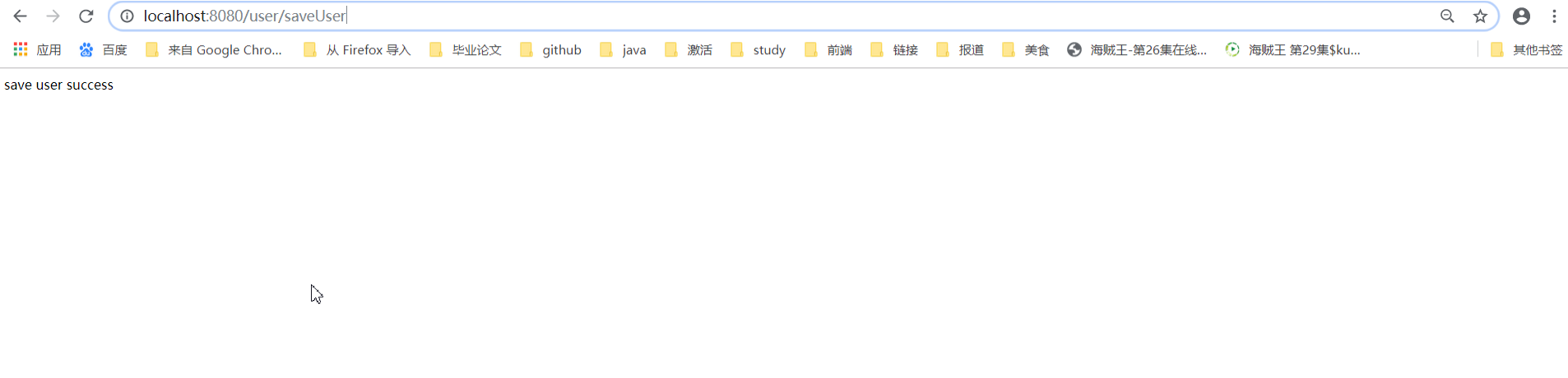
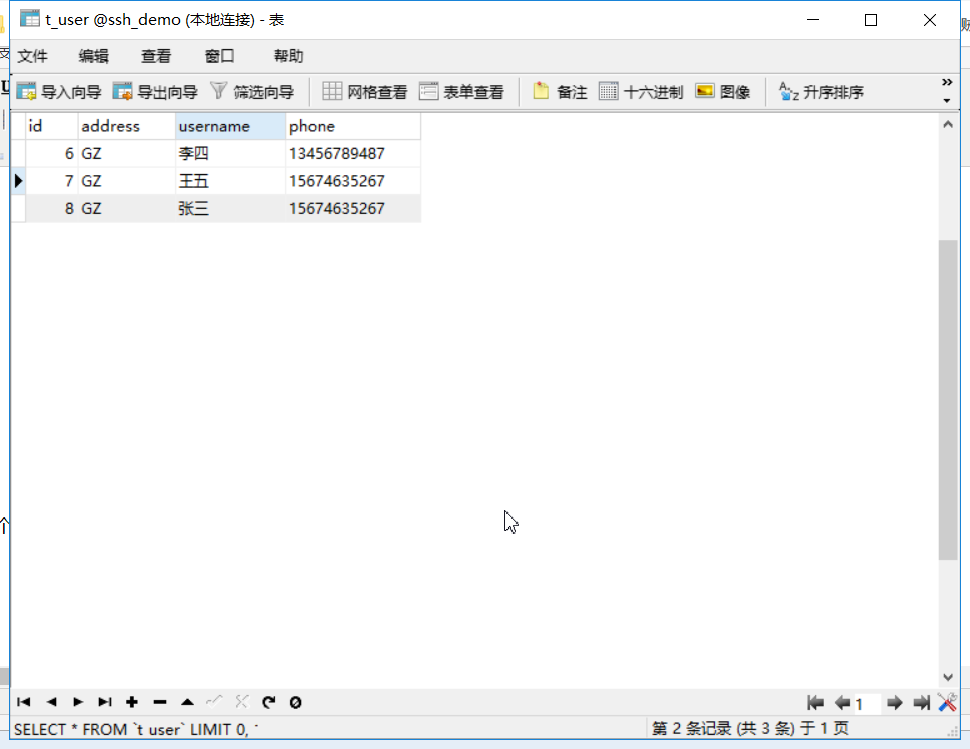
表中数据增加了一个用户
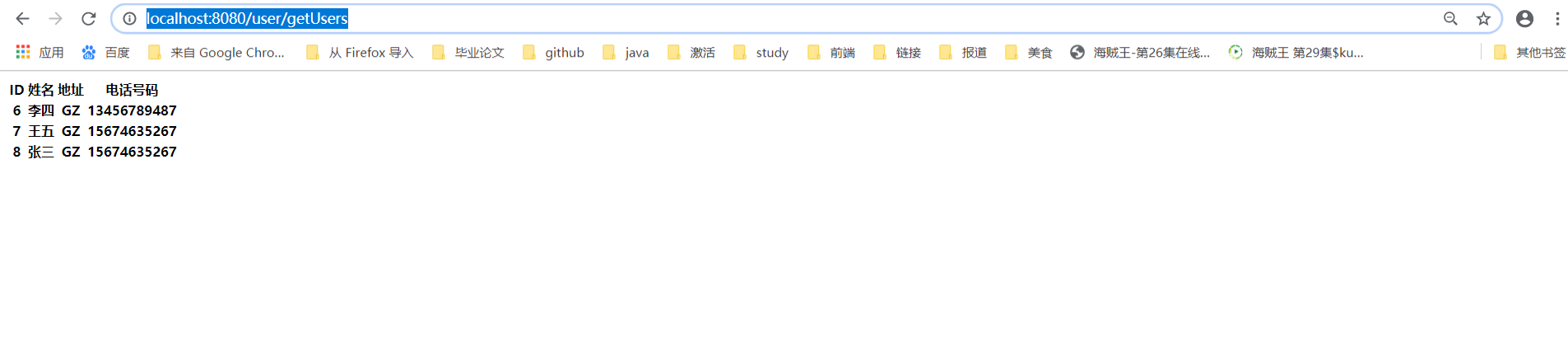
2.浏览器输入http://localhost:8080/user/getUsers
Spring、SpringMVC、Hibernate整合 ----超详细教程的更多相关文章
- Struts2+Spring4+Hibernate4整合超详细教程
Struts2.Spring4.Hibernate4整合 超详细教程 Struts2.Spring4.Hibernate4整合实例-下载 项目目的: 整合使用最新版本的三大框架(即Struts2.Sp ...
- 框架篇:Spring+SpringMVC+hibernate整合开发
前言: 最近闲的蛋疼,搭个框架写成博客记录下来,拉通一下之前所学知识,顺带装一下逼. 话不多说,我们直接步入正题. 准备工作: 1/ IntelliJIDEA的安装配置:jdk/tomcat等..(本 ...
- spring+springmvc+hibernate整合遇到的问题
spring+springmvc+hibernate整合遇到的问题2016年10月20日 23:24:03 守望dfdfdf 阅读数:702 标签: ssh学习经历的异常exception异常框架更多 ...
- springmvc框架(Spring SpringMVC, Hibernate整合)
直接干货 model 考虑给用户展示什么.关注支撑业务的信息构成.构建成模型. control 调用业务逻辑产生合适的数据以及传递数据给视图用于呈献: view怎样对数据进行布局,以一种优美的方式展示 ...
- spring+springmvc+hibernate 整合
三大框架反反复复搭了很多次,虽然每次都能搭起来,但是效率不高.最近重新搭了一次,理顺了思路,整理了需要注意的地方,分享出来. 工具:Eclipse(jdk 1.7) spring和hibernate版 ...
- Spring MVC基础知识整理➣Spring+SpringMVC+Hibernate整合操作数据库
概述 Hibernate是一款优秀的ORM框架,能够连接并操作数据库,包括保存和修改数据.Spring MVC是Java的web框架,能够将Hibernate集成进去,完成数据的CRUD.Hibern ...
- Spring+SpringMvc+Hibernate整合记录
Spring+SpringMvc+Hibernate+Maven整合各大配置文件记录 1.Idea新建的Maven架构 2.Maven的对象模型的内容 <project xmlns=" ...
- 笔记48 Spring+SpringMVC+Hibernate整合
搭建Spring+SpringMVC+Hibernate的框架的思路如下: 1.创建Maven项目,按需映入Maven包依赖. 2.搭建Spring:配置Spring对控件层Bean的注入. 3.搭建 ...
- spring+springmvc+hibernate整合实例
最近要弄一个自动化生成表及其实体对应的增删改查的框架,于是我想到了hibernate,hibernate就有根据实体自动建表,而且增删改查,都不需要想mybatis那样在xml文件中配置. 不过怎样让 ...
随机推荐
- Revit二次开发 屏蔽复制构件产生的重复类型提示窗
做了很久码农,也没个写博客的习惯,这次开始第一次写博客. 这个问题也是折腾了我接近一天时间,网上也没有任何的相关博文,于是决定分享一下,以供同样拥有此问题的小伙伴们参考. 内容源于目前在做的一个项目, ...
- JQuery操作样式以及JQuery事件机制
1.操作样式 1.1 css的操作 功能:设置或者修改样式,操作的是style属性 操作单个样式 // name:需要设置的样式名称 // value:对应的样式值 // $obj.c ...
- Spring源码解析系列汇总
相信我,你会收藏这篇文章的 本篇文章是这段时间撸出来的Spring源码解析系列文章的汇总,总共包含以下专题.喜欢的同学可以收藏起来以备不时之需 SpringIOC源码解析(上) 本篇文章搭建了IOC源 ...
- JS基础语法---分支语句总结
分支语句: if语句:一个分支 if-else语句:两个分支,最终只执行一个分支 if-else if-else if...语句: 多个分支,也是只会执行一个 switch-case语句:多分支语句, ...
- Tasteless challenges hard WP
hard Level 5- Fred CMS 十有八九是注入,不过测试引号和转义符并没发现什么,于是跑了下密码字典,竟然发现网页提示 sql injection detected! ,然后发现原来是密 ...
- 剑指offer 20:顺时针打印矩阵
题目描述 输入一个矩阵,按照从外向里以顺时针的顺序依次打印出每一个数字,例如,如果输入如下4 X 4矩阵: 1 2 3 4 5 6 7 8 9 10 11 12 13 14 15 16 则依次打印出数 ...
- SourceInsight教程
概述: Source Insight是一个面向项目开发的程序编辑器和代码浏览器,它拥有内置的对C/C++, C#和Java等程序的分析.Source Insight能分析你的源代码并在你工作的同时动态 ...
- INSTALL_FAILED_TEST_ONLY
查看博客:http://www.enjoytoday.cn/posts/159 Android studio安装apk无法安装,报错误,网上搜索可以看到都说是:* 调用者不被允许测试的测试程序*,但具 ...
- 源码包安装转换rpm包
目录 纯净版虚拟机 1. 先安装个虚拟机,登陆nginx官网 http://nginx.org/选择一个稳定的版本 2. 右键复制地址,到新克隆的纯净虚拟机wget 下载 3.源码包 4.解压 tar ...
- shell脚本一次性将tab制表符改为4空格的方法
问题描述: 今天需要修改一些bash脚本,因为考虑到pycharm里面能够直接写,而我用pycharm比较多,所以直接用pycharm写了,由于改的那个bash脚本是别的同事写的,里面的缩进都是用的T ...