
Eureka集群
Eureka集群搭建
高可用集群配置
当注册中心扛不住高并发的时候,这时候 要用集群来扛;
普通操作
我们再新建两个module microservice-eureka-server-2002 microservice-eureka-server-2003
1、pom.xml 把依赖加下;
<?xml version="1.0" encoding="UTF-8"?>

<project xmlns="http://maven.apache.org/POM/4.0.0" xmlns:xsi="http://www.w3.org/2001/XMLSchema-instance"

         xsi:schemaLocation="http://maven.apache.org/POM/4.0.0 https://maven.apache.org/xsd/maven-4.0.0.xsd">

    <modelVersion>4.0.</modelVersion>

    <parent>

        <groupId>com.jt</groupId>

        <artifactId>microservice</artifactId>

        <version>1.0-SNAPSHOT</version>

    </parent>

    <artifactId>microservice-eureka-server-</artifactId>

    <properties>

        <java.version>1.8</java.version>

    </properties>

    <dependencies>

        <dependency>

            <groupId>org.springframework.cloud</groupId>

            <artifactId>spring-cloud-starter-eureka-server</artifactId>

        </dependency>

        <dependency>

            <groupId>org.springframework.boot</groupId>

            <artifactId>spring-boot-starter-test</artifactId>

            <scope>test</scope>

        </dependency>

        <!--  修改后立即生效,热部署  -->

        <dependency>

            <groupId>org.springframework</groupId>

            <artifactId>springloaded</artifactId>

        </dependency>

        <dependency>

            <groupId>org.springframework.boot</groupId>

            <artifactId>spring-boot-devtools</artifactId>

        </dependency>

    </dependencies>

    <build>

        <plugins>

            <plugin>

                <groupId>org.springframework.boot</groupId>

                <artifactId>spring-boot-maven-plugin</artifactId>

            </plugin>

        </plugins>

    </build>

</project>
2、2002 2003的主启动类EurekaServerApplication_2002,EurekaServerApplication_2003复制修改下;
package com.jt.microserviceeurekaserver2002;

import org.springframework.boot.SpringApplication;

import org.springframework.boot.autoconfigure.SpringBootApplication;

import org.springframework.cloud.netflix.eureka.server.EnableEurekaServer;

@EnableEurekaServer

@SpringBootApplication

public class MicroserviceEurekaServer2002Application {

    public static void main(String[] args) {

        SpringApplication.run(MicroserviceEurekaServer2002Application.class, args);

    }

}
3、前面单机的时候 eureka注册中心实例名称 是localhost,现在是集群,不能三个实例都是localhost,这里复杂的办法是搞三个虚拟机,麻烦,这里有简单办法,直接配置本机hosts,来实现本机域名映射;
找到 C:\Windows\System32\drivers\etc 打开hosts,加配置
127.0.0.1  eureka2001.jt.com

127.0.0.1  eureka2002.jt.com

127.0.0.1  eureka2003.jt.com

修改三个项目的application.yml文件,主要是修改 hostname和defaultZone,
2001修改:
server:

  port:

  context-path: /

eureka:

  instance:

    hostname: eureka2001.jt.com

  client:

    register-with-eureka: false

    service-url:

      defaultZone: http://eureka2002.jt.com:2002/eureka/,http://eureka2003.jt.com:2003/eureka/ # 集群
2002
server:

  port:

  context-path: /

eureka:

  instance:

    hostname: eureka2002.jt.com

  client:

    register-with-eureka: false

    service-url:

      defaultZone: http://eureka2001.jt.com:2001/eureka/,http://eureka2003.jt.com:2003/eureka/
2003
server:

  port:

  context-path: /

eureka:

  instance:

    hostname: eureka2003.jt.com

  client:

    register-with-eureka: false

    service-url:

      defaultZone: http://eureka2001.jt.com:2001/eureka/,http://eureka2002.jt.com:2002/eureka/
骚操作
上面eureka服务搭建,除了yml文件不一样,其他文件都一样,那么我们有什么办法能够将多个eureka服务集合到一个工程中去呢?
创建一个microservice-eureka-server(三合一)子工程
Pom依赖
<?xml version="1.0" encoding="UTF-8"?>

<project xmlns="http://maven.apache.org/POM/4.0.0" xmlns:xsi="http://www.w3.org/2001/XMLSchema-instance"

         xsi:schemaLocation="http://maven.apache.org/POM/4.0.0 https://maven.apache.org/xsd/maven-4.0.0.xsd">

    <modelVersion>4.0.</modelVersion>

    <parent>

        <groupId>com.jt</groupId>

        <artifactId>microservice</artifactId>

        <version>1.0-SNAPSHOT</version>

    </parent>

    <artifactId>microservice-eureka-server</artifactId>

    <properties>

        <java.version>1.8</java.version>

    </properties>

    <dependencies>

        <dependency>

            <groupId>org.springframework.cloud</groupId>

            <artifactId>spring-cloud-starter-eureka-server</artifactId>

        </dependency>

        <dependency>

            <groupId>org.springframework.boot</groupId>

            <artifactId>spring-boot-starter-test</artifactId>

            <scope>test</scope>

        </dependency>

        <!--  修改后立即生效,热部署  -->

        <dependency>

            <groupId>org.springframework</groupId>

            <artifactId>springloaded</artifactId>

        </dependency>

        <dependency>

            <groupId>org.springframework.boot</groupId>

            <artifactId>spring-boot-devtools</artifactId>

        </dependency>

    </dependencies>

    <build>

        <plugins>

            <plugin>

                <groupId>org.springframework.boot</groupId>

                <artifactId>spring-boot-maven-plugin</artifactId>

            </plugin>

        </plugins>

    </build>

</project>
Yml文件
---

server:

  port:

  context-path: /

eureka:

  instance:

    hostname: eureka2001.jt.com

  client:

    register-with-eureka: false

    fetch-registry: false

    service-url:

      defaultZone: http://eureka2002.jt.com:2002/eureka/,http://eureka2003.jt.com:2003/eureka/

spring:

  profiles: eureka2001

---

server:

  port:

  context-path: /

eureka:

  instance:

    hostname: eureka2002.jt.com

  client:

    register-with-eureka: false

    fetch-registry: false

    service-url:

      defaultZone: http://eureka2001.jt.com:2001/eureka/,http://eureka2003.jt.com:2003/eureka/

spring:

  profiles: eureka2002

---

server:

  port:

  context-path: /

eureka:

  instance:

    hostname: eureka2003.jt.com

  client:

    register-with-eureka: false

    fetch-registry: false

    service-url:

      defaultZone: http://eureka2001.jt.com:2001/eureka/,http://eureka2002.jt.com:2002/eureka/

spring:

  profiles: eureka2003
启动类MicroserviceEurekaServerApplication.java
package com.jt.microserviceeurekaserver;

import org.springframework.boot.SpringApplication;

import org.springframework.boot.autoconfigure.SpringBootApplication;

import org.springframework.cloud.netflix.eureka.server.EnableEurekaServer;

@EnableEurekaServer

@SpringBootApplication

public class MicroserviceEurekaServerApplication {

    public static void main(String[] args) {

        SpringApplication.run(MicroserviceEurekaServerApplication.class, args);

    }

}
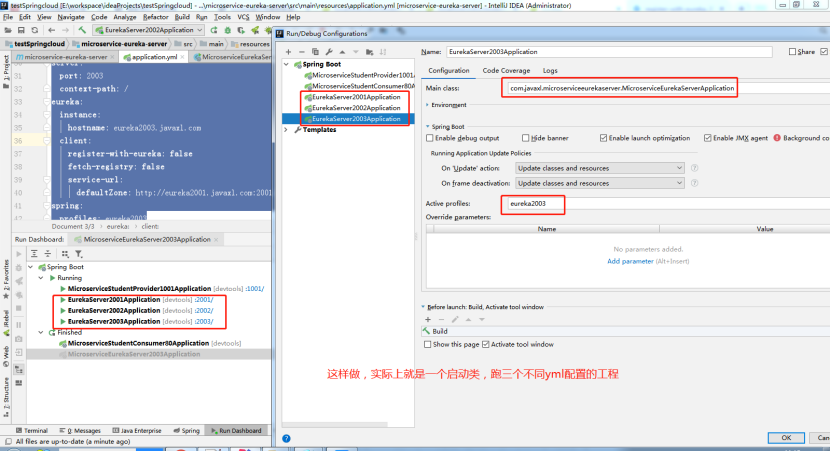
跑起来的效果跟普通操作的效果是一致的;
Eureka自我保护机制
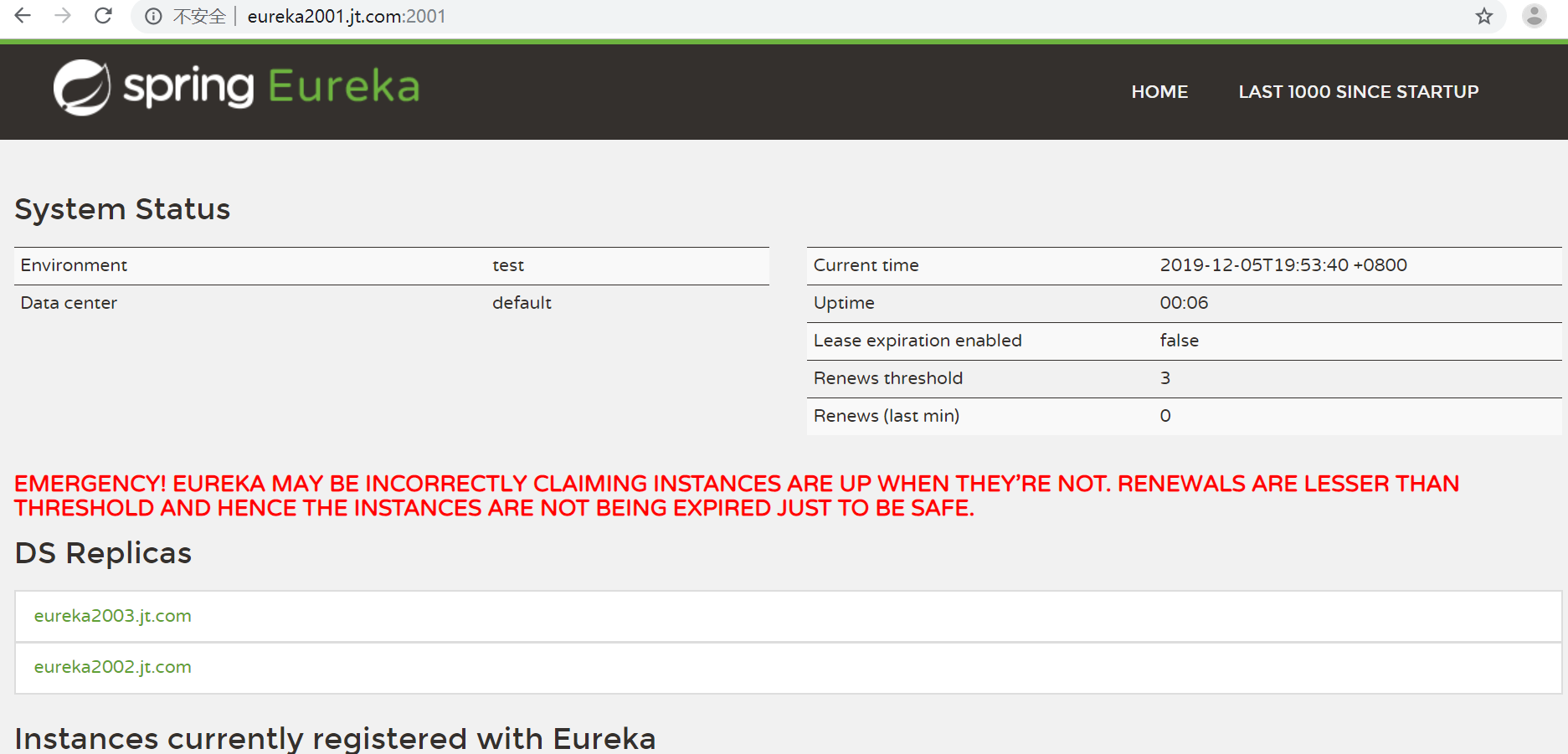
开发环境,我们经常会遇到这个红色的警告;
当我们长时间为访问服务以及变更服务实例名称的时候,就会出现这个红色警告;
默认情况,如果服务注册中心再一段时间内没有接收到某个微服务实例的心跳,服务注册中心会注销该实例(默认90秒)。
由于正式环境,经常会有网络故障,网络延迟问题发生,服务和注册中心无法正常通信,此时服务是正常的,不应该注销该服务,Eureka这时候,就通过“自我保护模式”来解决问题,当短时间和服务失去通信时,保留服务信息,当恢复网络和通信时候,退出“自我保护模式”;
通过“自我保护模式”,使Eureka集群更加的健壮和稳定;
Eureka集群的更多相关文章
- 微服务架构:Eureka集群搭建
版权声明:本文为博主原创文章,转载请注明出处,欢迎交流学习! 服务注册.发现是微服务架构的关键原理之一,由于微服务架构是由一系列职责单一的细粒度服务构成的网状结构,服务之间通过轻量机制进行通信,这就必 ...
- 基于dns搭建eureka集群
eureka集群方案: 1.通常我们部署的eureka节点多于两个,根据实际需求,只需要将相邻节点进行相互注册(eureka节点形成环状),就达到了高可用性集群,任何一个eureka节点挂掉不会受到影 ...
- eureka集群基于DNS配置方式
https://www.cnblogs.com/relinson/p/eureka_ha_use_dns.html 最近在研究spring cloud eureka集群配置的时候碰到问题:多台eu ...
- eureka集群的两种配置方式:配置文件方式与DNS方式
eureka client获取serviceUrls(eureka server地址)列表的过程: 1. 根据use-dns-for-fetching-service-urls属性判断是从dns还是从 ...
- SpringCloud之Eureka集群
前面我们介绍了SpringCloud注册中心Eureka,但是存在一个单点故障的问题,一个注册中心远远不能满足实际的生产环境,现在我们介绍一下如何搭建一个Eureka集群. 一:集群环境搭建 我们先建 ...
- eureka集群高可用配置
譬如eureka.client.register-with-eureka和fetch-registry是否要配置,配不配区别在哪里:eureka的客户端添加service-url时,是不是需要把所有的 ...
- Eureka集群试验的一点总结
先简单描述一下试验: 试验在一台机器上进行,假设有host文件中配置了以下内容 127.0.0.1 left 127.0.0.1 center 127.0.0.1 right 试验中搭建三个注册中心实 ...
- 【spring cloud】spring cloud中启动eureka集群时候,发生端口已经绑定的报错The Tomcat connector configured to listen on port 8000 failed to start. The port may already be in use or the connector may be misconfigured.
在分别设置 进行微服务eureka集群启动时候,执行命令行启动jar包时候,报错前面一个端口8000已经被使用,而我这里启动的配置文件中端口号是8001,怎么会导致端口冲突呢?? 但是报错我的端口冲突 ...
- eureka集群高可用配置,亲测成功配置(转)
转自大神的文章:https://blog.csdn.net/tianyaleixiaowu/article/details/78184793 网上讲这个东西的很多,抄来抄去的,大部分类似,多数没讲明白 ...
- Eureka集群搭建
服务注册.发现是微服务架构的关键原理之一,由于微服务架构是由一系列职责单一的细粒度服务构成的网状结构,服务之间通过轻量机制进行通信,这就必然引入一个服务注册发现的问题,也就是说服务提供方要注册报告服务 ...
随机推荐
- Ganglia与Centreon整合构建智能化监控报警平台
一.智能运维监控报警平台的组成 随着大数据时代的来临,运维工作的难度越来越大,每个运维人员都要面临不计其数的服务器和海量的数据,如何保证众多服务器和业务系统稳定高效地运行并尽量减少死机时间,成为考核运 ...
- Python深入之python内存管理机制(重点)
前言 本文的文字及图片来源于网络,仅供学习.交流使用,不具有任何商业用途,版权归原作者所有,如有问题请及时联系我们以作处理. 作者:醍醐三叶 关于python的存储问题, (1)由于python中 ...
- 【JS】306- 深入理解 call,apply 和 bind
作者:一像素 链接:https://www.cnblogs.com/onepixel/p/6034307.html 在JavaScript 中,call.apply 和 bind 是 Function ...
- 【Selenium】selenium.common.exceptions.ElementClickInterceptedException
出现问题: 使用代码点击提交按钮: driver.find_element(By.CSS_SELECTOR,"#submit").click() 出现如下异常: selenium. ...
- C# 导出pdf(浏览器不预览直接下载)
一.接口部分的代码 [HttpGet] public HttpResponseMessage ExportPdf(string id) { string pdfName = ""; ...
- 10分钟理解BFC原理
10 分钟理解 BFC 原理 一.常见定位方案 在讲 BFC 之前,我们先来了解一下常见的定位方案,定位方案是控制元素的布局,有三种常见方案: 普通流 (normal flow) 在普通流中,元素按照 ...
- eclipse没有打断点,项目确仍然要进入断点的问题。
eclipse没有打断点,却仍然每次debug项目启动时都进入一个断点,很烦人,经在网上查阅发现是勾选了下图中红框中所示的几个选项,把这几项去掉之后就自动不进入断点页面了,经分析这几个选项的大概意思是 ...
- 备战“金九银十”10道String高频面试题解析
前言 String 是我们实际开发中使用频率非常高的类,Java 可以通过 String 类来创建和操作字符串,使用频率越高的类,我们就越容易忽视它,因为见的多所以熟悉,因为熟悉所以认为它很简单,其实 ...
- iOS 类别 类扩展 简要说明
- 一步一步解决centos6.5配置无线网卡的问题
1.配置本地yum源 [local] name=local baseurl=file:///mnt/cdrom enable=1 gpgcheck=0 2.安装libnl rpm -ivh /mnt/ ...