
Eureka集群
Eureka集群搭建
高可用集群配置
当注册中心扛不住高并发的时候,这时候 要用集群来扛;
普通操作
我们再新建两个module microservice-eureka-server-2002 microservice-eureka-server-2003
1、pom.xml 把依赖加下;
<?xml version="1.0" encoding="UTF-8"?>

<project xmlns="http://maven.apache.org/POM/4.0.0" xmlns:xsi="http://www.w3.org/2001/XMLSchema-instance"

         xsi:schemaLocation="http://maven.apache.org/POM/4.0.0 https://maven.apache.org/xsd/maven-4.0.0.xsd">

    <modelVersion>4.0.</modelVersion>

    <parent>

        <groupId>com.jt</groupId>

        <artifactId>microservice</artifactId>

        <version>1.0-SNAPSHOT</version>

    </parent>

    <artifactId>microservice-eureka-server-</artifactId>

    <properties>

        <java.version>1.8</java.version>

    </properties>

    <dependencies>

        <dependency>

            <groupId>org.springframework.cloud</groupId>

            <artifactId>spring-cloud-starter-eureka-server</artifactId>

        </dependency>

        <dependency>

            <groupId>org.springframework.boot</groupId>

            <artifactId>spring-boot-starter-test</artifactId>

            <scope>test</scope>

        </dependency>

        <!--  修改后立即生效,热部署  -->

        <dependency>

            <groupId>org.springframework</groupId>

            <artifactId>springloaded</artifactId>

        </dependency>

        <dependency>

            <groupId>org.springframework.boot</groupId>

            <artifactId>spring-boot-devtools</artifactId>

        </dependency>

    </dependencies>

    <build>

        <plugins>

            <plugin>

                <groupId>org.springframework.boot</groupId>

                <artifactId>spring-boot-maven-plugin</artifactId>

            </plugin>

        </plugins>

    </build>

</project>
2、2002 2003的主启动类EurekaServerApplication_2002,EurekaServerApplication_2003复制修改下;
package com.jt.microserviceeurekaserver2002;

import org.springframework.boot.SpringApplication;

import org.springframework.boot.autoconfigure.SpringBootApplication;

import org.springframework.cloud.netflix.eureka.server.EnableEurekaServer;

@EnableEurekaServer

@SpringBootApplication

public class MicroserviceEurekaServer2002Application {

    public static void main(String[] args) {

        SpringApplication.run(MicroserviceEurekaServer2002Application.class, args);

    }

}
3、前面单机的时候 eureka注册中心实例名称 是localhost,现在是集群,不能三个实例都是localhost,这里复杂的办法是搞三个虚拟机,麻烦,这里有简单办法,直接配置本机hosts,来实现本机域名映射;
找到 C:\Windows\System32\drivers\etc 打开hosts,加配置
127.0.0.1  eureka2001.jt.com

127.0.0.1  eureka2002.jt.com

127.0.0.1  eureka2003.jt.com

修改三个项目的application.yml文件,主要是修改 hostname和defaultZone,
2001修改:
server:

  port:

  context-path: /

eureka:

  instance:

    hostname: eureka2001.jt.com

  client:

    register-with-eureka: false

    service-url:

      defaultZone: http://eureka2002.jt.com:2002/eureka/,http://eureka2003.jt.com:2003/eureka/ # 集群
2002
server:

  port:

  context-path: /

eureka:

  instance:

    hostname: eureka2002.jt.com

  client:

    register-with-eureka: false

    service-url:

      defaultZone: http://eureka2001.jt.com:2001/eureka/,http://eureka2003.jt.com:2003/eureka/
2003
server:

  port:

  context-path: /

eureka:

  instance:

    hostname: eureka2003.jt.com

  client:

    register-with-eureka: false

    service-url:

      defaultZone: http://eureka2001.jt.com:2001/eureka/,http://eureka2002.jt.com:2002/eureka/
骚操作
上面eureka服务搭建,除了yml文件不一样,其他文件都一样,那么我们有什么办法能够将多个eureka服务集合到一个工程中去呢?
创建一个microservice-eureka-server(三合一)子工程
Pom依赖
<?xml version="1.0" encoding="UTF-8"?>

<project xmlns="http://maven.apache.org/POM/4.0.0" xmlns:xsi="http://www.w3.org/2001/XMLSchema-instance"

         xsi:schemaLocation="http://maven.apache.org/POM/4.0.0 https://maven.apache.org/xsd/maven-4.0.0.xsd">

    <modelVersion>4.0.</modelVersion>

    <parent>

        <groupId>com.jt</groupId>

        <artifactId>microservice</artifactId>

        <version>1.0-SNAPSHOT</version>

    </parent>

    <artifactId>microservice-eureka-server</artifactId>

    <properties>

        <java.version>1.8</java.version>

    </properties>

    <dependencies>

        <dependency>

            <groupId>org.springframework.cloud</groupId>

            <artifactId>spring-cloud-starter-eureka-server</artifactId>

        </dependency>

        <dependency>

            <groupId>org.springframework.boot</groupId>

            <artifactId>spring-boot-starter-test</artifactId>

            <scope>test</scope>

        </dependency>

        <!--  修改后立即生效,热部署  -->

        <dependency>

            <groupId>org.springframework</groupId>

            <artifactId>springloaded</artifactId>

        </dependency>

        <dependency>

            <groupId>org.springframework.boot</groupId>

            <artifactId>spring-boot-devtools</artifactId>

        </dependency>

    </dependencies>

    <build>

        <plugins>

            <plugin>

                <groupId>org.springframework.boot</groupId>

                <artifactId>spring-boot-maven-plugin</artifactId>

            </plugin>

        </plugins>

    </build>

</project>
Yml文件
---

server:

  port:

  context-path: /

eureka:

  instance:

    hostname: eureka2001.jt.com

  client:

    register-with-eureka: false

    fetch-registry: false

    service-url:

      defaultZone: http://eureka2002.jt.com:2002/eureka/,http://eureka2003.jt.com:2003/eureka/

spring:

  profiles: eureka2001

---

server:

  port:

  context-path: /

eureka:

  instance:

    hostname: eureka2002.jt.com

  client:

    register-with-eureka: false

    fetch-registry: false

    service-url:

      defaultZone: http://eureka2001.jt.com:2001/eureka/,http://eureka2003.jt.com:2003/eureka/

spring:

  profiles: eureka2002

---

server:

  port:

  context-path: /

eureka:

  instance:

    hostname: eureka2003.jt.com

  client:

    register-with-eureka: false

    fetch-registry: false

    service-url:

      defaultZone: http://eureka2001.jt.com:2001/eureka/,http://eureka2002.jt.com:2002/eureka/

spring:

  profiles: eureka2003
启动类MicroserviceEurekaServerApplication.java
package com.jt.microserviceeurekaserver;

import org.springframework.boot.SpringApplication;

import org.springframework.boot.autoconfigure.SpringBootApplication;

import org.springframework.cloud.netflix.eureka.server.EnableEurekaServer;

@EnableEurekaServer

@SpringBootApplication

public class MicroserviceEurekaServerApplication {

    public static void main(String[] args) {

        SpringApplication.run(MicroserviceEurekaServerApplication.class, args);

    }

}
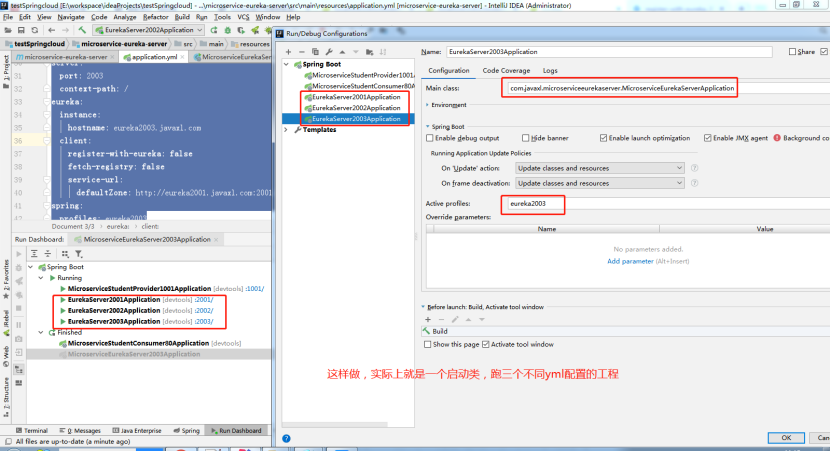
跑起来的效果跟普通操作的效果是一致的;
Eureka自我保护机制
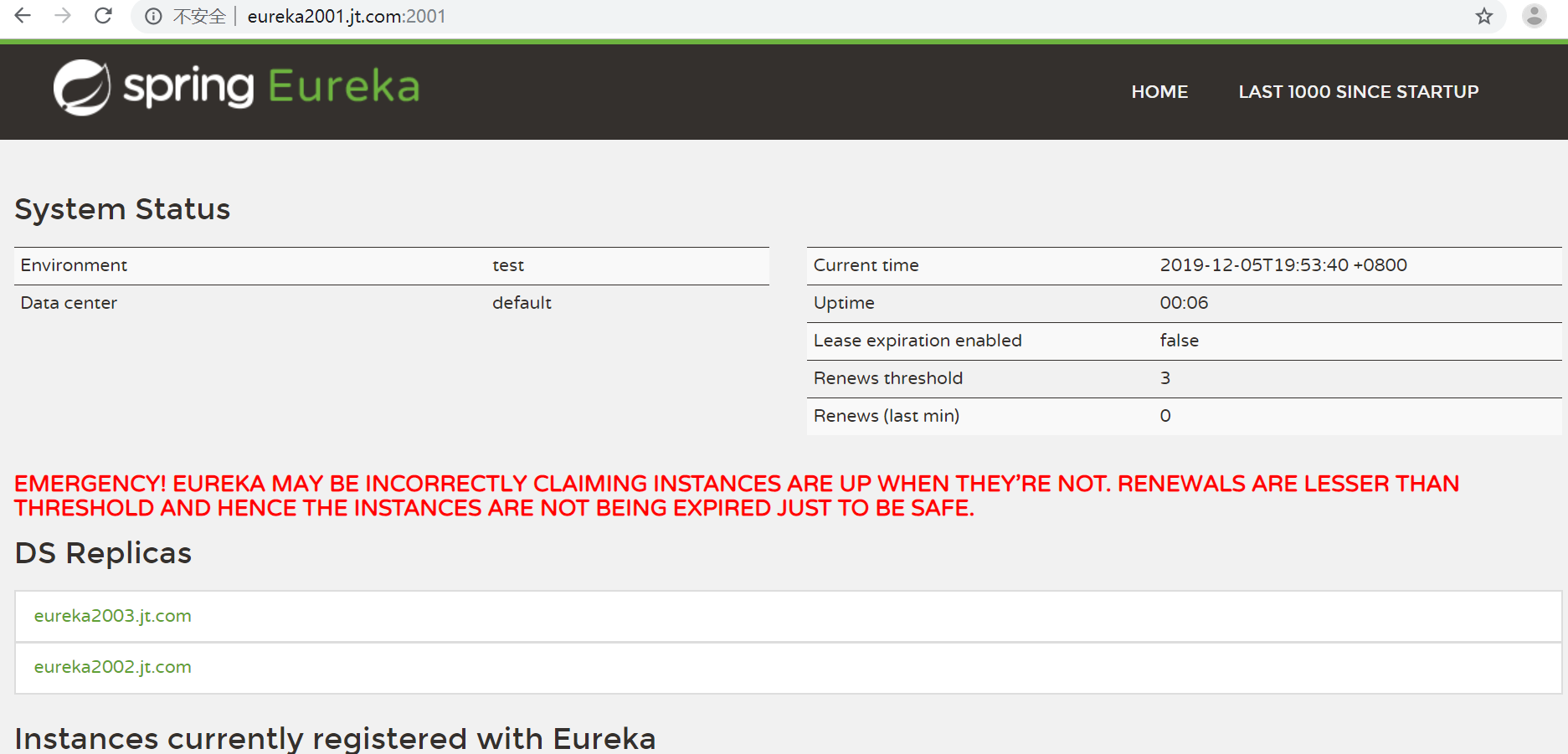
开发环境,我们经常会遇到这个红色的警告;
当我们长时间为访问服务以及变更服务实例名称的时候,就会出现这个红色警告;
默认情况,如果服务注册中心再一段时间内没有接收到某个微服务实例的心跳,服务注册中心会注销该实例(默认90秒)。
由于正式环境,经常会有网络故障,网络延迟问题发生,服务和注册中心无法正常通信,此时服务是正常的,不应该注销该服务,Eureka这时候,就通过“自我保护模式”来解决问题,当短时间和服务失去通信时,保留服务信息,当恢复网络和通信时候,退出“自我保护模式”;
通过“自我保护模式”,使Eureka集群更加的健壮和稳定;
Eureka集群的更多相关文章
- 微服务架构:Eureka集群搭建
版权声明:本文为博主原创文章,转载请注明出处,欢迎交流学习! 服务注册.发现是微服务架构的关键原理之一,由于微服务架构是由一系列职责单一的细粒度服务构成的网状结构,服务之间通过轻量机制进行通信,这就必 ...
- 基于dns搭建eureka集群
eureka集群方案: 1.通常我们部署的eureka节点多于两个,根据实际需求,只需要将相邻节点进行相互注册(eureka节点形成环状),就达到了高可用性集群,任何一个eureka节点挂掉不会受到影 ...
- eureka集群基于DNS配置方式
https://www.cnblogs.com/relinson/p/eureka_ha_use_dns.html 最近在研究spring cloud eureka集群配置的时候碰到问题:多台eu ...
- eureka集群的两种配置方式:配置文件方式与DNS方式
eureka client获取serviceUrls(eureka server地址)列表的过程: 1. 根据use-dns-for-fetching-service-urls属性判断是从dns还是从 ...
- SpringCloud之Eureka集群
前面我们介绍了SpringCloud注册中心Eureka,但是存在一个单点故障的问题,一个注册中心远远不能满足实际的生产环境,现在我们介绍一下如何搭建一个Eureka集群. 一:集群环境搭建 我们先建 ...
- eureka集群高可用配置
譬如eureka.client.register-with-eureka和fetch-registry是否要配置,配不配区别在哪里:eureka的客户端添加service-url时,是不是需要把所有的 ...
- Eureka集群试验的一点总结
先简单描述一下试验: 试验在一台机器上进行,假设有host文件中配置了以下内容 127.0.0.1 left 127.0.0.1 center 127.0.0.1 right 试验中搭建三个注册中心实 ...
- 【spring cloud】spring cloud中启动eureka集群时候,发生端口已经绑定的报错The Tomcat connector configured to listen on port 8000 failed to start. The port may already be in use or the connector may be misconfigured.
在分别设置 进行微服务eureka集群启动时候,执行命令行启动jar包时候,报错前面一个端口8000已经被使用,而我这里启动的配置文件中端口号是8001,怎么会导致端口冲突呢?? 但是报错我的端口冲突 ...
- eureka集群高可用配置,亲测成功配置(转)
转自大神的文章:https://blog.csdn.net/tianyaleixiaowu/article/details/78184793 网上讲这个东西的很多,抄来抄去的,大部分类似,多数没讲明白 ...
- Eureka集群搭建
服务注册.发现是微服务架构的关键原理之一,由于微服务架构是由一系列职责单一的细粒度服务构成的网状结构,服务之间通过轻量机制进行通信,这就必然引入一个服务注册发现的问题,也就是说服务提供方要注册报告服务 ...
随机推荐
- CodeForces1006E- Military Problem
E. Military Problem time limit per test 3 seconds memory limit per test 256 megabytes input standard ...
- ARTS-S pytorch中backward函数的gradient参数作用
导数偏导数的数学定义 参考资料1和2中对导数偏导数的定义都非常明确.导数和偏导数都是函数对自变量而言.从数学定义上讲,求导或者求偏导只有函数对自变量,其余任何情况都是错的.但是很多机器学习的资料和开源 ...
- 使用iCamera 测试MT9M001 130w高分辨率摄像头说明
该摄像头默认分辨率为1280*1024,即不设置任何寄存器参数,只要给该模块提供时钟,就可以输出. 在这里 我们可以通过右侧寄存器栏动态调整各寄存器 观察效果. 0x09寄存器可以调整曝光值,可以根据 ...
- PHP 7.4.0发布!一起看看有哪些新特性
PHP 7.4.0 发布了,此版本标志着 PHP 7 系列的第四次特性更新. 看了英文手册后,发现其进行了许多改进,并带来了一些新特性,现在将这些新特性您: 1.Typed Properties 类型 ...
- JS基础-BOM
BOM BOM 是 browser object model 的缩写, 简称浏览器对象模型. 主要处理浏览器窗口和框架, 描述了与浏览器进行交互的方法和接口, 可以对浏览器窗口进行访问和操作, 譬如可 ...
- pipelineDB学习笔记-2. Stream (流)
一.流的定义: 所谓的“流”(stream)在pipelineDB中是指那些被允许的数据库客服端推送到 Continuous View(连续视图) 的时序化数据的一种“抽象”.流中的每一个raw(数据 ...
- plsql修改某一行数据
plsql修改某一行数据时, 在查询语句后面加上for update,再点击
- Java String indexOf()方法
public class Test { public static void main(String[] args) { String s = "xXccxxxXX"; // 从头 ...
- SpringBoot之【mybatisplus】代码生成器
1.概述. AutoGenerator 是 MyBatis-Plus 的代码生成器,通过 AutoGenerator 可以快速生成 Entity.Mapper.Mapper XML.Service.C ...
- 一键删除数据库所有的外键约束-FOREIGN_KEYS
DECLARE @ESQL VARCHAR(1000);DECLARE FCursor CURSOR --定义游标FOR (SELECT 'ALTER TABLE '+O.name+' DROP ...