
thinkphp5 + barcode 生成条形码
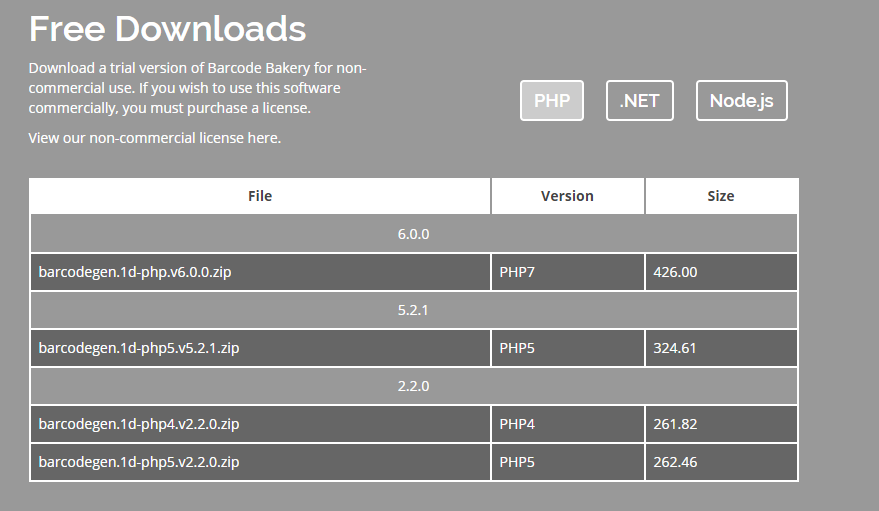
1、去官网下载类库 “https://www.barcodebakery.com/en/download”,选择自己的版本下载
2、解压放到“E:\phpstudy\PHPTutorial\WWW\guahao\vendor\下”,其中class文件是所有的类文件,生成条形码就是调用文件夹里的类,font文件是字体,index.php是一个可选择条件生成条形码的功能,是主程序的入口,test_1D.php是给的生成条形码的例子,test_1D.html是对应的渲染条形码的页面
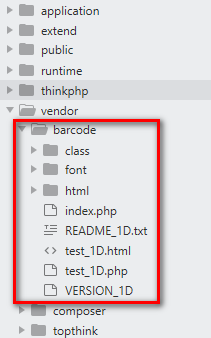
3、我们可以直接使用官方给的例子(test_1D.php),复制到自己需要用的地方,然后根据自己的需求稍加改动即可,需要注意的是,加载第三方类库的路径需要改一下。
生成条形码的php代码<?php
namespace app\index\controller;

use think\Controller;

/**

* 条形码操作类

*/

class Barcode extends Controller

{

    public function createBarcode()

    {

        $class_dir = VENDOR_PATH.'barcode/class/';

        // Including all required classes

        require_once($class_dir.'BCGFontFile.php');

        require_once($class_dir.'BCGColor.php');

        require_once($class_dir.'BCGDrawing.php');

        require_once($class_dir.'BCGcode39.barcode.php');

        // Loading Font

        // 注意font和class是同一级文件夹

        $font = new \BCGFontFile(VENDOR_PATH.'barcode/font/Arial.ttf', 18);// The arguments are R, G, B for color.

        $color_black = new \BCGColor(0, 0, 0);

        $color_white = new \BCGColor(255, 255, 255);

        $drawException = null;

        try {

            $code = new \BCGcode39();

            $code->setScale(2); // Resolution

            $code->setThickness(30); // Thickness

            $code->setForegroundColor($color_black); // Color of bars

            $code->setBackgroundColor($color_white); // Color of spaces

            $code->setFont($font); // Font (or 0)  0不显示文字
         $text = isset($_GET['text']) ? $_GET['text'] : 'HELLO';
            $code->parse($text); // Text
        } catch(Exception $exception) {

            $drawException = $exception;

        }

        /* Here is the list of the arguments

        1 - Filename (empty : display on screen)

        2 - Background color */

        $drawing = new \BCGDrawing('', $color_white);

        if($drawException) {

            $drawing->drawException($drawException);

        } else {

            $drawing->setBarcode($code);

            $drawing->draw();

        }

        // Header that says it is an image (remove it if you save the barcode to a file)

        header('Content-Type: image/png');

        header('Content-Disposition: inline; filename="barcode.png"');

        // Draw (or save) the image into PNG format.

        $drawing->finish(\BCGDrawing::IMG_FORMAT_PNG);

    }

    public function barcodedes()

    {

        return $this->fetch();

    }

}

?>
接受渲染条形码的Html代码
<img src="{:url('createBarcode')}">

当然,src还可以携带参数,只需更改以下代码
html代码
<img src="{:url('createBarcode',array('text'=>'123'))}">
php代码
把
$text = isset($_GET['text']) ? $_GET['text'] : 'HELLO';
改成
$text = input('text'); //接收的参数
4、如果想把条形码保存到本地,在实例化“BCGDrawing”的时候填写保存路径即可
// 文件路径

        $file_dir = 'uploads/barcode/'.date('Y-m-d');

        if (!file_exists($file_dir)) {

            mkdir($file_dir,0755,true);

        }

        $imgUrl = $file_dir.'/'.time().'.png';

        $class_dir = VENDOR_PATH.'barcode/class/';

        // Including all required classes

        require_once($class_dir.'BCGFontFile.php');

        require_once($class_dir.'BCGColor.php');

        require_once($class_dir.'BCGDrawing.php');

        require_once($class_dir.'BCGcode39.barcode.php');

        // Loading Font

        // 注意font和class是同一级文件夹

        $font = new \BCGFontFile(VENDOR_PATH.'barcode/font/Arial.ttf', 18);

        // Don't forget to sanitize user inputs

        // $text = isset($_GET['text']) ? $_GET['text'] : 'HELLO';

        // The arguments are R, G, B for color.

        $color_black = new \BCGColor(0, 0, 0);

        $color_white = new \BCGColor(255, 255, 255);

        $drawException = null;

        try {

            $code = new \BCGcode39();

            $code->setScale(2); // Resolution

            $code->setThickness(30); // Thickness

            $code->setForegroundColor($color_black); // Color of bars

            $code->setBackgroundColor($color_white); // Color of spaces

            $code->setFont($font); // Font (or 0)

            $text = input('text');      //接收的参数

            $text = isset($text) ? $text :'无参数';

            $code->parse($text); // Text

        } catch(Exception $exception) {

            $drawException = $exception;

        }

        /* Here is the list of the arguments

        1 - Filename (empty : display on screen)

        2 - Background color */

        // 保存到本地 (路径,颜色)路径为空则表示显示到页面上

        $drawing = new \BCGDrawing($imgUrl, $color_white);

        if($drawException) {

            $drawing->drawException($drawException);

        } else {

            $drawing->setBarcode($code);

            $drawing->draw();

        }

        $drawing->finish(\BCGDrawing::IMG_FORMAT_PNG);
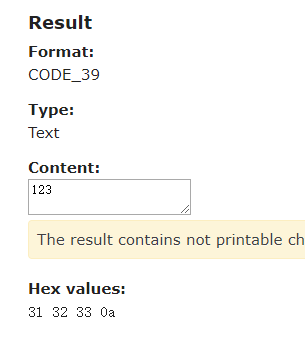
5、生成条形码之后,怎么判定条形码是否能用呢?可以把条形码保存成图片到本地,打开官网“https://www.onlinebarcodereader.com/”,上传刚刚生成的条形码,如果解析出的参数跟你输入的一样,说明条形码可以用。
thinkphp5 + barcode 生成条形码的更多相关文章
- 用Barcode生成条形码图片
使用第三方类库:BarcodeLib.dll private BitmapImage GenerateBarcodeBitmap(string visitId) { BarcodeLib.Barcod ...
- 使用BarcodeLib.Barcode.ASP.NET生成条形码
生成条形码图片,然后在前台页面展示: <img id="img" src="Mobile/<%=url %>"/> public str ...
- C# 在Word文档中生成条形码
C# 在Word文档中生成条形码 简介 条形码是由多个不同的空白和黑条按照一定的顺序组成,用于表示各种信息如产品名称.制造商.类别.价格等.目前,条形码在我们的日常生活中有着很广泛的应用,不管是在图书 ...
- JAVA生成条形码
1.下载生成条形码所需要的jar包barcode4j.jar: 2.java生成条形码代码 import java.awt.image.BufferedImage;import java.io.Fil ...
- C# 生成条形码
原文地址:http://www.cnblogs.com/xcsn/p/4514759.html 引用BarcodeLib.dll(百度云中有)生成条形 protected void Button2_C ...
- C# 利用BarcodeLib.dll生成条形码(一维,zxing,QrCodeNet/dll二维码)
原文:http://blog.csdn.net/kongwei521/article/details/17588825 首先效果: 一.下载BarcodeLib.dll 下载地址 :http://do ...
- PHP5生成条形码器
前阵子在做一个商家优惠券的功能,需要用到条形码,于是将资料重新整理下. 1.什么是条形码? 百度百科定义:条形码(barcode)是将宽度不等的多个黑条和空白,按照一定的编码规则排列,用以表达一组信息 ...
- PHP生成条形码
前阵子在做一个商家优惠券的功能,需要用到条形码,于是将资料重新整理下. 1.什么是条形码? 百度百科定义:条形码(barcode)是将宽度不等的多个黑条和空白,按照一定的编码规则排列,用以表达一组信息 ...
- C# 利用BarcodeLib.dll生成条形码
首先效果: 1:首先下载BarcodeLib.dll 下载地址 http://pan.baidu.com/share/link?shareid=2590968386&uk=2148890391 ...
随机推荐
- Selenium获取页面指定元素个数
测试需求: 获取页面中下拉框个数,并验证是否与预期个数一致 方法1:因下拉框的tagname属性值为select,可通过获取标签为select的元素来获取下拉框个数 List<WebElem ...
- 动态规划 | 对输入进行hash处理的LIS 1045
把序列M处理为有序序列,并且M不存在的序列要在A中删除. 对A进行了处理之后,执行LIS的操作(O(N^2)复杂度).当然可以优化为对数复杂度的,不过pat不卡这个. LCS解法:动态规划 | 保留重 ...
- Linux网络编程综合运用之MiniFtp实现(一)
春节过后,万物复苏,在这元宵佳节的前一天,决定继续开启新年的学习计划,生命在于运动,提高源于学习,在经过漫长的Linux网络编程学习后,接下来会以一个综合的小项目来将所学的知识点综合运用,首先是对项目 ...
- AtCoder Grand Contest 037 简要题解
从这里开始 题目目录 Problem A Dividing a String 猜想每段长度不超过2.然后dp即可. 考虑最后一个长度大于等于3的一段,如果划成$1 + 2$会和后面相同,那么划成$2 ...
- STM32开发/烧录/调试环境搭建 基于:Win10+STM32Cube+openocd+cmsis-dap(dap-link)
dap-link是个不错的STM32下载/调试工具,然而STM32Cube并没有直接支持它,只能通过openocd的方式间接支持. 网络上虽然已经有了其他人的教程,不过基本都是基于linux或者msy ...
- 阿里云虚拟空间.net 网站错误
Web.config 文件的 <compilation> 元素中的“targetFramework”特性仅用于目标 .NET Framework 版本 4.0 或更高版本(例如“< ...
- linux 开启oracle监听
secureCRT连接到数据库所在的linux机器,切换到oracle用户模式下 [root@nstlbeta ~]# su - oracle 步骤阅读 2 然后用sqlplus登录到数据库,关闭数据 ...
- 小程序1px边框在苹果机上变粗问题
在ios系统上1px的边框会变成2px,ui会感觉很粗 列表间隔,只需要一条边框 .border:after { position: absolute; content: ''; width: 100 ...
- IScroll自动计算高度代码
setScrollHeight: function () { var temp_height = 0; temp_height = $("#" + this.wrapperId). ...
- Tomcat基础操作
1.在WebApps ROOT目录里,如果删除过ROOT从新创建,放置index.html,index.jsp即可访问. 2.修改默认8080端口,打开server.xml,将8080端口修改为80即 ...