
vuex 的基本使用
工程目录
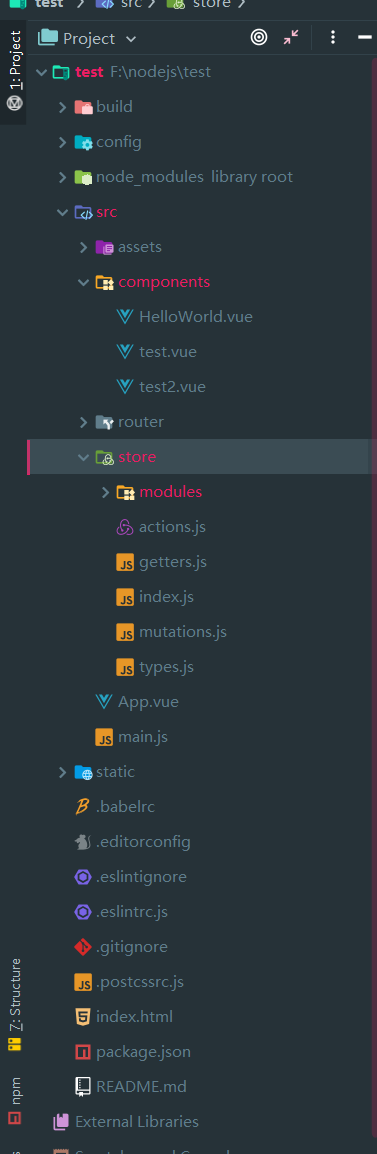
主要关注store 文件夹下的文件
store/index.js
import Vue from 'vue'

import Vuex from 'vuex'

// import getters from './store/getters.js'

// import actions from './store/actions.js'

// import mutations from './store/mutations.js'

import types from './types'

// children module

import users from './modules/users.js'

Vue.use(Vuex)

const state = {

  count: 1

}

const mutations = {

  [types.INCREMENT]: (state, n) => {

    state.count = state.count + n

  },

  [types.DECREMENT]: (state, n) => {

    state.count = state.count - n

  }

}

const actions = {

  increment: (context, n = 1) => {

    context.commit(types.INCREMENT, n)

  },

  decrement: (context, commit, n = 1) => {

    context.commit(types.DECREMENT, n)

  }

}

export default new Vuex.Store({

  state,

  mutations,

  actions,

  modules: {

    users

  }

})
store/modules/users.js
import types from '../types'

const state = {

  username: 'xiaojf'

}

const mutations = {

  [types.CHANGEUSERNAME]: (state, username) => {

    state.username = username

  }

}

const actions = {

  changeUsername (context, username = 'zhangsan') {

    context.commit(types.CHANGEUSERNAME, username)

  }

}

export default {

  state,

  mutations,

  actions

}
/components/test.vue
<template>

  <div>

    <div class="test">{{name}}</div>

    <div class="test">{{this.$store.state.count}}</div>

    <button v-on:click="increment()">increment</button>

    <button v-on:click="decrement()">decrement</button>

    <br>

    this is users module state <span style="color: red;" v-on:click="changeUsername()"> {{this.$store.state.users.username}}</span>

    <br>

    <test2></test2>

  </div>

</template>

<script>

import test2 from './test2'

export default {

  name: 'test',

  data: function () {

    return {

      name: 'xiaojf'

    }

  },

  components: {

    test2

  },

  methods: {

    increment () {

      // mutation

      this.$store.dispatch('increment', 1)

    },

    decrement () {

      // action

      this.$store.dispatch('decrement', 2)

    },

    changeUsername () {

      // children module's action

      this.$store.dispatch('changeUsername', 'xiaojianfeng')

    }

  }

}

</script>

<style scoped>

  .test {

    font-size:  28px;

    color: red;

  }

</style>
/components/test.vue
<template>

  <div>

    this is test2 {{this.$store.state.count}}

  </div>

</template>

<script>

export default {

  name: 'test2',

  data: function () {

    return {

      name: 'xiaojf'

    }

  }

}

</script>
vuex 的基本使用的更多相关文章
- 关于Vue.js 2.0 的 Vuex 2.0,你需要更新的知识库
应用结构 实际上,Vuex 在怎么组织你的代码结构上面没有任何限制,相反,它强制规定了一系列高级的原则: 应用级的状态集中放在 store 中. 改变状态的唯一方式是提交mutations,这是个同步 ...
- vuex复习方案
这次复习vuex,发现官方vuex2.0的文档写得太简略了,有些看不懂了.然后看了看1.0的文档,感觉很不错.那以后需要复习的话,还是先看1.0的文档吧.
- vuex 初体验
vuex是vue的状态管理工具,vue进阶从es6和npm开始,es6推荐阮一峰大神的教程. vuex学习从官方文档和一个记忆小游戏开始.本着兴趣为先的原则,我先去试玩了一把-->. Vuex ...
- vuex(1.0版本写法)
Vuex 是一个专门为 Vue.js 应用所设计的集中式状态管理架构. 官方文档:http://vuex.vuejs.org/zh-cn/ 2.0和1.0都能在此找到 每一个 Vuex 应用的核心就 ...
- 关于Vue vuex vux 文档
01. vue 链接 http://vuejs.org.cn/guide/ 02. vuex ----->>状态管理模块儿<<------- https://vuex.vue ...
- vuex
英文:(Introduction)中文:https://github.com/vuejs/vuex/issues/176(贡献者努力中)
- Vue 2.0 + Vue Router + Vuex
用 Vue.js 2.x 与相配套的 Vue Router.Vuex 搭建了一个最基本的后台管理系统的骨架. 当然先要安装 node.js(包括了 npm).vue-cli 项目结构如图所示: ass ...
- Vue2.X的状态管理vuex记录
记住上述的顺序情况:想要改变state,只能通过Mutation,虽然action可以直接改变state,这样会使每个状态可以方便的跟踪和记录(用Devtools跟踪) vue Method -- ...
- 在vue1.0遇到vuex和v-model的坑
事情是这样的,在开发项目的过程中我使用了vuex并且在store中定义了一个保存用户信息的对象 userInfo : { 'nickName' : '', // 昵称 'password' :'', ...
- vuex 笔记
Vuex 笔记 一个简单的状态管理 单一数据源: const sourceOfTruth = {} const vmA = new Vue({ data: sourceOfTruth }) const ...
随机推荐
- kvm创建windows2008虚拟机
virt-install -n win2008-fushi001 -r 16384 --vcpus=4 --os-type=windows --accelerate -c /data/kvm/imag ...
- Laravel —— batch 实现
很多项目中会用到自动执行脚本的功能, 例如,自动统计上个月的注册用户,定时生成 csv 文件并邮箱发送给客户等等. Laravel 中的任务调度,可实现定时任务, 结合自定义 artisan 命令,即 ...
- IN8005 Exercise Session
Exercise Session for Introductioninto Computer Science(for non Informatics studies, TUM BWL)(IN8005) ...
- C++内存分配/分布——堆栈存储区
FROM: C++内存分配方式详解——堆.栈.自由存储区.全局/静态存储区和常量存储区 栈,就是那些由编译器在需要的时候分配,在不需要的时候自动清除的变量的存储区.里面的变量通常是局部变量.函数参数等 ...
- App版本更新接口的设计
前段时间公司业务调整,新开了新的移动端的项目,所以和朋友聊到了“版本号”和“版本更新所需的数据表设计”. 一般来讲大部分的软件版本号分3段,比如 A.B.C A 表示大版本号,一般当软件整体重写,或出 ...
- (4)ardunio 矩阵求解官方库改造,添加逆的求解
多此一举,原来官方库给了求逆的函数,在源码里 除此之外,还有转置矩阵,只不过样例没显示出来. //Matrix Inversion Routine // * This function inverts ...
- gin+redis
var RedisDefaultPool *redis.Pool func newPool(addr string) *redis.Pool { return &redis.Pool{ Max ...
- docker 下载安装镜像
docker安装成功后. 1.搜索镜像 # docker search java 可使用 docker search命令搜索存放在 Docker Hub(这是docker官方提供的存放所有docker ...
- 异常过滤器的好坏(CLR)
为什么有些语言支持它们而另一些不支持呢?把它们加到我的新语言里是个好主意吗?我应该什么时候使用过滤器和catch/rethrow?就像很多事情一样,异常过滤器有好的一面也有坏的一面… 什么是异常过滤器 ...
- HDU 1542.Atlantis-线段树求矩形面积并(离散化、扫描线/线段树)-贴模板
好久没写过博客了,这学期不是很有热情去写博客,写过的题也懒得写题解.现在来水一水博客,写一下若干年前的题目的题解. Atlantis Time Limit: 2000/1000 MS (Java/Ot ...