
SpringMVC的文件上传与下载
1. 单文件上传
配置jsp页面
<%@ page contentType="text/html;charset=UTF-8" language="java" %>

<html>

<head>

    <title>文件上传</title>

</head>

<body>

<form action="/file/fileUpload" method="post" enctype="multipart/form-data">

<input type="file" name="file"/>

    作者:<input type="text" name="author"/>

    <input type="submit" value="提交">

</form>

</body>

</html>
配置文件上传的解析器
在WEB-INF里创建upload文件夹
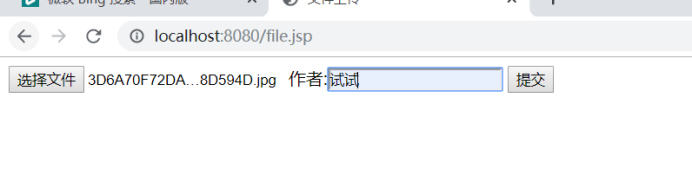
效果展示
<!--CommonsMultipartResolver文件上传解析器-->

<bean id="multipartResolver" class="org.springframework.web.multipart.commons.CommonsMultipartResolver">

    <!--编码-->

    <property name="defaultEncoding" value="UTF-8"/>

    <property name="maxInMemorySize" value="500000"/>

</bean>
2. 多文件上传
- 编写jsp页面

Form表单加上enctype="multipart/form-data"
input 属性的name值必须保持一致
<%@ page contentType="text/html;charset=UTF-8" language="java" %>

<html>

<head>

    <title>多文件上传</title>

</head>

<body>

<form action="/file/fileUploads" method="post" enctype="multipart/form-data">

    <input type="file" name="uploadFiles"/>

    <input type="file" name="uploadFiles"/>

    <input type="file" name="uploadFiles"/>

    作者:<input type="text" name="author"/>

    <input type="submit" value="提交">

</form>

</body>

</html>
@RequestMapping("/fileUploads")

public String fileMothers(HttpSession session, @RequestParam MultipartFile[] uploadFiles,String author) throws IOException {

    System.out.println("作者:"+author);

    System.out.println(uploadFiles);

    /*如何处理文件*/

  for (MultipartFile file:uploadFiles) {

      if (!file.isEmpty()) {

          //获取文件名称

          String fileName = file.getOriginalFilename();

          //获取需要上传的路径

          String realPath = session.getServletContext().getRealPath("/WEB-INF/upload");

          //创建文件对象

          File uploadfile = new File(realPath + "\\" + fileName);

          //如何上传文件

          file.transferTo(uploadfile);

      }

  }

    return "main";

}

实现handler文件
@RequestMapping("/springmvc")

@Controller

public class SpringMVCTest {

    /**

     *来一波上传文件 ,用@RequestParam注解来指定表单上的file为MultipartFile

     */

    @RequestMapping("/fileUpload")

    public void fileUpload(@RequestParam("file") MultipartFile file){

        // 判断文件是否为空

        if (!file.isEmpty()) {

            try {

                // 文件保存路径

                String filePath = "E:\\MySQL\\springmvc_test\\"

                        + file.getOriginalFilename();

                // 转存文件

                System.out.println(filePath);

                file.transferTo(new File(filePath));

                File uploadDest = new File(filePath);

                String[] fileNames = uploadDest.list();

                for (int i = 0; i < fileNames.length; i++) {

                    //打印出文件名

                    System.out.println(fileNames[i]);

                }

            } catch (Exception e) {

                e.printStackTrace();

            }

        }

    }

}
注意:我上面没有返回字符串或者是ModelAndView。。虽然能上传文件,但是跳转页面会是404,如下图:

这里进行修改
/**

     *来一波上传文件 ,用@RequestParam注解来指定表单上的file为MultipartFile

     */

    @RequestMapping("/fileUpload")

    public String fileUpload(@RequestParam("file") MultipartFile file){

        // 判断文件是否为空

        if (!file.isEmpty()) {

            try {

                // 文件保存路径

                String filePath = "E:\\MySQL\\springmvc_test\\"

                        + file.getOriginalFilename();

                // 转存文件

                System.out.println(filePath);

                file.transferTo(new File(filePath));

                File uploadDest = new File(filePath);

                String[] fileNames = uploadDest.list();

                for (int i = 0; i < fileNames.length; i++) {

                    //打印出文件名

                    System.out.println(fileNames[i]);

                }

            } catch (Exception e) {

                e.printStackTrace();

            }

        }

        // 重定向

        return SUCCESS;

    }
3.文件下载
修改index.jsp,加入下载文件的超链接:
<%@ page language="java" contentType="text/html; charset=UTF-8"

    pageEncoding="UTF-8"%>

<!DOCTYPE html PUBLIC "-//W3C//DTD HTML 4.01 Transitional//EN" "http://www.w3.org/TR/html4/loose.dtd">

<html>

<head>

<meta http-equiv="Content-Type" content="text/html; charset=UYF-8">

<title>Insert title here</title>

</head>

<body>

    <form action="springmvc/fileUpload" method="post" enctype="multipart/form-data">

    choose file:<input type="file" name="file">

    <input type="submit" value="submit">

    </form>

    <br><br>

    <a href="springmvc/testResponseEntity">Test ResponseEntity</a

</body>

</html>
在Controller中添加对应 handler:
 @RequestMapping("/testResponseEntity")

    public ResponseEntity<byte[]> testResponseEntity(HttpSession session) throws IOException {

        byte[] body =null;

        ServletContext servletContext = session.getServletContext();

        InputStream in = servletContext.getResourceAsStream("/files/abc.txt");

        body = new byte[in.available()];

        in.read(body);

        HttpHeaders headers = new HttpHeaders();

        //添加头部信息

        headers.add("Content-Disposition", "attachment;filename=abc.txt");

        HttpStatus statusCode = HttpStatus.OK;

        ResponseEntity<byte[]> response = new ResponseEntity<byte[]>(body, headers, statusCode);

        return response;

    }

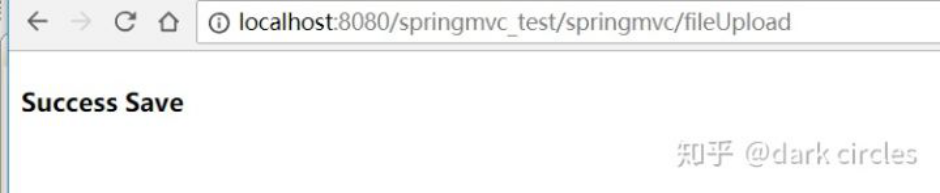
点击超链接,左下角看到

SpringMVC的文件上传与下载的更多相关文章
- SpringMVC 实现文件上传与下载,并配置异常页面
目录 上传文件的表单要求 Spring MVC实现上传文件 需要导入的jar包 配置MultipartResolver解析器 编写接收上传文件的控制器 Spring MVC实现文件下载 下载文件时的h ...
- 使用springMVC实现文件上传和下载之环境配置与上传
最近的项目中用到了文件的上传和下载功能,任务分配给了其他的同时完成.如今项目结束告一段落,我觉着这个功能比较重要,因此特意把它提取出来自己进行了尝试. 一. 基础配置: maven导包及配置pom.x ...
- springMvc之文件上传与下载
我们经常会使用的一个功能是文件下载,既然有文件下载就会有文件上传,下面我们来看一下文件上传是如何实现的 首先准备好一个页面 <style type="text/css"> ...
- springmvc之文件上传、下载
1.接收到的是图片的流时 //上传头像 @RequestMapping(value = "/uploadHeadSculpture", method = RequestMethod ...
- 使用SpringMVC实现文件上传和下载
文件上传 第一步,加入jar包: commons-fileupload-1.3.1.jar commons-io-2.4.jar 第二步,在SpringMVC配置文件中配置CommonsMultipa ...
- 【SpringMVC】文件上传与下载、拦截器、异常处理器
文件下载 使用ResponseEntity实现下载文件的功能 index.html <!DOCTYPE html> <html lang="en" xmlns:t ...
- 使用springMVC实现文件上传和下载之文件下载
接上一篇,文件下载需要获取下载文件的存储路径,这里只是手动填入,如果是在具体项目中,可以把文件名和上传后的存储路径保存在数据库中.然后增加一个文件列表的页面展示文件名和文件路径,然后点击下载的时候把相 ...
- 文件上传和下载(可批量上传)——Spring(二)
针对SpringMVC的文件上传和下载.下载用之前“文件上传和下载——基础(一)”的依然可以,但是上传功能要修改,这是因为springMVC 都为我们封装好成自己的文件对象了,转换的过程就在我们所配置 ...
- 使用Spring MVC实现文件上传与下载
前段时间做毕业设计的时候,想要完成一个上传文件的功能,后来,虽然在自己本地搭建了一个ftp服务器,然后使用公司的工具完成了一个文档管理系统:但是还是没有找到自己想要的文件上传与下载的方式. 今天看到一 ...
随机推荐
- python 坑1
目录 1.编码解码 2.基础数据类型补充: 2.1 str: 2.2list: 2.3tuple: 2.4dict: 2.5set: 3.坑 4.类型转换: 5.数据类型: 1.编码解码 编码:将文字 ...
- XGBoost 重要参数(调参使用)
XGBoost 重要参数(调参使用) 数据比赛Kaggle,天池中最常见的就是XGBoost和LightGBM. 模型是在数据比赛中尤为重要的,但是实际上,在比赛的过程中,大部分朋友在模型上花的时间却 ...
- Linux远程管理命令
关机\重启 shutdown 选项 时间 参数 -r 重启 例子: shutdown 1分钟后关机 shutdown now 立刻关机 shutdown –r now 立即重启 shutdown 20 ...
- linux maven 安装
1.使用wget命令下载maven安装包 wget https://mirrors.tuna.tsinghua.edu.cn/apache/maven/maven-3/3.6.2/binaries/a ...
- Xcode中提高效率的快捷键
依稀记得大神都是使用超多的快捷键来开发的.虽然要成为大神的路很远,不过把下面这些快捷键用熟练,就相当于把宝剑磨的既快又光,相当于有了一件极品的装备,对于接下来的打(升)怪(职)升(加)级(薪)那肯定是 ...
- html2canvas以及domtoimage的使用踩坑总结 动态获取的二维码失效如何生成海报
//判断手机为安卓还是ios 安卓html2canvas方法 ios系统dom-to-image方法 $(".code").click(function() { var u = n ...
- Educational Codeforces Round 66 (Rated for Div. 2)
A.直接模拟. #include<cstdio> #include<cstring> #include<iostream> #include<algorith ...
- 2.8_Database Interface ADO由来
OLE-DB,它无法广为流行,因为如下两点: 1.由于OLE-DB太底层化,使用上非常复杂,需要程序员拥有高潮的技巧. 2.OLEDB标准的API是C++API,只能供C++语言调用. 为了使得流行的 ...
- 原生JS-----一个剪刀石头布游戏
html: <h1>这是一个剪刀石头布游戏</h1> <h2>请出拳吧!少年!</h2> <h3>您已经获胜了<span id=&qu ...
- go语言实现限流器
本文:https://chai2010.cn/advanced-go-programming-book/ch5-web/ch5-06-ratelimit.html Ratelimit 服务流量限制 计 ...