
httprunner学习10-测试报告ExtentReport
前言
httprunner默认生成的报告不怎么美观,里面还有第二套报告模板extent_report_template.html。
extent_report_template
使用 hrun -h 可以看到运行的时候可以添加的命令行参数
C:\Users\dell>hrun -h

usage: hrun [-h] [-V] [--no-html-report] [--html-report-name HTML_REPORT_NAME]

            [--html-report-template HTML_REPORT_TEMPLATE]

            [--log-level LOG_LEVEL] [--log-file LOG_FILE]

            [--dot-env-path DOT_ENV_PATH] [--failfast]

            [--startproject STARTPROJECT]

            [--validate [VALIDATE [VALIDATE ...]]]

            [--prettify [PRETTIFY [PRETTIFY ...]]]

            [testset_paths [testset_paths ...]]

One-stop solution for HTTP(S) testing.

positional arguments:

  testset_paths         testset file path

optional arguments:

  -h, --help            show this help message and exit

  -V, --version         show version

  --no-html-report      do not generate html report.

  --html-report-name HTML_REPORT_NAME

                        specify html report name, only effective when

                        generating html report.

  --html-report-template HTML_REPORT_TEMPLATE

                        specify html report template path.

  --log-level LOG_LEVEL

                        Specify logging level, default is INFO.

  --log-file LOG_FILE   Write logs to specified file path.

  --dot-env-path DOT_ENV_PATH

                        Specify .env file path, which is useful for keeping

                        production credentials.

  --failfast            Stop the test run on the first error or failure.

  --startproject STARTPROJECT

                        Specify new project name.

  --validate [VALIDATE [VALIDATE ...]]

                        Validate JSON testset format.

  --prettify [PRETTIFY [PRETTIFY ...]]

                        Prettify JSON testset format.
使用 --html-report-template参数可以替换自己的模板,后面指定模板的路径:E:\python36\Lib\site-packages\httprunner\templates\extent_report_template.html
hrun test_demo.yml --html-report-template /path/templates/extent_report_template.html
D:\soft\untitled>hrun test_demo.yml --html-report-template E:\python36\Lib\site-packages\httprunner\templates\extent_report_template.html

test_demo case1

INFO     GET http://127.0.0.1:8000/api/test/demo

INFO     status_code: 200, response_time(ms): 39.2 ms, response_length: 255 bytes

INFO     start to extract from response object.

INFO     start to validate.

.

----------------------------------------------------------------------

Ran 1 test in 0.049s

OK

INFO     render with html report template: E:\python36\Lib\site-packages\httprunner\templates\extent_report_template.html

INFO     Start to render Html report ...

INFO     Generated Html report: D:\soft\untitled\reports\1569369482.html

D:\soft\untitled>
查看extentreport报告
查看extentreport测试报告,默认黑色主题
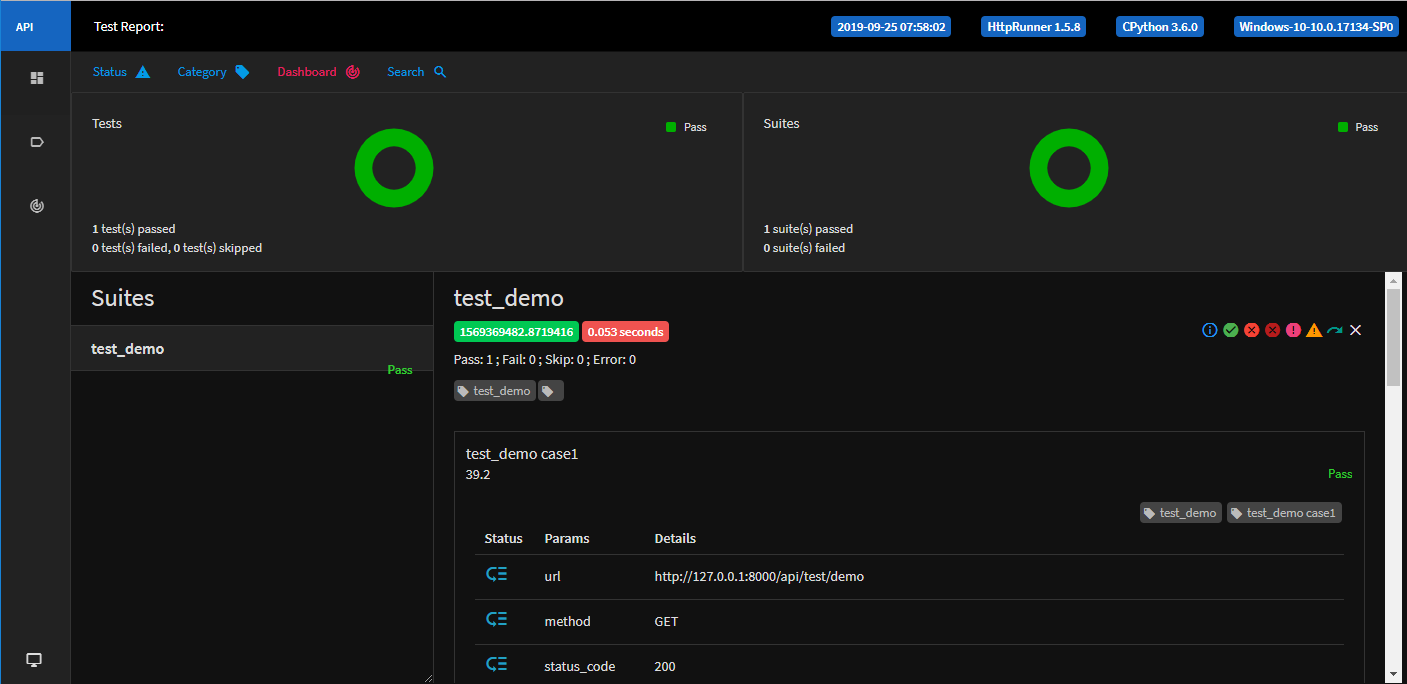
也可以切换成白色主题

默认使用extentreport报告
如果你不想每次输入这么长的参数,我们可以修改源码。默认使用extent_report_template.html
找到\site-packages\httprunner\report.py文件,相关代码
def render_html_report(summary, html_report_name=None, html_report_template=None):

    """ render html report with specified report name and template

        if html_report_name is not specified, use current datetime

        if html_report_template is not specified, use default report template

    """

    if not html_report_template:

        html_report_template = os.path.join(

            os.path.abspath(os.path.dirname(__file__)),

            "templates",

            "default_report_template.html"

        )

        logger.log_debug("No html report template specified, use default.")

    else:

        logger.log_info("render with html report template: {}".format(html_report_template))
修改后代码
def render_html_report(summary, html_report_name=None, html_report_template=None):

    """ render html report with specified report name and template

        if html_report_name is not specified, use current datetime

        if html_report_template is not specified, use default report template

    """

    if not html_report_template:

        html_report_template = os.path.join(

            os.path.abspath(os.path.dirname(__file__)),

            "templates",

            "extent_report_template.html"

        )

        logger.log_debug("No html report template specified, use extent_report_template.")

    elif html_report_template == 'default':

        html_report_template = os.path.join(

            os.path.abspath(os.path.dirname(__file__)),

            "templates",

            "default_report_template.html"

        )

        logger.log_debug("render with html report template: default_report_template.")

    else:

        logger.log_info("render with html report template: {}".format(html_report_template))
这样默认就会生成extentreport
hrun test_demo.yml
带上default参数就会生成原始的报告
hrun test_demo.yml --html-report-template default
httprunner学习10-测试报告ExtentReport的更多相关文章
- httprunner学习15-运行用例命令行参数详解
前言 HttpRunner 在命令行中启动测试时,通过指定参数,可实现丰富的测试特性控制. 命令行参数CLI 使用 -h 查看相关命令行参数 hrun -h 参数名称 参数值 参数说明 -h, --h ...
- JavaScript学习10 JS数据类型、强制类型转换和对象属性
JavaScript学习10 JS数据类型.强制类型转换和对象属性 JavaScript数据类型 JavaScript中有五种原始数据类型:Undefined.Null.Boolean.Number以 ...
- ThinkPhp学习10
原文:ThinkPhp学习10 查询操作 Action模块 User下的search public function search(){ //判断username是否已经传入,且不为空 if(isse ...
- HttpRunner学习8--使用debugtalk.py辅助函数
前言 在HttpRunner中,我们的测试用例都是写在 YAML/JSON 文件中,有时候我们想借助代码来实现某些较复杂的功能,但在 YAML/JSON 中是无法直接写代码来处理的,这个时候,我们可以 ...
- python学习10—迭代器、三元表达式与生成器
python学习10—迭代器.三元表达式与生成器 1. 迭代器协议 定义:对象必须提供一个next方法,执行该方法或者返回迭代中的下一项,或者返回一个StopIteration异常,以终止迭代(只能往 ...
- HttpRunner学习9--切换测试报告模板
前言 在HttpRunner中,给我们提供了 2 套测试报告模板,分别是 default_report_template.html 和 extent_report_template.html . 默认 ...
- HttpRunner学习6--使用parameters参数化
前言 在使用HttpRunner测试过程中,我们可能会遇到这种场景: 账号登录功能,需要输入用户名和密码,设计测试用例后有 N 种组合情况 如果测试组合比较少,比如只有2个,那我们直接在YAML脚本中 ...
- HttpRunner学习7--引用CSV文件数据
前言 在之前的文章中,我们已经学习了 parameters 参数化,是在测试脚本中直接指定参数列表.这种方法简单易用,但如果我们的参数列表数据比较多,这种方法可能就不太适合了. 当数据量比较大的时候, ...
- HttpRunner学习2--用例格式和简单使用
前言 HttpRunner中,测试用例支持两种文件格式:YAML 和 JSON.两种格式的用例是完全等价的,对于相同的信息内容,使用 YAML /JSON 得到的测试结果和报告也是一致的. 本人环境: ...
随机推荐
- Windows安装gmpy2
我在终端用python2的pip安装gmpy2时显示缺少Visual C++ 9.0 按照其要求,访问他给的网址安装一下 https://pypi.org/project/gmpy2/#files 进 ...
- Beta冲刺(3/7)——2019.5.25
作业描述 课程 软件工程1916|W(福州大学) 团队名称 修!咻咻! 作业要求 项目Beta冲刺(团队) 团队目标 切实可行的计算机协会维修预约平台 开发工具 Eclipse 团队信息 队员学号 队 ...
- apt-get命令使用
1.apt-get命令 apt-get命令是Debian Linux发行版中的APT软件包管理工具,所有基于Debian的发行都使用这个包管理系统. (1)命令语法 apt-get(选项)(参数) ( ...
- Java选择结构和循环结构
1.选择结构 ①.ifif(){ } if(){}else{} if(){}else if(){}else if(){}else{} ②.switch switch (表达式) { case 常量 1 ...
- 039 RabbitMq及数据同步01
1.RabbitMq (1)问题引出 目前我们已经完成了商品详情和搜索系统的开发.我们思考一下,是否存在问题? 商品的原始数据保存在数据库中,增删改查都在数据库中完成. 搜索服务数据来源是索引库,如果 ...
- Mysql——查看数据库,表占用磁盘大小
.查询所有数据库占用磁盘空间大小 select TABLE_SCHEMA, concat(,),' MB') as data_size, concat(,),'MB') as index_size f ...
- MethodInvoker委托,跨线程访问
Invoke(new MethodInvoker(delegate { textBox1.Enabled = true; })); 上面是简单缩写,也可以写成 private void btnOK_C ...
- 怎样调节Eclipse中的字体大小?
window->perference->appearance->colors and font->text font edit
- css 光标
<style> div{width:100;height:50;float:left;border:1px solid red;margin:1px;} </style> &l ...
- MVC伪静态路由简单搭配
public static void RegisterRoutes(RouteCollection routes) { routes.IgnoreRoute ...