
Springboot+Mybatis的逆向工程
Mybatis逆向工程,自动生成 entity类和常用的增删改查方法。
- 1.pom.xml引入类
<!-- 通用mapper   用于mabatis封装的基础增删改查的功能-->
<dependency>
    <groupId>tk.mybatis</groupId>
    <artifactId>mapper-spring-boot-starter</artifactId>
    <version>2.1.5</version>
    <exclusions>
        <exclusion>
            <groupId>org.springframework.boot</groupId>
            <artifactId>spring-boot-starter-jdbc</artifactId><!--已引入了这个,故此处例外掉其默认自带的-->
        </exclusion>
    </exclusions>
</dependency>
<!-- 逆向工程 -->
<dependency>
    <groupId>org.mybatis.generator</groupId>
    <artifactId>mybatis-generator-core</artifactId>
    <version>1.3.5</version>
    <scope>provided</scope>
</dependency>
- 2.springboot入口类,引入换一下
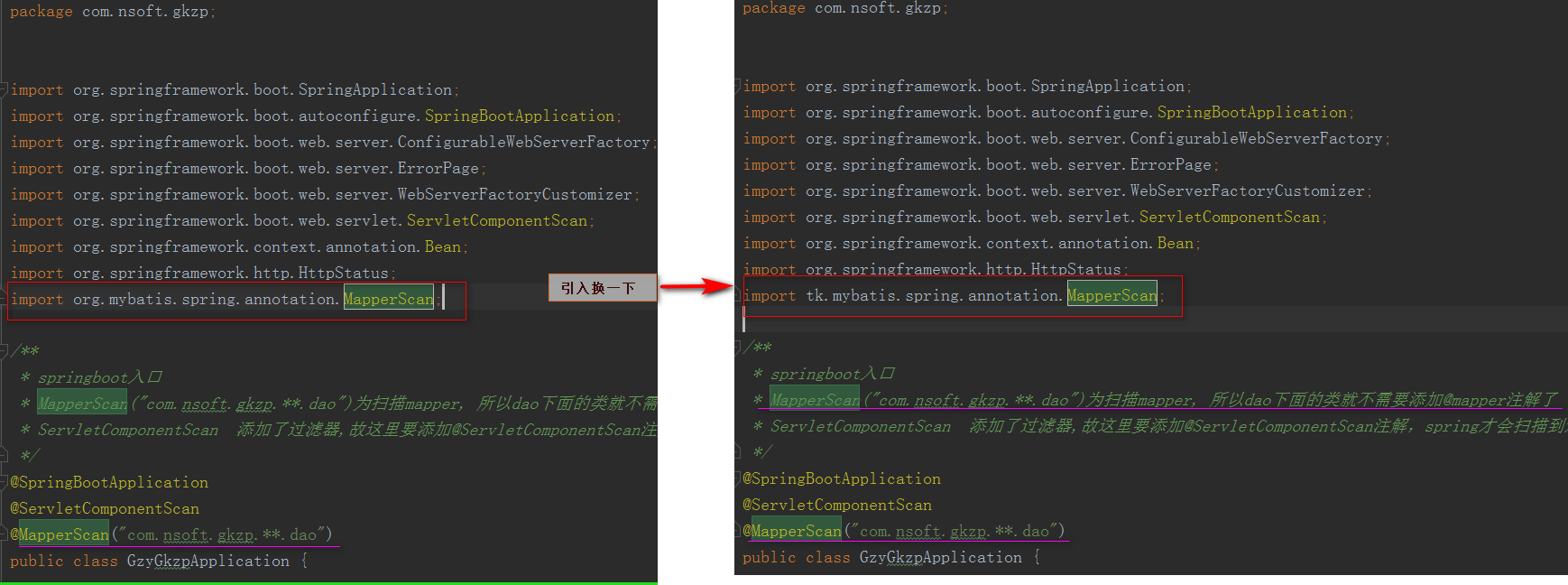
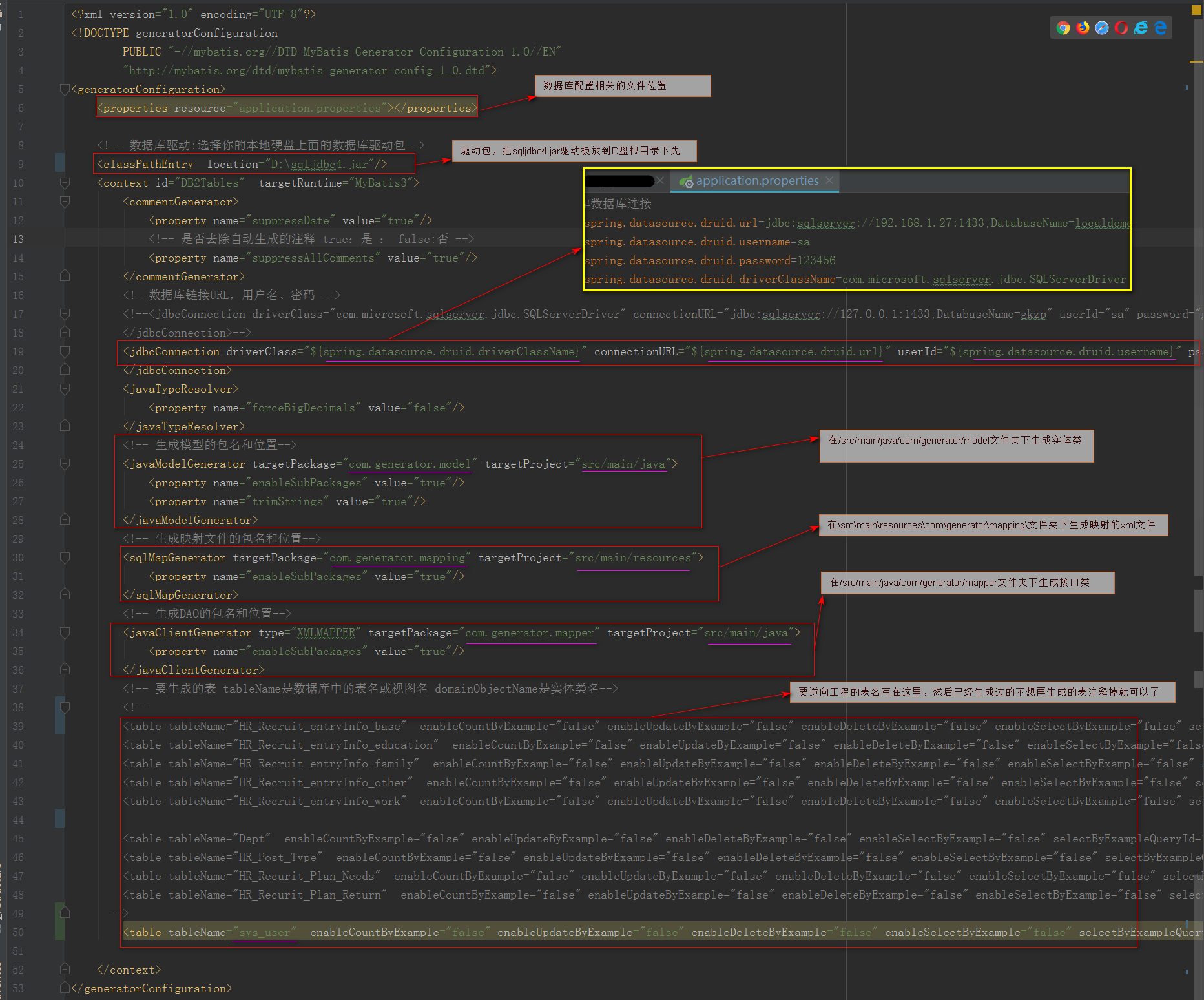
- 3.配置文件:\src\main\resources\resources\generatorConfig.xml
<?xml version="1.0" encoding="UTF-8"?>

<!DOCTYPE generatorConfiguration

        PUBLIC "-//mybatis.org//DTD MyBatis Generator Configuration 1.0//EN"

        "http://mybatis.org/dtd/mybatis-generator-config_1_0.dtd">

<generatorConfiguration>

    <properties resource="application.properties"></properties>

    <!-- 数据库驱动:选择你的本地硬盘上面的数据库驱动包-->

    <classPathEntry  location="D:\sqljdbc4.jar"/>

    <context id="DB2Tables"  targetRuntime="MyBatis3">

        <commentGenerator>

            <property name="suppressDate" value="true"/>

            <!-- 是否去除自动生成的注释 true:是 : false:否 -->

            <property name="suppressAllComments" value="true"/>

        </commentGenerator>

        <!--数据库链接URL,用户名、密码 -->

        <!--<jdbcConnection driverClass="com.microsoft.sqlserver.jdbc.SQLServerDriver" connectionURL="jdbc:sqlserver://127.0.0.1:1433;DatabaseName=gkzp" userId="sa" password="nsoft">

        </jdbcConnection>-->

        <jdbcConnection driverClass="${spring.datasource.druid.driverClassName}" connectionURL="${spring.datasource.druid.url}" userId="${spring.datasource.druid.username}" password="${spring.datasource.druid.password}">

        </jdbcConnection>

        <javaTypeResolver>

            <property name="forceBigDecimals" value="false"/>

        </javaTypeResolver>

        <!-- 生成模型的包名和位置-->

        <javaModelGenerator targetPackage="com.generator.model" targetProject="src/main/java">

            <property name="enableSubPackages" value="true"/>

            <property name="trimStrings" value="true"/>

        </javaModelGenerator>

        <!-- 生成映射文件的包名和位置-->

        <sqlMapGenerator targetPackage="com.generator.mapping" targetProject="src/main/resources">

            <property name="enableSubPackages" value="true"/>

        </sqlMapGenerator>

        <!-- 生成DAO的包名和位置-->

        <javaClientGenerator type="XMLMAPPER" targetPackage="com.generator.mapper" targetProject="src/main/java">

            <property name="enableSubPackages" value="true"/>

        </javaClientGenerator>

        <!-- 要生成的表 tableName是数据库中的表名或视图名 domainObjectName是实体类名-->

        <!--

        <table tableName="HR_Recruit_entryInfo_base"  enableCountByExample="false" enableUpdateByExample="false" enableDeleteByExample="false" enableSelectByExample="false" selectByExampleQueryId="false"></table>

        <table tableName="HR_Recruit_entryInfo_education"  enableCountByExample="false" enableUpdateByExample="false" enableDeleteByExample="false" enableSelectByExample="false" selectByExampleQueryId="false"></table>

        <table tableName="HR_Recruit_entryInfo_family"  enableCountByExample="false" enableUpdateByExample="false" enableDeleteByExample="false" enableSelectByExample="false" selectByExampleQueryId="false"></table>

        <table tableName="HR_Recruit_entryInfo_other"  enableCountByExample="false" enableUpdateByExample="false" enableDeleteByExample="false" enableSelectByExample="false" selectByExampleQueryId="false"></table>

        <table tableName="HR_Recruit_entryInfo_work"  enableCountByExample="false" enableUpdateByExample="false" enableDeleteByExample="false" enableSelectByExample="false" selectByExampleQueryId="false"></table>

        <table tableName="Dept"  enableCountByExample="false" enableUpdateByExample="false" enableDeleteByExample="false" enableSelectByExample="false" selectByExampleQueryId="false"></table>

        <table tableName="HR_Post_Type"  enableCountByExample="false" enableUpdateByExample="false" enableDeleteByExample="false" enableSelectByExample="false" selectByExampleQueryId="false"></table>

        <table tableName="HR_Recurit_Plan_Needs"  enableCountByExample="false" enableUpdateByExample="false" enableDeleteByExample="false" enableSelectByExample="false" selectByExampleQueryId="false"></table>

        <table tableName="HR_Recurit_Plan_Return"  enableCountByExample="false" enableUpdateByExample="false" enableDeleteByExample="false" enableSelectByExample="false" selectByExampleQueryId="false"></table>

      -->

        <table tableName="sys_user"  enableCountByExample="false" enableUpdateByExample="false" enableDeleteByExample="false" enableSelectByExample="false" selectByExampleQueryId="false"></table>

    </context>

</generatorConfiguration>
源代码
- 4.配置Java类
\src\main\java\com\nsoft\gkzp\system\sysuser\service\SysUserServiceImpl.java
File configFile文件参数指定generatorConfig.xml配置文件位置
package com.nsoft.gkzp.util;

import org.mybatis.generator.api.MyBatisGenerator;

import org.mybatis.generator.config.Configuration;

import org.mybatis.generator.config.xml.ConfigurationParser;

import org.mybatis.generator.internal.DefaultShellCallback;

import java.io.File;

import java.util.ArrayList;

import java.util.List;

public class GeneratorSqlmap {

    public void generator() throws Exception {

        List<String> warnings = new ArrayList<String>();

        boolean overwrite = true;

        //指定 逆向工程配置文件

        File configFile = new File("./src/main/resources/resources/generatorConfig.xml");

        ConfigurationParser cp = new ConfigurationParser(warnings);

        Configuration config = cp.parseConfiguration(configFile);

        DefaultShellCallback callback = new DefaultShellCallback(overwrite);

        MyBatisGenerator myBatisGenerator = new MyBatisGenerator(config,callback, warnings);

        myBatisGenerator.generate(null);

    }

    /**

     * 运行这个main方法就可以进行逆向工程

     * @param args

     * @throws Exception

     */

    public static void main(String[] args) throws Exception {

        try {

            GeneratorSqlmap generatorSqlmap = new GeneratorSqlmap();

            generatorSqlmap.generator();

        } catch (Exception e) {

            e.printStackTrace();

        }

    }

}
运行上面的main方法,就会自动生成三个文件(以sys_User表为例)(如下图)

create table sys_user(

    id              int                identity(1,1)  primary key not null,    --id主键 自增长

    loginName     nvarchar(50)    NOT NULL ,                                    --登录用户名

    password      nvarchar(50)    NOT NULL ,                                    --登录密码

    email          nvarchar(255)    ,                                        --用户邮箱    (邮箱登录)

    phone         nvarchar(15)  ,                                        --用户手机号(手机号登录)

    createTime    datetime default CONVERT(varchar(100), GETDATE(), 20),    --用户创建时间

    pwdChangeTime datetime default CONVERT(varchar(100), GETDATE(), 20),    --改密码时间(初始值为用户创建时间)

    code          varchar(255) ,                                            --'激活码'

    usertype      int            NOT NULL default 2,                            --用户类型(0系统管理员 1、内网用户 2、普通用户)

    state          int           NOT NULL default 0 ,                        --用户激活状态:0表示未激活,1表示激活

    nstatusid      int default 1                                                --用户状态 0无效 1有效

);
表sys_user
另:SysUser实体类中,例如loginname字段均为小写的,如果表字段设计为login_name的话,生成的实体类此字段映射为loginName,就会大写。同理表名也是如此。
- 5.实际应用
生成后,可以将
5.1 接口类SysUserMapper.java、映射文件UserMapper.xml 两个文件删除了,用不到。 实体类SysUser.java复制粘贴到你要放实际放的地方就可以了。
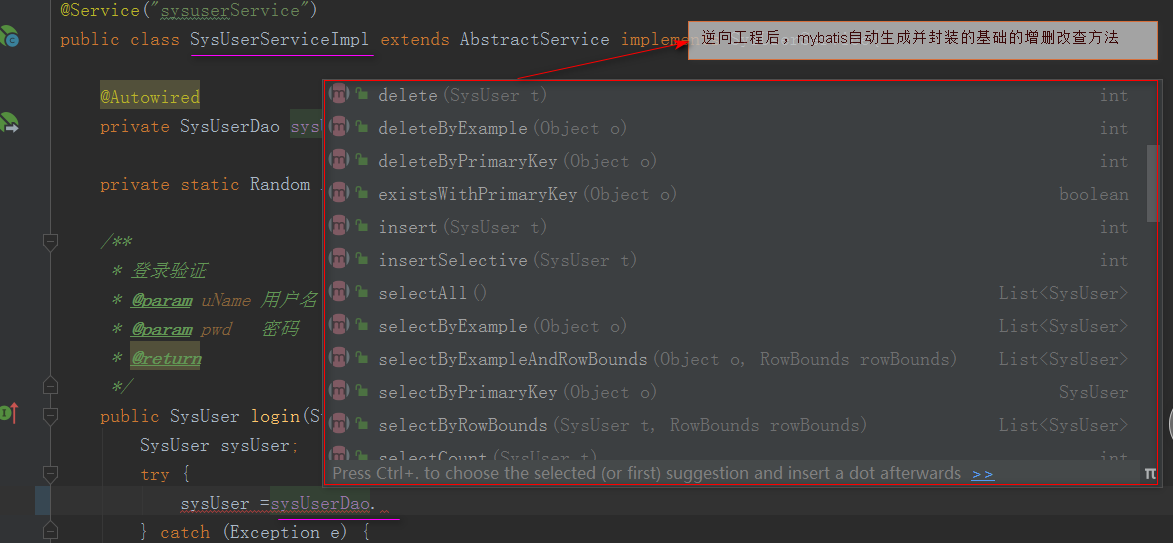
5.2 实际的dao层接口类继承 Mapper<com.generator.model.SysUser> ,继承后,基础的增删改查操作mybatis已经自动生成并封装,不需要写了,这里只写其他业务逻辑方法就可以了。
注意:1).这里<com.generator.model.SysUser>为你生成实体类存放位置,如你在4.1步骤将SysUser.java实体类复制粘贴到其他位置,那么这里就写新位置的路径
2). 继承的Mapper为 tk.mybatis.mapper.common.Mapper。

在service实现类,就可以直接使用mybatis自动生成并封装的基础的增删改成操作,如下图。
Springboot+Mybatis的逆向工程的更多相关文章
- SpringBoot+Mybatis+Generator 逆向工程使用(二)
Mybatis-Genarator 逆向工程使用 个人开发环境 java环境:Jdk1.8.0_60 编译器:IntelliJ IDEA 2017.1.4 mysql驱动:mysql-connecto ...
- 项目转移时发生的错误<springboot+mybatis(xml逆向工程自动生成)>
org.springframework.beans.factory.UnsatisfiedDependencyException: Error creating bean with name 'app ...
- Java逆向工程SpringBoot + Mybatis Generator + MySQL
Java逆向工程SpringBoot+ Mybatis Generator + MySQL Meven pop.xml文件添加引用: <dependency> <groupId> ...
- SpringBoot+Mybatis+Maven+MySQL逆向工程实现增删改查
SpringBoot+Mybatis+MySQL+MAVEN逆向工程实现增删改查 这两天简单学习了下SpringBoot,发现这玩意配置起来是真的方便,相比于SpringMVC+Spring的配置简直 ...
- idea+springboot+mybatis逆向工程
前提:使用idea开发,基于springboot.用到了mybatis的逆向工程 因为之前用eclipse开发ssm比较多,现在转idea 使用springboot 踩了一些坑,在这记录一下~ 注意事 ...
- springboot实现mybaitis逆向工程
springboot实现mybaitis逆向工程 首先引入依赖,一共需要两个依赖(一个是mybaits依赖,一个是mybatis逆向工程插件) <dependency> <group ...
- 第五章 springboot + mybatis(转载)
本编博客转发自:http://www.cnblogs.com/java-zhao/p/5350021.html springboot集成了springJDBC与JPA,但是没有集成mybatis,所以 ...
- mybatis的逆向工程
mybatis的逆向工程是很大的减少了程序员对代码的编写工作,由于mybatis是半自动的sql语句使用,我们在项目中一般都是采用逆向工程来生成mybatis的文件,mapper接口相当于我们平常所说 ...
- 第九章 springboot + mybatis + 多数据源 (AOP实现)
在第八章 springboot + mybatis + 多数据源代码的基础上,做两点修改 1.ShopDao package com.xxx.firstboot.dao; import org.spr ...
随机推荐
- [HNOI2015]亚瑟王(概率期望,DP)
题目大意:很清晰了,不写了. $1\le T\le 444,1\le n\le 220,0\le r\le 132,0<p_i<1,0\le d_i\le 1000$. $p_i$ 和 $ ...
- PHP读取文件内容的五种方式
-----第一种方法-----fread()-------- <?php $file_path = "test.txt"; if(file_exists($file_path ...
- bat 文件追加
@echo off set str1=disable_modules:set str2= - mine echo %str1% >> c:\minionecho %str2% >&g ...
- 自定义Ribbon的负载均衡策略
自定义负载均衡策略 官方文档指出:自定义的负载均衡配置类不能放在 @componentScan 所扫描的当前包下及其子包下,否则我们自定义的这个配置类就会被所有的Ribbon客户端所共享,也就是说我们 ...
- PHP微信发红包简明教程
PHP微信发红包简明教程1首先进入公众号申请微信支付 申请成功账号密码会发到你指定的邮箱 是登陆商户平台的2 进入后申请发红包借口3 调用发红包接口 https://api.mch.weixin.qq ...
- Linux手动安装新版本Python教程(CentOS)
一.说明 1.1 linux为什么不升级python版本 2008年python3就发布了,到2020年1月1日python2.7就停止更新了,为什么主流的linux迟迟不去除python2自带pyt ...
- Zookeeper简单入门
官网地址https://zookeeper.apache.org/releases.html 下载https://mirrors.tuna.tsinghua.edu.cn/apache/zookeep ...
- Sitecore 8.2 工作流程
假设您的新Sitecore项目的所有开发都已完成.现在的下一步是在网站上填写内容并准备上线.客户通知您他们希望使用专门的网站管理员团队负责整个内容管理流程,并要求您为他们准备实例以便能够执行此操作. ...
- 面试题(Python)
面试题 字符串反向输出 s = "给阿姨倒杯卡布奇诺"反向输出S:print(s[::-1]) 面试必问:赋值,浅拷贝,深拷贝 赋值:多个变量指到相同内存浅拷贝中所有的元素,不管第 ...
- 300iq Contest 1 简要题解
300iq Contest 1 简要题解 咕咕咕 codeforces A. Angle Beats description 有一张\(n\times m\)的方阵,每个位置上标有*,+,.中的一种. ...