
ElasticSearch(十四):Linux下设置ElasticSearch 开机自启
一、创建脚本文件
在 /etc/init.d 目录下,创建脚本文件 elasticsearch
#  cd /etc/init.d/

#  vim elasticsearch
将以下内容写入文件中(其中JDK安装路径、elasticsearch安装路径及用于启动的elasticsearch的用户根据实际情况进行修改)
#!/bin/sh

#chkconfig:

#description: elasticsearch

export JAVA_HOME=/usr/local/java/jdk1..0_171

export JAVA_BIN=/usr/local/java/jdk1..0_171/bin

export PATH=$PATH:$JAVA_HOME/bin

export CLASSPATH=.:$JAVA_HOME/lib/dt.jar:$JAVA_HOME/lib/tools.jar

export JAVA_HOME JAVA_BIN PATH CLASSPATH

case "$1" in

start)

    su -  es<<!

    cd /usr/local/elasticsearch-6.8.

    ./bin/elasticsearch -d

!

    echo "elasticsearch startup"

    ;;

stop)

    es_pid=`ps aux|grep elasticsearch | grep -v 'grep elasticsearch' | awk '{print $2}'`

    kill - $es_pid

    echo "elasticsearch stopped"

    ;;

restart)

    es_pid=`ps aux|grep elasticsearch | grep -v 'grep elasticsearch' | awk '{print $2}'`

    kill - $es_pid

    echo "elasticsearch stopped"

    su - es<<!

    cd /usr/local/elasticsearch-6.8.

    ./bin/elasticsearch -d

!

    echo "elasticsearch startup"

    ;;

*)

    echo "start|stop|restart"

    ;;

esac

exit $?
保存退出
二、设置开机自启
在 /etc/init.d 目录下赋予新创建的elasticsearch文件执行权限
# chmod +x elasticsearch
添加到开机启动任务
# chkconfig --add elasticsearch
重启机器,检测elasticsearch是否自启
# ps -ef|grep elasticsearch
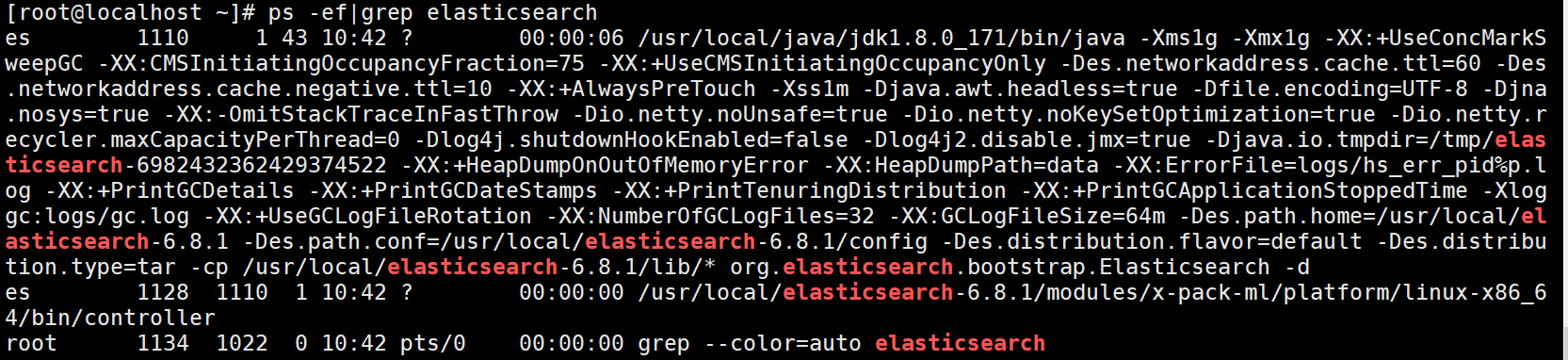
elasticsearch进程已经起来
检测elasticsearch服务是否正常
# curl http://192.168.56.13:9200
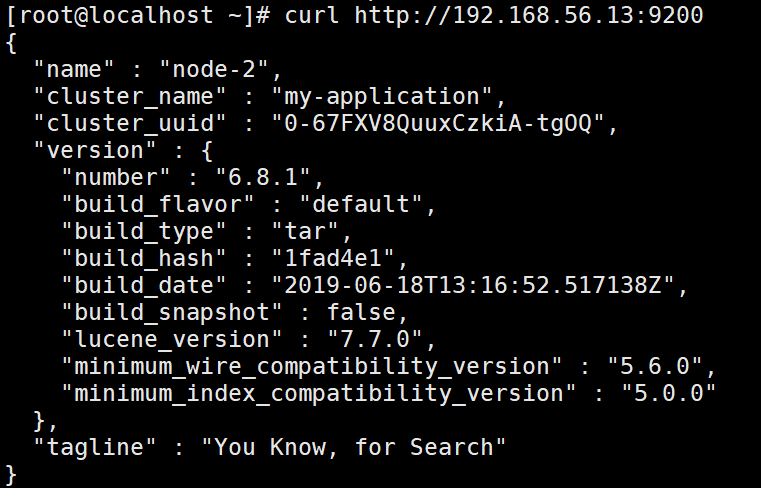
服务正常,至此Linux下设置Elasticsearch开机自启完成!
ElasticSearch(十四):Linux下设置ElasticSearch 开机自启的更多相关文章
- Linux下设置Nginx开机自启
1.本地环境 [root@dev ~]#cat /etc/redhat-release CentOS Linux release 7.5.1804 (Core) 2.在/etc/init.d创建ngi ...
- linux 上设置mysql开机自启
此方式是通过安装包安装的,如果是yum安装的rpm包,可参考yum安装MySQL8.0 三个月之前安装的mysql,记得是设置了开机自启,但是今天再次进入的时候发现,无法登录,报错如下 原因是mysq ...
- Nginx知多少系列之(十四)Linux下.NET Core项目Nginx+Keepalived高可用(主从模式)
目录 1.前言 2.安装 3.配置文件详解 4.工作原理 5.Linux下托管.NET Core项目 6.Linux下.NET Core项目负载均衡 7.负载均衡策略 8.加权轮询(round rob ...
- Linux下设置svn开机自启动
方式一:centos 7 设置svn开机自启动 使用新的systemctl 服务命令 (笔者成功验证过,该方式可行) [root@iZjvr37lpviqbkZ init.d]# vi /lib/s ...
- Linux下设置Tomcat开机自启动
--未验证 第一步:在/etc/init.d下新建一个文件tomcat(需要root操作权限) vi /etc/init.d/tomcat 然后点击"i"写下如下代码,tomcat ...
- Linux下设置Tomcat开机启动
1.进入/etc/rc.d/init.d,新建文件tomcat,并让它成为可执行文件 chmod 755 tomcat. #!/bin/bash # # /etc/rc.d/init.d/tomcat ...
- 记录Linux下安装elasticSearch时遇到的一些错误
记录Linux下安装elasticSearch时遇到的一些错误 http://blog.sina.com.cn/s/blog_c90ce4e001032f7w.html (2016-11-02 22: ...
- linux下安装Elasticsearch(单机版和集群版)
一.linux下安装Elasticsearch(单机) 1.软件下载 下载地址:https://www.elastic.co/cn/downloads/past-releases/elasticsea ...
- Ubuntu Linux下设置IP的配置命令
Ubuntu Linux下设置IP的配置命令 今天装了Ubuntu,但是发现不能上网,开始排查问题: 1.首先确定网络连接是否正确,所用的网线是否可以正常工作 2.查看网卡是否能正常工作,检测的方法如 ...
随机推荐
- 软件工程卷1 抽象与建模 (Dines Bjorner 著)
I 开篇 1. 绪论 II 离散数学 2. 数 (已看) 3. 集合 4. 笛卡尔 5. 类型 6. 函数 7. λ演算 8. 代数 9. 数理逻辑 III 简单RSL 10. RSL中的原子类型和值 ...
- nginx 配置状态监控
Nginx有内置一个状态页,需要在编译的时候指定参数--with-http_stub_status_module参数方可打开.也就是说,该功能是由http_stub_status_module模块提供 ...
- springcloud的Hystrix turbine断路器聚合监控实现(基于springboot2.02版本)
本文基于方志朋先生的博客实现:https://blog.csdn.net/forezp/article/details/70233227 一.准本工作 1.工具:Idea,JDK1.8,Maven3. ...
- Spring Cloud 升级最新 Greenwich 版本,舒服了~
去年将 Spring Cloud 升级到了 Finchley 版本: Spring Cloud 升级最新 Finchley 版本,踩了所有的坑! 这个大版本栈长是踩了非常多的坑啊,帮助了不少小伙伴. ...
- 牛逼哄哄的 Lambda 表达式,简洁优雅就是生产力!
阅读本文大概需要 4 分钟. 作者:Sevenvidia https://www.zhihu.com/question/20125256/answer/324121308 什么是Lambda? 我们知 ...
- 【06月19日】A股滚动市盈率PE最低排名
仅根据最新的市盈率计算公式进行排名,无法对未来的业绩做出预测. 方大集团(SZ000055) - 滚动市盈率PE:2.59 - 滚动市净率PB:1.16 - 滚动年化股息收益率:3.91% - 建筑 ...
- ASP.NET Core使用Docker进行容器化托管和部署
一.课程介绍 人生苦短,我用.NET Core!今天给大家分享一下Asp.Net Core以Docker进行容器化部署托管,本课程并不是完完全全的零基础Docker入门教学,课程知识点难免有没覆盖全面 ...
- IO流—字符流
字符流 只能读写文本文件 Reader 抽象类 字符输出流的父类 Writer 抽象类 字符输出流的父类 字符转换输出流: OutputStreamWriter(OutputStream out):创 ...
- Sitecore 8.2 防火墙规则的权威指南
如今,使用多层安全保护您的数据不再是奢侈品; 这是不容谈判的.此外,您需要确保Sitecore解决方案保持运行并与集成服务(例如SQL,Mongo,Solr)通信,同时保持相同的安全级别. 让我们假设 ...
- 66 网络编程(五)——TCP多线程实现多人聊天室
思路 客户端读写各一个类,可以使内部类,实现Runnable.读写类都与服务器端建立连接,一个收,一个发. 客户端实现接收和转发.多线程实现每个客户端的连接(使与各客户端的连接独立). 服务器端中创建 ...