
关于iPhone X 适配
直接上代码,具体原理自己搜索网上一大堆
<!DOCTYPE html>

<html>

<head>

    <meta name="viewport" content="initial-scale=1">

    <!--<meta name="viewport" content="initial-scale=1, viewport-fit=cover">-->

    <meta name="viewport" content="width=device-width,initial-scale=1.0, minimum-scale=1.0, maximum-scale=1.0, user-scalable=no, viewport-fit=cover">

    <!--<meta name="viewport" content="width=device-width, initial-scale=1.0, viewport-fit=cover">-->

    <title></title>

    <style>

        body {

            margin: 0;

            font-family: Helvetica;

            font-size: 16pt;

            -webkit-text-size-adjust: 100%;

            background-color: #eef;

            padding-top: env(safe-area-inset-top);

            padding-left: env(safe-area-inset-left);

            padding-right: env(safe-area-inset-right);

            padding-bottom: env(safe-area-inset-bottom);

        }

        * {

            box-sizing: border-box;

        }

        #topBar {

            background-color: #729fcf;

            padding: env(safe-area-inset-top) env(safe-area-inset-right) 0 env(safe-area-inset-left);

        }

        #topBar a {

            display: inline-block;

            height: 100%;

            padding: 12px;

            border-right: 3px solid rgba(255, 255, 255, 0.5);

            color: white;

            text-decoration: none;

            font-weight: bold;

            font-size: 18pt;

        }

        #topBar a:last-child {

            border-right: none;

        }

        #bottomBar {

            position: fixed;

            left: 0;

            right: 0;

            bottom: 0;

            background-color: #3465a4;

            text-align: center;

            padding: 8px;

            padding-left: env(safe-area-inset-left);

            padding-right: env(safe-area-inset-right);

            padding-bottom: env(safe-area-inset-bottom);

        }

        #bottomBar a {

            padding: 0 24px;

            color: white;

            font-size: 12pt;

            text-decoration: none;

        }

        h1 {

            margin: 12px 0 0 0;

        }

        h2 {

            color: #aaa;

            font-size: 12pt;

            text-align: left;

            margin: 0;

        }

        .post {

            width: 100%;

            margin-bottom: 50px;

            padding: 12px;

            padding-left: env(safe-area-inset-left);

            padding-right: env(safe-area-inset-right);

        }

        .post p:first-child {

            margin: 0;

        }

    </style>

</head>

<body>

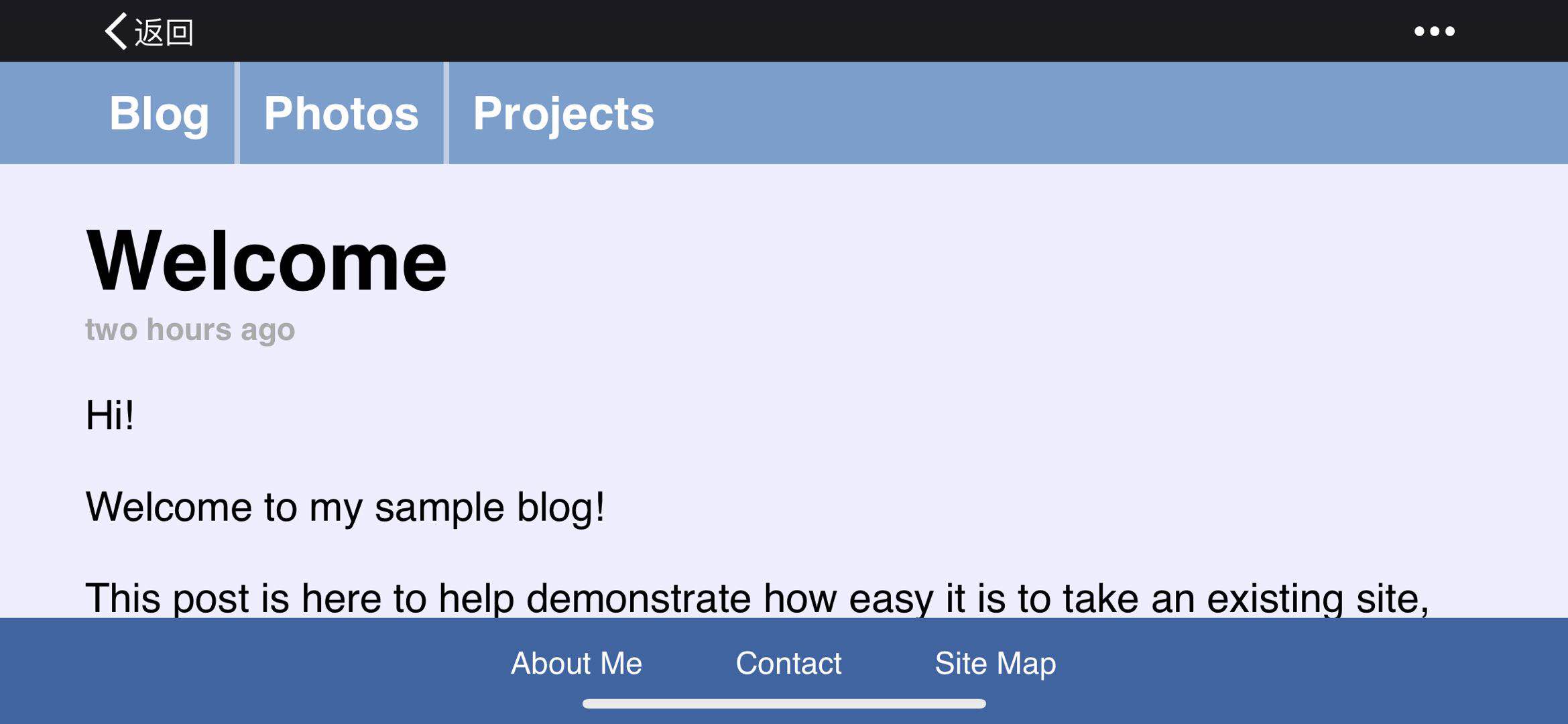
<div id="topBar"><a href="#">Blog</a><a href="#">Photos</a><a href="#">Projects</a></div>

<div class="post">

    <h1>Welcome</h1>

    <h2>two hours ago</h2>

    <p>Hi!</p>

    <p>Welcome to my sample blog!</p>

    <p>This post is here to help demonstrate how easy it is to take an existing site, along with full-width bars and fixed-position elements, and make it take full advantage of iPhone X's edge-to-edge display.</p>

    <p>The actual post describing how to adopt the new API is over on the <a href="https://webkit.org/blog/7929/designing-websites-for-iphone-x/">WebKit blog</a>.</p>

    <p>There, you will learn all about new WebKit features, including <code>viewport-fit</code>, <code>constant()</code>, safe area insets, and <code>min()</code> and <code>max()</code>.</p>

    <p>There, you will learn all about new WebKit features, including <code>viewport-fit</code>, <code>constant()</code>, safe area insets, and <code>min()</code> and <code>max()</code>.</p>

    <p>There, you will learn all about new WebKit features, including <code>viewport-fit</code>, <code>constant()</code>, safe area insets, and <code>min()</code> and <code>max()</code>.</p>

    <p>There, you will learn all about new WebKit features, including <code>viewport-fit</code>, <code>constant()</code>, safe area insets, and <code>min()</code> and <code>max()</code>.</p>

    <p>There, you will learn all about new WebKit features, including <code>viewport-fit</code>, <code>constant()</code>, safe area insets, and <code>min()</code> and <code>max()</code>.</p>

    <p>There, you will learn all about new WebKit features, including <code>viewport-fit</code>, <code>constant()</code>, safe area insets, and <code>min()</code> and <code>max()</code>.</p>

    <p>There, you will learn all about new WebKit features, including <code>viewport-fit</code>, <code>constant()</code>, safe area insets, and <code>min()</code> and <code>max()</code>.</p>

    <p>There, you will learn all about new WebKit features, including <code>viewport-fit</code>, <code>constant()</code>, safe area insets, and <code>min()</code> and <code>max()</code>.</p>

    <p>There, you will learn all about new WebKit features, including <code>viewport-fit</code>, <code>constant()</code>, safe area insets, and <code>min()</code> and <code>max()</code>.</p>

    <p>There, you will learn all about new WebKit features, including <code>viewport-fit</code>, <code>constant()</code>, safe area insets, and <code>min()</code> and <code>max()</code>.</p>

    <p>There, you will learn all about new WebKit features, including <code>viewport-fit</code>, <code>constant()</code>, safe area insets, and <code>min()</code> and <code>max()</code>.</p>

    <p>There, you will learn all about new WebKit features, including <code>viewport-fit</code>, <code>constant()</code>, safe area insets, and <code>min()</code> and <code>max()</code>.</p>

    <p>There, you will learn all about new WebKit features, including <code>viewport-fit</code>, <code>constant()</code>, safe area insets, and <code>min()</code> and <code>max()</code>.</p>

    <p>There, you will learn all about new WebKit features, including <code>viewport-fit</code>, <code>constant()</code>, safe area insets, and <code>min()</code> and <code>max()</code>.</p>

    <p>There, you will learn all about new WebKit features, including <code>viewport-fit</code>, <code>constant()</code>, safe area insets, and <code>min()</code> and <code>max()</code>.</p>

    <p>There, you will learn all about new WebKit features, including <code>viewport-fit</code>, <code>constant()</code>, safe area insets, and <code>min()</code> and <code>max()</code>.</p>

    <p>There, you will learn all about new WebKit features, including <code>viewport-fit</code>, <code>constant()</code>, safe area insets, and <code>min()</code> and <code>max()</code>.</p>

    <p>There, you will learn all about new WebKit features, including <code>viewport-fit</code>, <code>constant()</code>, safe area insets, and <code>min()</code> and <code>max()</code>.</p>

    <p>There, you will learn all about new WebKit features, including <code>viewport-fit</code>, <code>constant()</code>, safe area insets, and <code>min()</code> and <code>max()</code>.</p>

    <p>There, you will learn all about new WebKit features, including <code>viewport-fit</code>, <code>constant()</code>, safe area insets, and <code>min()</code> and <code>max()</code>.</p>

    <p>There, you will learn all about new WebKit features, including <code>viewport-fit</code>, <code>constant()</code>, safe area insets, and <code>min()</code> and <code>max()</code>.</p>

    <p>There, you will learn all about new WebKit features, including <code>viewport-fit</code>, <code>constant()</code>, safe area insets, and <code>min()</code> and <code>max()</code>.</p>

    <p>There, you will learn all about new WebKit features, including <code>viewport-fit</code>, <code>constant()</code>, safe area insets, and <code>min()</code> and <code>max()</code>.</p>

    <p>I hope that it helps you adopt these new features in your websites.</p>

</div>

<div id="bottomBar"><a href="#">About Me</a><a href="#">Contact</a><a href="#">Site Map</a></div>

</body>

</html>

关于iPhone X 适配的更多相关文章
- iOS开发点滴:iPhone屏幕适配
最近开始做iOS开发,遇到一些小问题和解决方法,记录下. 今天是iPhone屏幕适配 iPhone5出来之后屏幕就有iPhone就有了2种尺寸:3.5寸和4寸,xcode 5 的IB设计器里面界面 ...
- 大屏iPhone的适配 +iOS 图片尺寸要求
摘自:http://blog.ibireme.com/2014/09/16/adapted_to_iphone6/ 苹果公司官网设计介绍到:Retina显示屏的超高像素密度已超过人眼能分辨的范围.Re ...
- iOS 11 & iPhone X 适配资料集
本文主要简单谈谈并收集一些关于 iOS 11 & iPhone X 的适配及设计指南. iPhone X 众所周知,iPhone X 屏幕与其他的 iPhone 设备均不同,苹果称 iPhon ...
- 混合式App开发 Apicloud 官方iPhone X 适配
iPhone X 适配 由于iPhone X的特殊造型,为了方便开发者对iPhone X进行适配,苹果在iOS 11中引入了Safe Area的概念,引擎也在api对象下添加了safeArea属性和s ...
- 微信小程序中的iPhone X适配问题
微信小程序中的iPhone X适配问题 小程序中下方的导航会被iPhone X下面的那条黑线盖住[微笑脸],所以要专门为了iPhone X做样式上的适配[微笑脸] wx.getSystemInfo({ ...
- 移动端iPhone系列适配问题的一些坑
完成移动端的开发项目之后,发现谷歌自带的调试器似乎没有什么太大的作用,整天借同事的苹果手机测bug,尽管同事不厌其烦,但还是觉得这iPhone系列适配问题适配到想逃逃逃,好在项目已经顺利完成,测试通过 ...
- iOS - iPhone屏幕适配/启动图适配/APP图标适配(iPhone最全尺寸包含iPhoneX/XR/XS/XS Max等)
趁iPhone新品还没有发布,先整理一下屏幕适配.启动图适配.APP图标适配的笔记,方便以后查阅: 注:部分图片来源于网络 违删; (一)iPhone屏幕适配: (1)屏幕分辨率: ①设计尺寸规范(表 ...
- iPhone屏幕适配,历史及现状(http://hjcapple.github.io/2014/10/10/iphone-screen.html)
iPhone屏幕适配,历史及现状 初代iPhone 2007年,初代iPhone发布,屏幕的宽高是320×480像素.下文也是按照宽度,高度的顺序排列.这个分辨率一直到iPhone 3GS的也保持不变 ...
- iPhone X适配方案
iPhone X适配方案 https://github.com/Wscats/iPhone-X 绝对长度单位 英寸 厘米 毫米 磅 pc inch cm mm pt pica 相对长度单位 是网页设计 ...
- ipad和iphone的适配
关于xib或者storybord下iphone的横竖屏的适配以及ipad的适配 ios8出现了Size Classes,解决了各种屏幕适配的问题,他把屏幕的宽和高分别分成了三种,把屏幕总共分成了九种情 ...
随机推荐
- [转帖]IOC Security: Indicators of Attack vs. Indicators of Compromise
IOC Security: Indicators of Attack vs. Indicators of Compromise https://www.crowdstrike.com/blog/ind ...
- c++模板使用及常见问题
一.为什么使用模板?? 使用模板的目的是为了避免重复声明和定义一系列基本功能相同的函数或者类,其区别因传入参数的不同而产生不同类型的数据,其基本工作过程都是一致的! 二.调用模板函数产生不明确问题 ( ...
- php将二维数组转换成我想要的一维数组
使用方法array_column($array,b,$arr): 参数说明:$array是我们原始的二维数组,B是我们想要的values,c是key 举个栗子:这是我原来的二维数组 这是我需要的一维数 ...
- C++ 制作一个“测运”小游戏-rand()函数的应用
游戏说明: 游戏名:Lucky Guy 玩法说明:有2种模式可以选择,一种是一直选择数字,直到抽到炸弹为止.另一种是在0~9个数字中进行选择,有5个炸弹,最高分为5,抽到炸弹即游戏结束.游戏结束后,可 ...
- 「LibreOJ NOI Round #2」不等关系
「LibreOJ NOI Round #2」不等关系 解题思路 令 \(F(k)\) 为恰好有 \(k\) 个大于号不满足的答案,\(G(k)\) 表示钦点了 \(k\) 个大于号不满足,剩下随便填的 ...
- mybatis generator对于同一个表生成多次代码的问题
原文:https://blog.csdn.net/jiangjun0130/article/details/83055336 现象: mybatis generator是一个持久层代码自动生成工具,能 ...
- js 算法,判断一个数组中的数字出现多少次
let arr = [11, 11, 2, 2, 5, 5, 5, 5, 3]; //创建一个map,把每个数字和其个数相对应 let countObj = {}; for (i = 0; i < ...
- 过滤器实现Token验证(登录验证+过期验证)---简单的实现
功能:登录验证+过期验证+注销清除cookie+未注销下关闭或刷新浏览器仍可直接访问action概述:token只存在客户端cookie,后端AES加密+解密+验证,每一次成功访问action都会刷新 ...
- TableCache设置过小造成MyISAM频繁损坏 与 把table_cache适当调小mysql能更快地工作
来源: 前些天说了一下如何修复损坏的MyISAM表,可惜只会修复并不能脱离被动的境地,只有查明了故障原因才会一劳永逸. 如果数据库服务非正常关闭(比如说进程被杀,服务器断电等等),并且此时恰好正在更新 ...
- 使用maven导入module时,报java.security.InvalidAlgorithmParameterException: the trustAnchors parameter must be non-empty
在新装IDEA导入Flink源码时出现一些问题,在此记录,希望能帮到大伙! 一.环境 IDEA2019.1.2(破解版):OpenJDK 1.8.0_40:Maven 3.5.3/3.2.5/3.6. ...