
7.1数据注解属性--Key【Code-First系列】
Key特性可以被用到类的属性中,Code-First默认约定,创建一个主键,是以属性的名字“Id”,或者是类名+Id来的。
Key特性重写了这个默认的约定,你可以应用Key特性到一个类的属性上面,不管这个属性的名字是什么,你都可以创建一个主键。
让我们看看下面的代码吧:
using System;
using System.Collections.Generic;
using System.ComponentModel.DataAnnotations;
using System.ComponentModel.DataAnnotations.Schema;
using System.Linq;
using System.Text;
using System.Threading.Tasks;

namespace EF2
{
    [Table("StudentInfo")]
   public class Student
    {
        [Key]
        public int StudentKey { get; set; }

        [Column("Name",TypeName="ntext")]
        [MaxLength()]
        public string StudentName { get; set; }

        [NotMapped()]
        public int? Age { get; set; }

        public int StdId { get; set; }

        [ForeignKey("StdId")]
        public virtual Standard Standard { get; set; }

    }
}
在上面的例子中,Key属性应用到了Student实体的StudnetKey属性上面,那么下面将会得到这个主键:

当然你还可以创建复合主键,使用Key特性和Column特性,使2个列同时作为主键,看看下面的代码吧:
注意:我这里先让大家看看一个错误的例子。创建复合主键的时候,我只用Key特性,看可以不可以呢???
看我的代码:
using System;
using System.Collections.Generic;
using System.ComponentModel.DataAnnotations;
using System.ComponentModel.DataAnnotations.Schema;
using System.Linq;
using System.Text;
using System.Threading.Tasks;

namespace EF2
{
    [Table("StudentInfo")]
   public class Student
    {
        [Key]
        public int StudentKey1 { get; set; }

        [Key]
        public int StudentKey2 { get; set; }

        [Column("Name",TypeName="ntext")]
        [MaxLength()]
        public string StudentName { get; set; }

        [NotMapped()]
        public int? Age { get; set; }

        public int StdId { get; set; }

        [ForeignKey("StdId")]
        public virtual Standard Standard { get; set; }

    }
}
当然我们需要,改一下Main函数的调用代码:
using System;
using System.Collections.Generic;
using System.Linq;
using System.Text;
using System.Threading.Tasks;

namespace EF2
{
    class Program
    {
        static void Main(string[] args)
        {
            Student stuModel = new Student() { StudentKey1 = 1,StudentKey2=1, StudentName = "cfs", StdId = 1 };

            using (var db = new DbContextClass())
            {
                db.Students.Add(stuModel);
                db.SaveChanges();
            }

            Console.WriteLine("Add Success");
            Console.ReadKey();
        }
    }
}
运行程序:

报错了,看一下具体的错误消息:
Unable to determine composite primary key ordering for type 'EF2.Student'. Use the ColumnAttribute (see http://go.microsoft.com/fwlink/?LinkId=386388) or the HasKey method (see http://go.microsoft.com/fwlink/?LinkId=386387) to specify an order for composite primary keys.
大意是:不能创建复合主键,因为没有使用Column特性或者HasKey方法,来指定主键的序列。
然后我们再修改一下代码:
using System;
using System.Collections.Generic;
using System.ComponentModel.DataAnnotations;
using System.ComponentModel.DataAnnotations.Schema;
using System.Linq;
using System.Text;
using System.Threading.Tasks;

namespace EF2
{
    [Table("StudentInfo")]
   public class Student
    {
        [Key]
        [Column]
        public int StudentKey1 { get; set; }

        [Key]
        [Column]
        public int StudentKey2 { get; set; }

        [Column("Name",TypeName="ntext")]
        [MaxLength()]
        public string StudentName { get; set; }

        [NotMapped()]
        public int? Age { get; set; }

        public int StdId { get; set; }

        [ForeignKey("StdId")]
        public virtual Standard Standard { get; set; }

    }
}
看现在我们加了Column特性了吧,现在我们再运行程序:
还是抱上面的错误,然后我们再修改代码:
using System;
using System.Collections.Generic;
using System.ComponentModel.DataAnnotations;
using System.ComponentModel.DataAnnotations.Schema;
using System.Linq;
using System.Text;
using System.Threading.Tasks;

namespace EF2
{
    [Table("StudentInfo")]
   public class Student
    {
        [Key]
        [Column("one")]
        public int StudentKey1 { get; set; }

        [Key]
        [Column("two")]
        public int StudentKey2 { get; set; }

        [Column("Name",TypeName="ntext")]
        [MaxLength()]
        public string StudentName { get; set; }

        [NotMapped()]
        public int? Age { get; set; }

        public int StdId { get; set; }

        [ForeignKey("StdId")]
        public virtual Standard Standard { get; set; }

    }
}
这样还是不行,哈哈,因为没有指定列的顺序,算了,不折腾了,上正确的代码:
using System;
using System.Collections.Generic;
using System.ComponentModel.DataAnnotations;
using System.ComponentModel.DataAnnotations.Schema;
using System.Linq;
using System.Text;
using System.Threading.Tasks;

namespace EF2
{
    [Table("StudentInfo")]
   public class Student
    {
        [Key]
        [Column(Order=1)]
        public int StudentKey1 { get; set; }

        [Key]
        [Column(Order=2)]
        public int StudentKey2 { get; set; }

        [Column("Name",TypeName="ntext")]
        [MaxLength()]
        public string StudentName { get; set; }

        [NotMapped()]
        public int? Age { get; set; }

        public int StdId { get; set; }

        [ForeignKey("StdId")]
        public virtual Standard Standard { get; set; }

    }
}
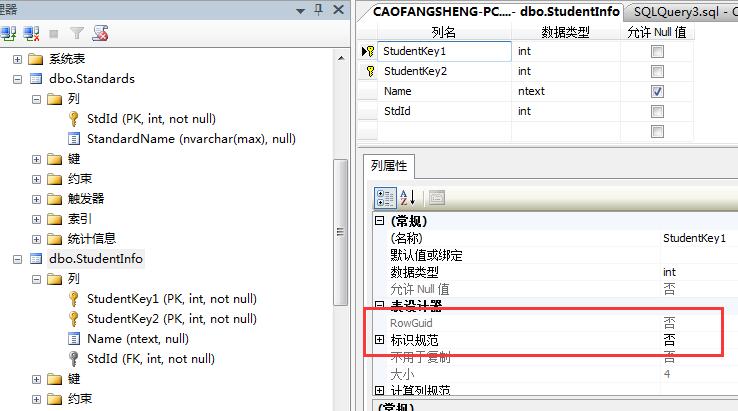
运行程序之后,看下数据库:

请注意:单个主键,EF Code-First为我们创建的:主键是自动增长的,而复合主键,得到的主键不是自动增长的。
当然,key 属性不仅仅可以引用到int类型的属性上,还可以应用到字符串,日期类型等等。。
好了,这就是数据注解特性的Key特性了。
7.1数据注解属性--Key【Code-First系列】的更多相关文章
- 7.2 数据注解属性--TimeStamp特性【Code-First 系列】
TimeStamp特性可以应用到领域类中,只有一个字节数组的属性上面,这个特性,给列设定的是tiemStamp类型.在并发的检查中,Code-First会自动使用这个TimeStamp类型的字段. 下 ...
- 7.4 数据注解属性--Required
Required attribute can be applied to a property of a domain class. EF Code-First will create a NOT N ...
- 1.什么是Code First(EF Code First 系列)
EF4.1中开始支持Code First .这种方式在领域设计模式中非常有用.使用Code First模式,你可以专注于领域设计,根据需要,为你一个领域的对象创建类集合,而不是首先来设计数据库,然后来 ...
- 9.3 翻译系列:数据注解特性之Key【EF 6 Code-First 系列】
原文链接:http://www.entityframeworktutorial.net/code-first/key-dataannotations-attribute-in-code-first.a ...
- MVC5中Model层开发数据注解 EF Code First Migrations数据库迁移 C# 常用对象的的修饰符 C# 静态构造函数 MSSQL2005数据库自动备份问题(到同一个局域网上的另一台电脑上) MVC 的HTTP请求
MVC5中Model层开发数据注解 ASP.NET MVC5中Model层开发,使用的数据注解有三个作用: 数据映射(把Model层的类用EntityFramework映射成对应的表) 数据验证( ...
- 7.DataAnnotations(数据注解)【Code-First 系列】
EF Code-First提供了一系列的数据注解的特性,你可以将其应用到你的领域类和属性中,数据注解属性重写了EF默认的约定. System.ComponentModel.DataAnnotation ...
- MVC5中Model层开发数据注解
ASP.NET MVC5中Model层开发,使用的数据注解有三个作用: 数据映射(把Model层的类用EntityFramework映射成对应的表) 数据验证(在服务器端和客户端验证数据的有效性) 数 ...
- ASP.NET MVC5中的数据注解
ASP.NET MVC5中Model层开发,使用的数据注解有三个作用: 数据映射(把Model层的类用EntityFramework映射成对应的表) 数据验证(在服务器端和客户端验证数据的有效性) 数 ...
- ASP.NET MVC5中的数据注解(转载)
ASP.NET MVC5中Model层开发,使用的数据注解有三个作用: 数据映射(把Model层的类用EntityFramework映射成对应的表) 数据验证(在服务器端和客户端验证数据的有效性) 数 ...
随机推荐
- SDOI 2016 游戏
树链剖分 线段树维护区间最小值,区间最大值 更新,对于每一个区间,找到当前区间的最小值的最大值,和要更新的值比较,如果比最大值还大,则此数对于以后的询问无任何贡献,直接返回即可,若有贡献,则一直递归到 ...
- 转:隐马尔可夫模型(HMM)攻略
隐马尔可夫模型 (Hidden Markov Model,HMM) 最初由 L. E. Baum 和其它一些学者发表在一系列的统计学论文中,随后在语言识别,自然语言处理以及生物信息等领域体现了很大的价 ...
- 浅谈Android应用保护(一):Android应用逆向的基本方法
对于未进行保护的Android应用,有很多方法和思路对其进行逆向分析和攻击.使用一些基本的方法,就可以打破对应用安全非常重要的机密性和完整性,实现获取其内部代码.数据,修改其代码逻辑和机制等操作.这篇 ...
- 分分钟用上C#中的委托和事件
每一个初学C#的程序猿,在刚刚碰到委托和事件的概念时,估计都是望而却步,茫然摸不到头脑的.百度一搜,关于概念介绍的文章大把大把的,当然也不乏深入浅出的好文章.可看完这些文章,大多数新手,估计也只是信心 ...
- Express4 启航指南
确实有感而发,Nodejs真的发展太快了,这么说的原因有两点:自己去年冬天买了本<了不起的Node.js>,里面介绍Express的版本还是2.x.x:前些天小伙伴买了本<Node. ...
- 测试框架Mocha与断言expect
测试框架Mocha与断言expect在浏览器和Node环境都可以使用除了Mocha以外,类似的测试框架还有Jasmine.Karma.Tape等,也很值得学习. 整个项目源代码: 为什么学习测试代码? ...
- MyBatis参数绑定规则及原理分析
MyBatis参数的传递有几种不同的方法,本文通过测试用例出发,对其中的方式进行总结和说明,并对其部分源码进行分析. 一.测试用例(环境参考之前博客SSM接口编程一文 http://www.cnblo ...
- 谈谈service层在mvc框架中的意义和职责
mvc框架由model,view,controller组成,执行流程一般是:在controller访问model获取数据,通过view渲染页面. mvc模式是web开发中的基础模式,采用的是分层设计, ...
- 【Win10 应用开发】从前台应用触发后台任务
有关后台任务的使用,估计大伙伴们不会陌生,而且老周曾经在某文中也简单讲述过.说到后台任务,老周想到了一个问题:有人问,后台任务一定要独立写到一个Runtime组件中吗,能不能写到主项目的代码中? 老周 ...
- Polynomial Library in OpenCascade
Polynomial Library in OpenCascade eryar@163.com 摘要Abstract:分析幂基曲线即多项式曲线在OpenCascade中的计算方法,以及利用OpenSc ...