
High scalability with Fanout and Fastly
转自:http://blog.fanout.io/2017/11/15/high-scalability-fanout-fastly/
Fanout Cloud is for high scale data push. Fastly is for high scale data pull. Many realtime applications need to work with data that is both pushed and pulled, and thus can benefit from using both of these systems in the same application. Fanout and Fastly can even be connected together!

Using Fanout and Fastly in the same application, independently, is pretty straightforward. For example, at initialization time, past content could be retrieved from Fastly, and Fanout Cloud could provide future pushed updates. What does it mean to connect the two systems together though? Read on to find out.
Proxy chaining
Since Fanout and Fastly both work as reverse proxies, it is possible to have Fanout proxy traffic through Fastly rather than sending it directly to your origin server. This provides some unique benefits:
Cached initial data. Fanout lets you build API endpoints that serve both historical and future content, for example an HTTP streaming connection that returns some initial data before switching into push mode. Fastly can provide that initial data, reducing load on your origin server.
Cached Fanout instructions. Fanout’s behavior (e.g. transport mode, channels to subscribe to, etc.) is determined by instructions provided in origin server responses, usually in the form of special headers such as
Grip-HoldandGrip-Channel. Fastly can cache these instructions/headers, again reducing load on your origin server.High availability. If your origin server goes down, Fastly can serve cached data and instructions to Fanout. This means clients could connect to your API endpoint, receive historical data, and activate a streaming connection, all without needing access to the origin server.
Network flow
Suppose there’s an API endpoint /stream that returns some initial data and then stays open until there is an update to push. With Fanout, this can be implemented by having the origin server respond with instructions:
HTTP/1.1 200 OK

Content-Type: text/plain

Content-Length: 29

Grip-Hold: stream

Grip-Channel: updates

{"data": "current value"}
When Fanout Cloud receives this response from the origin server, it converts it into a streaming response to the client:
HTTP/1.1 200 OK

Content-Type: text/plain

Transfer-Encoding: chunked

Connection: Transfer-Encoding

{"data": "current value"}
The request between Fanout Cloud and the origin server is now finished, but the request between the client and Fanout Cloud remains open. Here’s a sequence diagram of the process:
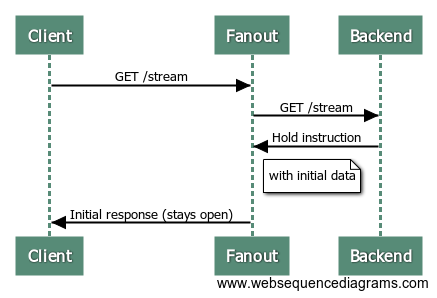
Since the request to the origin server is just a normal short-lived request/response interaction, it can alternatively be served through a caching server such as Fastly. Here’s what the process looks like with Fastly in the mix:
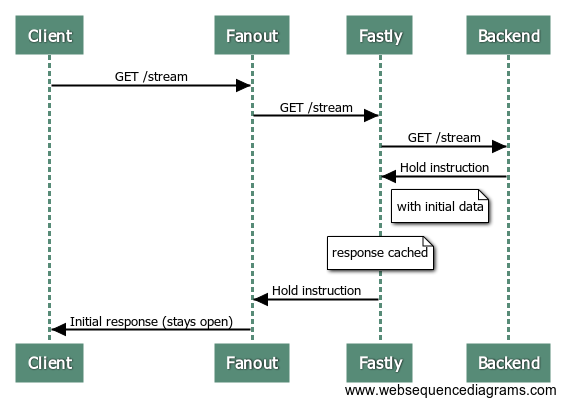
Now, guess what happens when the next client makes a request to the /stream endpoint?
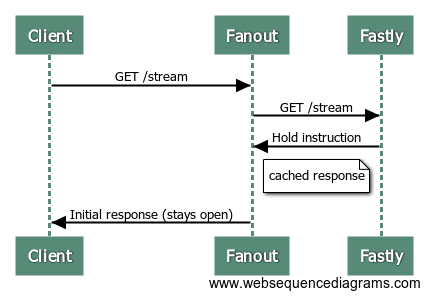
That’s right, the origin server isn’t involved at all! Fastly serves the same response to Fanout Cloud, with those special HTTP headers and initial data, and Fanout Cloud sets up a streaming connection with the client.
Of course, this is only the connection setup. To send updates to connected clients, the data must be published to Fanout Cloud.
We may also need to purge the Fastly cache, if an event that triggers a publish causes the origin server response to change as well. For example, suppose the “value” that the /stream endpoint serves has been changed. The new value could be published to all current connections, but we’d also want any new connections that arrive afterwards to receive this latest value as well, rather than the older cached value. This can be solved by purging from Fastly and publishing to Fanout Cloud at the same time.
Here’s a (long) sequence diagram of a client connecting, receiving an update, and then another client connecting:
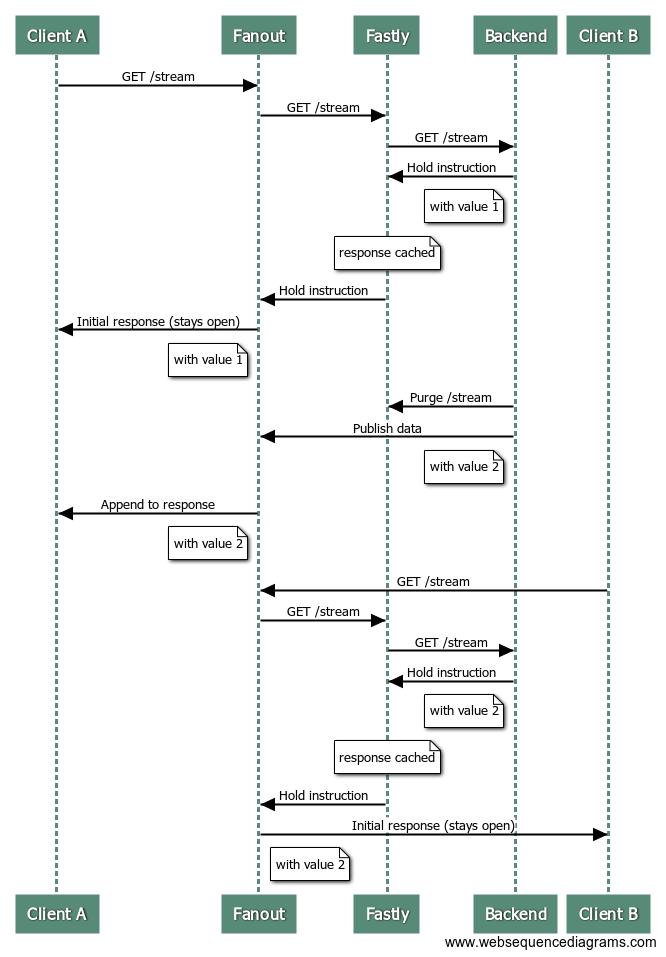
At the end of this sequence, the first and second clients have both received the latest data.
Rate-limiting
One gotcha with purging at the same time as publishing is if your data rate is high it can negate the caching benefit of using Fastly.
The sweet spot is data that is accessed frequently (many new visitors per second), changes infrequently (minutes), and you want changes to be delivered instantly (sub-second). An example could be a live blog. In that case, most requests can be served/handled from cache.
If your data changes multiple times per second (or has the potential to change that fast during peak moments), and you expect frequent access, you really don’t want to be purging your cache multiple times per second. The workaround is to rate-limit your purges. For example, during periods of high throughput, you might purge and publish at a maximum rate of once per second or so. This way the majority of new visitors can be served from cache, and the data will be updated shortly after.
An example
We created a Live Counter Demo to show off this combined Fanout + Fastly architecture. Requests first go to Fanout Cloud, then to Fastly, then to a Django backend server which manages the counter API logic. Whenever a counter is incremented, the Fastly cache is purged and the data is published through Fanout Cloud. The purge and publish process is also rate-limited to maximize caching benefit.
The code for the demo is on GitHub.
High scalability with Fanout and Fastly的更多相关文章
- spring amqp rabbitmq fanout配置
基于spring amqp rabbitmq fanout配置如下: 发布端 <rabbit:connection-factory id="rabbitConnectionFactor ...
- 可扩展性 Scalability
水平扩展和垂直扩展: Horizontal and vertical scaling Methods of adding more resources for a particular applica ...
- RabbitMQ Exchange中的fanout类型
fanout 多播 在之前都是使用direct直连类型的交换机,通过routingkey来决定把消息推到哪个queue中. 而fanout则是把拿到消息推到与之绑定的所有queue中. 分析业务,怎样 ...
- RabbitMQ学习笔记4-使用fanout交换器
fanout交换器会把发送给它的所有消息发送给绑定在它上面的队列,起到广播一样的效果. 本里使用实际业务中常见的例子, 订单系统:创建订单,然后发送一个事件消息 积分系统:发送订单的积分奖励 短信平台 ...
- What is the difference between extensibility and scalability?
You open a small fast food center, with a serving capacity of 5-10 people at a time. But you have en ...
- Achieving High Availability and Scalability - ARR and NLB
Achieving High Availability and Scalability: Microsoft Application Request Routing (ARR) for IIS 7.0 ...
- Improve Scalability With New Thread Pool APIs
Pooled Threads Improve Scalability With New Thread Pool APIs Robert Saccone Portions of this article ...
- A Flock Of Tasty Sources On How To Start Learning High Scalability
This is a guest repost by Leandro Moreira. When we usually are interested about scalability we look ...
- SSIS ->> Reliability And Scalability
Error outputs can obviously be used to improve reliability, but they also have an important part to ...
随机推荐
- 【题解】Luogu P5360 [SDOI2019]世界地图
原题传送门 每次查询的实际就是将地图的一个前缀和一个后缀合并后的图的最小生成树边权和 我们要预处理每个前缀和后缀的最小生成树 实际求前缀和(后缀和)的过程珂以理解为上一个前缀和这一列的最小生成树进行合 ...
- 记一次 WPS Pro 2019 设备和驱动器图标删除
1.图标预览 先看样式 2.软件不能关闭 百度和腾讯网盘都会创建,但是可以软件关闭,WPS以前也可以,现在新版作妖了 3.注册表删除 你做那我就删~Code:HKEY_CURRENT_USER\Sof ...
- "Sed" 高级实用功能汇总
sed命令有两个空间,一个叫pattern space,一个叫hold space.这两个空间能够证明人类的脑瓜容量是非常小的,需要经过大量的训练和烧脑的理解,才能适应一些非常简单的操作. 不信看下面 ...
- NEST refresh flush forcemerge
public void Refresh() { client.Refresh("employee"); } public void Flush() { client.Flush(& ...
- P1361 小M的作物 (最大流)
题目 P1361 小M的作物 解析 把\(A\)看做源点,把\(B\)看做汇点,先不考虑额外情况 显然,这是一种两者选其一的问题,我们选择一部分边割去,使这部分边的贡献最小,就是求最小割,我们求出了收 ...
- 安装VMware14可能出现的问题
未能提取文件 安装程序未能提取安装vmware workstation所必须的文件 在没有关闭这个弹框的前提下,Win+R输入%temp%,找到以~setup结尾的文件夹,双击下面的临时文件VMwar ...
- 记录axios在IOS上不能发送的问题
最近 遇到 了axios在IOS上无法发送的问题,测试 了两个 苹果 机,IOS10上不能发送,IOS12可以,百度了下,找到了解决方法.记录下吧 首先引入qs,这个安装axios也已经有了吧:然后在 ...
- Node: 包管理机制
Node.js 的模块机制可以很好地解决业务代码混乱的难题,但对于第三方模块包,就有些力不从心了,因为第三方模块包分散存放在各地,无法集中式管理.这就需要一个包管理机制,在 Node.js 中,Isa ...
- 爬虫之scrapy框架应用selenium
一.利用selenium 爬取 网易军事新闻 使用流程: ''' 在scrapy中使用selenium的编码流程: 1.在spider的构造方法中创建一个浏览器对象(作为当前spider的一个属性) ...
- session和cookie的区别和联系详解,Cookie Session相关看这篇就够了。
本文转自:91博客:原文地址:http://www.9191boke.com/199015867.html 有一朋友做面试官的时候,曾经问过很多朋友这个问题: Cookie 和 Session 有什么 ...