
Gin-Go学习笔记七:Gin-Web框架 布局页面
模板使用
页面布局
1> 一个html页面由:head部分,body部分,内部css,内部js,外联css,外联的js这几部分组成。因此,一个布局文件也就需要针对这些进行拆分。
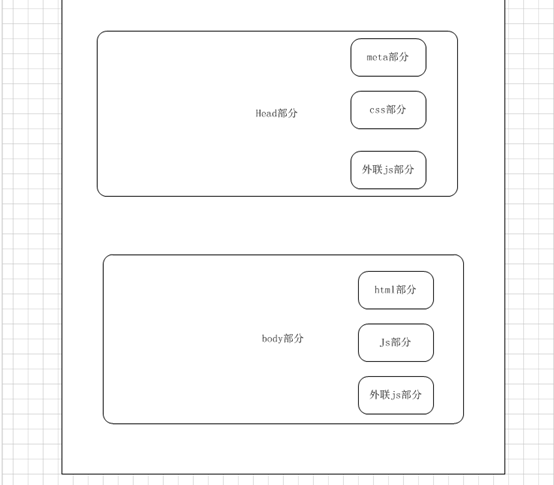
2> 新建一个layout.go的控制器。编写一个引用布局文件的实例。具体代码如下:
package controllers

import (

	"fmt"

	"log"

	"html/template"

	"github.com/gin-gonic/gin"

	"net/http"

)

/**内容页面**/

func Contenthtml(c *gin.Context){

    //模板文件的拼接

	t, err := template.ParseFiles("views/layout.html", "views/head.tpl",

		"views/content.html","views/sidebar.tpl","views/scripts.tpl")

	//备注:参数1》模板页面;参数2》css部分;参数3》内容部分;

	//参数4》底部版权信息部分;参数5》页面中使用到的js部分

    if err != nil {

        log.Fatal(err)

    }

	fmt.Println(t)

	//渲染html文件

	c.HTML(http.StatusOK,"layout.html", gin.H{

		"title": "布局页面",

	})

}
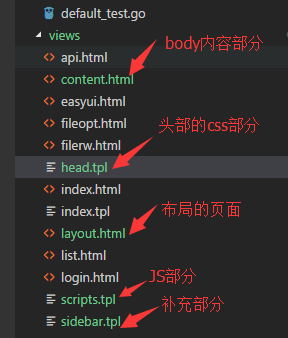
3> 新建布局页面,具体的如下图所示
4> 在路由器中添加代码,编译运行项目,修订错误,查看运行的效果
package routers

import (

  "github.com/gin-gonic/gin"

  . "GinLearn/GinLearn/apis" //api部分

  . "GinLearn/GinLearn/controllers" //constroller部分

 )

func InitRouter() *gin.Engine{

  router := gin.Default()

  //Hello World

  router.GET("/", IndexApi)

  //渲染html页面

  router.LoadHTMLGlob("views/*")

  router.GET("/home/index", ShowHtmlPage)

  //列表页面

  router.GET("/home/list", ListHtml)

  router.POST("/home/PageData", GetDataList)

  router.POST("/home/PageNextData", PageNextData)

  //新增页面

  router.GET("/home/add", AddHtml)

  router.POST("/home/saveadd", AddPersonApi)

   //编辑页面

   router.GET("/home/edit", EditHtml)

   router.POST("/home/saveedit", EditPersonApi)

    //删除

    router.POST("/home/delete", DeletePersonApi)

    //Bootstrap布局页面

    router.GET("/home/bootstrap", Bootstraphtml)

    //文件的上传和下载

    router.GET("/home/fileopt", Fileopthtml)

    router.POST("/home/fileuplaod", Fileupload)

    router.GET("/home/filedown", Filedown)

    //文件的创建删除和读写

    router.GET("/home/filerw", Filerwhtml)

    router.POST("/home/addfile", FilerCreate)//创建文件

    router.POST("/home/writefile", FilerWrite)//写入文件

    router.POST("/home/readfile", FilerRead)//读取文件

    router.POST("/home/deletefile", FilerDelete)//删除文件

    //api调用的部分

    router.GET("/home/api", GetApiHtml)

    router.GET("/api/jsondata", GetJsonData)

    router.GET("/api/xmldata", GetXmlData)

    router.GET("/api/yamldata", GetYamlData)

    router.GET("/api/paramsdata", GetParamsJsonData)

    //布局页面

    router.GET("/home/content", Contenthtml)

    return router

 }
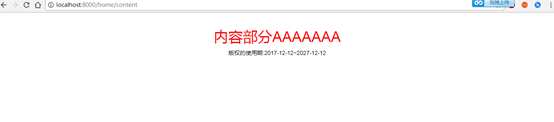
5> 运行效果如下:
6> Layout.html具体的代码如下:
<!DOCTYPE html>

<html>

<head>

    <title>{{ .title }}</title>

    <meta name="viewport" content="width=device-width, initial-scale=1.0">

    <meta http-equiv="Content-Type" content="text/html; charset=utf-8">

    <link rel="stylesheet" href="/static/bootstrap/css/bootstrap.min.css"/>

    <link rel="stylesheet" href="/static/bootstrap/css/bootstrap-theme.min.css"/>

    <script type="text/javascript" src="/static/js/jquery-2.1.1.min.js"></script>

    <script type="text/javascript" src="/static/bootstrap/js/bootstrap.min.js"></script>

    <!--CSS样式文件-->

    {{template "header"}}

</head>

<body>

    <!--内容部分-->

    <div class="container">

        {{template "content"}}

    </div>

    <!--底部版权部分-->

    <div class="sidebar">

       {{template "sidebar"}}

    </div>

    <!--页面JS的引用-->

    {{template "jsfile"}}

</body>

</html>
7> head.tpl的代码如下:
{{define "header"}}

<style>

     body{

         widith:100%;

         height:100%;

         border:none;

     }

     h1 {

        color: red;

        text-align:center;

     }

     .bodydiv{

        widith:100%;

        height:100%;

        text-align:center;

        font-size:14px;

        color:#0f0;

     }

     .sidebar{

        widith:100%;

        height:100%;

        text-align:center;

        font-size:14px;

        color:#000;

     }

</style>

{{end}}
8>content.html的代码如下:
{{ define "content" }}

    <h1>

        内容部分AAAAAAA

    </h1>

{{end}}
9>scripts.tpl的代码如下:
{{define "jsfile"}}

   <script type="text/javascript">

    //页面的初始化

    $(document).ready(function() {

        console.log('页面的初始化')

    });

    console.log('这是JS文件')

</script>

{{end}}
10>sidebar.tpl的代码如下:
{{define "sidebar"}}

    版权的使用期:2017-12-12~2027-12-12

{{end}}
11>下一周进行修整,不写博客了!
Gin-Go学习笔记七:Gin-Web框架 布局页面的更多相关文章
- python 学习笔记十五 web框架
python Web程序 众所周知,对于所有的Web应用,本质上其实就是一个socket服务端,用户的浏览器其实就是一个socket客户端. Python的WEB框架分为两类: 自己写socket,自 ...
- tornado 学习笔记9 Tornado web 框架---模板(template)功能分析
Tornado模板系统是将模板编译成Python代码. 最基本的使用方式: t = template.Template("<html>{{ myv ...
- go微服务框架kratos学习笔记七(kratos warden 负载均衡 balancer)
目录 go微服务框架kratos学习笔记七(kratos warden 负载均衡 balancer) demo demo server demo client 池 dao service p2c ro ...
- python3.4学习笔记(七) 学习网站博客推荐
python3.4学习笔记(七) 学习网站博客推荐 深入 Python 3http://sebug.net/paper/books/dive-into-python3/<深入 Python 3& ...
- Go语言笔记[实现一个Web框架实战]——EzWeb框架(一)
Go语言笔记[实现一个Web框架实战]--EzWeb框架(一) 一.Golang中的net/http标准库如何处理一个请求 func main() { http.HandleFunc("/& ...
- ASP.NET MVC Web API 学习笔记---第一个Web API程序
http://www.cnblogs.com/qingyuan/archive/2012/10/12/2720824.html GetListAll /api/Contact GetListBySex ...
- Spring实战第八章学习笔记————使用Spring Web Flow
Spring实战第八章学习笔记----使用Spring Web Flow Spring Web Flow是一个Web框架,它适用于元素按规定流程运行的程序. 其实我们可以使用任何WEB框架写流程化的应 ...
- Spring实战第五章学习笔记————构建Spring Web应用程序
Spring实战第五章学习笔记----构建Spring Web应用程序 Spring MVC基于模型-视图-控制器(Model-View-Controller)模式实现,它能够构建像Spring框架那 ...
- (转)Qt Model/View 学习笔记 (七)——Delegate类
Qt Model/View 学习笔记 (七) Delegate 类 概念 与MVC模式不同,model/view结构没有用于与用户交互的完全独立的组件.一般来讲, view负责把数据展示 给用户,也 ...
随机推荐
- 每天一套题打卡|河南省第九届ACM/ICPC
A 表达式求值 表达式求值:可以用递归求解,也可以用栈模拟,考过多次. 类似题目:NYOJ305,NYOJ35 用栈模拟做法: #include <stdio.h> #include &l ...
- luoguP1195 口袋的天空
生成树一 题目描述 给你云朵的个数NN,再给你MM个关系,表示哪些云朵可以连在一起. 现在小杉要把所有云朵连成KK个棉花糖,一个棉花糖最少要用掉一朵云,小杉想知道他怎么连,花费的代价最小. 链接 分析 ...
- django学习-安装、创建应用、编写视图
快速安装指南 py -3 -m pip install django >>> import django >>> django.get_version() '2.2 ...
- HDU5050:Divided Land(大数的进制转化与GCD)
题意:给定大数A和B,求gcd.所有数字都是二进制. 思路:先输入字符串,再转化为大数,然后用大数的gcd函数,最后转化为字符串输出. 利用字符串和大数转化的时候可以声明进制,就很舒服的完成了进制转化 ...
- 在 Oracle 中使用正则表达式
Oracle使用正则表达式离不开这4个函数: 1.regexp_like 2.regexp_substr 3.regexp_instr 4.regexp_replace 看函数名称大概就能猜到有什么用 ...
- Java编译期与运行期
编译期:是指把源码交给编译器编译成计算机可以执行的文件的过程.在Java中也就是把Java代码编成class文件的过程.编译期只是做了一些翻译功能,并没有把代码放在内存中运行起来,而只是把代码当成文本 ...
- 洛谷 P1823 [COI2007] Patrik 音乐会的等待
洛谷 P1823 [COI2007] Patrik 音乐会的等待 洛谷传送门 题目描述 N个人正在排队进入一个音乐会.人们等得很无聊,于是他们开始转来转去,想在队伍里寻找自己的熟人.队列中任意两个人A ...
- (转)Tomcat与Jetty区别
一.简介 Tomcat: Tomcat是Apache软件基金会(Apache Software Foundation)的Jakarta项目中的一个核心项目,由Apache.Sun和其他一些公司及个人共 ...
- Python搭建HTTP服务
我们平时可能会需要HTTP服务,本机搭建一个服务器来完成有些过于繁琐,这时就可以用python帮我们搭建一个HTTP服务器,省时高效. python 2.x 输入命令:python -m Simple ...
- AtCoder Grand Contest 037题解
传送门 \(A\) 直接把每个字母作为一个字符串,如果某个串和它前面的相同,那么就把这个字母和它后面那个字母接起来.然而我并不会证明这个贪心的正确性 //quming #include<bits ...