
Gin-Go学习笔记七:Gin-Web框架 布局页面
模板使用
页面布局
1> 一个html页面由:head部分,body部分,内部css,内部js,外联css,外联的js这几部分组成。因此,一个布局文件也就需要针对这些进行拆分。
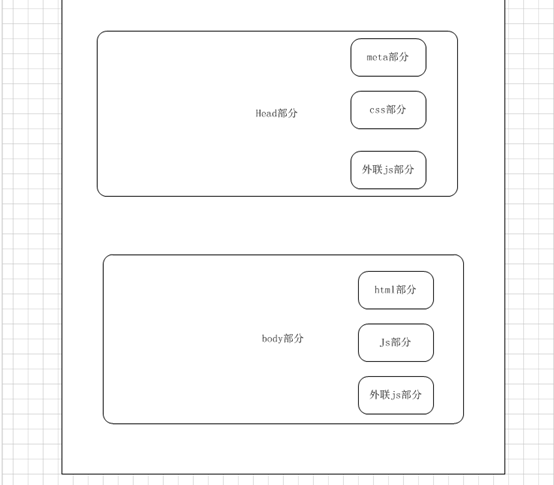
2> 新建一个layout.go的控制器。编写一个引用布局文件的实例。具体代码如下:
package controllers

import (

	"fmt"

	"log"

	"html/template"

	"github.com/gin-gonic/gin"

	"net/http"

)

/**内容页面**/

func Contenthtml(c *gin.Context){

    //模板文件的拼接

	t, err := template.ParseFiles("views/layout.html", "views/head.tpl",

		"views/content.html","views/sidebar.tpl","views/scripts.tpl")

	//备注:参数1》模板页面;参数2》css部分;参数3》内容部分;

	//参数4》底部版权信息部分;参数5》页面中使用到的js部分

    if err != nil {

        log.Fatal(err)

    }

	fmt.Println(t)

	//渲染html文件

	c.HTML(http.StatusOK,"layout.html", gin.H{

		"title": "布局页面",

	})

}
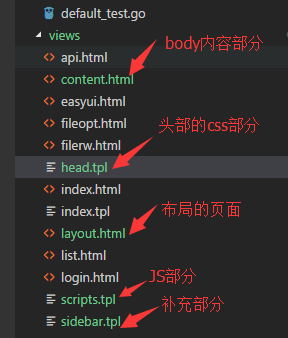
3> 新建布局页面,具体的如下图所示
4> 在路由器中添加代码,编译运行项目,修订错误,查看运行的效果
package routers

import (

  "github.com/gin-gonic/gin"

  . "GinLearn/GinLearn/apis" //api部分

  . "GinLearn/GinLearn/controllers" //constroller部分

 )

func InitRouter() *gin.Engine{

  router := gin.Default()

  //Hello World

  router.GET("/", IndexApi)

  //渲染html页面

  router.LoadHTMLGlob("views/*")

  router.GET("/home/index", ShowHtmlPage)

  //列表页面

  router.GET("/home/list", ListHtml)

  router.POST("/home/PageData", GetDataList)

  router.POST("/home/PageNextData", PageNextData)

  //新增页面

  router.GET("/home/add", AddHtml)

  router.POST("/home/saveadd", AddPersonApi)

   //编辑页面

   router.GET("/home/edit", EditHtml)

   router.POST("/home/saveedit", EditPersonApi)

    //删除

    router.POST("/home/delete", DeletePersonApi)

    //Bootstrap布局页面

    router.GET("/home/bootstrap", Bootstraphtml)

    //文件的上传和下载

    router.GET("/home/fileopt", Fileopthtml)

    router.POST("/home/fileuplaod", Fileupload)

    router.GET("/home/filedown", Filedown)

    //文件的创建删除和读写

    router.GET("/home/filerw", Filerwhtml)

    router.POST("/home/addfile", FilerCreate)//创建文件

    router.POST("/home/writefile", FilerWrite)//写入文件

    router.POST("/home/readfile", FilerRead)//读取文件

    router.POST("/home/deletefile", FilerDelete)//删除文件

    //api调用的部分

    router.GET("/home/api", GetApiHtml)

    router.GET("/api/jsondata", GetJsonData)

    router.GET("/api/xmldata", GetXmlData)

    router.GET("/api/yamldata", GetYamlData)

    router.GET("/api/paramsdata", GetParamsJsonData)

    //布局页面

    router.GET("/home/content", Contenthtml)

    return router

 }
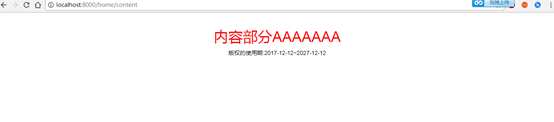
5> 运行效果如下:
6> Layout.html具体的代码如下:
<!DOCTYPE html>

<html>

<head>

    <title>{{ .title }}</title>

    <meta name="viewport" content="width=device-width, initial-scale=1.0">

    <meta http-equiv="Content-Type" content="text/html; charset=utf-8">

    <link rel="stylesheet" href="/static/bootstrap/css/bootstrap.min.css"/>

    <link rel="stylesheet" href="/static/bootstrap/css/bootstrap-theme.min.css"/>

    <script type="text/javascript" src="/static/js/jquery-2.1.1.min.js"></script>

    <script type="text/javascript" src="/static/bootstrap/js/bootstrap.min.js"></script>

    <!--CSS样式文件-->

    {{template "header"}}

</head>

<body>

    <!--内容部分-->

    <div class="container">

        {{template "content"}}

    </div>

    <!--底部版权部分-->

    <div class="sidebar">

       {{template "sidebar"}}

    </div>

    <!--页面JS的引用-->

    {{template "jsfile"}}

</body>

</html>
7> head.tpl的代码如下:
{{define "header"}}

<style>

     body{

         widith:100%;

         height:100%;

         border:none;

     }

     h1 {

        color: red;

        text-align:center;

     }

     .bodydiv{

        widith:100%;

        height:100%;

        text-align:center;

        font-size:14px;

        color:#0f0;

     }

     .sidebar{

        widith:100%;

        height:100%;

        text-align:center;

        font-size:14px;

        color:#000;

     }

</style>

{{end}}
8>content.html的代码如下:
{{ define "content" }}

    <h1>

        内容部分AAAAAAA

    </h1>

{{end}}
9>scripts.tpl的代码如下:
{{define "jsfile"}}

   <script type="text/javascript">

    //页面的初始化

    $(document).ready(function() {

        console.log('页面的初始化')

    });

    console.log('这是JS文件')

</script>

{{end}}
10>sidebar.tpl的代码如下:
{{define "sidebar"}}

    版权的使用期:2017-12-12~2027-12-12

{{end}}
11>下一周进行修整,不写博客了!
Gin-Go学习笔记七:Gin-Web框架 布局页面的更多相关文章
- python 学习笔记十五 web框架
python Web程序 众所周知,对于所有的Web应用,本质上其实就是一个socket服务端,用户的浏览器其实就是一个socket客户端. Python的WEB框架分为两类: 自己写socket,自 ...
- tornado 学习笔记9 Tornado web 框架---模板(template)功能分析
Tornado模板系统是将模板编译成Python代码. 最基本的使用方式: t = template.Template("<html>{{ myv ...
- go微服务框架kratos学习笔记七(kratos warden 负载均衡 balancer)
目录 go微服务框架kratos学习笔记七(kratos warden 负载均衡 balancer) demo demo server demo client 池 dao service p2c ro ...
- python3.4学习笔记(七) 学习网站博客推荐
python3.4学习笔记(七) 学习网站博客推荐 深入 Python 3http://sebug.net/paper/books/dive-into-python3/<深入 Python 3& ...
- Go语言笔记[实现一个Web框架实战]——EzWeb框架(一)
Go语言笔记[实现一个Web框架实战]--EzWeb框架(一) 一.Golang中的net/http标准库如何处理一个请求 func main() { http.HandleFunc("/& ...
- ASP.NET MVC Web API 学习笔记---第一个Web API程序
http://www.cnblogs.com/qingyuan/archive/2012/10/12/2720824.html GetListAll /api/Contact GetListBySex ...
- Spring实战第八章学习笔记————使用Spring Web Flow
Spring实战第八章学习笔记----使用Spring Web Flow Spring Web Flow是一个Web框架,它适用于元素按规定流程运行的程序. 其实我们可以使用任何WEB框架写流程化的应 ...
- Spring实战第五章学习笔记————构建Spring Web应用程序
Spring实战第五章学习笔记----构建Spring Web应用程序 Spring MVC基于模型-视图-控制器(Model-View-Controller)模式实现,它能够构建像Spring框架那 ...
- (转)Qt Model/View 学习笔记 (七)——Delegate类
Qt Model/View 学习笔记 (七) Delegate 类 概念 与MVC模式不同,model/view结构没有用于与用户交互的完全独立的组件.一般来讲, view负责把数据展示 给用户,也 ...
随机推荐
- fitEllipse的外接矩形与拟合的椭圆参数关系
根据我看的博客,fitEllipse返回的外接矩形(假设为box),对应椭圆的相应参数: box.size.width 和box.size.height对应椭圆的长轴和短轴: box.center对应 ...
- JS高阶---闭包(循环遍历+监听)
大纲: 主体: (1)场景1:点击按钮显示点击的第几个 注意:伪数组每次循环时都会重新计算一次长度,所以最好提出去或者直接加到for循环内部 结果: 分析: 1.i为全局变量 解决方案: 1.下标法 ...
- c# 第16节 一维数组的声明及使用
本节内容: 1:为什么要有使用数组 2:数组的简介 3:一维数组的声明 4: 实例数组声明 5:一维数组的使用 6:一维数组使用注意地方 1:为什么要使用数组 2:数组的简介 3:一维数组的声明 4: ...
- c# 第14节 字符方法、转义字符、字符串的方法
本节内容: 1:字符的定义 2:字符的方法 3: 转义字符 4:字符串简介 5:字符串方法 1:字符的定义 char与Unicode一一对应,一个char 2个字节. 2:字符的使用方法: 实例: s ...
- 201871010136 -赵艳强《面向对象程序设计(java)》第十六周学习总结
201871010136-赵艳强<面向对象程序设计(java)>第十六周学习总结 项目 内容 这个作业属于哪个课程 <任课教师博客主页链接>https://www.cnbl ...
- Mysql基础知识--触发器
触发器的操作 在数据库系统中,当执行表事件时,则会激活触发器,从而执行其包含的操作 在具体的应用中,之所以会经常使用出发器数据对象,是由于该对象能够加强数据库表中数据的完整性约束和业务规则等. 一.创 ...
- webapi添加basic认证
BasicAbstractAuthorize:抽象类,子类中校验用户名密码,并创建Principal BasicAuthorize:实现类 //base.OnAuthorization(),此方法 ...
- O(n log n)求最长上升子序列与最长不下降子序列
考虑dp(i)表示新上升子序列第i位数值的最小值.由于dp数组是单调的,所以对于每一个数,我们可以二分出它在dp数组中的位置,然后更新就可以了,最终的答案就是dp数组中第一个出现正无穷的位置. 代码非 ...
- sed和awk练习及知识点
一.针对/etc/passwd操作 1.sed操作,将文件中的第九行至第十五行复制到第16行下. [root@ns1 lianxi]# sed '9,15H;16G' /etc/passwd 2.用a ...
- [LeetCode] 650. 2 Keys Keyboard 两键的键盘
Initially on a notepad only one character 'A' is present. You can perform two operations on this not ...