
201871010105-曹玉中《面向对象程序设计(java)》第十六周学习总结
201871010105-曹玉中《面向对象程序设计(java)》第十六周学习总结
| 项目 | 内容 |
| 这个作业属于哪个过程 | https://www.cnblogs.com/nwnu-daizh/ |
| 这个作业的要求在哪里 | https://www.cnblogs.com/zyja/p/11963340.html |
| 作业学习目标 |
(1) 掌握Java应用程序的打包操作; (2) 掌握线程概念; (3) 掌握线程创建的两种技术。 |
第一部分:理论知识。
进程:指一个内存中运行的应用程序。例如运行QQ那么它就是一个进程,而且一个应用程序可以同时运行多个进程
线程:线程是进程中的一个执行单元,就比如用360我们可以让它一边杀毒一边清理垃圾,那么360它就是一个进程,那么杀毒和清理垃圾就是进程下的两个线程
注:一个程序运行后至少有一个进程,一个进程中可以包含多个线程
Thread类
构造方法:
public Thread() :分配一个新的线程对象。
public Thread(String name) :分配一个指定名字的新的线程对象。
public Thread(Runnable target) :分配一个带有指定目标新的线程对象。
public Thread(Runnable target,String name) :分配一个带有指定目标新的线程对象并指定名字。
常用方法:
public String getName() :获取当前线程名称。
public void start() :导致此线程开始执行; Java虚拟机调用此线程的run方法。
public void run() :此线程要执行的任务在此处定义代码。
public static void sleep(long millis) :使当前正在执行的线程以指定的毫秒数暂停
public static Thread currentThread() :返回对当前正在执行的线程对象的引用。
创建线程的方式总共有两种:
1.是继承Thread类方式
2.是实现Runnable接口
创建线程的方式一:
定义Thread类子类,并重写该类的run()方法,run()方法的方法体就代表了线程需要完成的任务,
创建Thread子类的实例3. 调用Thread的start()方法来启动该线程
代码如下:
public class Test {

public static void main(String[] args) {

MyThread mt = new MyThread();

Thread t1 = new Thread(mt);

t1.start();

}

}

class MyThread extends Thread{

@Override

public void run(){

System.out.println("第一种方式创建线程");

}

}
创建线程的方式二:
定义Runnable接口的实现类,并重写该接口的run()方法,run()方法的方法体代表线程完成的任务
创建Runnable实现类的实例。
调用Thread的start()方法来启动线程。
代码如下:
public class Test {

public static void main(String[] args) {

MyRunnable mr = new MyRunnable();

Thread t1 = new Thread(mr);

t1.start();

}

}

class MyRunnable implements Runnable{

@Override

public void run(){

System.out.println("第二种方式创建线程");

}

}
Thread和Runnable的区别
因为类都是单继承的,如果一个类继承Thread,就不可以继承其他类了。但是如果实现了Runnable接口的话,则很容易的实现资源共享,避免了java中的单继承的局限性,所以Runnable比Thread更有优势
用匿名内部类创建线程
使用匿名内部类的方式实现Runnable接口,重写Runnable接口中的run方法:
代码如下:
public class Test {

public static void main(String[] args) {

new Thread(new Runnable(){

@Override

public void run() {

System.out.println("匿名内部类创建线程");

}

}).start();

}

}
线程安全问题的概述
如果有多个线程在同时运行,而这些线程可能会同时运行这段代码。程序每次运行结果和单线程运行的结果是一样的,而且其他的变量的值也和预期的是一样的,就是线程安全的。
那么什么是线程不安全的呢?我们由一段代码看一下:
这里我想打印的是1-100之间的整数:
public class Test {

public static void main(String[] args) {

MyRunnable r = new MyRunnable();

Thread t1 = new Thread(r);

Thread t2 = new Thread(r);

Thread t3 = new Thread(r);

t1.start();

t2.start();

t3.start();

}

}

class MyRunnable implements Runnable{

private int sum = ;

public void run(){

while(true){

if(sum>){

try {

Thread.sleep();

catch (InterruptedException e) {

e.printStackTrace();

}

System.out.println(sum);

sum--;

}

}

}

}
运行结果出现了很多重复的,甚至还有-1,结果和预期是不一样的,这就是线程不安全情况。那么为什么会出现这种情况呢?是因为这三个线程在执行过程中不断抢夺CPU的执行权,当某一个线程运行到Thread.sleep(10)的时候处于睡眠状态,那么CPU的执行权交给了另外两个线程以此类推,三个线程都执行到了这里,这时代码就不是一条判断一条输出了,当睡眠结束后三条线程面临的都是一条输出语句一个sum–不再判断sum的值,若最后判断sum的值为1,最后sum的值将被–三次,所以才会导致最终的结果出现0和-1的情况(最终sum的值为-2),这里的Thread.sleep()其实是为了增加线程安全问题出现的概率。
第二部分:实验。
测试程序1
l 在elipse IDE中调试运行教材585页程序13-1,结合程序运行结果理解程序;
l 将所生成的JAR文件移到另外一个不同的目录中,再运行该归档文件,以便确认程序是从JAR文件中,而不是从当前目录中读取的资源。
l 掌握创建JAR文件的方法;
代码如下:
package resource;

import java.awt.*;

import java.io.*;

import java.net.*;

import java.util.*;

import javax.swing.*;

/**

 * @version 1.41 2015-06-12

 * @author Cay Horstmann

 */

public class ResourceTest

{

   public static void main(String[] args)

   {

      EventQueue.invokeLater(() -> {

         JFrame frame = new ResourceTestFrame();

         frame.setTitle("ResourceTest");

         frame.setDefaultCloseOperation(JFrame.EXIT_ON_CLOSE);

         frame.setVisible(true);

      });

   }

}

/**

 * A frame that loads image and text resources.

 */

class ResourceTestFrame extends JFrame

{

   private static final int DEFAULT_WIDTH = ;

   private static final int DEFAULT_HEIGHT = ;

   public ResourceTestFrame()

   {

      setSize(DEFAULT_WIDTH, DEFAULT_HEIGHT);

      URL aboutURL = getClass().getResource("about.gif");

      Image img = new ImageIcon(aboutURL).getImage();

      setIconImage(img);

      JTextArea textArea = new JTextArea();

      InputStream stream = getClass().getResourceAsStream("about.txt");

      try (Scanner in = new Scanner(stream, "UTF-8"))

      {

         while (in.hasNext())

            textArea.append(in.nextLine() + "\n");

      }

      add(textArea);

   }

}
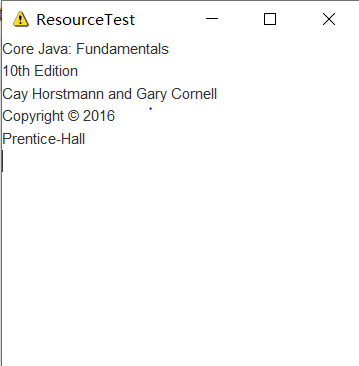
Main-Class: resource.ResourceTest
Core Java: Fundamentals
10th Edition
Cay Horstmann and Gary Cornell
Copyright 漏 2016
Prentice-Hall

运行结果如下:
测试程序2:
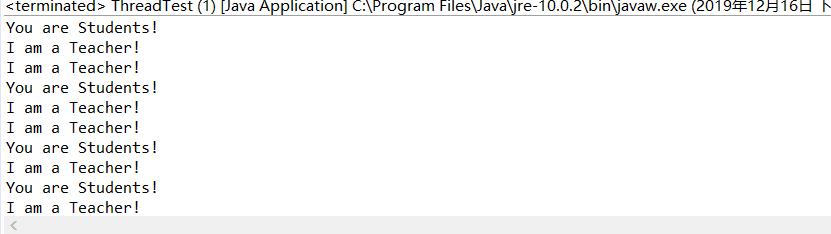
l 在elipse IDE中调试运行ThreadTest,结合程序运行结果理解程序;
l 掌握线程概念;
l 掌握用Thread的扩展类实现线程的方法;
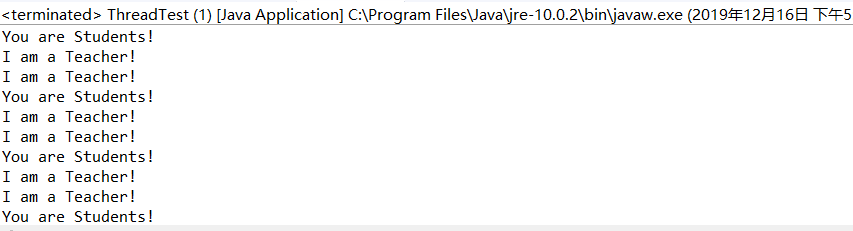
l 利用Runnable接口改造程序,掌握用Runnable接口创建线程的方法。
代码如下:
class Lefthand extends Thread {

   public void run()

   {

       for(int i=;i<=;i++)

       {  System.out.println("You are Students!");

           try{   sleep();   }

           catch(InterruptedException e)

           { System.out.println("Lefthand error.");}

       }

  }

}

class Righthand extends Thread {

    public void run()

    {

         for(int i=;i<=;i++)

         {   System.out.println("I am a Teacher!");

             try{  sleep();  }

             catch(InterruptedException e)

             { System.out.println("Righthand error.");}

         }

    }

}

public class ThreadTest

{

     static Lefthand left;

     static Righthand right;

     public static void main(String[] args)

     {     left=new Lefthand();

           right=new Righthand();

           left.start();

           right.start();

     }

}
运行结果如下:
Runnable接口创建线程的方法
class Lefthand implements Runnable {

    public void run() {

        for (int i = ; i <= ; i++) {

            System.out.println("You are Students!");

            try {

                Thread.sleep();

            } catch (InterruptedException e) {

                System.out.println("Lefthand error.");

            }

        }

    }

}

class Righthand implements Runnable {

    public void run() {

        for (int i = ; i <= ; i++) {

            System.out.println("I am a Teacher!");

            try {

                Thread.sleep();

            } catch (InterruptedException e) {

                System.out.println("Righthand error.");

            }

        }

    }

}

public class ThreadTest {

    public static void main(String[] args) {

        Runnable left = new Lefthand();

        Thread a = new Thread(left);

        Runnable right = new Righthand();

        Thread b = new Thread(right);

        a.start();

        b.start();

    }

}
运行结果如下:
测试程序3:
在Elipse环境下调试教材625页程序14-1、14-2 、14-3,结合程序运行结果理解程序;
代码如下:
package bounceThread;

import java.awt.geom.*;

/**

   A ball that moves and bounces off the edges of a

   rectangle

 * @version 1.33 2007-05-17

 * @author Cay Horstmann

*/

public class Ball

{

   private static final int XSIZE = ;

   private static final int YSIZE = ;

   private double x = ;

   private double y = ;

   private double dx = ;

   private double dy = ;

   /**

      Moves the ball to the next position, reversing direction

      if it hits one of the edges

   */

   //定义了移动方法

   public void move(Rectangle2D bounds)

   {

      x += dx;

      y += dy;

      if (x < bounds.getMinX())

      {

         x = bounds.getMinX();

         dx = -dx;

      }

      if (x + XSIZE >= bounds.getMaxX())

      {

         x = bounds.getMaxX() - XSIZE;

         dx = -dx;

      }

      if (y < bounds.getMinY())

      {

         y = bounds.getMinY();

         dy = -dy;

      }

      if (y + YSIZE >= bounds.getMaxY())

      {

         y = bounds.getMaxY() - YSIZE;

         dy = -dy;

      }

   }

   /**

      Gets the shape of the ball at its current position.

   */

   //定义球外形

   public Ellipse2D getShape()

   {

      return new Ellipse2D.Double(x, y, XSIZE, YSIZE);

   }

}
package bounceThread;

import java.awt.geom.*;

/**

   A ball that moves and bounces off the edges of a

   rectangle

 * @version 1.33 2007-05-17

 * @author Cay Horstmann

*/

public class Ball

{

   private static final int XSIZE = ;

   private static final int YSIZE = ;

   private double x = ;

   private double y = ;

   private double dx = ;

   private double dy = ;

   /**

      Moves the ball to the next position, reversing direction

      if it hits one of the edges

   */

   //定义了移动方法

   public void move(Rectangle2D bounds)

   {

      x += dx;

      y += dy;

      if (x < bounds.getMinX())

      {

         x = bounds.getMinX();

         dx = -dx;

      }

      if (x + XSIZE >= bounds.getMaxX())

      {

         x = bounds.getMaxX() - XSIZE;

         dx = -dx;

      }

      if (y < bounds.getMinY())

      {

         y = bounds.getMinY();

         dy = -dy;

      }

      if (y + YSIZE >= bounds.getMaxY())

      {

         y = bounds.getMaxY() - YSIZE;

         dy = -dy;

      }

   }

   /**

      Gets the shape of the ball at its current position.

   */

   //定义球外形

   public Ellipse2D getShape()

   {

      return new Ellipse2D.Double(x, y, XSIZE, YSIZE);

   }

}
package bounce;

import java.awt.*;

import java.awt.event.*;

import javax.swing.*;

/**

 * Shows an animated bouncing ball.

 * @version 1.34 2015-06-21

 * @author Cay Horstmann

 */

public class Bounce

{

   public static void main(String[] args)

   {

      EventQueue.invokeLater(() -> {

         JFrame frame = new BounceFrame();

         frame.setDefaultCloseOperation(JFrame.EXIT_ON_CLOSE);

         frame.setVisible(true);

      });

   }

}

/**

 * The frame with ball component and buttons.

 */

class BounceFrame extends JFrame

{

   private BallComponent comp;

   public static final int STEPS = ;

   public static final int DELAY = ;

   /**

    * Constructs the frame with the component for showing the bouncing ball and

    * Start and Close buttons

    */

   public BounceFrame()

   {

      setTitle("Bounce");

      comp = new BallComponent();

      add(comp, BorderLayout.CENTER);

      JPanel buttonPanel = new JPanel();

      addButton(buttonPanel, "Start", event -> addBall());//将按钮放入buttonPanel

      addButton(buttonPanel, "Close", event -> System.exit());

      add(buttonPanel, BorderLayout.SOUTH);//将buttonPanel放入边界管理器的南端

      pack();

   }

   /**

    * Adds a button to a container.

    * @param c the container

    * @param title the button title

    * @param listener the action listener for the button

    */

   public void addButton(Container c, String title, ActionListener listener)

   {

       //生成按钮对象

      JButton button = new JButton(title);

      c.add(button);

      button.addActionListener(listener);//注册监听器事件

   }

   /**

    * Adds a bouncing ball to the panel and makes it bounce 1,000 times.

    */

   public void addBall()

   {

      try

      {

         Ball ball = new Ball();

         comp.add(ball);

         for (int i = ; i <= STEPS; i++)

         {

            ball.move(comp.getBounds());

            comp.paint(comp.getGraphics());

            Thread.sleep(DELAY);//在两个球显示之间有延迟

         }

      }

      catch (InterruptedException e)//中断异常

      {

      }

   }

}

Bounce

Bounce
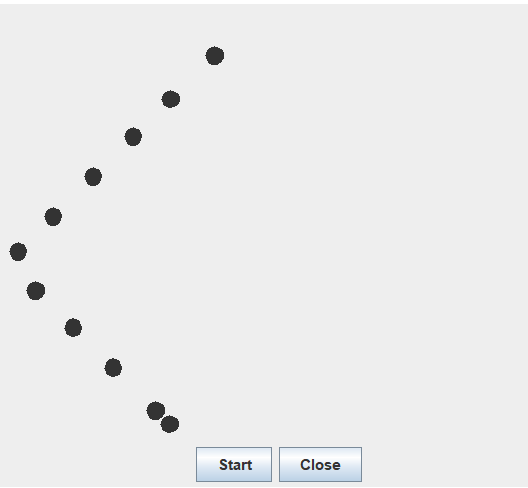
运行结果如下:
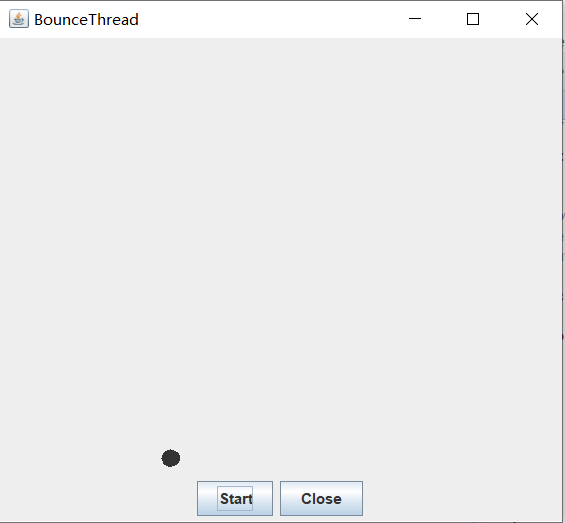
l 在Elipse环境下调试教材631页程序14-4,结合程序运行结果理解程序;
l 对比两个程序,理解线程的概念和用途;
l 掌握线程创建的两种技术。
代码如下:
package bounceThread;

import java.awt.*;

import java.awt.event.*;

import javax.swing.*;

/**

 * 显示动画弹跳球

 * @version 1.34 2015-06-21

 * @author Cay Horstmann

 */

public class BounceThread {

    public static void main(String[] args) {

        EventQueue.invokeLater(() -> {

            JFrame frame = new BounceFrame();

            frame.setTitle("BounceThread");

            frame.setDefaultCloseOperation(JFrame.EXIT_ON_CLOSE);

            frame.setVisible(true);

        });

    }

}

/**

 * 框架与球组件和按钮

 */

class BounceFrame extends JFrame {

    private BallComponent comp;

    public static final int STEPS = ;

    public static final int DELAY = ;

    /**

     * 用显示弹跳球以及开始和关闭按钮的组件构建框架

     */

    public BounceFrame() {

        comp = new BallComponent();

        add(comp, BorderLayout.CENTER);

        JPanel buttonPanel = new JPanel();

        addButton(buttonPanel, "Start", event -> addBall());

        addButton(buttonPanel, "Close", event -> System.exit());

        add(buttonPanel, BorderLayout.SOUTH);

        pack();

    }

    /**

     * 向容器添加按钮

     *

     * @param c

     *            the container

     * @param title

     *            the button title

     * @param listener

     *            the action listener for the button

     */

    public void addButton(Container c, String title, ActionListener listener) {

        JButton button = new JButton(title);

        c.add(button);

        button.addActionListener(listener);

    }

    /**

     * 在画布上添加一个弹跳球,并启动一个线程使其弹跳

     */

    public void addBall() {

        Ball ball = new Ball();

        comp.add(ball);

        Runnable r = () -> {

            try {

                for (int i = ; i <= STEPS; i++) {

                    ball.move(comp.getBounds());//将球移动到下一个位置,如果碰到其中一个边缘则反转方向

                    comp.repaint();//重绘此组件。

                    Thread.sleep(DELAY);//在指定的毫秒数内让当前正在执行的线程休眠

                }

            } catch (InterruptedException e) {

            }

        };

        Thread t = new Thread(r);

        t.start();

    }

}
运行结果如下:
第三部分:学习总结
通过本章的学习,掌握了一些关于线程的相关知识,在学习的时候学的一片混乱,好在课下通过看书
和在Mooc上 看翁凯老师的课才对本章内容有了一定的了解,但还需要再做一些练习才能够掌握本章内容
的精髓,在做验证性实验部分内容的时候,并没有遇到很多困难,同时体验到了本章实验内容的重要性,
但实验课的时候遇到较多问题,好在在助教学长的帮助下得以解决,我也会在课下多多学习,加强巩固
基础知识。
201871010105-曹玉中《面向对象程序设计(java)》第十六周学习总结的更多相关文章
- 201571030332 扎西平措 《面向对象程序设计Java》第八周学习总结
<面向对象程序设计Java>第八周学习总结 项目 内容 这个作业属于哪个课程 https://www.cnblogs.com/nwnu-daizh/ 这个作业的要求在哪里 https: ...
- 201771010118马昕璐《面向对象程序设计java》第八周学习总结
第一部分:理论知识学习部分 1.接口 在Java程序设计语言中,接口不是类,而是对类的一组需求描述,由常量和一组抽象方法组成.Java为了克服单继承的缺点,Java使用了接口,一个类可以实现一个或多个 ...
- 201771010134杨其菊《面向对象程序设计java》第八周学习总结
第八周学习总结 第一部分:理论知识 一.接口.lambda和内部类: Comparator与comparable接口: 1.comparable接口的方法是compareTo,只有一个参数:comp ...
- 201771010134杨其菊《面向对象程序设计java》第七周学习总结
第七周学习总结 第一部分:理论知识 1.继承是面向对象程序设计(Object Oriented Programming-OOP)中软件重用的关键技术.继承机制使用已经定义的类作为基础建立新的类定义,新 ...
- 201771010123汪慧和《面向对象程序设计JAVA》第六周实验总结
一.理论部分: 1.继承 用已有类来构建新类的一种机制.当定义了一个新类继承了一个类时,这个新类就继承了这个类的方法和域,同时在新类中添加新的方法和域以适应新的情况. 2.类.超类.子类 (1)类继承 ...
- 201771010128 王玉兰《面象对象程序设计 (Java) 》第六周学习总结
---恢复内容开始--- 第一部分:基础知识总结: 1.继承 A:用已有类来构建新类的一种机制,当定义了一个新类继承一个类时,这个新类就继承了这个类的方法和域以适应新的情况: B:特点:具有层次结构. ...
- 周强201771010141《面向对象程序设计Java》第八周学习总结
一.理论知识学习部分 Java为了克服单继承的缺点,Java使用了接口,一个类可以实现一个或多个接口. 接口体中包含常量定义和方法定义,接口中只进行方法的声明,不提供方法的实现. 类似建立类的继承关系 ...
- 201871010126 王亚涛《面向对象程序设计 JAVA》 第十三周学习总结
内容 这个作业属于哪个课程 https://www.cnblogs.com/nwnu-daizh/ 这个作业的要求在哪里 https://www.cnblogs.com/nwnu-daizh/p/ ...
- 马凯军201771010116《面向对象程序设计Java》第八周学习总结
一,理论知识学习部分 6.1.1 接口概念 两种含义:一,Java接口,Java语言中存在的结构,有特定的语法和结构:二,一个类所具有的方法的特征集合,是一种逻辑上的抽象.前者叫做“Java接口”,后 ...
- 201777010217-金云馨《面向对象程序设计Java》第八周学习总结
项目 内容 这个作业属于哪个课程 https://www.cnblogs.com/nwnu-daizh/ 这个作业的要求在哪里 https://www.cnblogs.com/nwnu-daizh/p ...
随机推荐
- (day48)Bootstrap、Adminlte框架、sweetalert
目录 Bootstrap框架官网 Adminlte框架官网 sweetalert 一.基础 二.布局 三.组件 四.插件 Bootstrap框架官网 Adminlte框架官网 sweetalert g ...
- C++ 异或运算及其应用
前置知识: 1.一个整数自己跟自己异或,结果为0 //因为异或的法则为,相同为0,不同为1,注意这里所说的都是二进制位. 2.任意一个整数跟0异或,结果为本身. //因为1异或0得1,0异或0,得 ...
- Serializable接口的意义和用法
本人软件工程大三妹子一枚,以下为个人观点仅供参考: 最近在云课堂学习springmvc+mybatis项目时,发现老师在实体类中引用了serializable这个接口,如下: import jav ...
- 在 React 组件中监听 android 手机物理返回/回退/back键事件
当前端页面嵌入到 webview 中运行时,有时会需要监听手机的物理返回按键事件来做一些自定义的操作. 比如我最近遇到的,在一个页面里面有批量选择的功能,当点击手机的返回键时,清除页面上的选中状态.我 ...
- Java Metrics工具介绍
目录 简介 快速入门 Maven配置 MetricRegistry Gauge Meter Counter Histgram Timer Reporter 更多用法 参考资料 简介 Metric是一个 ...
- golang基础之第一个go程序
编写 Hello World 创建文件 hello.go,不写入任何内容.按照如下的命令尝试进行编译 $ go run hello.go 将会打印出如下错误: package main: hello. ...
- gradle 多模块Springboot项目 compile project引用其他模块的坑
本来以为子项目中compile project(':xxx'),就能引用其他模块了,因为之后idea也没在引用时候标红 然而我gradle build的时候,居然各种找不到引用模块的类 最后在stac ...
- 发布.net core项目 System.AggregateException: 发生一个或多个错误
背景:之前创建.net core webapi项目的时候SDK是2.2的版本,后改成2.1,发布的时候报错. 发布的时候报错,展示的信息是: 其实这里也大致能看到部分信息,但由于信息量太小,没办法知道 ...
- cuda,cudnn
20191008 服务器上的cuda总是被人搞坏掉,好烦.记录下: 卸载干净cuda sudo rm -rf /usr/local/cuda sudo apt-get remove cuda sudo ...
- java架构之路-(JVM优化与原理)JVM的运行时内存模型
还是我们上次的图,我们上次大概讲解了类加载子系统的执行过程,验证,准备,解析,初始化四个过程.还有我们的双亲委派机制. 我们这次来说一下运行时内存模型.上一段小代码. public class Mai ...