
Spring Cloud微服务安全实战_4-4_OAuth2协议与微服务安全
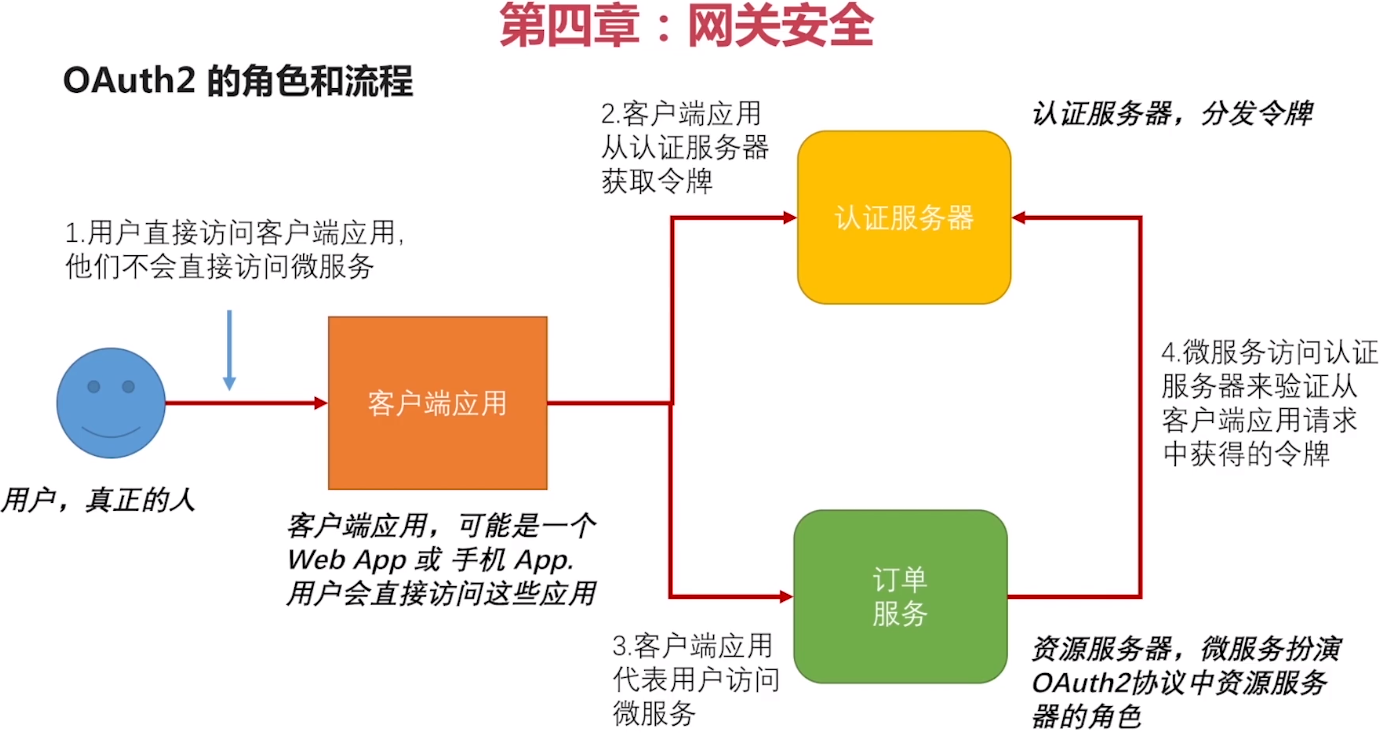
接上篇文章,在这个流程中,PostMan可以代表客户端应用,订单服务是资源服务器,唯一缺少的是 认证服务器 ,下面来搭建认证服务器
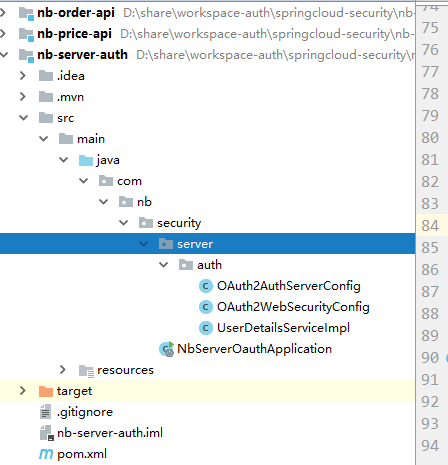
项目结构:
Pom.xml : DependencyManager 引入SpringCloud的配置,Dependency引入 spring-cloud-starter-oauth2
<?xml version="1.0" encoding="UTF-8"?>

<project xmlns="http://maven.apache.org/POM/4.0.0" xmlns:xsi="http://www.w3.org/2001/XMLSchema-instance"

    xsi:schemaLocation="http://maven.apache.org/POM/4.0.0 https://maven.apache.org/xsd/maven-4.0.0.xsd">

    <modelVersion>4.0.0</modelVersion>

    <groupId>com.nb.security</groupId>

    <artifactId>nb-server-auth</artifactId>

    <version>0.0.1-SNAPSHOT</version>

    <properties>

        <mybatis-plus.version>3.1.2</mybatis-plus.version>

        <java.version>1.8</java.version>

        <project.reporting.outputEncoding>UTF-8</project.reporting.outputEncoding>

        <project.build.sourceEncoding>UTF-8</project.build.sourceEncoding>

        <mybatis-plus.version>3.1.2</mybatis-plus.version>

        <druid.version>1.1.17</druid.version>

        <jwt.version>0.9.1</jwt.version>

        <commons.version>2.6</commons.version>

        <aliyun-java-sdk-core.version>3.2.3</aliyun-java-sdk-core.version>

        <aliyun-java-sdk-dysmsapi.version>1.0.0</aliyun-java-sdk-dysmsapi.version>

        <aliyun.oss.version>3.6.0</aliyun.oss.version>

        <qc.cos.version>5.6.5</qc.cos.version>

    </properties>

    <dependencyManagement>

        <dependencies>

            <dependency>

                <!-- Import dependency management from Spring Boot -->

                <groupId>org.springframework.boot</groupId>

                <artifactId>spring-boot-dependencies</artifactId>

                <version>2.1.6.RELEASE</version>

                <type>pom</type>

                <scope>import</scope>

            </dependency>

            <!--spring cloud-->

            <dependency>

                <groupId>org.springframework.cloud</groupId>

                <artifactId>spring-cloud-dependencies</artifactId>

                <version>Greenwich.SR2</version>

                <type>pom</type>

                <scope>import</scope>

            </dependency>

        </dependencies>

    </dependencyManagement>

    <dependencies>

        <dependency>

            <groupId>org.springframework.boot</groupId>

            <artifactId>spring-boot-starter-web</artifactId>

        </dependency>

        <dependency>

            <groupId>org.springframework.cloud</groupId>

            <artifactId>spring-cloud-starter-oauth2</artifactId>

        </dependency>

        <!--集成mybatisplus-->

        <!-- mybatis-plus -->

        <dependency>

            <groupId>com.baomidou</groupId>

            <artifactId>mybatis-plus-boot-starter</artifactId>

            <version>${mybatis-plus.version}</version>

        </dependency>

        <dependency>

            <groupId>com.baomidou</groupId>

            <artifactId>mybatis-plus-generator</artifactId>

            <version>3.2.0</version>

        </dependency>

        <dependency>

            <groupId>org.apache.velocity</groupId>

            <artifactId>velocity-engine-core</artifactId>

            <version>2.1</version>

        </dependency>

        <dependency>

            <groupId>org.freemarker</groupId>

            <artifactId>freemarker</artifactId>

            <version>2.3.29</version>

        </dependency>

        <!-- druid -->

        <dependency>

            <groupId>com.alibaba</groupId>

            <artifactId>druid-spring-boot-starter</artifactId>

            <version>${druid.version}</version>

        </dependency>

        <!--mysql-->

        <dependency>

            <groupId>mysql</groupId>

            <artifactId>mysql-connector-java</artifactId>

            <version>5.1.47</version>

            <scope>runtime</scope>

        </dependency>

        <!--commons-lang3-->

        <dependency>

            <groupId>org.apache.commons</groupId>

            <artifactId>commons-lang3</artifactId>

        </dependency>

    </dependencies>

    <build>

        <plugins>

            <!--指定JDK编译版本 -->

            <plugin>

                <groupId>org.apache.maven.plugins</groupId>

                <artifactId>maven-compiler-plugin</artifactId>

                <configuration>

                    <source>1.8</source>

                    <target>1.8</target>

                    <encoding>UTF-8</encoding>

                </configuration>

            </plugin>

            <!-- 打包跳过测试 -->

            <plugin>

                <groupId>org.apache.maven.plugins</groupId>

                <artifactId>maven-surefire-plugin</artifactId>

                <configuration>

                    <skipTests>true</skipTests>

                </configuration>

            </plugin>

            <plugin>

                <groupId>org.springframework.boot</groupId>

                <artifactId>spring-boot-maven-plugin</artifactId>

            </plugin>

        </plugins>

    </build>

</project>
application.yml :
server:

  port:

spring:

  application:

    name: auth-server

  datasource:

    url: jdbc:mysql://localhost:3306/db_oauth?allowMultiQueries=true&useUnicode=true&characterEncoding=UTF-8

    username: root

    password: root

    driver-class-name: com.mysql.jdbc.Driver

#mybatis plus 设置

mybatis-plus:

  mapper-locations: classpath*:mapper/*Mapper.xml

  global-config:

    # 关闭MP3.0自带的banner

    banner: false

    db-config:

      #主键类型  0:"数据库ID自增",1:"该类型为未设置主键类型", 2:"用户输入ID",3:"全局唯一ID (数字类型唯一ID)", 4:"全局唯一ID UUID",5:"字符串全局唯一ID (idWorker 的字符串表示)";

      id-type: 0

      # 默认数据库表下划线命名

      table-underline: true

  configuration:

    # 这个配置会将执行的sql打印出来,在开发或测试的时候可以用

    log-impl: org.apache.ibatis.logging.stdout.StdOutImpl
下面开始新建认证服务器的配置类,写代码之前,先来看一下下图,
作为认证服务器,OAuth2 协议里的其他几个角色他都要知道,认证服务器都要知道各个角色都是谁,他们各自的特征是什么。
1,要知道有哪些客户端应用 来申请令牌
2,要知道有哪些合法的用户
3,要知道发出去的令牌,能够访问哪些资源服务器

写代码
我们需要新建一个认证服务器配置类 OAuth2AuthServerConfig ,继承 AuthorizationServerConfigurerAdapter ,AuthorizationServerConfigurerAdapter 是认证服务器适配器,我们看一下的源码:
/**

 * @author Dave Syer

 *

 */

public class AuthorizationServerConfigurerAdapter implements AuthorizationServerConfigurer {

    @Override

    public void configure(AuthorizationServerSecurityConfigurer security) throws Exception {

    }

    @Override

    public void configure(ClientDetailsServiceConfigurer clients) throws Exception {

    }

    @Override

    public void configure(AuthorizationServerEndpointsConfigurer endpoints) throws Exception {

    }

}
里面有三个方法,这三个方法,正对应上图中箭头所指的三个问题,我们需要重写这三个方法,实现自己的配置。
1,配置Client信息
从图中可以看出,认证服务器要配置两个Client,一个是【客户端应用】,他需要来认证服务器申请令牌,一个是 【订单服务】,他要来认证服务器验令牌。
重写AuthorizationServerConfigurerAdapter 的 configure(ClientDetailsServiceConfigurer clients) throws Exception 方法
/**

 * Created by: 李浩洋 on 2019-10-29

 *

 * 认证服务器

 **/

@Configuration  //这是一个配置类

@EnableAuthorizationServer //当前应用是一个认证服务器

public class OAuth2AuthServerConfig extends AuthorizationServerConfigurerAdapter {//AuthorizationServerConfigurerAdapter:认证服务器适配器

    //Spring 对密码加密的封装,自己配置下

    @Autowired

    private PasswordEncoder passwordEncoder;

    /**

     * 配置客户端应用的信息,让认证服务器知道有哪些客户端应用来申请令牌。

     *

     * ClientDetailsServiceConfigurer:客户端的详情服务的配置

     * @param clients

     * @throws Exception

     */

    @Override

    public void configure(ClientDetailsServiceConfigurer clients) throws Exception {

        clients.inMemory()//配置在内存里,后面修改为数据库里

                //~============== 注册【客户端应用】,使客户端应用能够访问认证服务器 ===========

                .withClient("orderApp")

                .secret(passwordEncoder.encode("123456")) //spring

                .scopes("read","write") //orderApp有哪些权限

                .accessTokenValiditySeconds(3600) //token的有效期

                .resourceIds("order-server") //资源服务器的id。发给orderApp的token,能访问哪些资源服务器,可以多个

                .authorizedGrantTypes("password")//授权方式,再给orderApp做授权的时候可以用哪种授权方式授权

                //~=============客户端应用配置结束 =====================

                .and()

                //~============== 注册【资源服务器-订单服务】(因为订单服务需要来认证服务器验令牌),使订单服务也能够访问认证服务器 ===========

                .withClient("orderServer")

                .secret(passwordEncoder.encode("123456")) //spring

                .scopes("read","write") //有哪些权限

                .accessTokenValiditySeconds(3600) //token的有效期

                .resourceIds("order-server") //资源服务器的id

                .authorizedGrantTypes("password");//授权方式

    }

}
2,配置用户 信息
告诉认证服务器,有哪些用户可以来访问认证服务器
重写AuthorizationServerConfigurerAdapter 的 configure(AuthorizationServerEndpointsConfigurer endpoints) 方法
/**

 * Created by: 李浩洋 on 2019-10-29

 *

 * 认证服务器

 **/

@Configuration  //这是一个配置类

@EnableAuthorizationServer //当前应用是一个认证服务器

public class OAuth2AuthServerConfig extends AuthorizationServerConfigurerAdapter {//AuthorizationServerConfigurerAdapter:认证服务器适配器

    //Spring 对密码加密的封装,自己配置下

    @Autowired

    private PasswordEncoder passwordEncoder;

    @Autowired

    private AuthenticationManager authenticationManager;

    /**

     * 1,配置客户端应用的信息,让认证服务器知道有哪些客户端应用来申请令牌。

     *

     * ClientDetailsServiceConfigurer:客户端的详情服务的配置

     * @param clients

     * @throws Exception

     */

    @Override

    public void configure(ClientDetailsServiceConfigurer clients) throws Exception {

        clients.inMemory()//配置在内存里,后面修改为数据库里

                //~============== 注册【客户端应用】,使客户端应用能够访问认证服务器 ===========

                .withClient("orderApp")

                .secret(passwordEncoder.encode("123456")) //spring

                .scopes("read","write") //orderApp有哪些权限

                .accessTokenValiditySeconds(3600) //token的有效期

                .resourceIds("order-server") //资源服务器的id。发给orderApp的token,能访问哪些资源服务器,可以多个

                .authorizedGrantTypes("password")//授权方式,再给orderApp做授权的时候可以用哪种授权方式授权

                //~=============客户端应用配置结束 =====================

                .and()

                //~============== 注册【资源服务器-订单服务】(因为订单服务需要来认证服务器验令牌),使订单服务也能够访问认证服务器 ===========

                .withClient("orderServer")

                .secret(passwordEncoder.encode("123456")) //spring

                .scopes("read","write") //orderServer有哪些权限

                .accessTokenValiditySeconds(3600) //token的有效期

                .resourceIds("order-server") //资源服务器的id。

                .authorizedGrantTypes("password");//授权方式,

    }

    /**

     *,2,配置用户信息

     * @param endpoints

     * @throws Exception

     */

    @Override

    public void configure(AuthorizationServerEndpointsConfigurer endpoints) throws Exception {

        //传给他一个authenticationManager用来校验传过来的用户信息是不是合法的,注进来一个,自己实现

        endpoints.authenticationManager(authenticationManager);

    }

    /**

     * 3,配置资源服务器过来验token 的规则

     * @param security

     * @throws Exception

     */

    @Override

    public void configure(AuthorizationServerSecurityConfigurer security) throws Exception {

        /**

         * 过来验令牌有效性的请求,不是谁都能验的,必须要是经过身份认证的。

         * 所谓身份认证就是,必须携带clientId,clientSecret,否则随便一请求过来验token是不验的

         */

        security.checkTokenAccess("isAuthenticated()");

    }

}
上边的 加密解密类 PasswordEncoder 和 配置用户信息的 AuthenticationManager 还没有地方来,下边配置这俩类。
新建配置类 OAuth2WebSecurityConfig 继承 WebSecurityConfigurerAdapter
package com.nb.security.server.auth;

import org.springframework.beans.factory.annotation.Autowired;

import org.springframework.context.annotation.Bean;

import org.springframework.context.annotation.Configuration;

import org.springframework.context.annotation.Lazy;

import org.springframework.security.authentication.AuthenticationManager;

import org.springframework.security.config.annotation.authentication.builders.AuthenticationManagerBuilder;

import org.springframework.security.config.annotation.web.configuration.EnableWebSecurity;

import org.springframework.security.config.annotation.web.configuration.WebSecurityConfigurerAdapter;

import org.springframework.security.core.userdetails.UserDetailsService;

import org.springframework.security.crypto.bcrypt.BCryptPasswordEncoder;

import org.springframework.security.crypto.password.PasswordEncoder;

/**

 * Created by: 李浩洋 on 2019-10-29

 **/

@Configuration

@EnableWebSecurity //使安全配置生效

public class OAuth2WebSecurityConfig extends WebSecurityConfigurerAdapter {

    @Autowired

    private UserDetailsService userDetailsService;

    @Autowired

    private PasswordEncoder passwordEncoder;

    /**

     * AuthenticationManagerBuilder 是用来构建  AuthenticationManager(处理登录操作)的

     * 需要两个东西:userDetailsService  、passwordEncoder

     * @param auth

     * @throws Exception

     */

    @Override

    protected void configure(AuthenticationManagerBuilder auth) throws Exception {

        auth.userDetailsService(userDetailsService) //获取用户信息

                .passwordEncoder(passwordEncoder); //比对密码

    }

    /**

     * 把AuthenticationManager暴露为bean

     * @return

     * @throws Exception

     */

    @Bean

    @Override

    public AuthenticationManager authenticationManagerBean() throws Exception {

        return super.authenticationManagerBean();

    }

}
+++++++++++++++ 备注 ++++++++++++++++++++++++++
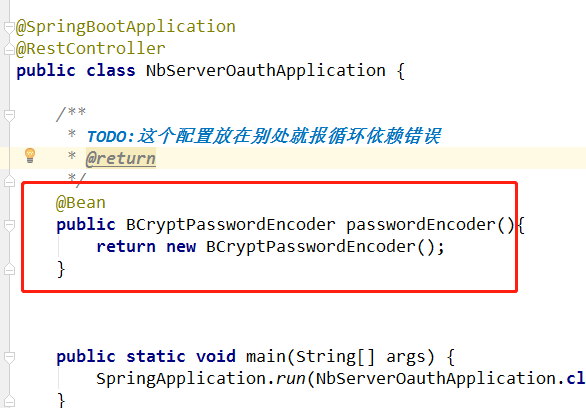
2019-12-15-23:00, passwordEncoder 本应该配置在上述类里,但是配置后报错循环依赖,暂时将其写在启动类里,不报错
+++++++++++++++++++++++++++++++++++++++++++++
UserDetailsService接口
UserDetailsService接口,只有一个方法,返回UserDetails 接口:
public interface UserDetailsService {

    UserDetails loadUserByUsername(String username) throws UsernameNotFoundException;

}
loadUserByUsername,这里不用比对密码,比对密码是在AuthenticationManager里做的。
UserDetails接口如下,提供了一些见名知意的方法,我们需要自定义自己的UserDetails实现类,比如你的User类实现这个接口 :
public interface UserDetails extends Serializable {

    // ~ Methods

    // ========================================================================================================

    Collection<? extends GrantedAuthority> getAuthorities();

    String getPassword();

    String getUsername();

    boolean isAccountNonExpired();

    boolean isAccountNonLocked();

    boolean isCredentialsNonExpired();

    boolean isEnabled();

}
自定义UserDetailsService 实现类:
/**

 * Created by: 李浩洋 on 2019-10-29

 **/

@Component//TODO:这里不写 ("userDetailsService")

public class UserDetailsServiceImpl implements UserDetailsService {

    /**

     *

     */

    @Autowired

    private PasswordEncoder passwordEncoder;

    public UserDetails loadUserByUsername(String username) throws UsernameNotFoundException {

        return User.withUsername(username)

                .password(passwordEncoder.encode("123456"))

                .authorities("ROLE_ADMIN") //权限

                .build();//构建一个User对象

    }

}
AuthenticationManager 接口
也只有一个方法,实现类一般不需要自己实现。入参 是一个 Authentication 接口的实现,其中封装了认证的信息,不同的认证发的信息不一样,如用户名/密码 登录需要用户名密码,OAuth2则需要appId,appSecret,redirectURI等,
不同的认证方式传过来的实现不同, authenticate 方法验证完了后将其中的信息更新调,返回。
public interface AuthenticationManager {

    Authentication authenticate(Authentication authentication)

            throws AuthenticationException;

}
所有的准备工作都做好了,下面启动应用,来申请一个OAuth2令牌
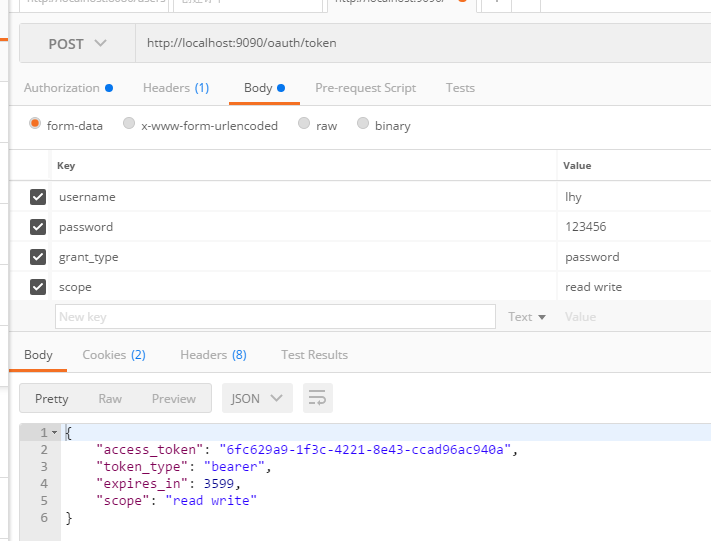
postman请求http://localhost:9090/oauth/token ,HttpBasic传入客户端id和客户端密码。
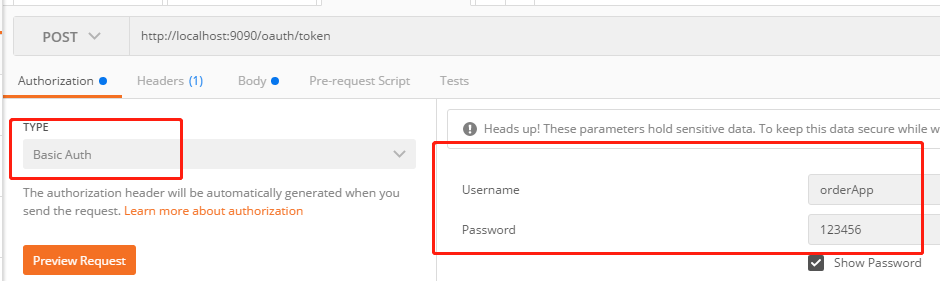
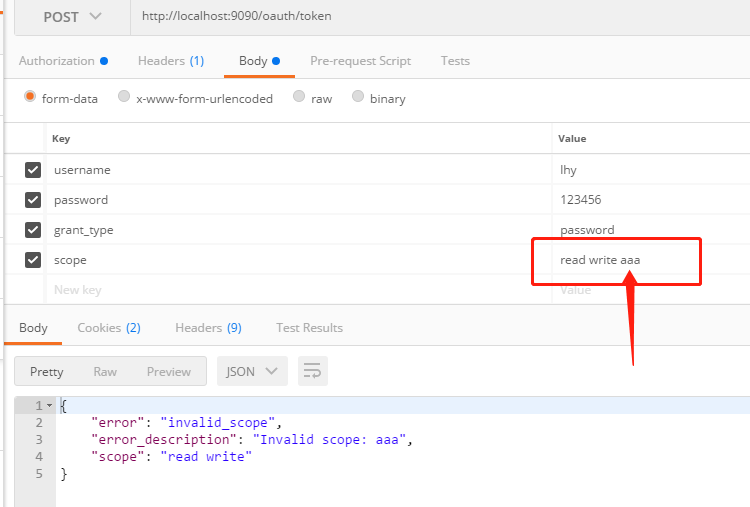
用户名随便输,密码要和UserDetailsService一致,grant_type是说OAuth2的授权类型是授权码类型,scope是该客户端申请的权限,必须在Client配置里面包含
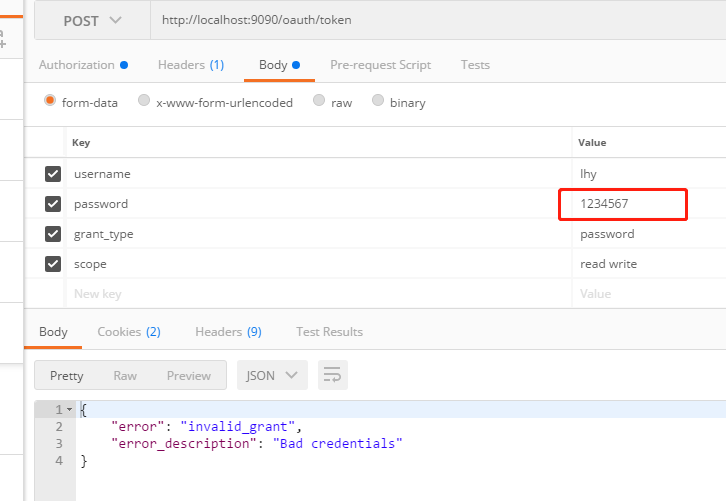
输入错误的密码:
输入不存在的scope:
代码github:https://github.com/lhy1234/springcloud-security/tree/chapt-4-4-andbefore
+++++++++++++分割线++++++++++++++++++++++
小结
用图片生动解释了 OAuth2 中的角色和Spring接口 AuthorizationServerConfigurerAdapter 三个方法的关系,方便记忆
实现了OAuth2的密码模式,来申请token
存在问题:passwordEncoder 如果放在了 OAuth2WebSecurityConfig配置类里面,就会报循环依赖错误,有待解决
Spring Cloud微服务安全实战_4-4_OAuth2协议与微服务安全的更多相关文章
- Spring cloud微服务安全实战-4-4 OAuth2协议与微服务安全
Oauth2 解决了cookie和session的问题 搭建认证服务器 把依赖都复制进来 因为搭建的是Oauth的服务器,所以还需要导入oauth2 开始写代码 首先创建启动类 增加配置文件 端口设置 ...
- spring cloud: zuul(二): zuul的serviceId/service-id配置(微网关)
spring cloud: zuul(二): zuul的serviceId/service-id配置(微网关) zuul: routes: #路由配置表示 myroute1: #路由名一 path: ...
- 新书上线:《Spring Boot+Spring Cloud+Vue+Element项目实战:手把手教你开发权限管理系统》,欢迎大家买回去垫椅子垫桌脚
新书上线 大家好,笔者的新书<Spring Boot+Spring Cloud+Vue+Element项目实战:手把手教你开发权限管理系统>已上线,此书内容充实.材质优良,乃家中必备垫桌脚 ...
- Spring Cloud Gateway限流实战
欢迎访问我的GitHub https://github.com/zq2599/blog_demos 内容:所有原创文章分类汇总及配套源码,涉及Java.Docker.Kubernetes.DevOPS ...
- Spring Cloud架构教程 (七)消息驱动的微服务(核心概念)【Dalston版】
下图是官方文档中对于Spring Cloud Stream应用模型的结构图.从中我们可以看到,Spring Cloud Stream构建的应用程序与消息中间件之间是通过绑定器Binder相关联的,绑定 ...
- Spring Cloud架构教程 (六)消息驱动的微服务【Dalston版】
Spring Cloud Stream是一个用来为微服务应用构建消息驱动能力的框架.它可以基于Spring Boot来创建独立的.可用于生产的Spring应用程序.它通过使用Spring Integr ...
- Spring Cloud架构教程 (八)消息驱动的微服务(消费组)【Dalston版】
使用消费组实现消息消费的负载均衡 通常在生产环境,我们的每个服务都不会以单节点的方式运行在生产环境,当同一个服务启动多个实例的时候,这些实例都会绑定到同一个消息通道的目标主题(Topic)上. 默认情 ...
- Spring Cloud Sleuth超详细实战
为什么需要Spring Cloud Sleuth 微服务架构是一个分布式架构,它按业务划分服务单元,一个分布式系统往往有很多个服务单元.由于服务单元数量众多,业务的复杂性,如果出现了错误和异常,很难去 ...
- spring cloud 入门系列四:使用Hystrix 实现断路器进行服务容错保护
在微服务中,我们将系统拆分为很多个服务单元,各单元之间通过服务注册和订阅消费的方式进行相互依赖.但是如果有一些服务出现问题了会怎么样? 比如说有三个服务(ABC),A调用B,B调用C.由于网络延迟或C ...
- spring cloud 入门系列五:使用Feign 实现声明式服务调用
一.Spring Cloud Feign概念引入通过前面的随笔,我们了解如何通过Spring Cloud ribbon进行负责均衡,如何通过Spring Cloud Hystrix进行服务断路保护,两 ...
随机推荐
- c# 多线程 双色球
学习记录.仅供参考. 知识点: 多线程 Lock 环境: Visual Studio 2017 public partial class Form1 : Form { private static r ...
- 文件安全复制之 FastCopy
FastCopy是Windows平台上最快的文件拷贝.删除软件.由于其功能强劲,性能优越,一时间便超越相同类型的所有其他软件.由于该软件十分小巧,你甚至可以在安装后,直接将安装目录中的文件复制到任何可 ...
- javascript 写一个 map方法
<!DOCTYPE html> <html lang="en"> <head> <meta charset="UTF-8&quo ...
- NoSql之Redis系列(.Net Core)
一. 简介 1. 什么是Redis? 全称“Remote Dictionary Server”,基于内存管理数据,它有多种数据结构(常用的5种),分别应对不同场景:它是单线程模型的,所以不会存在并发问 ...
- 修改设置notepad++默认保存文件格式
设置notepad++保存文件的默认格式 在使用notepad++新建文件保存后,有的时候会有一个all type 然后没有文件扩展名,很不方便 网上有很多帖子都是如下图所示的提示,但是却不生效
- Kubernetes service 三种类型/NodePort端口固定
Kubernetes service 三种类型 • ClusterIP:默认,分配一个集群内部可以访问的虚拟IP(VIP)• NodePort:在每个Node上分配一个端口作为外部访问入口• Load ...
- Prometheus 监控K8S集群资源监控
Prometheus 监控K8S集群中Pod 目前cAdvisor集成到了kubelet组件内,可以在kubernetes集群中每个启动了kubelet的节点使用cAdvisor提供的metrics接 ...
- 【Easyexcel】java导入导出超大数据量的xlsx文件 解决方法
解决方法: 使用easyexcel解决超大数据量的导入导出xlsx文件 easyexcel最大支持行数 1048576. 官网地址: https://alibaba-easyexcel.github. ...
- 端口快速扫描程序(c#版 一次可发起1000个连接)
前言 为了探测本机或对方开放了哪些端口,需要用到端口扫描程序.扫描端口的原理很简单:就是尝试连接对方:如果成功,对方就开放了此端口.扫描程序的关键是速度,如果一次只能发起几个连接,显然速度太慢.如果对 ...
- 基于OpenCV.Net连通域分析进行文本块分割
上一次通过投影的方式进行了文本块分割,(见 https://www.cnblogs.com/BoyTNT/p/11812323.html )但这种方法有很大的局限性,要求分行清晰.不能有字符跨多行.不 ...