
stringstream用法
1.头文件:#include<sstream>
2.stringstream是C++提供的串流(stream)物件,其中:
clear()重置流的标志状态;str()清空流的内存缓冲,重复使用内存消耗不再增加!
在使用stringstream时遇到的问题:
#include <cstdlib>

#include <iostream>

#include <sstream>

using namespace std;

int main(int argc, char * argv[])

{

    stringstream stream;

    int a,b;

    stream<<"80";

    stream>>a;

    stream<<"90";

    stream>>b;

    cout<<a<<endl;

    cout<<b<<endl;

    system("PAUSE ");

    return  EXIT_SUCCESS;

}
运行结果:

预期b为90,但是出现-858993460,这是由于stringstream重复使用时,没有清空导致的。
修改之后:
#include <cstdlib>

#include <iostream>

#include <sstream>

using namespace std;

int main(int argc, char * argv[])

{

    stringstream stream;

    int a,b;

    stream<<"80";

    stream>>a;

    stream.clear();

    stream<<"90";

    stream>>b;

    cout<<a<<endl;

    cout<<b<<endl;

    system("PAUSE ");

    return  EXIT_SUCCESS;

}
运行结果:
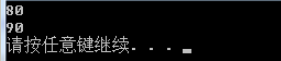
但是clear()仅仅清空标志位,并没有释放内存。
#include <cstdlib>

#include <iostream>

#include <sstream>

using namespace std;

int main(int argc, char * argv[])

{

    stringstream stream;

    int a,b;

    stream<<"80";

    stream>>a;

    stream.clear();

    cout<<"Size of stream = "<<stream.str().length()<<endl;

    stream<<"90";

    stream>>b;

    cout<<"Size of stream = "<<stream.str().length()<<endl;

    cout<<a<<endl;

    cout<<b<<endl;

    system("PAUSE ");

    return  EXIT_SUCCESS;

}
clear()之后,虽然结果正确了,但是stream占用的内存却没有释放!在实际的应用中,要是多次使用stringstream,每次都增加占用的内存。
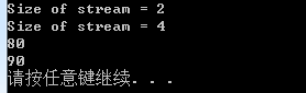
可以利用stringstream.str("")来清空stringstream。
void str ( const string & s ); // copies the content of string s to the string object associated with the string stream buffer. The function effectivelly calls rdbuf()->str(). Notice that setting a new string does not clear the error flags currently set in the stream object unless the member function clearis explicitly called.
#include <cstdlib>

#include <iostream>

#include <sstream>

using namespace std;

int main(int argc, char * argv[])

{

    stringstream stream;

    int a,b;

    stream<<"80";

    stream>>a;

    cout<<"Size of stream = "<<stream.str().length()<<endl;

    stream.clear();

    stream.str("");

    cout<<"Size of stream = "<<stream.str().length()<<endl;

    stream<<"90";

    stream>>b;

    cout<<"Size of stream = "<<stream.str().length()<<endl;

    cout<<a<<endl;

    cout<<b<<endl;

    system("PAUSE ");

    return  EXIT_SUCCESS;

}
运行结果:
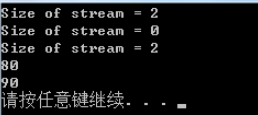
stringstream默认空格会直接分词!
題目:输入的第一行有一个数字 N 代表接下來有 N 行数字,每一行数字里有不固定个数的整数,打印每一行的总和。
输入:
3
1 2 3
20 17 23 54 77 60
111 222 333 444 555 666 777 888 999
输出:
6
251
4995
string s;

stringstream ss;

int n, i, sum, a;

cin >> n;

getline(cin, s); // 换行读取

for (i=0; i<n; i++)

{

getline(cin, s);

ss.clear();

ss.str(s);

sum=0;

while (1)

{

ss >> a;

if ( ss.fail() )
   break;

sum+=a;

}

cout << sum << endl;

}
本文主要介绍 C++ 中 stringstream 类的常见用法。
1 概述
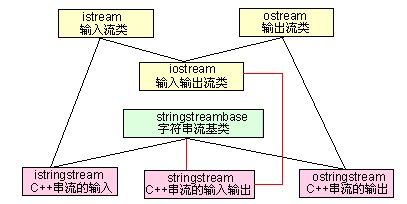
<sstream> 定义了三个类:istringstream、ostringstream 和 stringstream,分别用来进行流的输入、输出和输入输出操作。本文以 stringstream 为主,介绍流的输入和输出操作。
<sstream> 主要用来进行数据类型转换,由于 <sstream> 使用 string 对象来代替字符数组(snprintf方式),就避免缓冲区溢出的危险;而且,因为传入参数和目标对象的类型会被自动推导出来,所以不存在错误的格式化符的问题。简单说,相比c库的数据类型转换而言,<sstream> 更加安全、自动和直接。
2 代码示例
2.1 数据类型转换
这里展示一个代码示例,该示例介绍了将 int 类型转换为 string 类型的过程。示例代码(stringstream_test1.cpp)如下:
#include <string>

#include <sstream>

#include <iostream>

#include <stdio.h>

using namespace std;

int main()

{

    stringstream sstream;

    string strResult;

    int nValue = ;

    // 将int类型的值放入输入流中

    sstream << nValue;

    // 从sstream中抽取前面插入的int类型的值,赋给string类型

    sstream >> strResult;

    cout << "[cout]strResult is: " << strResult << endl;

    printf("[printf]strResult is: %s\n", strResult.c_str());

    return ;

}
编译并执行上述代码,结果如下:

2.2 多个字符串拼接
本示例介绍在 stringstream 中存放多个字符串,实现多个字符串拼接的目的(其实完全可以使用 string 类实现),同时,介绍 stringstream 的清空方法。
示例代码(stringstream_test2.cpp)如下:
#include <string>

#include <sstream>

#include <iostream>

using namespace std;

int main()

{

    stringstream sstream;

    // 将多个字符串放入 sstream 中

    sstream << "first" << " " << "string,";

    sstream << " second string";

    cout << "strResult is: " << sstream.str() << endl;

    // 清空 sstream

    sstream.str("");

    sstream << "third string";

    cout << "After clear, strResult is: " << sstream.str() << endl;

    return ;

}
编译并执行上述代码,结果如下:

从上述代码执行结果能够知道:
- 可以使用 str() 方法,将 stringstream 类型转换为 string 类型;
- 可以将多个字符串放入 stringstream 中,实现字符串的拼接目的;
- 如果想清空 stringstream,必须使用 sstream.str(""); 方式;clear() 方法适用于进行多次数据类型转换的场景。详见示例2.3。
2.3 stringstream的清空
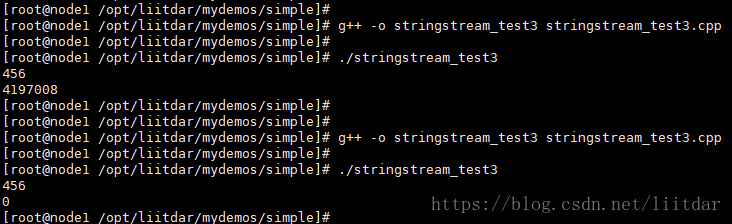
清空 stringstream 有两种方法:clear() 方法以及 str("") 方法,这两种方法有不同的使用场景。str("") 方法的使用场景,在上面的示例中已经介绍了,这里介绍 clear() 方法的使用场景。示例代码(stringstream_test3.cpp)如下:
#include <sstream>

#include <iostream>

using namespace std;

int main()

{

    stringstream sstream;

    int first, second;

    // 插入字符串

    sstream << "";

    // 转换为int类型

    sstream >> first;

    cout << first << endl;

    // 在进行多次类型转换前,必须先运行clear()

    sstream.clear();

    // 插入bool值

    sstream << true;

    // 转换为int类型

    sstream >> second;

    cout << second << endl;

    return ;

}
编译并执行上述代码,结果如下:

注意:在本示例涉及的场景下(多次数据类型转换),必须使用 clear() 方法清空 stringstream,不使用 clear() 方法或使用 str("") 方法,都不能得到数据类型转换的正确结果。下图分别是未使用 clear() 方法、使用 str("") 方法时的运行结果:
stringstream用法的更多相关文章
- C++ stringstream用法(转)
一直觉得C++ iostream的cout输出比起printf差了太多,今天查c++字符串拼接的时候偶然看到原来还有stringstream这个类,还是挺好用的,该类位于<sstream> ...
- [转]string和stringstream用法总结
转自:http://blog.csdn.net/xw20084898/article/details/21939811 作者:xw20084898 一.string string 是 C++ 提供的字 ...
- stringstream 用法
stringstream stringstream 是 C++ 提供的另一个字串型的串流(stream)物件,和之前学过的 iostream.fstream 有类似的操作方式.要使用 stringst ...
- string和stringstream用法总结
参考:http://blog.csdn.net/xw20084898/article/details/21939811
- STL用法总结
stringstream用法:对已有的运算符赋予多重含义,使同一个运算符作用于不同类型的数据导致不同类型的行为. stream << i 将i输入流中 stream >> ...
- c++之stringstream类的用法
简介: 今天利用opecv提取每一帧图片并保存到本地指定目录下的时,对于保存的每一帧的图片希望第几帧体现在图片名中, 这里便用到了stringstream类的将数字转化为字符串这一功能 C++ Str ...
- sstream头文件-getline 函数 和 stringstream函数 和string的常见用法
2017-08-12 19:50:50 writer:pprp getline函数可以读入一行的字符,不论有没有空格 第一个参数,流 第二个参数 ,将流读入的地方 第三个参数,当读到某个字符的时候停止 ...
- stringstream的用法
stringstream的基本用法 stringstream是字符串流.它将流与存储在内存中的string对象绑定起来. 在多种数据类型之间实现自动格式化. 1.stringstream对象的使用 # ...
- stringstream类的简介和用法
一.简介 <sstream>类库定义了三种类:istringstream,ostringstream,stringstream.分别用来进行流的输入,流的输出,输入输出操作.在此演示str ...
随机推荐
- LabelEncoder save 离线使用
For me the easiest way was exporting LabelEncoder as .pkl file for each column. You have to export t ...
- 《CoderXiaoban》第八次团队作业:Alpha冲刺 3
项目 内容 这个作业属于哪个课程 任课教师博客主页链接 这个作业的要求在哪里 实验十二 团队作业8:软件测试与ALPHA冲刺 团队名称 Coderxiaoban团队 作业学习目标 (1)掌握软件测试基 ...
- 《你说对就队》第八次团队作业:Alpha冲刺
<你说对就队>第八次团队作业:Alpha冲刺 项目 内容 这个作业属于哪个课程 [教师博客主页链接] 这个作业的要求在哪里 [作业链接地址] 团队名称 <你说对就队> 作业学习 ...
- 《Exceptioning团队》第四次作业:项目需求调研与分析
一.项目基本介绍 项目 内容 这个作业属于哪个课程 任课教师博客主页链接 这个作业的要求在哪里 作业链接地址 团队名称 Exception 作业学习目标 1.探索团队软件项目需求获取技巧与方法2.学会 ...
- 创建型模式(过渡模式) 简单工厂模式(Simple Factory)
简单工厂模式(Simple Factory Pattern)属于类的创建型模式,又叫静态工厂方法模式(Static FactoryMethod Pattern) 是通过专门定义一个类来负责创建其他类的 ...
- c#基础用法
1.注释符 1)注销 2)解释 2.3种方式 1)单行注释 // 2)多行注释 /*要注释的内容*/ 3)文档注释 /// 多用来解释类或方法 3.数据类型 1)值类型 2)引用类型 1.对象 obj ...
- netty: 以默认的ByteBuf作为传输数据
client部分代码: //线程 EventLoopGroup worker = new NioEventLoopGroup(); //辅助类 Bootstrap b = new Bootstrap( ...
- SpringBoot官方文档学习(二)Externalized Configuration(外部化配置)
Spring Boot允许您将配置外部化,以便可以在不同的环境中使用相同的应用程序代码.您可以使用属性文件.YAML文件.环境变量和命令行参数来具体化配置.属性值可以通过使用@Value注释直接注入b ...
- 第4课.vi编辑器
1.vi编辑器的配置 cd /etc/vim cp vimrc ~/.vimrc cd ~ gedit .vimrc 在.vimrc中加入如下内容: "关闭兼容功能 set nocompat ...
- TPCH 22条SQL语句分析
使用TPC-H进行性能测试,需要有很多工作配合才能获得较高性能,如建立索引,表数据的合理分布(使用表空间和聚簇技术)等.本文从查询优化技术的角度,对TPC-H的22条查询语句和主流数据库执行每条语句对 ...