
Android studio开发-第一个应用
Android studio开发-第一个应用
上效果图
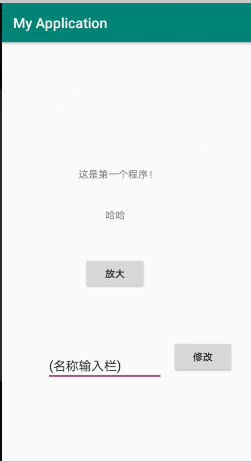
1.先创建布局文件 firstbutton.xml

代码
 <?xml version="1.0" encoding="utf-8"?>

 <android.support.constraint.ConstraintLayout xmlns:android="http://schemas.android.com/apk/res/android"

     xmlns:app="http://schemas.android.com/apk/res-auto"

     xmlns:tools="http://schemas.android.com/tools"

     android:layout_width="match_parent"

     android:layout_height="match_parent"

     tools:context=".MainActivity">

     <TextView

         android:id="@+id/textView4"

         android:layout_width="113dp"

         android:layout_height="22dp"

         android:layout_marginBottom="336dp"

         android:text="这是第一个程序!"

         app:layout_constraintBottom_toBottomOf="parent"

         app:layout_constraintHorizontal_bias="0.472"

         app:layout_constraintLeft_toLeftOf="parent"

         app:layout_constraintRight_toRightOf="parent" />

     <Button

         android:id="@+id/button"

         android:layout_width="89dp"

         android:layout_height="47dp"

         android:layout_marginStart="128dp"

         android:layout_marginLeft="128dp"

         android:layout_marginTop="50dp"

         android:layout_marginEnd="167dp"

         android:layout_marginRight="167dp"

         android:text="放大"

         android:onClick="bigger"

         app:layout_constraintEnd_toEndOf="parent"

         app:layout_constraintStart_toStartOf="parent"

         app:layout_constraintTop_toBottomOf="@+id/txv"

         tools:ignore="OnClick" />

     <Button

         android:id="@+id/confirm"

         android:layout_width="wrap_content"

         android:layout_height="wrap_content"

         android:layout_marginStart="12dp"

         android:layout_marginLeft="12dp"

         android:layout_marginTop="377dp"

         android:layout_marginEnd="43dp"

         android:layout_marginRight="43dp"

         android:layout_marginBottom="86dp"

         android:text="修改"

         android:onClick="display"

         app:layout_constraintBottom_toBottomOf="parent"

         app:layout_constraintEnd_toEndOf="parent"

         app:layout_constraintStart_toEndOf="@+id/name"

         app:layout_constraintTop_toTopOf="parent" />

     <EditText

         android:id="@+id/name"

         android:layout_width="166dp"

         android:layout_height="wrap_content"

         android:layout_marginStart="75dp"

         android:layout_marginLeft="75dp"

         android:layout_marginTop="54dp"

         android:layout_marginEnd="12dp"

         android:layout_marginRight="12dp"

         android:layout_marginBottom="88dp"

         android:ems=""

         android:inputType="textPersonName"

         android:hint="请输入要显示的字符"

         android:text="(名称输入栏)"

         app:layout_constraintBottom_toBottomOf="parent"

         app:layout_constraintEnd_toStartOf="@+id/confirm"

         app:layout_constraintStart_toStartOf="parent"

         app:layout_constraintTop_toBottomOf="@+id/button" />

     <TextView

         android:id="@+id/txv"

         android:layout_width="wrap_content"

         android:layout_height="wrap_content"

         android:layout_marginStart="159dp"

         android:layout_marginLeft="159dp"

         android:layout_marginTop="36dp"

         android:layout_marginEnd="197dp"

         android:layout_marginRight="197dp"

         android:text="哈哈"

         app:layout_constraintEnd_toEndOf="parent"

         app:layout_constraintStart_toStartOf="parent"

         app:layout_constraintTop_toBottomOf="@+id/textView4" />

 </android.support.constraint.ConstraintLayout>
修改java代码
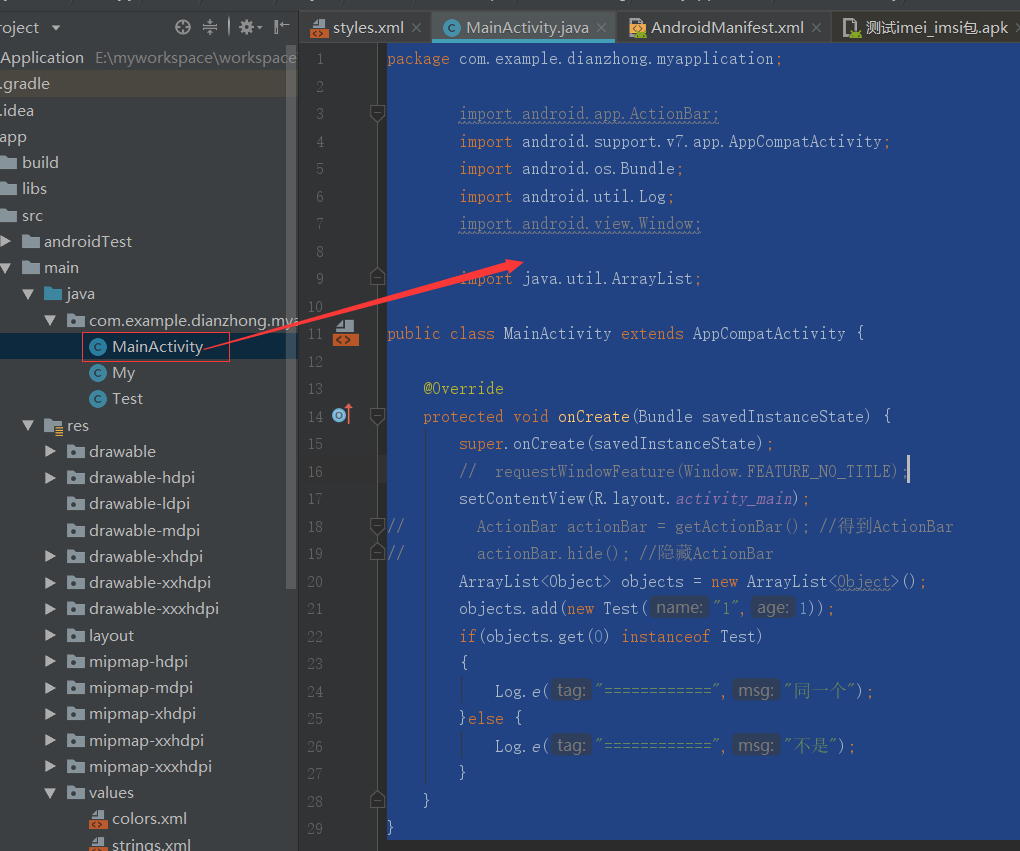
插入代码
package com.demo.my.myapplication;

import android.support.annotation.Nullable;

import android.support.v7.app.AppCompatActivity;

import android.os.Bundle;

import android.util.Log;

import android.view.View;

import android.widget.EditText;

import android.widget.TextView;

public class MainActivity extends AppCompatActivity {

    @Override

    protected void onCreate(@Nullable Bundle savedInstanceState) {

        super.onCreate(savedInstanceState);

        setContentView(R.layout.firstbutton);

        }

        //添加布局

        int size=30;   // 按钮对应的 onclick 响应

        public void bigger(View v){

            TextView txv;

            txv=(TextView) findViewById(R.id.txv);   //根据ID找到对应的text对象

            txv.setTextSize(++size);  //修改对象的字符大小-size

        }

        //另一个按钮对应的onclick响应

        public void display(View v){

            EditText name=(EditText) findViewById(R.id.name);  //根据ID找到对应的text对象,并进行接下来的操作

            TextView text2=(TextView) findViewById(R.id.txv);

            text2.setText(name.getText().toString()); //设置字符

        }

}
Android studio开发-第一个应用的更多相关文章
- Android Studio开发第一篇QuickStart
为什么把as的环境开发放在gradle里呢,因为eclipse里装gradle插件还是不够方便,as直接集成了,然后正好as也是大势所趋,学习一下正好. 看到右边Quick Start快速启动栏下面 ...
- 《Android Studio开发实战 从零基础到App上线》资源下载和内容勘误
转载于:https://blog.csdn.net/aqi00/article/details/73065392 资源下载 下面是<Android Studio开发实战 从零基础到App上线&g ...
- windows平台下Android studio开发环境搭建教程
最近,Google 已宣布,为了简化 Android 的开发力度,以重点建设 Android Studio 工具,到今年年底将停止支持Eclipse等其他集成开发环境 .而随着Android stud ...
- 使用 Android Studio 开发 widget 安卓桌面插件
•What AppWidget 即桌面小部件,也叫桌面控件,就是能直接显示在Android系统桌面上的小程序: 这么说可能有点抽象,看图: 像这种,桌面上的天气.时钟.搜索框等等,都属于 APP Wi ...
- 使用Android Studio开发J2SE项目方法
0.前言 最近因为要为项目开发一个底层的Java应用,所以非常偶然的遇到了这样一个问题,过去Eclipse有Java Project而现在手头使用Android Studio并不能直接建立Java应用 ...
- Android studio 开发环境搭建
Android studio 开发环境搭建 一.环境: 下载java jdk:http://www.oracle.com/technetwork/cn/java/javase/downloads/jd ...
- 【Android 应用开发】Ubuntu 下 Android Studio 开发工具使用详解 (旧版本 | 仅作参考)
. 基本上可以导入项目开始使用了 ... . 作者 : 万境绝尘 转载请注明出处 : http://blog.csdn.net/shulianghan/article/details/21035637 ...
- Android Studio开发环境配置以及相关说明
版权声明:本文为HaiyuKing原创文章,转载请注明出处! 前言 这里简单记录下在开发的时候使用的Android Studio开发环境版本以及相关注意事项. 一般来讲,每隔一段时间就要检查下Andr ...
- 【Android Studio安装部署系列】二、Android Studio开发环境搭建
版权声明:本文为HaiyuKing原创文章,转载请注明出处! 概述 Android Studio开发环境安装步骤 下载Android Studio 下载地址: http://www.wanandroi ...
随机推荐
- MySQL-查询数据(SELECT)
MySQL SELECT语句 SELECT语句用于从表或视图中获取数据 Select语句组成 Select 之后是逗号分隔列或星号(*)的列表,表示要返回所有列. From 指定要查询数据的表或视图. ...
- BestCoder Round #56/hdu5463 Clarke and minecraft 水题
Clarke and minecraft 问题描述 克拉克是一名人格分裂患者.某一天,克拉克分裂成了一个游戏玩家,玩起了minecraft.渐渐地,克拉克建起了一座城堡. 有一天,克拉克为了让更多的人 ...
- 使用 dva + antd 快速开发react应用
使用 dva + antd 快速开发react应用 版本说明: 注意:dva的版本是0.9.2 $ node -v v10.2.1 $ npm -v $ dva -v dva-cli version ...
- Hadoop安装—— WARN util.NativeCodeLoader: Unable to load native-hadoop library for your platf
今天在安装hadoop完成测试创建用户目录失败在网上找到了原因记录一下原文地址 http://blog.csdn.net/l1028386804/article/details/51538611 配置 ...
- POJ1808 平方(二次)同余方程
POJ1808 给定一个方程 x*x==a(mod p) 其中p为质数 判断是否有解 程序中 MOD_sqr()返回整数解 无解返回-1 数学证明略 #include<iostream> ...
- 使用spring的DefaultResourceLoader自定义properties文件加载工具类
转自:https://www.cnblogs.com/zrbfree/p/6230957.html import java.io.IOException; import java.io.InputSt ...
- robotframework - create dictionary 操作
1.创建字典 2.从字典中获取的项 -- 打印出 item 3.获取字典的key -- 打印出 key 4.获取字典的value -- 打印出 value 5.获取字典key,value 6.打印出字 ...
- 2019 第三届强网杯线上赛部分web复现
0x00前言 周末打了强网杯,队伍只做得出来6道签到题,web有三道我仔细研究了但是没有最终做出来,赛后有在群里看到其他师傅提供了writeup和环境复现的docker环境,于是跟着学习一波并记录下来 ...
- [LOJ#10132]异象石
Description Adera 是 Microsoft 应用商店中的一款解谜游戏. 异象石是进入 Adera 中异时空的引导物,在 Adera 的异时空中有一张地图.这张地图上 有 N 个点,有 ...
- ACM_01背包(恰好装满)
背包2 Time Limit: 2000/1000ms (Java/Others) Problem Description: 有n个重量和价值分别为Wi,Vi的物品,现从这些物品中挑选出总量刚好为 W ...