
OpenCASCADE View Manipulator
OpenCASCADE View Manipulator
Abstract. When you finish modeling objects in the scene, you must want to use some operations to view the scene objects, such as Pan, Zoom and Rotate the scene. Pan and Zoom is easy to understand, rotate the 3D scene according to 2D point in the viewport is a little complicated. There are many methods to rotate the 3D scene, but the Arcball Controller is intuitive for the user and any viewport can be described. You can rotate your model at will just by using the mouse.
Key Words. OpenCASCADE Camera, View, ArcBall, Rotate
1. Introduction
当 用OpenGL建立了一个模型场景后,就需要有便捷的操作来观察场景中的物体。场景的观察即注重于一个从三维世界转换到二维屏幕的过程。假设场景的观察者 使用一台相机来记录世界的变化,那么相机的移动、角度偏转、焦距变化都会改变底片上显现的内容,也就是观察这个世界的方式,这涉及到三维人机的交互。
三 维用户交互是一种与三维环境本身特性相匹配的交互动作,可使用户在虚拟场景中获得身临其境的直观感受。三维世界的交互技术相当于一种“控制-显示”的映 射,用户设备例如鼠标、键盘等向系统输入控制信息,然后系统向用户输出执行结果。所以首先要对硬件设备的输入信息进行处理,然后就是根据这些信息来改变场 景数据。
三维交互涉及的任务很多,包括三维场景对象的选择和编辑、三维世界中的导航漫游,乃至时下流行的三维交互建模等。本文主要介绍如何通过改变像机参数来对场景进行浏览,如对场景的平移、缩放和旋转操作。
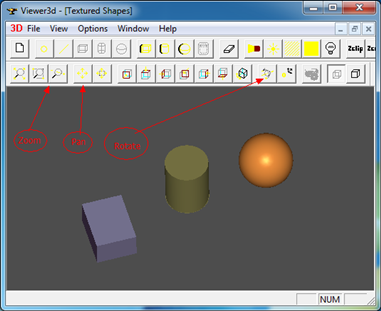
Figure 1.1 OpenCASCADE Viewer
2.Translate View
场景的移动就是改变观察相机的位置,相对容易理解,在OpenCASCADE的类V3d_View中也是这样实现的,代码如下所示:
// function : Translate
// purpose : Internal
// ==================================================================
void V3d_View::Translate (const Handle(Graphic3d_Camera)& theCamera,
const Standard_Real theDXv,
const Standard_Real theDYv) const
{
const gp_Pnt& aCenter = theCamera->Center();
const gp_Dir& aDir = theCamera->Direction();
const gp_Dir& anUp = theCamera->Up();
gp_Ax3 aCameraCS (aCenter, aDir.Reversed(), aDir ^ anUp);
gp_Vec aCameraPanXv = gp_Vec (aCameraCS.XDirection()) * theDXv;
gp_Vec aCameraPanYv = gp_Vec (aCameraCS.YDirection()) * theDYv;
gp_Vec aCameraPan = aCameraPanXv + aCameraPanYv;
gp_Trsf aPanTrsf;
aPanTrsf.SetTranslation (aCameraPan);
theCamera->Transform (aPanTrsf);
}
由上述代码可知,根据两次鼠标位置计算出需要移动的偏移量来对相机进行移动变换。根据鼠标第一次按下及移动过程中的坐标点来计算偏移量。计算偏移量时,需要注意坐标系的统一,即要么都在视口坐标系,要么都在世界坐标系中。如下代码是将鼠标点变换到世界坐标系中进行移动:
{
gp_Pnt aCurrentPoint = Convert2World(thePoint);
gp_Trsf aTrsf;
aTrsf.SetTranslation(aCurrentPoint, mPreviousPoint);
mCamera->Transform(aTrsf);
}
对相机参数进行修改后,需要更新场景数据。移动场景只涉及到MODELVIEW变换,所以需要刷新模型视图MODELVIEW变换矩阵数据并重绘场景,相关代码如下所示:
glMatrixMode(GL_MODELVIEW);
glLoadIdentity();
glLoadMatrixf(theArcballController.GetOrientationMatrix());
其中theArcballController的这个函数是调用了Graphic3d_Camera的函数来设置模型视图变换矩阵。经过测试,移动效果还可以,如下图所示为将一个Teapot从屏幕左上角移动到了右下角:
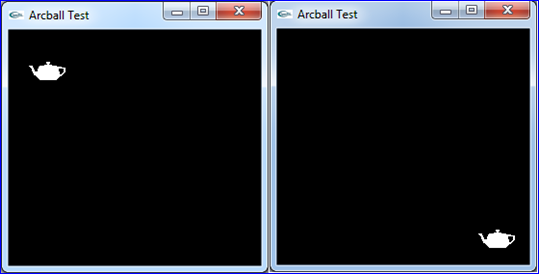
Figure 2.1 Translate the Scene
3.Zoom View
对
于透视投影而言,靠模型越近,看到模型就越大,因为透视投影的特点就是近大远小。而对平行投影而言,这种规律就不适用了。其实二者都可以统一到通过调整视
口大小来对场景模型进行缩放。同样的模型,当投影到较大的视口中时,模型的投影得到的二维图形也会较大;当投影到较小的视口中时,模型的投影得到的二维图
形也会较小。这样就达到对场景进行缩放的目的了。其中OpenCASCADE中的实现是通过设置Graphic3d_Camera的Scale来实现的,
代码如下图所示:
//function : SetZoom
//purpose :
//===================================================================
void V3d_View::SetZoom(const Standard_Real Coef,const Standard_Boolean Start)
{
V3d_BadValue_Raise_if( Coef <= 0.,"V3d_View::SetZoom, bad coefficient");
if (Start)
{
myCamStartOpEye = myCamera->Eye();
myCamStartOpCenter = myCamera->Center();
}
Standard_Real aViewWidth = myCamera->ViewDimensions().X();
Standard_Real aViewHeight = myCamera->ViewDimensions().Y();
// ensure that zoom will not be too small or too big
Standard_Real coef = Coef;
if (aViewWidth < coef * Precision::Confusion())
{
coef = aViewWidth / Precision::Confusion();
}
else if (aViewWidth > coef * 1e12)
{
coef = aViewWidth / 1e12;
}
if (aViewHeight < coef * Precision::Confusion())
{
coef = aViewHeight / Precision::Confusion();
}
else if (aViewHeight > coef * 1e12)
{
coef = aViewHeight / 1e12;
}
myCamera->SetEye (myCamStartOpEye);
myCamera->SetCenter (myCamStartOpCenter);
myCamera->SetScale (myCamera->Scale() / Coef);
View()->AutoZFit();
ImmediateUpdate();
}
根据鼠标点计算出缩改系数,通过myCamera->SetScale()来达到对场景进行缩放的目的。场景缩放操作涉及到需要更新OpenGL的投影矩阵数据,代码如下所示:
glMatrixMode(GL_PROJECTION);
glLoadIdentity();
glLoadMatrixf(theArcballController.GetProjectionMatrix());
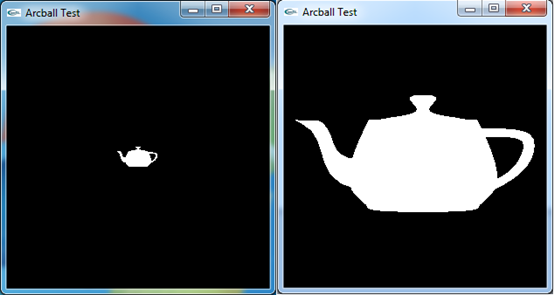
Figure 3.1 Zoom the scene
4.Rotate View
通过鼠标在二维屏幕上来旋转三维的场景有几种方法,如下图所示:
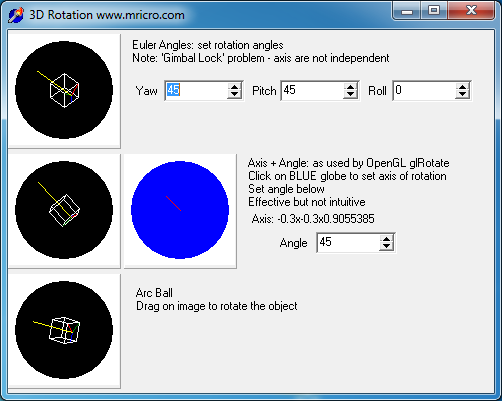
Figure 4.1 3D Rotation(http://www.cabiatl.com/mricro/obsolete/graphics/3d.html)
方法一是通过Euler Angles来实现,好处是用户比较容易理解Euler角,如yaw, pitch和roll,如下图所示:
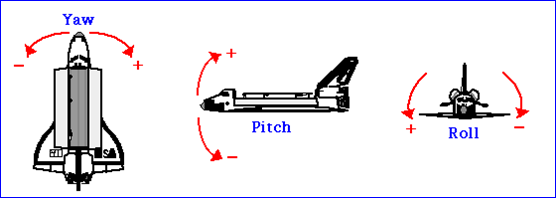
Figure 4.2 Euler Angles: Yaw, Pitch and Roll
缺点就是因为死锁问题(gimbal lock)导致不能指定一些视图,当出现死锁问题时,操作就显得不直观了。
比较直观的方法就是ArcBall方式了,使用这种方法可以以任意方向来查看场景中的模型。有个网页版的实现,可以去体验一下:
http://www.math.tamu.edu/~romwell/arcball_js/index.html
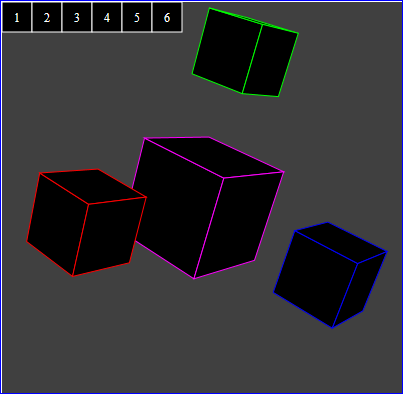
Figure 4.3 Arcball in Javascript
ArcBall的原理是将二维屏幕上鼠标点转换到球面上,拖动鼠标就是在转动这个球。根据映射到球面的两个点,通过矢量的点乘及叉乘得到旋转角度及旋转轴。通过这种方式可以将二维的鼠标位置映射到三维的场景来实现对场景观察的直观操作。
OpenCASCADE中场景的旋转方式是通过先遍历场景中的模型计算出重心点,再绕三个坐标轴来旋转,代码如下所示:
//function : Rotate
//purpose :
//=============================================================================
void V3d_View::Rotate(const Standard_Real ax, const Standard_Real ay, const Standard_Real az,
const Standard_Real X, const Standard_Real Y, const Standard_Real Z, const Standard_Boolean Start)
{
Standard_Real Ax = ax ;
Standard_Real Ay = ay ;
Standard_Real Az = az ;
if( Ax > 0. ) while ( Ax > DEUXPI ) Ax -= DEUXPI ;
else if( Ax < 0. ) while ( Ax < -DEUXPI ) Ax += DEUXPI ;
if( Ay > 0. ) while ( Ay > DEUXPI ) Ay -= DEUXPI ;
else if( Ay < 0. ) while ( Ay < -DEUXPI ) Ay += DEUXPI ;
if( Az > 0. ) while ( Az > DEUXPI ) Az -= DEUXPI ;
else if( Az < 0. ) while ( Az < -DEUXPI ) Az += DEUXPI ;
if (Start)
{
myGravityReferencePoint.SetCoord (X, Y, Z);
myCamStartOpUp = myCamera->Up();
myCamStartOpEye = myCamera->Eye();
myCamStartOpCenter = myCamera->Center();
}
const Graphic3d_Vertex& aVref = myGravityReferencePoint;
myCamera->SetUp (myCamStartOpUp);
myCamera->SetEye (myCamStartOpEye);
myCamera->SetCenter (myCamStartOpCenter);
// rotate camera around 3 initial axes
gp_Pnt aRCenter (aVref.X(), aVref.Y(), aVref.Z());
gp_Dir aZAxis (myCamera->Direction().Reversed());
gp_Dir aYAxis (myCamera->Up());
gp_Dir aXAxis (aYAxis.Crossed (aZAxis));
gp_Trsf aRot[3], aTrsf;
aRot[0].SetRotation (gp_Ax1 (aRCenter, aYAxis), -Ax);
aRot[1].SetRotation (gp_Ax1 (aRCenter, aXAxis), Ay);
aRot[2].SetRotation (gp_Ax1 (aRCenter, aZAxis), Az);
aTrsf.Multiply (aRot[0]);
aTrsf.Multiply (aRot[1]);
aTrsf.Multiply (aRot[2]);
myCamera->Transform (aTrsf);
View()->AutoZFit();
ImmediateUpdate();
}
5.Conclusion
当实现三维场景的建模后,最激动人心的应该是对场景及场景中模型的控制。通过交互操作使用户方便地观察场景的模型,或直观地编辑场景中的模型。所以交互也是三维软件中的重要功能,且是给用户最直接的感觉的操作。
因
为交互操作涉及到鼠标键盘消息的处理,所以首先要设计好对这些消息的处理方式,在OpenSceneGraph中使用了适配器的方式来实现跨平台的消息处
理,使用户通过继承的方式来实现对消息的处理。这种方式使程序的可扩展性及代码的可读性更好,OpenCASCADE中的消息的处理还是比较直接的,没有
什么封装。
本文主要介绍了如何实现对场景的控制,如移动、缩放及旋转操作,这些功能的实现需要对OpenGL的渲染管线有一定的了解。在
理解了对视图/场景的控制后,为进一步理解对场景中的模型的控制打下基础,如选择Picking,拖拽Drag等操作。最后给出一个基于
OpenCASCADE的类Graphic3d_Camera及GLUT实现的场景变换操作,功能不是很完善,仅供参考。若有好的意见,欢迎反馈。
6. References
1. Brad Smith. ArcBall. http://rainwarrior.ca/dragon/arcball.html
2. WikiBooks. Modern OpenGL Tutorial Arcball.
http://en.wikibooks.org/wiki/OpenGL_Programming/Modern_OpenGL_Tutorial_Arcball
3. sgCore demo code. http://www.cppblog.com/eryar/archive/2013/06/30/201411.html
4. Virtual Trackballs Revisited. http://image.diku.dk/research/trackballs/index.html
5. http://oviliazhang.diandian.com/post/2012-05-19/40027878859
6. 王锐,钱学雷. OpenSceneGraph三维渲染引擎设计与实践. 清华大学出版社. 2009
PDF Version and Source code: OpenCASCADE View Manipulator
OpenCASCADE View Manipulator的更多相关文章
- OpenCASCADE AIS Manipulator
OpenCASCADE AIS Manipulator eryar@163.com Abstract. OpenCASCADE7.1.0 introduces new built-in interac ...
- OpenCASCADE PCurve of Topological Face
OpenCASCADE PCurve of Topological Face eryar@163.com Abstract. OpenCASCADE provides a class BRepBuil ...
- Create views of OpenCASCADE objects in the Debugger
Create views of OpenCASCADE objects in the Debugger eryar@163.com Abstract. The Visual Studio Natvis ...
- OpenCASCADE Hidden Line Removal
OpenCASCADE Hidden Line Removal eryar@163.com Abstract. To provide the precision required in industr ...
- A Simple OpenCASCADE Qt Demo-occQt
A Simple OpenCASCADE Qt Demo-occQt eryar@163.com Abstract. OpenCASCADE have provided the Qt samples ...
- OpenCASCADE Coordinate Transforms
OpenCASCADE Coordinate Transforms eryar@163.com Abstract. The purpose of the OpenGL graphics process ...
- OpenCASCADE Camera
OpenCASCADE Camera eryar@163.com Abstract. OpenCASCADE introduce a new class Graphic3d_Camera for th ...
- OpenCASCADE Conic to BSpline Curves-Circle
OpenCASCADE Conic to BSpline Curves-Circle eryar@163.com Abstract. The conic sections and circles pl ...
- OpenCASCADE Color Scale
OpenCASCADE Color Scale eryar@163.com Abstract. The color scale is a specialized label object that d ...
随机推荐
- PHP注册与登录【2】用户注册
注册页面 reg.html 负责收集用户填写的注册信息.教程里只列出关键的代码片段,完整的代码附在本节最后. 注册表单 <fieldset> <legend>用户注册</ ...
- 【BZOJ1911】[Apio2010]特别行动队 斜率优化DP
想了好久啊....——黑字为第一次更新.——这里是第二次更新,维护上下凸包据题而论,第一种方法是化式子的方法,需要好的化式子的方法,第二种是偏向几何,十分好想,纯正的维护凸包的方法,推荐. 用了我感觉 ...
- JS生成随机字符串
function randomString(len) { len = len || 32; var $chars = 'ABCDEFGHJKMNPQRSTWXYZabcdefhijkmnprstwxy ...
- css border属性做小三角标
<!doctype html><html> <head> <title></title> <meta charset="ut ...
- Dertouzos (5750)
Dertouzos 题意: 就是给一个n和一个d,问有多少个小于n的数的最大因子是d. 分析: 如果一个数是质数,又和d互质,它们的乘积在范围内的话显然是满足条件的, 如果这个质数和d不互质,那么如果 ...
- HTML5新特性——HTML 5 Canvas vs. SVG
Canvas 和 SVG 都允许您在浏览器中创建图形,但是它们在根本上是不同的. SVG SVG 是一种使用 XML 描述 2D 图形的语言. SVG 基于 XML,这意味着 SVG DOM 中的每个 ...
- Windows下ADT环境搭建
1.JDK安装 下载JDK(点我下载),安装成功后在我的电脑->属性->高级->环境变量->系统变量中添加以下环境变量: JAVA_HOME值为C:\Program Files ...
- Python之路Day14--html
本节内容: 一.HTML 二.CSS 三.JS HTML 1.一套规则,浏览器认识的规则. 2.开发者: 学习Html规则 开发后台程序: - 写Html文件(充当模板的作用) ****** - 数据 ...
- java包(package)的命名规范
Java的包名都有小写单词组成,类名首字母大写:包的路径符合所开发的 系统模块的 定义,比如生产对生产,物资对物资,基础类对基础类.以便看了包名就明白是哪个模块,从而直接到对应包里找相应的实现. 由 ...
- jQuery最基础最全面的选择器大览
一.基本选择器 1.标签选择器 (element):根据给定的标签名匹配元素 eg:$("h2")选取所有h2元素 --- 返回元素集合 2.类选择器 (.class):根 ...