
使用 Azure ARM 部署Word Press 遇到 Extension节点 扩展的问题
在使用Azure ARM模式部署wordpress,将php网站压缩成zip的形式在DefaultTemplate模板中已扩展的形式实现安装
遇到的问题总结:
1、开始在sites节点中,resource节点下的配置如下:
servicePackageLink是我wp的网站压缩包地址
{
          "apiVersion": "2015-08-01",
          "name": "web",
          "type": "config",
          "dependsOn": [
            "[concat('Microsoft.Web/sites/', parameters('siteName'))]"
          ],
          "properties": {
            "phpVersion": "5.5"
          }
        },
        {
          "apiVersion": "2015-08-01",
          "type": "config",
          "name": "connectionstrings",
          "dependsOn": [
            "[concat('Microsoft.Web/sites/', parameters('siteName'))]",
            "[concat('Microsoft.MySql/servers/', parameters('mysqlServerName'))]"
          ],
          "properties": {
            "DefaultConnection": {
              "value": "[variables('dbConnectionString')]",
              "type": "MySql"
            }
          }
        },
        {
          "apiVersion": "2015-08-01",
          "name": "MSDeploy",
          "type": "extensions",
          "properties": {
            "packageUri": "[variables('servicePackageLink')]",
            "dbType": "None",
            "connectionString": "[variables('dbConnectionString')]"
          },
          "dependsOn": [
            "[concat('Microsoft.Web/sites/', parameters('siteName'))]"
          ]
        }
采用powershell部署时,报以下错误:

Deployment was interrupted and the process running it was terminated unexpectedly, if an ARM template is used, the likely cause is a race condition. To solve the race condition, make all resources that could potentially restart the site (app settings or site config changes for example) have a dependency on MSDeploy resource. For more info please read the information here: http://go.microsoft.com/fwlink/?LinkId=808141

根据错误信息查看,问题提示 网站部署操作被切断,推断是 MSDeploy 节点的依赖条件限制上出了问题,于是根据提示连接查看了文章,而且做了相应更改:
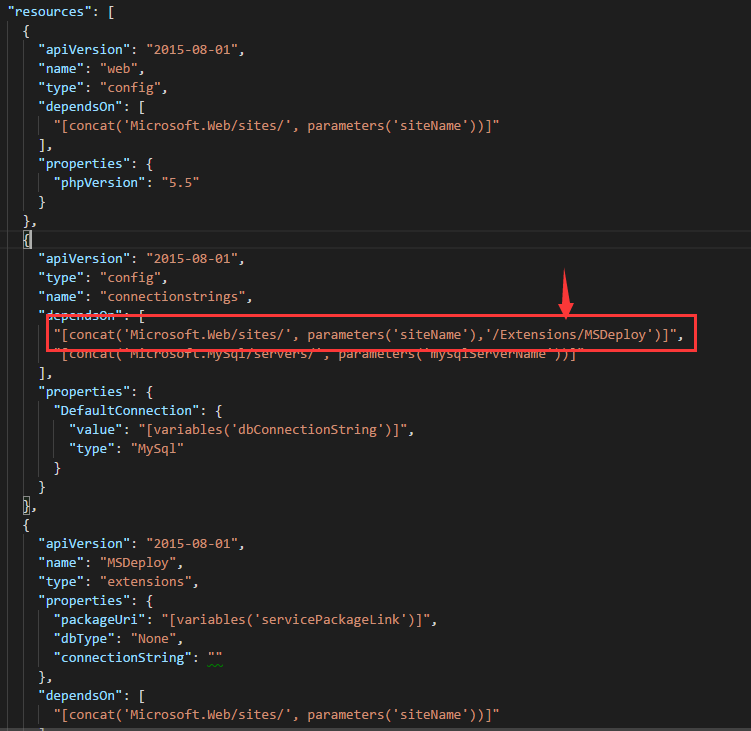
在config节点中中的dependsOn中添加了限制
Deployment template validation failed: 'The resource '/subscriptions/xxxxxxxxxxx/resourceGroups/WPTestResourceGroup/providers/Microsoft.Web/Sites/wptestwb/config/connectionstrings' at line '129' and column '
14' doesn't depend on parent resource '/subscriptions/xxxxxxx/resourceGroups/WPTestResourceGroup/providers/Microsoft.Web/Sites/wptestwb'. Please add dependency explicitly using the 'dependsOn' syntax. Please see https://aka.ms/arm-template/#resources for usage details.'.
于是只能采用其他方式来解决,既然 '/Extensions/MSDeploy' 放到 config中不能成功,那就在 extensions 加条件来限制试一下,于是给 extensions 节点添加依赖条件-> (等数据库连接创建完成以后在开始将网站部署到website中)
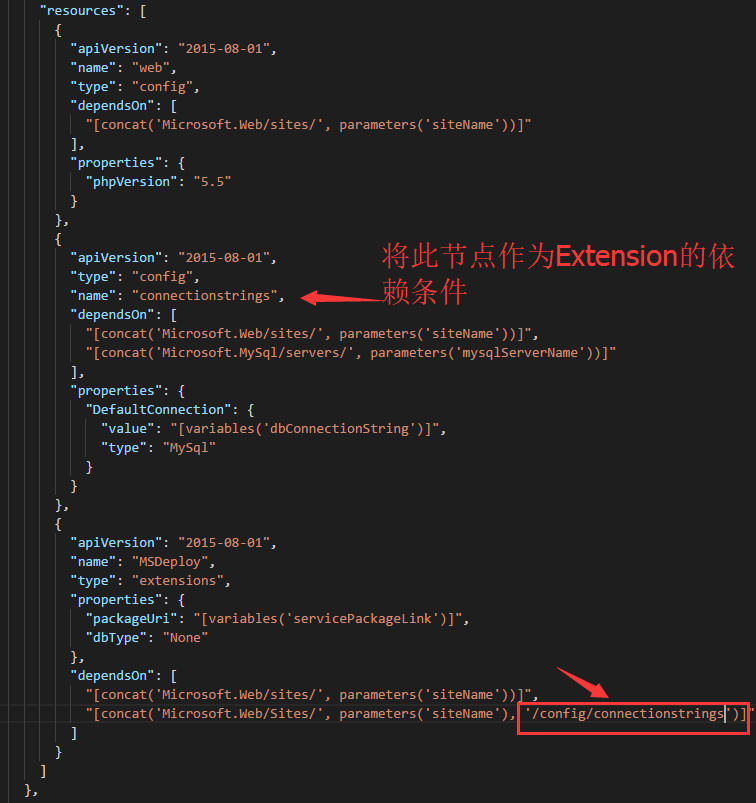
发现还是报错:
Deployment was interrupted and the process running it was terminated unexpectedly, if an ARM template is used, the likely cause is a race condition. To solve the race condition, make all resources that could potentially restart the site (app settings or site config changes for example) have a de
pendency on MSDeploy resource. For more info please read the information here: http://go.microsoft.com/fwlink/?LinkId=808141
经过查询资料看,将/ config/connectionstrings 改成 /config/web 居然成功了,
原因应该是,网站扩展包需要依赖的条件是在网站部署完成以及配置完成后才能开始从远程下载网站包,网站在配置后需要重启,重启时就会切断所有操作,这也说明了开始时会报 操作被终止 的错误,所以要将网站部署包依赖于网站配置完成后进行

最后将DefaultTemplate贴上来:
{
  "$schema": "http://schema.management.azure.com/schemas/2015-01-01/deploymentTemplate.json#",
  "contentVersion": "1.0.0.0",
  "parameters": {
    "siteName": {
      "type": "string",
      "metadata": {
        "description": "Wordpress 网站名称."
      }
    },
    "hostingPlanName": {
      "type": "string",
      "metadata": {
        "description": "Wordpress 后台web应用服务器名称."
      }
    },
    "sku": {
      "type": "string",
      "allowedValues": [
        "F1",
        "S1"
      ],
      "defaultValue": "F1",
      "metadata": {
        "description": "web应用服务器类型,F1为免费版,S1为标准版. 价格详情请访问: https://www.azure.cn/pricing/details/app-service/"
      }
    },
    "mysqlServerName": {
      "type": "string",
      "metadata": {
        "description": "MySql 服务器的名字. 最大长度为64个字母数字字符. 请通过 @mysqlServerName.mysqldb.chinacloudapi.cn访问MySql数据库. 管理配置MySql数据库请访问 https://manage.windowsazure.cn"
      }
    },
    "mysqlServerSku": {
      "type": "string",
      "defaultValue": "MS2",
      "allowedValues": [
        "MS1",
        "MS2",
        "MS3",
        "MS4",
        "MS5",
        "MS6"
      ],
      "metadata": {
        "description": "MySql 服务器的性能版本,价格详情请访问 https://www.azure.cn/pricing/details/mysql/"
      }
    },
    "mysqlServerVersion": {
      "type": "string",
      "allowedValues": [
        "5.6",
        "5.7",
        "5.5"
      ],
      "defaultValue": "5.6",
      "metadata": {
        "description": "MySQL服务器版本. "
      }
    },
    "mysqlUserName": {
      "type": "string",
      "metadata": {
        "description": "MySql 服务器登录名。登录名格式为 ‘MySQL服务器名%登录名’,长度小于16个字符。用户名和密码规范请参考: http://dev.mysql.com/doc/refman/5.6/en/user-names.html"
      }
    },
    "mysqlPassword": {
      "type": "securestring",
      "metadata": {
        "description": "MySql 服务器登录密码。长度必须大于8个字符,小于64个字符。用户名和密码规范请参考: http://dev.mysql.com/doc/refman/5.6/en/user-names.html"
      }
    },
    "mysqldatabaseName": {
      "type": "string",
      "metadata": {
        "description": "数据库名字。必须小于64个字符,其它命名规范请参考: http://dev.mysql.com/doc/refman/5.6/en/identifiers.html"
      }
    },
    "artifactsLocation": {
      "type": "string",
      "metadata": {
        "description": "The location where dependency package is stored."
      }
    }
  },
  "variables": {
    "servicePackageLink": "[concat(parameters('artifactsLocation'), 'wordpress-azure.zip')]",
    "dbConnectionString": "[concat('Data Source=', parameters('mysqlServerName'), '.mysqldb.chinacloudapi.cn', ';Database=', parameters('mysqldatabaseName'), ';User Id=', parameters('mysqlUserName'), '@', parameters('mysqlServerName'), ';Password=', parameters('mysqlPassword'))]"
  },
  "resources": [
    {
      "apiVersion": "2015-08-01",
      "name": "[parameters('hostingPlanName')]",
      "type": "Microsoft.Web/serverFarms",
      "location": "[resourceGroup().location]",
      "properties": {

      },
      "sku": {
        "name": "[parameters('sku')]",
        "capacity": 1
      }
    },
    {
      "apiVersion": "2015-08-01",
      "name": "[parameters('siteName')]",
      "type": "Microsoft.Web/Sites",
      "kind": "app",
      "location": "[resourceGroup().location]",
      "dependsOn": [
        "[concat('Microsoft.Web/serverFarms/', parameters('hostingPlanName'))]"
      ],
      "properties": {
        "name": "[parameters('siteName')]",
        "serverFarmId": "[parameters('hostingPlanName')]"
      },
      "resources": [
        {
          "apiVersion": "2015-08-01",
          "name": "web",
          "type": "config",
          "dependsOn": [
            "[concat('Microsoft.Web/sites/', parameters('siteName'))]"
          ],
          "properties": {
            "phpVersion": "5.5"
          }
        },
        {
          "apiVersion": "2015-08-01",
          "type": "config",
          "name": "connectionstrings",
          "dependsOn": [
            "[concat('Microsoft.Web/sites/', parameters('siteName'))]",
            "[concat('Microsoft.MySql/servers/', parameters('mysqlServerName'))]"
          ],
          "properties": {
            "DefaultConnection": {
              "value": "[variables('dbConnectionString')]",
              "type": "MySql"
            }
          }
        },
        {
          "apiVersion": "2015-08-01",
          "name": "MSDeploy",
          "type": "extensions",
          "properties": {
            "packageUri": "[variables('servicePackageLink')]",
            "dbType": "None"
          },
          "dependsOn": [
            "[concat('Microsoft.Web/sites/', parameters('siteName'))]",
            "[concat('Microsoft.Web/Sites/', parameters('siteName'), '/config/web')]"
          ]
        }
      ]
    },
    {
      "type": "Microsoft.MySql/servers",
      "name": "[parameters('mysqlServerName')]",
      "apiVersion": "2015-09-01",
      "location": "[resourceGroup().location]",
      "tags": {
        "displayName": "[parameters('mysqlServerName')]"
      },
      "sku": { "name": "[parameters('mysqlServerSku')]" },
      "properties": {
        "version": "[parameters('mysqlServerVersion')]",
        "AllowAzureServices": true
      },
      "resources": [
        {
          "name": "[parameters('mysqlUserName')]",
          "type": "users",
          "apiVersion": "2015-09-01",
          "dependsOn": [
            "[concat('Microsoft.MySql/servers/', parameters('mysqlServerName'))]"
          ],
          "properties": {
            "password": "[parameters('mysqlPassword')]"
          }
        },

        {
          "name": "[parameters('mysqldatabaseName')]",
          "type": "databases",
          "tags": {
            "displayName": "[parameters('mysqldatabaseName')]"
          },
          "apiVersion": "2015-09-01",
          "dependsOn": [
            "[concat('Microsoft.MySql/servers/', parameters('mysqlServerName'))]"
          ],
          "properties": {},
          "resources": [
            {
              "name": "[parameters('mysqlUserName')]",
              "type": "privileges",
              "apiVersion": "2015-09-01",
              "dependsOn": [
                "[concat('Microsoft.MySql/servers/', parameters('mysqlServerName'), '/users/', parameters('mysqlUserName'))]",
                "[concat('Microsoft.MySql/servers/', parameters('mysqlServerName'), '/databases/', parameters('mysqldatabaseName'))]"
              ],
              "properties": {
                "level": "ReadWrite"
              }
            }
          ]
        }
      ]
    }

  ]
}
使用 Azure ARM 部署Word Press 遇到 Extension节点 扩展的问题的更多相关文章
- Azure ARM虚拟机部署反恶意软件-安全扩展
Azure虚拟机,默认情况下没有安装杀毒软件.如果您有此需求可以通过Azure 扩展进行安装,有关Azure反恶意软件的官方说明请参考:https://docs.azure.cn/zh-cn/secu ...
- Azure ARM (8) ARM Template - VS Code
<Windows Azure Platform 系列文章目录> 在上一节内容中,笔者介绍了如何使用Visual Studio来编辑ARM Template. 但是在某些时候,Visual ...
- 在Azure上部署IPv6的App通过IOS App Store审核
随着中国企业出海Go Global,越来越多的用户开始在Global Azure部署自己的应用.由于对Global Azure功能和文档的不熟悉,使用过程中或多或少遇到了一些坑.事实上呢,这些并不是坑 ...
- Azure ARM (3) ARM支持的服务类型
<Windows Azure Platform 系列文章目录> 我们在使用ARM创建资源的时候,首先要确认哪些Azure服务,支持ARM模式. 具体内容,我们可以参考连接:https:// ...
- Azure ARM (5) ARM Template初探 - 本地JSON Template文件(1)
<Windows Azure Platform 系列文章目录> Azure ARM (1) 概览 Azure ARM (2) 概览 Azure ARM (3) ...
- Azure ARM (10) ARM模式下的虚拟机和Classic Model虚拟机的区别
<Windows Azure Platform 系列文章目录> 本文内容比较多,请大家仔细阅读,谢谢! 请读者注意,在Azure ARM平台,有两种虚拟机模式:经典虚拟机和ARM虚拟机 A ...
- China Azure中部署Kubernetes(K8S)集群
目前China Azure还不支持容器服务(ACS),使用名称"az acs create --orchestrator-type Kubernetes -g zymtest -n kube ...
- Azure ARM (21) Azure订阅的两种管理模式
<Windows Azure Platform 系列文章目录> 熟悉Azure平台的读者都知道,Microsoft Azure服务管理,分为三个层次: 1.企业服务合同 (Enterpri ...
- 手把手教你创建Azure ARM Template
Azure的ARM模式在中国已经落地了.在ARM模式中,通过ARM的Template批量的创建各种资源是与ASM模式的最大的区别之一.目前Azure ARM的Template数量已经越来越多,更多的客 ...
随机推荐
- javascript XMLHttpRequest 对象的open() 方法参数说明
下文是从w3c上摘录下来的,其中参数 method 说明的很简短,不是很理解,所以又找了些资料作为补充.文中带括号部分. XMLHttpRequest.open() 初始化 HTTP 请求参数 语法o ...
- html5--6-50 动画效果-变形
html5--6-50 动画效果-变形 实例 学习要点 掌握2D变形动画 了解3D变形动画 transform:2D变形: 通过 CSS3 转换,我们能够对元素进行移动.缩放.转动.拉长或拉伸.转换方 ...
- VC++静态连接库
目录 第1章静态连接库 1 1.1 同名函数的选择 1 1.2 模块合并 2 1.2.1 模块替换 4 1.3 内联函数 4 第1章静态连接库 静态连接库与动态连接库一样 ...
- ubuntu openjdk 7 升级 8
/******************************************************************************* * ubuntu openjdk 7 ...
- 「HAOI2015」「LuoguP3178」树上操作(树链剖分
题目描述 有一棵点数为 N 的树,以点 1 为根,且树点有边权.然后有 M 个操作,分为三种: 操作 1 :把某个节点 x 的点权增加 a . 操作 2 :把某个节点 x 为根的子树中所有点的点权都增 ...
- Cow Marathon(树的直径)
传送门 Cow Marathon Time Limit: 2000MS Memory Limit: 30000K Total Submissions: 5362 Accepted: 2634 ...
- Python 赋值、浅拷贝和深拷贝
初学Python,和C++还是有许多不同.直接赋值.浅拷贝和深拷贝,这三种拷贝对象的操作之间还是有许多的区别.Python语言的版本为2.7,在Pycharm中进行实验. 一.直接赋值 用下面的代码来 ...
- A - Two Substrings
Time Limit:2000MS Memory Limit:262144KB 64bit IO Format:%I64d & %I64u Description You ar ...
- 自己设计的java web消息提示机制
最近在做个类CMS的一个系统,前端展示都OK了,在做后台管理,就是对数据库的增删改查.使用SSH实现功能倒也蛮简单的,只是为了人性化的设计,需要做一些提示机制,比如用户删除了一条数据给个删除成功的提示 ...
- django基础知识
一.django的安装 1. pip3 install django 2. 把安装路径加到环境变量里以便以后启动admin相关命令,在windows系统中---我的电脑---属性----高级系统设置- ...