
[Unit Testing] Fundamentals of Testing in Javascript
In this lesson, we’ll get the most fundamental understanding of what an automated test is in JavaScript. A test is code that throws an error when the actual result of something does not match the expected output.
Tests can get more complicated when you’re dealing with code that depends on some state to be set up first (like a component needs to be rendered to the document before you can fire browser events, or there needs to be users in the database). However, it is relatively easy to test pure functions (functions which will always return the same output for a given input and not change the state of the world around them).
Base file to test against:
math.js
const sum = (a, b) => a - b;

const subtract = (a, b) => a - b;

const sumAsync = (...args) => Promise.resolve(sum(...args));

const subtractAsync = (...args) => Promise.resolve(subtract(...args));

module.exports = { sum, subtract, sumAsync, subtractAsync };
index.js
const { sum, subtract } = require("./math");

let result, expected;

result = sum(, );

expected = ;

if (actual !== expected) {

   throw new Error(`${result} is not equal to ${expected}`);

}

result = subtract(, );

expected = ;

if (actual !== expected) {

   throw new Error(`${result} is not equal to ${expected}`);

}
Let’s add a simple layer of abstraction in our simple test to make writing tests easier. The assertion library will help our test assertions read more like a phrase you might say which will help people understand our intentions better. It will also help us avoid unnecessary duplication.
const { sum, subtract } = require("./math");

let result, expected;

result = sum(, );

expected = ;

expect(result).toBe(expected);

result = subtract(, );

expected = ;

expect(result).toBe(expected);

function expect(actual) {

  return {

    toBe(expected) {

      if (actual !== expected) {

        throw new Error(`${actual} is not equal to ${expected}`);

      }

    }

  };

}
This is also a common way to write a assetion library, expect() function take a actual value and return an object contains 'toBe', 'toEqual'... functions.
One of the limitations of the way that this test is written is that as soon as one of these assertions experiences an error, the other tests are not run. It can really help developers identify what the problem is if they can see the results of all of the tests.
Let’s create our own test function to allow us to encapsulate our automated tests, isolate them from other tests in the file, and ensure we run all the tests in the file with more helpful error messages.
const { sum, subtract } = require("./math");

let result, expected;

test("sum adds numbers", () => {

  result = sum(, );

  expected = ;

  expect(result).toBe(expected);

});

test("subtract substracts numbers", () => {

  result = subtract(, );

  expected = ;

  expect(result).toBe(expected);

});

function test(title, cb) {

  try {

    cb();

    console.log(`%c ✔︎ ${title}`, "color: green");

  } catch (err) {

    console.error(`✘ ${title}`);

    console.error(err);

  }

}
Our testing framework works great for our synchronous test. What if we had some asynchronous functions that we wanted to test? We could make our callback functions async, and then use the await keyword to wait for that to resolve, then we can make our assertion on the result and the expected.
Let’s make our testing framework support promises so users can use async/await.
const { sumAsync, subtractAsync } = require("./math");

let result, expected;

test("sum adds numbers", async () => {

  result = await sumAsync(3, 7);

  expected = 10;

  expect(result).toBe(expected);

});

test("subtract substracts numbers", async () => {

  result = await subtractAsync(7, 3);

  expected = 4;

  expect(result).toBe(expected);

});

function test(title, cb) {

  try {

    cb();

    console.log(`%c ✔︎ ${title}`, "color: green");

  } catch (err) {

    console.error(`✘ ${title}`);

    console.error(err);

  }

}

function expect(actual) {

  return {

    toBe(expected) {

      if (actual !== expected) {

        throw new Error(`${actual} is not equal to ${expected}`);

      }

    }

  };

}
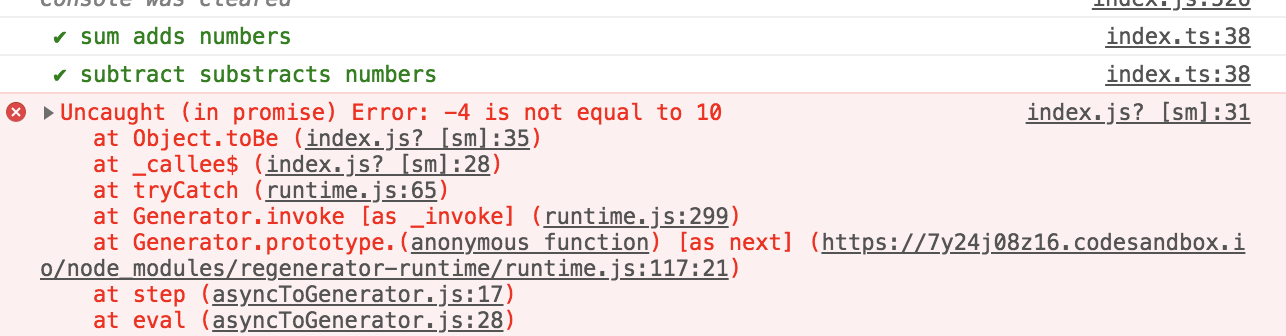
To fix the problem, we can make our testing lib async / await.
async function test(title, cb) {

  try {

    await cb();

    console.log(`%c ✔︎ ${title}`, "color: green");

  } catch (err) {

    console.error(`✘ ${title}`);

    console.error(err);

  }

}
Not it works normal again.
These testing utilities that we built are pretty useful. We want to be able to use them throughout our application in every single one of our test files.
Some testing frameworks provide their helpers as global variables. Let’s implement this functionality to make it easier to use our testing framework and assertion library. We can do this by exposing our test and expect functions on the global object available throughout the application.
setup-global.js:
async function test(title, cb) {

  try {

    await cb();

    console.log(`%c ✔︎ ${title}`, "color: green");

  } catch (err) {

    console.error(`✘ ${title}`);

    console.error(err);

  }

}

function expect(actual) {

  return {

    toBe(expected) {

      if (actual !== expected) {

        throw new Error(`${actual} is not equal to ${expected}`);

      }

    }

  };

}

global.test = test;

global.expect = expect;
Run:
node --require ./setup-global.js src/index.js
Up to this point we’ve created all our own utilities. As it turns out, the utilities we’ve created mirror the utilities provided by Jest perfectly! Let’s install Jest and use it to run our test!
npx jest
[Unit Testing] Fundamentals of Testing in Javascript的更多相关文章
- 【Android Api 翻译1】Android Texting(2)Testing Fundamentals 测试基础篇
Testing Fundamentals The Android testing framework, an integral part of the development environment, ...
- Android Texting(2)Testing Fundamentals 测试基础篇
Testing Fundamentals The Android testing framework, an integral part of the development environment, ...
- Unit Testing, Integration Testing and Functional Testing
转载自:https://codeutopia.net/blog/2015/04/11/what-are-unit-testing-integration-testing-and-functional- ...
- Android测试:Fundamentals of Testing
原文地址:https://developer.android.com/training/testing/fundamentals.html 用户在不同的级别上与你的应用产生交互.从按下按钮到将信息下载 ...
- Difference Between Performance Testing, Load Testing and Stress Testing
http://www.softwaretestinghelp.com/what-is-performance-testing-load-testing-stress-testing/ Differen ...
- Go testing 库 testing.T 和 testing.B 简介
testing.T 判定失败接口 Fail 失败继续 FailNow 失败终止 打印信息接口 Log 数据流 (cout 类似) Logf format (printf 类似) SkipNow 跳过当 ...
- [Testing] Config jest to test Javascript Application -- Part 1
Transpile Modules with Babel in Jest Tests Jest automatically loads and applies our babel configurat ...
- [Testing] Config jest to test Javascript Application -- Part 3
Run Jest Watch Mode by default locally with is-ci-cli In CI, we don’t want to start the tests in wat ...
- [Testing] Config jest to test Javascript Application -- Part 2
Setup an afterEach Test Hook for all tests with Jest setupTestFrameworkScriptFile With our current t ...
随机推荐
- 【Gradle】Downloading https://services.gradle.org/distributions/gradle-3.3-bin.zip 失败
提示连接超时 Downloading https://services.gradle.org/distributions/gradle-3.3-bin.zip 失败 这时候需要单独去官网下载包,然后放 ...
- Day11名称空间,作用域,闭包函数
Day11 1.函数对象: ①可以被引用 ②可以作为另一个函数的参数 ③可以作为另一个函数的返回值0 ④可以被存储到容器类型中 2.函数嵌套: ①嵌套调用:在一个函数中调用了另一个函数 ...
- nrf52810学习笔记——三
在开发nRF52系列的蓝牙方案的时候,会用到IDE.SDK.softdevice.nrfgoStudio等开发软件,这里做一个小小的总结. 首先,下载SDK,里面有适合keil4号iar7(iar8也 ...
- 几条sql语句(exists)
通常exists后的子查询是需要和外面的表建立关联关系的,如 select count(*) from a where exists (select 'x' from b where a.id = b ...
- 关于awk中NR、FNR、NF、$NF、FS、OFS的说明
一.NR和FNR 1.释义 NR: 表示当前读取的行数 FNR:当前修改了多少行 2.举例 比如现在AWK处理到第五行.第一行没有进行操作,2,3,4,5行进行了操作,那么NR=5,FNR=4 NR= ...
- python算法-栈
定义: 栈(stack)又名堆栈,它是一种运算受限的线性表.其限制是仅允许在表的一端进行插入和删除运算.这一端被称为栈顶,相对地,把另一端称为栈底.向一个栈插入新元素又称作进栈.入栈或压栈,它是把新元 ...
- div的显示隐藏方法汇总
JQuery DIV 动态隐藏和显示的方法 1. 如果在载入是隐藏: <head> <script language="javascript"> funct ...
- 通过日志动态查看正在执行的mysql语句
通过日志动态查看正在执行的mysql语句 :tail -f /tmp/general_log.log
- NYOJ 311 完全背包
完全背包 时间限制:3000 ms | 内存限制:65535 KB 难度:4 描述 直接说题意,完全背包定义有N种物品和一个容量为V的背包,每种物品都有无限件可用.第i种物品的体积是c,价值是 ...
- nginx,lvs,haproxy负载均衡对比
Nginx/LVS/HAProxy是目前使用最广泛的三种负载均衡软件,一般对负载均衡的使用是随着网站规模的提升根据不同的阶段来使用不同的技术,具体的应用需求还得具体分析. 如果是中小型的Web应用,比 ...