
[Unit Testing] Fundamentals of Testing in Javascript
In this lesson, we’ll get the most fundamental understanding of what an automated test is in JavaScript. A test is code that throws an error when the actual result of something does not match the expected output.
Tests can get more complicated when you’re dealing with code that depends on some state to be set up first (like a component needs to be rendered to the document before you can fire browser events, or there needs to be users in the database). However, it is relatively easy to test pure functions (functions which will always return the same output for a given input and not change the state of the world around them).
Base file to test against:
math.js
const sum = (a, b) => a - b;

const subtract = (a, b) => a - b;

const sumAsync = (...args) => Promise.resolve(sum(...args));

const subtractAsync = (...args) => Promise.resolve(subtract(...args));

module.exports = { sum, subtract, sumAsync, subtractAsync };
index.js
const { sum, subtract } = require("./math");

let result, expected;

result = sum(, );

expected = ;

if (actual !== expected) {

   throw new Error(`${result} is not equal to ${expected}`);

}

result = subtract(, );

expected = ;

if (actual !== expected) {

   throw new Error(`${result} is not equal to ${expected}`);

}
Let’s add a simple layer of abstraction in our simple test to make writing tests easier. The assertion library will help our test assertions read more like a phrase you might say which will help people understand our intentions better. It will also help us avoid unnecessary duplication.
const { sum, subtract } = require("./math");

let result, expected;

result = sum(, );

expected = ;

expect(result).toBe(expected);

result = subtract(, );

expected = ;

expect(result).toBe(expected);

function expect(actual) {

  return {

    toBe(expected) {

      if (actual !== expected) {

        throw new Error(`${actual} is not equal to ${expected}`);

      }

    }

  };

}
This is also a common way to write a assetion library, expect() function take a actual value and return an object contains 'toBe', 'toEqual'... functions.
One of the limitations of the way that this test is written is that as soon as one of these assertions experiences an error, the other tests are not run. It can really help developers identify what the problem is if they can see the results of all of the tests.
Let’s create our own test function to allow us to encapsulate our automated tests, isolate them from other tests in the file, and ensure we run all the tests in the file with more helpful error messages.
const { sum, subtract } = require("./math");

let result, expected;

test("sum adds numbers", () => {

  result = sum(, );

  expected = ;

  expect(result).toBe(expected);

});

test("subtract substracts numbers", () => {

  result = subtract(, );

  expected = ;

  expect(result).toBe(expected);

});

function test(title, cb) {

  try {

    cb();

    console.log(`%c ✔︎ ${title}`, "color: green");

  } catch (err) {

    console.error(`✘ ${title}`);

    console.error(err);

  }

}
Our testing framework works great for our synchronous test. What if we had some asynchronous functions that we wanted to test? We could make our callback functions async, and then use the await keyword to wait for that to resolve, then we can make our assertion on the result and the expected.
Let’s make our testing framework support promises so users can use async/await.
const { sumAsync, subtractAsync } = require("./math");

let result, expected;

test("sum adds numbers", async () => {

  result = await sumAsync(3, 7);

  expected = 10;

  expect(result).toBe(expected);

});

test("subtract substracts numbers", async () => {

  result = await subtractAsync(7, 3);

  expected = 4;

  expect(result).toBe(expected);

});

function test(title, cb) {

  try {

    cb();

    console.log(`%c ✔︎ ${title}`, "color: green");

  } catch (err) {

    console.error(`✘ ${title}`);

    console.error(err);

  }

}

function expect(actual) {

  return {

    toBe(expected) {

      if (actual !== expected) {

        throw new Error(`${actual} is not equal to ${expected}`);

      }

    }

  };

}
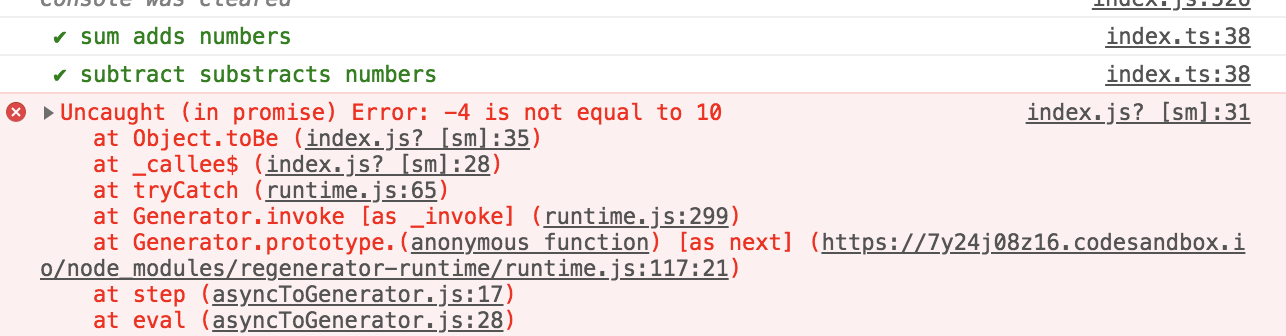
To fix the problem, we can make our testing lib async / await.
async function test(title, cb) {

  try {

    await cb();

    console.log(`%c ✔︎ ${title}`, "color: green");

  } catch (err) {

    console.error(`✘ ${title}`);

    console.error(err);

  }

}
Not it works normal again.
These testing utilities that we built are pretty useful. We want to be able to use them throughout our application in every single one of our test files.
Some testing frameworks provide their helpers as global variables. Let’s implement this functionality to make it easier to use our testing framework and assertion library. We can do this by exposing our test and expect functions on the global object available throughout the application.
setup-global.js:
async function test(title, cb) {

  try {

    await cb();

    console.log(`%c ✔︎ ${title}`, "color: green");

  } catch (err) {

    console.error(`✘ ${title}`);

    console.error(err);

  }

}

function expect(actual) {

  return {

    toBe(expected) {

      if (actual !== expected) {

        throw new Error(`${actual} is not equal to ${expected}`);

      }

    }

  };

}

global.test = test;

global.expect = expect;
Run:
node --require ./setup-global.js src/index.js
Up to this point we’ve created all our own utilities. As it turns out, the utilities we’ve created mirror the utilities provided by Jest perfectly! Let’s install Jest and use it to run our test!
npx jest
[Unit Testing] Fundamentals of Testing in Javascript的更多相关文章
- 【Android Api 翻译1】Android Texting(2)Testing Fundamentals 测试基础篇
Testing Fundamentals The Android testing framework, an integral part of the development environment, ...
- Android Texting(2)Testing Fundamentals 测试基础篇
Testing Fundamentals The Android testing framework, an integral part of the development environment, ...
- Unit Testing, Integration Testing and Functional Testing
转载自:https://codeutopia.net/blog/2015/04/11/what-are-unit-testing-integration-testing-and-functional- ...
- Android测试:Fundamentals of Testing
原文地址:https://developer.android.com/training/testing/fundamentals.html 用户在不同的级别上与你的应用产生交互.从按下按钮到将信息下载 ...
- Difference Between Performance Testing, Load Testing and Stress Testing
http://www.softwaretestinghelp.com/what-is-performance-testing-load-testing-stress-testing/ Differen ...
- Go testing 库 testing.T 和 testing.B 简介
testing.T 判定失败接口 Fail 失败继续 FailNow 失败终止 打印信息接口 Log 数据流 (cout 类似) Logf format (printf 类似) SkipNow 跳过当 ...
- [Testing] Config jest to test Javascript Application -- Part 1
Transpile Modules with Babel in Jest Tests Jest automatically loads and applies our babel configurat ...
- [Testing] Config jest to test Javascript Application -- Part 3
Run Jest Watch Mode by default locally with is-ci-cli In CI, we don’t want to start the tests in wat ...
- [Testing] Config jest to test Javascript Application -- Part 2
Setup an afterEach Test Hook for all tests with Jest setupTestFrameworkScriptFile With our current t ...
随机推荐
- 解决zend studio代码无法自动提示的3个方法
最近电脑重装,索性把用了好多年的老版本7.x 升级了,网上下载了一个12.x的破解版. 起初一切正常,等导入项目开始开发的时候发现PHP函数尽然没有提示,一脸懵逼! 经过多方查阅和尝试,现在分享3个解 ...
- 折半查找,binarySearch
折半查找法也称为二分查找法,它充分利用了元素间的次序关系,采用分治策略,可在最坏的情况下用O(log n)完成搜索任务.它的基本思想是,将n个元素分成个数大致相同的两半,取a[n/2]与欲查找的x作比 ...
- C盘清理小技巧
步骤/方法 1 1 关闭休眠功能,在开始菜单的运行里输入powercfg -h off 指令,关闭休眠,此文件实际大小和物理内存是一样的,大约可以为C盘释放1-3G的空间. 2 2 设置虚拟内存: ...
- 资产管理软件 GLPI的安装(转)
资产管理系统GLPI的安装 2010-07-05 16:20:31 标签:休闲 资产管理系统 GLPI 职场 原创作品,允许转载,转载时请务必以超链接形式标明文章 原始出处 .作者信息和本声明.否则 ...
- PHP优化之批量操作MySQL
设计一个数据表如下: create table optimization( id INT NOT NULL AUTO_INCREMENT, value VARCHAR(10) NOT NULL, PR ...
- python3--__repr_和__str__会返回字符串表达形式
__repr_和__str__会返回字符串表达形式 下一个例子是已经见过的init构造方法和add重载方法,本例也会定义返回实例的字符串表达形式的__repr__方法.字符串格式把self.data对 ...
- poj 3617Best Cow Line
Description FJ is about to take his N (1 ≤ N ≤ 2,000) cows to the annual"Farmer of the Year&quo ...
- Android点击按钮拨打电话
代码改变世界 Android点击按钮拨打电话 public void callPhone(String str) { Intent intent=new Intent(); intent.setAct ...
- POJ 3693 Maximum repetition substring ——后缀数组
重复次数最多的字串,我们可以枚举循环节的长度. 然后正反两次LCP,然后发现如果长度%L有剩余的情况时,答案是在一个区间内的. 所以需要找到区间内最小的rk值. 两个后缀数组,四个ST表,$\Thet ...
- hdu4336 Card Collector(概率DP,状态压缩)
In your childhood, do you crazy for collecting the beautiful cards in the snacks? They said that, fo ...