
Netty入门教程:Netty拆包粘包技术讲解
Netty编解码技术是什么意思呢?所谓的编解码技术,说白了就是java序列化技术。序列化有两个目的:
1、进行网络传输
2、对象持久化
虽然我们可以使用java进行序列化,Netty去传输。但是java序列化的硬伤太多,比如java的序列化无法跨平台、序列化后码流太大、序列化性能非常低等等...
码流太大是什么意思呢?比如说原先的我一篇文档,比如说大小是1M,序列化完了之后可能0.5M,序列化减少二分之一的码,比较大。然后0.5M去网络传输这个不太好。你比如说用其它的一些主流序列化的话可能就0.01M,非常小。性能非常好。
性能太低就是说,我用java序列化的过程可能需要10s,而用其它的高性能序列化可能0.1s。差距就是这么的大。
序列化的目的无非就是网络传输。而目前主流的序列化框架有以下几种:
1、JBoss的Marshalling
2、Google的Protobuf
3、基于Protobuf的Kyro
4、MessagePack框架
其实我们主要是讲Marshalling和Google的Protobuf。这两个是业界非常好用的框架。其中JBoss的Marshalling速度还要比Google的Protobuf要快,原因是因为Marshalling不是跨语言,两端都是java与java之间相互传输的。因此,在这种情况下我们就用它就行了。但如果你想实现跨语言,比如这边是c#,另一边是java。这种跨语言进行通信传输的话,那你就需要用到Google的Protobuf来进行跨语言的传输。性能也非常高。而且它自己有一些大端小端的优化机制。
下面开始Marshalling编码实现。
首先新建一个java工程,导入netty和jboss-marshalling的jar包,导入几张图片到sources文件夹以便测试。

新建一个Req类,并编写相关代码
 package com.it448.serial;

 import java.io.Serializable;

 public class Req implements Serializable{

     private static final long serialVersionUID = 1L;

     private String id ;

     private String name ;

     private String requestMessage ;

     private byte[] attachment;

     public String getId() {

         return id;

     }

     public void setId(String id) {

         this.id = id;

     }

     public String getName() {

         return name;

     }

     public void setName(String name) {

         this.name = name;

     }

     public String getRequestMessage() {

         return requestMessage;

     }

     public void setRequestMessage(String requestMessage) {

         this.requestMessage = requestMessage;

     }

     public byte[] getAttachment() {

         return attachment;

     }

     public void setAttachment(byte[] attachment) {

         this.attachment = attachment;

     }

 }
新建一个Resp类,并编写相关代码
 package com.it448.serial;

 import java.io.Serializable;

 public class Resp implements Serializable{

     private static final long serialVersionUID = 1L;

     private String id;

     private String name;

     private String responseMessage;

     public String getId() {

         return id;

     }

     public void setId(String id) {

         this.id = id;

     }

     public String getName() {

         return name;

     }

     public void setName(String name) {

         this.name = name;

     }

     public String getResponseMessage() {

         return responseMessage;

     }

     public void setResponseMessage(String responseMessage) {

         this.responseMessage = responseMessage;

     }

 }
新建一个工具类GzipUtils,方便调用
 package com.it448.utils;

 import java.io.ByteArrayInputStream;

 import java.io.ByteArrayOutputStream;

 import java.io.File;

 import java.io.FileInputStream;

 import java.io.FileOutputStream;

 import java.util.zip.GZIPInputStream;

 import java.util.zip.GZIPOutputStream;

 public class GzipUtils {

     public static byte[] gzip(byte[] data) throws Exception{

         ByteArrayOutputStream bos = new ByteArrayOutputStream();

         GZIPOutputStream gzip = new GZIPOutputStream(bos);

         gzip.write(data);

         gzip.finish();

         gzip.close();

         byte[] ret = bos.toByteArray();

         bos.close();

         return ret;

     }

     public static byte[] ungzip(byte[] data) throws Exception{

         ByteArrayInputStream bis = new ByteArrayInputStream(data);

         GZIPInputStream gzip = new GZIPInputStream(bis);

         byte[] buf = new byte[1024];

         int num = -1;

         ByteArrayOutputStream bos = new ByteArrayOutputStream();

         while((num = gzip.read(buf, 0 , buf.length)) != -1 ){

             bos.write(buf, 0, num);

         }

         gzip.close();

         bis.close();

         byte[] ret = bos.toByteArray();

         bos.flush();

         bos.close();

         return ret;

     }

     public static void main(String[] args) throws Exception{

         // 读取文件

         String readPath = System.getProperty("user.dir") + File.separatorChar + "sources" +  File.separatorChar + "006.jpg";

         File file = new File(readPath);

         FileInputStream in = new FileInputStream(file);

         byte[] data = new byte[in.available()];

         in.read(data);

         in.close();

         System.out.println("文件原始大小:" + data.length);

         // 测试压缩

         byte[] ret1 = GzipUtils.gzip(data);

         System.out.println("压缩之后大小:" + ret1.length);

         byte[] ret2 = GzipUtils.ungzip(ret1);

         System.out.println("还原之后大小:" + ret2.length);

         // 写出文件

         String writePath = System.getProperty("user.dir") + File.separatorChar + "receive" +  File.separatorChar + "006.jpg";

         FileOutputStream fos = new FileOutputStream(writePath);

         fos.write(ret2);

         fos.close();

     }

 }
新建一个Marshalling工厂类MarshallingCodeCFactory.java
 package com.it448.serial;

 import io.netty.handler.codec.marshalling.DefaultMarshallerProvider;

 import io.netty.handler.codec.marshalling.DefaultUnmarshallerProvider;

 import io.netty.handler.codec.marshalling.MarshallerProvider;

 import io.netty.handler.codec.marshalling.MarshallingDecoder;

 import io.netty.handler.codec.marshalling.MarshallingEncoder;

 import io.netty.handler.codec.marshalling.UnmarshallerProvider;

 import org.jboss.marshalling.MarshallerFactory;

 import org.jboss.marshalling.Marshalling;

 import org.jboss.marshalling.MarshallingConfiguration;

 /**

  * Marshalling工厂

  * @author(xyh)

  * @since 2019-06-12

  */

 public final class MarshallingCodeCFactory {

     /**

           * 创建Jboss Marshalling解码器MarshallingDecoder

      * @return MarshallingDecoder

      */

     public static MarshallingDecoder buildMarshallingDecoder() {

         // 首先通过Marshalling工具类的精通方法获取Marshalling实例对象 参数serial标识创建的是java序列化工厂对象。

         final MarshallerFactory marshallerFactory = Marshalling.getProvidedMarshallerFactory("serial");

         // 创建了MarshallingConfiguration对象,配置了版本号为5

         final MarshallingConfiguration configuration = new MarshallingConfiguration();

         configuration.setVersion(5);

         // 根据marshallerFactory和configuration创建provider

         UnmarshallerProvider provider = new DefaultUnmarshallerProvider(marshallerFactory, configuration);

         // 构建Netty的MarshallingDecoder对象,俩个参数分别为provider和单个消息序列化后的最大长度

         MarshallingDecoder decoder = new MarshallingDecoder(provider, 1024 * 1024 * 1);

         return decoder;

     }

     /**

           * 创建Jboss Marshalling编码器MarshallingEncoder

      * @return MarshallingEncoder

      */

     public static MarshallingEncoder buildMarshallingEncoder() {

         final MarshallerFactory marshallerFactory = Marshalling.getProvidedMarshallerFactory("serial");

         final MarshallingConfiguration configuration = new MarshallingConfiguration();

         configuration.setVersion(5);

         MarshallerProvider provider = new DefaultMarshallerProvider(marshallerFactory, configuration);

         // 构建Netty的MarshallingEncoder对象,MarshallingEncoder用于实现序列化接口的POJO对象序列化为二进制数组

         MarshallingEncoder encoder = new MarshallingEncoder(provider);

         return encoder;

     }

 }
新建一个服务端的Handler类ServerHandler.java
 package com.it448.serial;

 import java.io.File;

 import java.io.FileOutputStream;

 import com.it448.utils.GzipUtils;

 import io.netty.channel.ChannelHandlerContext;

 import io.netty.channel.ChannelInboundHandlerAdapter;

 public class ServerHandler extends ChannelInboundHandlerAdapter{

     @Override

     public void channelActive(ChannelHandlerContext ctx) throws Exception {

     }

     @Override

     public void channelRead(ChannelHandlerContext ctx, Object msg) throws Exception {

         Req req = (Req)msg;

         System.out.println("Server : " + req.getId() + ", " + req.getName() + ", " + req.getRequestMessage());

         byte[] attachment = GzipUtils.ungzip(req.getAttachment());

         String path = System.getProperty("user.dir") + File.separatorChar + "receive" +  File.separatorChar + "001.jpg";

         FileOutputStream fos = new FileOutputStream(path);

         fos.write(attachment);

         fos.close();

         Resp resp = new Resp();

         resp.setId(req.getId());

         resp.setName("resp" + req.getId());

         resp.setResponseMessage("响应内容" + req.getId());

         ctx.writeAndFlush(resp);

     }

     @Override

     public void channelReadComplete(ChannelHandlerContext ctx) throws Exception {

     }

     @Override

     public void exceptionCaught(ChannelHandlerContext ctx, Throwable cause) throws Exception {

         ctx.close();

     }

 }
新建一个服务端类Server.java
 package com.it448.serial;

 import io.netty.bootstrap.ServerBootstrap;

 import io.netty.channel.ChannelFuture;

 import io.netty.channel.ChannelInitializer;

 import io.netty.channel.ChannelOption;

 import io.netty.channel.EventLoopGroup;

 import io.netty.channel.nio.NioEventLoopGroup;

 import io.netty.channel.socket.SocketChannel;

 import io.netty.channel.socket.nio.NioServerSocketChannel;

 import io.netty.handler.logging.LogLevel;

 import io.netty.handler.logging.LoggingHandler;

 public class Server {

     public static void main(String[] args) throws Exception{

         EventLoopGroup pGroup = new NioEventLoopGroup();

         EventLoopGroup cGroup = new NioEventLoopGroup();

         ServerBootstrap b = new ServerBootstrap();

         b.group(pGroup, cGroup)

          .channel(NioServerSocketChannel.class)

          .option(ChannelOption.SO_BACKLOG, 1024)

          // 设置日志

          .handler(new LoggingHandler(LogLevel.INFO))

          .childHandler(new ChannelInitializer<SocketChannel>() {

             protected void initChannel(SocketChannel sc) throws Exception {

                 sc.pipeline().addLast(MarshallingCodeCFactory.buildMarshallingDecoder());

                 sc.pipeline().addLast(MarshallingCodeCFactory.buildMarshallingEncoder());

                 sc.pipeline().addLast(new ServerHandler());

             }

         });

         ChannelFuture cf = b.bind(8765).sync();

         cf.channel().closeFuture().sync();

         pGroup.shutdownGracefully();

         cGroup.shutdownGracefully();

     }

 }
新建一个客户端Handler类ClientHandler.java
 package com.it448.serial;

 import io.netty.channel.ChannelHandlerContext;

 import io.netty.channel.ChannelInboundHandlerAdapter;

 import io.netty.util.ReferenceCountUtil;

 public class ClientHandler extends ChannelInboundHandlerAdapter{

     @Override

     public void channelActive(ChannelHandlerContext ctx) throws Exception {

     }

     @Override

     public void channelRead(ChannelHandlerContext ctx, Object msg) throws Exception {

         try {

             Resp resp = (Resp)msg;

             System.out.println("Client : " + resp.getId() + ", " + resp.getName() + ", " + resp.getResponseMessage());

         } finally {

             ReferenceCountUtil.release(msg);

         }

     }

     @Override

     public void channelReadComplete(ChannelHandlerContext ctx) throws Exception {

     }

     @Override

     public void exceptionCaught(ChannelHandlerContext ctx, Throwable cause) throws Exception {

         ctx.close();

     }

 }
新建一个客户端类Client.java
 package com.it448.serial;

 import io.netty.bootstrap.Bootstrap;

 import io.netty.channel.ChannelFuture;

 import io.netty.channel.ChannelInitializer;

 import io.netty.channel.EventLoopGroup;

 import io.netty.channel.nio.NioEventLoopGroup;

 import io.netty.channel.socket.SocketChannel;

 import io.netty.channel.socket.nio.NioSocketChannel;

 import java.io.File;

 import java.io.FileInputStream;

 import com.it448.utils.GzipUtils;

 public class Client {

     public static void main(String[] args) throws Exception{

         EventLoopGroup group = new NioEventLoopGroup();

         Bootstrap b = new Bootstrap();

         b.group(group)

          .channel(NioSocketChannel.class)

          .handler(new ChannelInitializer<SocketChannel>() {

             @Override

             protected void initChannel(SocketChannel sc) throws Exception {

                 sc.pipeline().addLast(MarshallingCodeCFactory.buildMarshallingDecoder());

                 sc.pipeline().addLast(MarshallingCodeCFactory.buildMarshallingEncoder());

                 sc.pipeline().addLast(new ClientHandler());

             }

         });

         ChannelFuture cf = b.connect("127.0.0.1", 8765).sync();

         for(int i = 0; i < 1000; i++ ){

             Req req = new Req();

             req.setId("" + i);

             req.setName("pro" + i);

             req.setRequestMessage("数据信息" + i);

             String path = System.getProperty("user.dir") + File.separatorChar + "sources" +  File.separatorChar + "001.jpg";

             File file = new File(path);

             FileInputStream in = new FileInputStream(file);

             byte[] data = new byte[in.available()];

             in.read(data);

             in.close();

             req.setAttachment(GzipUtils.gzip(data));

             cf.channel().writeAndFlush(req);

         }

         cf.channel().closeFuture().sync();

         group.shutdownGracefully();

     }

 }
代码测试
首先启动服务端,也就是运行Server类的main方法。

然后启用客户端,也就是运行Client类的main方法。
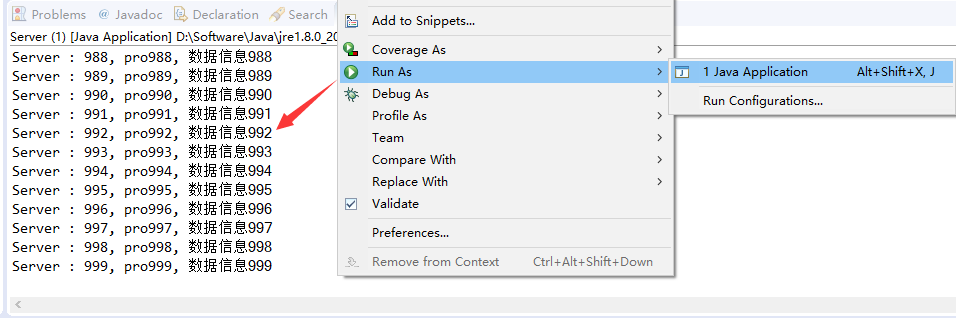
测试结果

从图中可以看到,receive文件夹多了一张001.jpg的图片。说明图片已经传输过来了。
好了,这部分内容就讲到这里,送上今天的福利:三套Netty系列教程【价值600】,加wxhaox就可以领取。当然了,对应netty有任何疑问也都可以咨询!!
end -- 1560313059
-- 学而不思则罔,思而不学则殆
Netty入门教程:Netty拆包粘包技术讲解的更多相关文章
- Netty 拆包粘包和服务启动流程分析
Netty 拆包粘包和服务启动流程分析 通过本章学习,笔者希望你能掌握EventLoopGroup的工作流程,ServerBootstrap的启动流程,ChannelPipeline是如何操作管理Ch ...
- 【转】Netty 拆包粘包和服务启动流程分析
原文:https://www.cnblogs.com/itdragon/archive/2018/01/29/8365694.html Netty 拆包粘包和服务启动流程分析 通过本章学习,笔者希望你 ...
- 深入学习Netty(5)——Netty是如何解决TCP粘包/拆包问题的?
前言 学习Netty避免不了要去了解TCP粘包/拆包问题,熟悉各个编解码器是如何解决TCP粘包/拆包问题的,同时需要知道TCP粘包/拆包问题是怎么产生的. 在此博文前,可以先学习了解前几篇博文: 深入 ...
- 使用Netty如何解决拆包粘包的问题
首先,我们通过一个DEMO来模拟TCP的拆包粘包的情况:客户端连续向服务端发送100个相同消息.服务端的代码如下: AtomicLong count = new AtomicLong(0); NioE ...
- Netty入门教程——认识Netty
什么是Netty? Netty 是一个利用 Java 的高级网络的能力,隐藏其背后的复杂性而提供一个易于使用的 API 的客户端/服务器框架. Netty 是一个广泛使用的 Java 网络编程框架(N ...
- Netty(四):粘包问题描述及解决
拆包粘包问题解决 netty使用tcp/ip协议传输数据.而tcp/ip协议是类似水流一样的数据传输方式.多次访问的时候有可能出现数据粘包的问题,解决这种问题的方式如下: 1 定长数据流 客户端和服务 ...
- Netty_TCP拆包粘包解决方案
一.问题 熟悉tcp编程的可能都知道,无论是服务器端还是客户端,当我们读取或者发送数据的时候,都需要考虑TCP底层的粘包/拆包机制. TCP是一个“流”协议,所谓流就是没有界限的遗传数据,大家可以想象 ...
- tomcat Http11NioProtocol如何解析http请求及如何解决TCP拆包粘包
前言 tomcat是常用的Web 应用服务器,目前国内有很多文章讲解了tomcat架构,请求流程等,但是没有如何解析http请求及如何解决TCP粘包拆包,所以这篇文章的目的就是介绍这块内容,一下内容完 ...
- Netty(三)TCP粘包拆包处理
tcp是一个“流”的协议,一个完整的包可能会被TCP拆分成多个包进行发送,也可能把小的封装成一个大的数据包发送,这就是所谓的TCP粘包和拆包问题. 粘包.拆包问题说明 假设客户端分别发送数据包D1和D ...
随机推荐
- Windows10+anaconda,python3.5, 安装glove-python
Windows10+anaconda,python3.5, 安装glove-python安装glove安装之前 Visual C++ 2015 Build Tools开始安装安装glove最近因为一个 ...
- ratio_to_report分析函数求占比
drop table test; create table test ( name varchar(20), kemu varchar(20), score number ); insert int ...
- 企业版https
http://www.cocoachina.com/bbs/read.php?tid=194213
- 学习笔记(_huaji_)
假如我没有见过太阳,我也许会忍受黑暗. 如果我知道自己会在哪里死去,我就永远都不去那儿.失败的经历,其实也有它的价值. 人的过失会带来错误,但要制造真正的灾难还得用计算机. 嘴角微微上扬已不复当年轻狂 ...
- GIMP模板选区操作
选择方法有很多种,这里我就新学的方法记录一下,主要是通过小剪刀和Toggle Quick Mask 相结合的运用. 选择Scissors Select Tool工具 设置基本的属性:Antialisa ...
- PHP操作MySQL事务实例
PHP与MYSQL事务处理 一般来说,事务都应该具备ACID特征.所谓ACID是Atomic(原子性),Consistent(一致性),Isolated(隔离性),Durable(持续性)四个词的首字 ...
- 前端用户体验优化: JS & CSS 各类效果代码段
前言 不定时更新 在线预览 https://zzyper.github.io/opti... 在线预览的源码 https://github.com/zzyper/opt... 部分内容仅兼容webki ...
- HttpServlet RequestDispatcher sendredirect和forward
Servlet的框架是由两个Java包组成:javax.servlet和javax.servlet.http. 在javax.servlet包中定义了所有的Servlet类都必须实现或扩展的的通用接口 ...
- Myeclipse 添加Android开发工具
1.JDK是必须的,同时配置相应环境变量. 2.Android SDK 下载后解压缩需要把SDK目录下的tools和platform-tools加入环境变量. 3.MyEclipse中安装ADT插件 ...
- 二分查找与 bisect 模块
Python 的列表(list)内部实现是一个数组,也就是一个线性表.在列表中查找元素可以使用 list.index() 方法,其时间复杂度为O(n).对于大数据量,则可以用二分查找进行优化.二分查找 ...